




Stop Overpaying for Slow Hosting Google Web Hosting Services Explained for Small Business
Article
Introduction
You have a small business website. You want it to load fast, stay secure, and never go down. But the hosting world feels confusing. Cheap plans slow your site down. Big promises lead to hidden fees. And downtime? It quietly costs you sales and trust.

Here is the truth. In 2026, the global web hosting services market has hit $149.30 billion, according to industry data. That number is massive because hosting matters more than ever. Yet most small business owners pick a host the same way: by looking at the price tag first. Then they end up with slow speeds, security headaches, and support that does not actually help.
The good news? You have a better path forward.
Google offers a whole ecosystem of hosting tools. When people search for google web hosting services, they often find a mix of options. Google Cloud Platform gives you powerful infrastructure. Google WordPress hosting is available through specialized partners. And tools like Google Domains (now part of Squarespace) help you manage domains google handles professionally. The challenge is knowing which pieces fit your business.
Think of it this way. Google domain and hosting can work together beautifully, but only if you understand the setup. Without that knowledge, you can end up paying for power you do not need or stuck with tools that do not talk to each other.
That is why this guide exists. We will walk through Google’s hosting ecosystem step by step. You will learn how it solves the biggest pain points for small businesses: technical complexity, security risks, and unreliable performance. You will also discover when managed support makes sense so you can focus on growing your business instead of fixing your server.
By the end, you will have a clear plan to choose the right google web hosting services for your needs. No jargon. No guesswork. Just practical advice that works in 2026.
Let us start with the foundation: what Google actually offers and how to make it work for you.
What Are Google Web Hosting Services?
So what exactly are google web hosting services? In simple terms, they are a set of cloud tools from Google that let you run your website on the same infrastructure Google uses for Search, Gmail, and YouTube. Instead of renting a small slice of a shared server, you get access to a powerful platform that can grow with your traffic.
The main options under the Google Cloud umbrella include:
- Cloud Run – A fully managed serverless platform. It runs your code only when someone visits your site, scaling automatically as demand changes. Google describes it as a way to run containers without worrying about servers. You pay only for the resources you use, making it a budget-friendly starting point.
- Compute Engine – Virtual machines you control completely. This option gives you the most freedom, but you need to manage the operating system, security updates, and scaling yourself.
- App Engine – A platform as a service (PaaS) that handles much of the backend work for you. It is a middle ground between full control and hands-off management. Google notes that Cloud Run now offers more flexibility for similar workloads.
- Firebase Hosting – Built for static sites and single-page apps. It serves content through a global CDN, so pages load fast anywhere in the world.
Unlike traditional shared hosting, Google‘s infrastructure comes with built-in global load balancing, auto-scaling, and integrated security. When a blog post goes viral, your site stays up because Cloud Run automatically spins up more instances. You don’t have to call support or upgrade plans.
But these perks come with trade-offs. The pay-as-you-go pricing can surprise you if a sudden traffic spike happens. Google Cloud also requires some technical know-how. Setting up a WordPress site here is not a one-click install. You will need to configure databases, storage, and networking manually.
For small business owners who want google web hosting services without the learning curve, a simpler path exists. A managed host like Prism Webhost gives you the same reliability and speed with a dashboard you can use in minutes. You get enterprise-grade security, 99.99% uptime, and human support when you need it.
If you are still wondering how hosting works at a basic level, check out this plain‑language guide to web hosting services before diving deeper into Google’s ecosystem.
The key is matching the tool to your comfort level. Google Cloud gives you power and flexibility. A managed provider gives you simplicity and peace of mind. Either way, you do not have to settle for slow shared hosting anymore.
Performance and Speed: How Google’s Global Infrastructure Delivers Fast Load Times
Speed is often the main reason people look at google web hosting services. A slow website loses visitors. It hurts your search rankings. And it directly costs you sales.

Google’s global network is built to solve this problem. They run over 200 points of presence around the world. These work like local copies of your website. When someone visits from Cape Town or Tokyo, they connect to the nearest location instead of a server far away. This keeps latency extremely low.
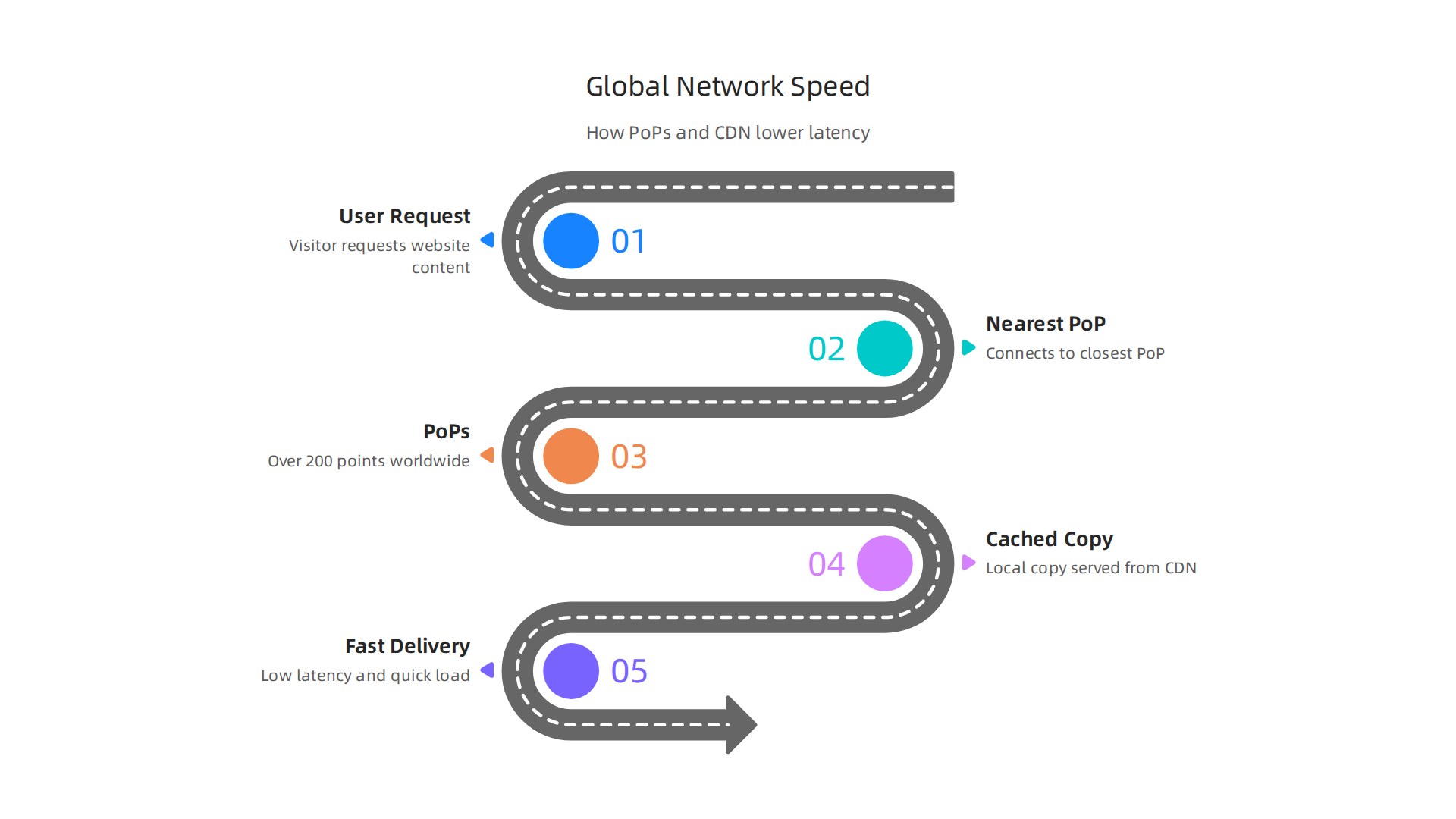
Google Cloud CDN handles the caching for you. It stores static files like images, CSS, and JavaScript at the edge of the network. So repeat visits load almost instantly. On top of that, HTTP/3 support makes each connection faster and more reliable, especially on mobile networks.
Performance benchmarks from 2026 show that Google Cloud matches or beats other big providers in network throughput and data delivery speed. While AWS offers more instance types, Google focuses on making every connection count. If your site relies on fast data processing and low lag, this matters a lot.
The business impact is huge too. Research shows that even a 0.1 second improvement in load time can boost conversion rates. For an ecommerce store running on google wordpress hosting, that speed translates directly to more completed purchases and happier users.
Now, here is the catch. Getting the most out of Google Cloud CDN and HTTP/3 requires technical setup. You need to configure caching rules, manage DNS, and optimize your application stack. That is not something most business owners want to learn.
What if you could get the same global speed without the complexity? Prism Webhost gives you enterprise-grade CDN performance and HTTP/3 support right out of the box. You do not need to touch a command line. For a deeper look at how managed hosts compare on speed, check out our data-backed web hosting reviews for 2026.
Security and Reliability: Built-in Protection Against Downtime and Attacks
You have probably worried about your website getting hacked or going down at the worst moment. Maybe during a big sale or right after you launched a new product. That fear is real. But here is the good news. When you use google web hosting services, you get enterprise-grade security and reliability baked right into the infrastructure.
Google Cloud Armor is the backbone of their DDoS protection. It blocks massive attacks before they reach your site. And it works seamlessly with their load balancers, so a sudden traffic spike from an attack looks the same as a real wave of visitors. Your site stays up and fast. In 2026, Google continues to lead in security innovation, especially when you compare the overall cloud provider landscape. According to a detailed cloud provider selection guide, Google Cloud Platform prioritizes data and security capabilities, making it a strong choice for compliance-focused businesses source: Ardura Consulting.
On top of DDoS protection, all your data is encrypted by default. That means when a visitor sends a form, and when you store that information, it is scrambled and unreadable to outsiders. Google Cloud meets strict compliance standards like SOC 2, ISO 27001, and PCI DSS. If you run an online store that accepts credit cards, this is a must. You can also manage your SSL certificates easily through Google Domains if you use google domain and hosting together.
Reliability is just as important. Google offers a 99.99% uptime SLA for Compute Engine and Cloud Run. That is less than an hour of downtime per year. Of course, you still need to configure your setup correctly to hit that number. But the infrastructure itself is rock solid.
Now, here is the reality. Setting up Google Cloud Armor, encryption rules, and compliance checks takes technical knowhow. Not every business owner wants to hire a DevOps engineer just to keep their site secure.
That is why many companies turn to managed hosting that brings these security features without the complexity. For example, Prism Webhost gives you 17 Tbps+ DDoS protection, free SSL, and isolated hosting environments right out of the box. You get enterprise-level security without touching a command line. For a deeper look at how different hosts compare on security and local compliance, check out our South African web hosting comparison. If you want a hosting solution that handles protection for you, Prism Webhost is built for exactly that.
Ease of Use: Managing Google Hosting for Non-Technical Users
So you read about all that security and reliability. That sounds great, right? But then you open Google Cloud Console for the first time and feel totally lost. You are not alone.
Google Cloud Console does have a decent interface. Many users say it is intuitive and the search works well source: G2 reviews. But if you compare it to simpler hosting dashboards like cPanel, the learning curve is real. In 2026, Google Cloud still lags behind AWS and Azure when it comes to overall usability for beginners source: DataVerse Technologies comparison. You can find your way around, but it takes time.
Here is the good news. Google does offer easier paths for non-technical users. If you are building a simple static site like a landing page or a portfolio, Firebase Hosting is a solid choice. You can deploy your whole site with one command from the command line interface. No server setup needed. It is fast and free for small projects.
Another easy option is Cloud Run. This is a managed service that runs your code without you worrying about the underlying servers. You just push your container image, and Google handles the scaling, patching, and uptime. It is perfect if you want the power of google web hosting services without managing infrastructure every day.
Still, even Firebase and Cloud Run require some tech knowhow. You need to understand CLI commands or Docker containers. That is not something every business owner wants to learn.
That is where managed hosting providers come in. They give you the same kind of reliability and speed but with a control panel you already understand. For example, if you want a simple google wordpress hosting setup, a host like Prism Webhost offers one-click WordPress installation, free SSL, and automatic updates. No command line required.
If you want to compare how managed hosts stack up against Google’s own tools, check out our web hosting services reviews 2026 for a data-backed guide. And if you decide you want a host that just works without the learning curve, Prism Webhost provides a dashboard you can master in minutes.
Scaling Your Hosting: From Solo Site to Growing Business
You built a site. It works. Then one day traffic spikes. A blog post goes viral. A sale launches. And your site slows down or crashes. That is the moment you realize your hosting needs to grow with you.
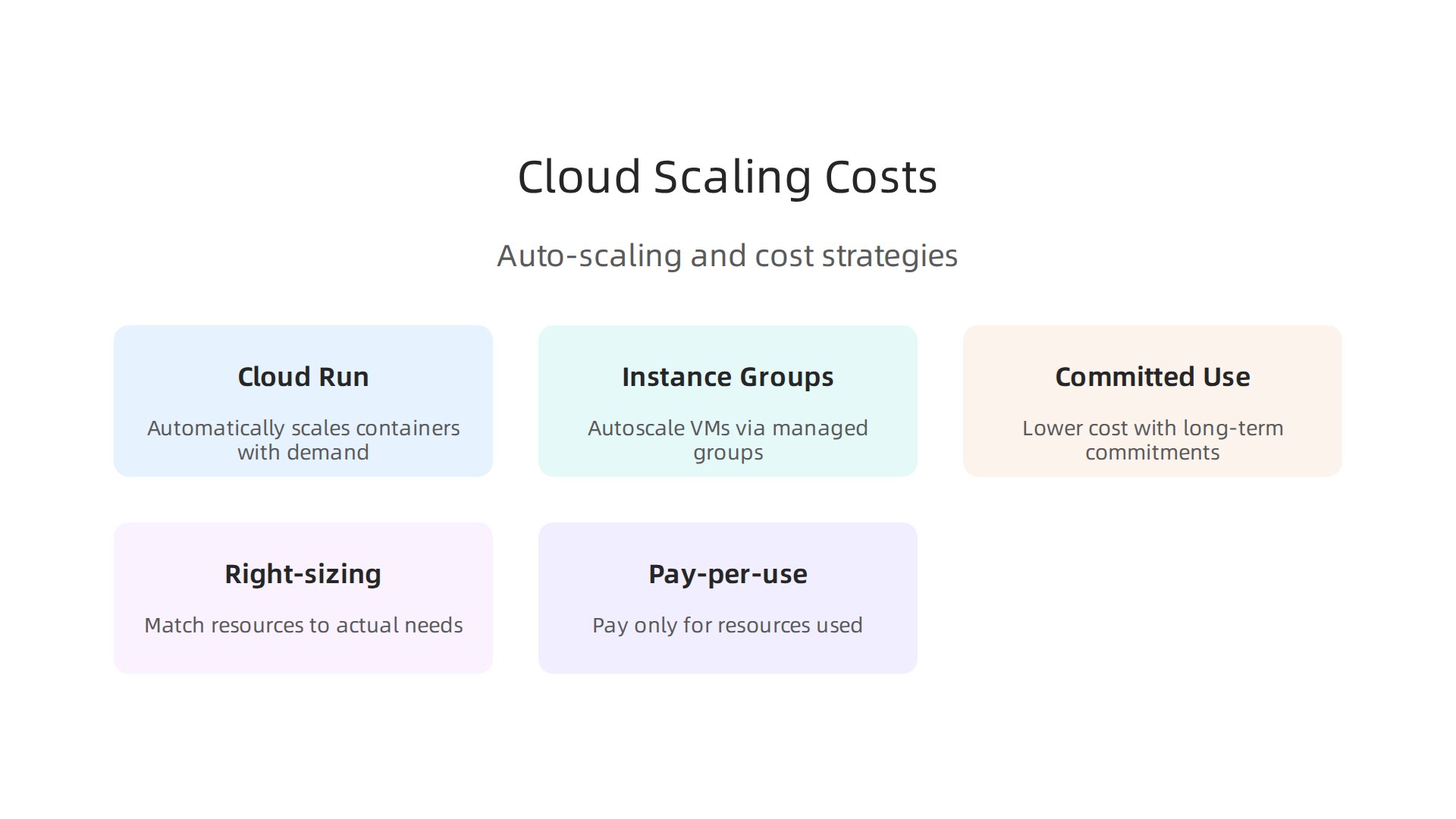
The good news? Google Cloud handles this well. Cloud Run automatically scales your containers based on demand. When traffic jumps, it spins up more instances instantly. When traffic drops, it scales back down. You only pay for what you use source: Google Cloud Run pricing.
This is a game changer for businesses that experience unpredictable traffic.
If you need more control, Compute Engine instance groups let you set rules for scaling across virtual machines. You can configure auto-scaling policies to add or remove servers based on CPU usage or request counts. This gives you the power of google web hosting services without overprovisioning.
Keeping Costs Under Control
Auto-scaling sounds expensive, but it can actually save you money. Without auto-scaling, you might pay for servers that sit idle most of the time. With Google Cloud, you pay only for the resources you use.
To keep your budget predictable, use committed use discounts. You agree to use a certain amount of resources for one or three years, and Google gives you a big discount source: Finout Google Cloud pricing guide. Also practice right-sizing. Audit your instances regularly. If a server is using only 10% of its CPU, downgrade it. Small changes save real money over time.
Moving Your Existing Site
If you are on shared hosting today and want to move to Google Cloud, you do not have to rebuild everything. Google offers tools like Migrate for Compute Engine. This service lifts and shifts your virtual machines from your current host to Google Cloud with minimal downtime. You can also use a lift-and-shift strategy for WordPress sites, moving your entire server image over without reconfiguring your app.
For a deeper look at comparing hosting costs as you grow, read our guide on web hosting cost in 2026 how to compare pricing models and avoid hidden fees. It helps you understand what to expect when scaling.
If managing auto-scaling and discounts sounds like too much tech work for you, a managed host can handle the heavy lifting. Prism Webhost offers scalable plans with automatic resource upgrades and 24/7 support. Their infrastructure handles traffic spikes so you can focus on your business.
Google Domains: Registering and Managing Domain Names (2026 Update)
Now that your hosting can scale, you need a domain name that keeps up too. Your domain is your address on the web. If it’s hard to manage or slow to update, it can slow down your whole business. That’s where Google Domains comes in. In 2026, this service is more tightly integrated with Google Cloud DNS, giving you one place to register, secure, and manage your domains.
What Google Domains Offers
Google Domains gives you domain registration with free privacy protection and easy setup for DNSSEC. DNSSEC adds an extra security layer that stops attackers from hijacking your domain traffic. That’s a big deal for anyone serious about security.
You manage everything through the Google Cloud Console. Users love how easy the console is to navigate. One review from G2 says the interface is "intuitive" with "powerful search functionality" that helps you find resources fast source: Google Cloud Console reviews on G2.
That same simplicity carries over to domain management.
Pricing and Renewal Rates
Google Domains pricing is competitive with other registrars like GoDaddy or Namecheap. But you need to watch renewal rates. Many registrars offer low first-year prices and then hike up the cost later. Google’s renewal prices stay steady, which is a plus for long-term planning.
If you want to see how different registrars compare on pricing, check out our guide on cheapest domain extensions: the real costs and risks you must know. It helps you spot hidden fees and choose a registrar that fits your budget.
Integration with Google Services
The real power of Google Domains comes from integration. You can connect your domain directly to Google Workspace for business email, and to Google Cloud hosting for your website. This means you handle everything from one dashboard. No more logging into separate accounts for your domain, email, and hosting.
For example, if you use google web hosting services like Cloud Run or Compute Engine, pointing your domain to your site is a few clicks. You can also link it to Google Sites, Blogger, or any other Google service.
A Simpler Alternative
Managing a domain through Google Cloud Console is powerful, but it might feel like too much if you just want a simple setup. Some business owners prefer a host that handles both domain registration and website hosting in one place. That’s where a managed provider shines.
Prism Webhost offers domain registration plus secure, scalable hosting. You get free SSL, DNSSEC support, and 24/7 help without diving into cloud consoles. It’s a great fit if you want to keep things simple and safe.
For more tips on choosing a domain registrar that protects your business, read our guide on how to find reputable domain name registrars that protect your business. It walks you through what to look for in a registrar and common traps to avoid.
Comparing Google Web Hosting to Alternatives: AWS, Azure, Traditional Hosts
So you’ve got your domain ready with Google Domains. Now it’s time to pick where your site actually lives. You’ve got options, and each one works differently. Let’s compare google web hosting services with the big cloud players and the traditional hosts you already know.
Cost: Simpler Pricing Wins
Google Cloud uses per-second billing and sustained-use discounts that kick in automatically. You only pay for what you use, and the discounts happen without any upfront commitment. AWS has a much wider range of instance types, but that complexity can make bills unpredictable. Azure sits somewhere in between. For a typical SaaS startup, Google Cloud comes out 6-10% cheaper than AWS and Azure on compute and database costs, according to a 2026 comparison source: Tech Insider. Another study found that GCP has the highest share of users in the lowest monthly spend tier, meaning more people keep costs under control source: CRN.
Traditional hosts like SiteGround or Bluehost give you a flat monthly fee. That’s easy to budget, but you pay for resources you might not use, and scaling up usually means jumping to a pricier plan.
Ease of Use: Dashboards and Learning Curves
The Google Cloud Console is clean and powerful, but it still takes time to learn. AWS Management Console has more features but can feel cluttered. Many small business owners find both overwhelming at first.
Traditional hosting gives you cPanel, a control panel that’s been around for years. It’s simpler, with one-click installs and clear menus. If you just want to get your site live without studying cloud architecture, cPanel is a lot friendlier.
But here’s the trade off: cPanel hosts limit your ability to scale. When your traffic spikes, you might hit a wall. Cloud platforms let you add resources instantly, but you’re the one in charge of setting it up.
DIY vs. Handholding
Google Cloud is a DIY platform. You pick the services, configure security, and manage updates yourself. That gives you full control, but it also means you’re responsible when something breaks.
Traditional hosts handle most of the technical work. They update software, monitor for attacks, and offer support when you call. That’s great for busy owners who don’t want to become IT pros. But if your site grows fast, you’ll outgrow their shared plans and need to migrate.
For many businesses, the sweet spot is a managed provider that gives you the reliability of cloud infrastructure without the complexity. That’s where Prism Webhost fits. You get enterprise-grade security, automatic scalability, and 24/7 support, all without wrestling with cloud consoles.
If you’re still unsure which path fits, check out our data-backed guide on web hosting services reviews 2026 to see how different providers stack up on speed, uptime, and support.
When to Choose a Managed Google Cloud Partner Like Prism Webhost
So you like the power and pricing of Google Cloud. But the previous section showed that the real work comes after you sign up. Setting up servers, managing security, and tweaking costs takes time. If you’re running a small business, do you really have hours to spend inside a cloud console?
That’s where a managed Google Cloud partner steps in. Think of it as having a dedicated team that handles the technical stuff so you can focus on your customers.
What a Managed Partner Does for You
A good managed partner does three big things:
- Migration assistance. Moving your site from an old host or even another cloud provider is tricky. A partner handles the data transfer, tests everything, and makes sure nothing breaks. This is a huge time saver if you’re moving from another host.
- Ongoing optimization. Google Cloud has automatic sustained-use discounts, but there are other ways to save money. A partner monitors your resource usage and adjusts things so you’re not overpaying. They also keep your site fast by using caching and CDN settings.
- Proactive monitoring. They watch your site 24/7 for problems. If a server starts slowing down or a security threat appears, they fix it before you even know about it. This prevents downtime and protects your reputation.
Who Needs This Help Most
Small and medium businesses without a dedicated IT person get the most value. If you’re a founder, a marketer, or a team of two running an online store, you likely don’t have time to learn cloud architecture. You need someone who already knows it.
Managed partners also help with cost control. A 2026 analysis shows Google Cloud can be 6-10% cheaper than AWS and Azure for compute and database costs Tech Insider. But without proper monitoring, you could accidentally spin up expensive resources. A partner watches your bills and finds waste.
Security is another big concern. A managed partner handles firewall rules, SSL certificates, and data backups. You get enterprise-grade protection without becoming a security expert.
Why Prism Webhost Fits the Bill
Prism Webhost tailors Google Cloud environments specifically for entrepreneurs and small teams. Instead of giving you a bare dashboard and saying “good luck,” they provide a setup that works out of the box.
You get automatic scalability, nightly backups, and 24/7 support from people who understand small business needs.
If you’re tired of wrestling with cloud consoles and just want your site to be fast, secure, and always online, a managed partner is the right call. Check out our data-backed guide to choosing a reliable host to see how managed solutions stack up against DIY cloud hosting. And if you’re ready to skip the headache, start with Prism Webhost today for a hosting experience that feels effortless.
Summary
This article is a practical guide for small business owners who want reliable, fast, and secure hosting using Google’s ecosystem. It explains the main Google hosting options—Cloud Run, Compute Engine, App Engine, and Firebase—and shows how Google’s global CDN, HTTP/3, and built‑in security deliver better performance and uptime than typical shared hosts. The guide covers trade‑offs like the technical learning curve and pay‑as‑you‑go billing, and gives concrete steps for scaling, cost control (committed use discounts and right‑sizing), and migrating existing sites. You’ll also learn how Google Domains simplifies DNS and domain management, when compliance and encryption matter, and why many small businesses choose a managed partner such as Prism Webhost to get cloud reliability without the cloud complexity. After reading, you’ll know which Google tools fit your needs, how to avoid common mistakes, and when to hire managed support to keep your site fast and secure.
