



Web Address Explained: URL, Domain, Hosting, and DNS for Businesses
Article
Why understanding a web address matters for entrepreneurs and SMBs
Have you ever felt a bit lost when talking about your website online? It’s easy to get confused by all the different terms. Many business owners, especially those with small and medium-sized businesses (SMBs), often mix up what a web address really is with things like domain names and web hosting.

This confusion can lead to big problems, like your website not working when it should, or even security risks.
Actually, knowing the difference between a web address, a domain name, and web hosting is super important. Think of your business website as a house. A domain name meaning is like your house’s street address (e.g., 123 Main Street). It’s how people find you. A web address (also known as a URL) is that full string of letters and symbols you type into your browser, like https://www.yourbusiness.com/contact. It’s the whole path to a specific page in your house. And web hosting meaning refers to the land your house sits on, plus all the utilities that keep it running. Without the land and utilities, your house can’t stand or be used.
When you’re running an online business, a mistake with your web address or your web domain meaning can cause your website to go down. This means customers can’t find you, which can hurt your sales and your reputation. Also, picking the right web hosting for your business is key to keeping your site fast and safe. For example, Prism Webhost makes sure websites stay up, run quickly, and are protected with strong security features like DDoS protection and secure connections, which helps businesses avoid these common mistakes.
In this article, we’re going to make all these terms super clear. We will explain what is a website domain and how it all works together. You’ll get simple, practical steps to manage your web addresses, boost your website’s security, and make smart choices about web hosting. This way, you can focus on growing your business without worrying about technical headaches.
Knowing the difference between your website’s parts is like knowing the different rooms in your house. It helps you keep everything organized and working well. Let’s make it super clear what each part means for your online business.
What exactly is a web address (URL vs domain vs IP)?
When we talk about your "web address," we are usually talking about the full path to a page online, which is called a Uniform Resource Locator, or URL. Think of it as the complete address for a specific piece of content, like a page about your services or your contact page. A URL always has a few main parts. It starts with a scheme like https:// which tells your computer how to talk to the website. Then comes the domain name, followed by the path to the exact page or file you want to see Networking Protocols. For example, https://www.yourbusiness.com/contact-us is a full web address.
Now, let’s look at the other important parts:
-
Domain Name: This is the easy-to-remember name for your website, like
yourbusiness.com. It’s what people type into their browser to find your site. The domain name meaning is crucial because it’s your brand’s identity online. A domain name has parts too. For example,.com,.org, or.netare called Top-Level Domains (TLDs). These help sort websites into groups Domain Name System (DNS). If you want to dive deeper into this, you can learn more about what is a website domain simple answers for business owners. -
IP Address: While domain names are for people, computers use numbers. An IP address is a unique string of numbers that points to a specific computer or server on the internet. It’s like a phone number for your website’s server. For example, an IP address might look like
192.168.1.1. Every website has an IP address, but we use domain names because they are much easier for us to remember and type Domain Name System Quick Reference.
How They Work Together: The DNS
So, how does typing a human-friendly web domain meaning like yourbusiness.com take you to a numeric IP address? This is where the Domain Name System (DNS) comes in. The DNS is like a giant phone book for the internet. When you type a domain name, the DNS looks it up and finds the matching IP address for your website. Then, your computer uses that IP address to connect to the right server and show you the website. This process happens in a blink, making the internet seem simple and fast! Different types of DNS servers, like TLD servers, help direct this traffic Topic 19: DNS Security.
Why This Matters for Your Business
Understanding these differences is super important for several reasons:
- Buying Your Domain: When you buy a web domain meaning, you’re reserving that human-friendly name. You don’t buy the IP address directly. Knowing this helps you pick the right name for your brand.
- Setting Up Your Website: You need to tell your domain name where your website’s files are stored. This is done by setting up DNS records, which link your domain to your web hosting’s IP address. If these records are wrong, your website won’t show up online.
- Troubleshooting Problems: If customers can’t reach your site, knowing the difference helps you figure out if the problem is with your domain name settings, your web hosting, or something else. For example, if your domain name isn’t pointing to the correct IP address, your site won’t load.
- Security and Performance: How your DNS is set up can affect your site’s speed and safety. Properly managed DNS helps prevent issues like your site going down or being attacked.
For a business owner, getting the hang of these terms means you can make better decisions about your online presence.

It helps you choose good hosting, manage your domain, and keep your website running smoothly and securely. It also helps you talk more clearly with web developers or hosting providers, so everyone is on the same page.
Understanding the different parts of a web address, or URL, goes beyond just knowing your domain name meaning. It’s like knowing all the different parts of a car engine, not just its name. Each part plays a special role in how your website works and how people find it. A URL is a detailed map to specific content online Uniform resource names in the World Wide Web and their resolution.
Let’s break down a full web address (URL) into its individual pieces:
Breaking down the components of a web address (scheme, subdomain, domain, TLD, path, query, fragment)
Imagine this web address: https://blog.yourbusiness.com/articles/latest-news?id=123&sort=new#comments
Here’s what each part means:
- Scheme: This is
https://at the very beginning. It tells your web browser how to talk to the website’s server.HTTPstands for Hypertext Transfer Protocol. TheSinHTTPSmeans "Secure," showing that the connection is encrypted and safe. This is very important for online businesses today to protect customer information and build trust. WithoutHTTPS, browsers might warn visitors that your site is not secure. - Subdomain: In our example,
blog.is the subdomain. The most common one iswww., but you can use others likeshop.,support., orapp.to organize different parts of your website. A subdomain acts like a separate section of your mainweb domain meaning. - Domain Name: This is
yourbusiness.com. It’s the unique name for your whole website. As we talked about before, this is your brand’s main identity online and is made up of a second-level domain (likeyourbusiness) and a Top-Level Domain. To learn more about this, you can look into what is web hosting services a clear definition for business owners. - Top-Level Domain (TLD): This is
.comin our example. It’s the last part of your domain name. Other common TLDs include.org,.net,.info, and country-specific ones like.co.ukor.ca. The TLD helps categorize websites. - Path: This is
/articles/latest-news. The path tells the browser exactly where to find a specific page or file on your website. Think of it as the folders and file names on your computer. A clear path helps search engines understand your site structure. - Query String: This starts with a question mark (
?) like?id=123&sort=new. Query strings are used for dynamic content, which means the page content can change based on what you ask for. For example, when you sort products on an e-commerce site, the URL might add a query string. - Fragment: This starts with a hash symbol (
#) like#comments. A fragment tells your browser to jump to a specific part within a page. It’s often used for table of contents links or to highlight certain sections of a long article.
Together, these parts make up the full structure of a Uniform Resource Identifier (URI), which includes URLs URI = scheme ":" hier-part [ "?" query ] [ "#" fragment ].
Why These Components Matter for Your Business
Knowing these parts helps you manage your website better in several ways:
- Search Engine Optimization (SEO): Search engines like Google look at your URLs. Clear, well-structured paths help them understand what your page is about. Also, making sure you use a "canonical" URL tells search engines which version of a page is the main one, especially if you have similar content on different URLs. This helps prevent issues with duplicate content. Keeping your URLs clean and easy to read is part of good SEO practice Crawling. You can learn more about how this affects your online standing by exploring domain rating a practical guide to boosting your SEO authority.
- User Experience (UX): A simple and logical web address is easier for people to remember, type, and share. If your customers can easily guess what a page is about just by looking at the URL, that’s a good sign.
- Linking and Redirects: When you need to move a page or change its address, understanding these components helps you set up proper redirects. A redirect tells old links where to find the new page, so your visitors don’t see a "page not found" error.
- Website Analytics: When you look at your website’s data, understanding the different URL parts helps you see exactly which pages and even which sections of pages are most popular. This information can help you make smart choices for your business.
By paying attention to these details, you ensure your online presence is not just there, but that it works efficiently for both people and search engines. It’s all part of building a strong online foundation for your business.
Knowing the different parts of a web address helps you understand what you’re looking at. But how does that web address actually connect to your website, making it appear online? This is where your web hosting and something called DNS come into play. They work together like a postal service and a phone book for the internet.
How web addresses map to hosting and DNS (A, AAAA, CNAME, NS, TTL explained)
Think of your website like a house. It has a physical spot, and it has an address. The physical spot is where your website files live, which is your web hosting service. The address that people use to find it, like yourbusiness.com, is your web address or domain name. But computers don’t understand names; they understand numbers, called IP addresses. This is like a street address for your website’s home on the internet.
The Domain Name System, or DNS, is the special service that translates your easy-to-remember domain name (like yourbusiness.com) into the IP address (like 192.0.2.1) that computers need to find your website. It’s often called the "phone book of the internet" because it maps names to numbers Domain Name System Quick Reference. When you type a web address into your browser, DNS quickly looks up its IP address to tell your browser where to go. This whole process helps direct people to your website’s hosting service.
For businesses, managing DNS is very important. It ensures your website is always online and reachable. When you get a domain name, you’ll work with DNS records. These are small bits of information that tell DNS servers how to handle your domain. Let’s look at the main types:
- A Record (Address Record): This is the most common type. It maps your domain name, like
yourbusiness.com, directly to an IPv4 address. IPv4 is the older, more common style of IP address (like192.0.2.1). - AAAA Record (Quad-A Record): This record does the same job as an A record, but for IPv6 addresses. IPv6 is the newer, longer style of IP address that allows for many more unique addresses.
- CNAME Record (Canonical Name Record): This record points a domain or a subdomain to another domain name, rather than directly to an IP address. For example,
www.yourbusiness.commight use a CNAME record to point toyourbusiness.com. This is helpful if you have different services all pointing to the same main domain. - NS Record (Name Server Record): This record lists the main DNS servers that hold all the other records for your domain. These are the servers that are in charge of your domain’s DNS information Domain Name System (DNS) – cs.wisc.edu.
There’s also something called TTL (Time To Live). Every DNS record has a TTL value, which tells other DNS servers how long to remember the record’s information before checking for updates. A longer TTL means faster loading times because DNS servers don’t have to check as often. But it also means that if you change your IP address or other settings, it might take longer for everyone to see the new changes. This delay is known as "DNS propagation."
Sometimes, businesses run into common problems with DNS. These include:
- Propagation Delays: When you change a DNS record, it takes time for these changes to spread across the internet. This is because of the TTL settings. Some people might see the old information for a while.
- Incorrect Records: A small typo in an A, AAAA, or CNAME record can send visitors to the wrong place or make your website unreachable.
- Conflicting CNAME Rules: Using CNAME records improperly can create issues, especially if you try to use a CNAME for your main domain (
yourbusiness.com).
Understanding these records and how they work helps ensure your website is always pointing to the correct place. A good web hosting provider handles many of these technical details for you, making sure your web address correctly links to your website. If you’re wondering what a website domain means in simple terms, learning more about what is a website domain can be very helpful.
Finding a hosting service that offers strong DNS management is key to reliable online performance. Providers like Prism Web Host focus on making sure your website is always accessible and fast. You can learn more about how to check who hosts a website by understanding how to perform a website host lookup.
By choosing a hosting service that takes care of your DNS settings, you can rest easy knowing that your business’s online home is connected correctly to its web address. To explore reliable, secure, and high-performance hosting options, check out Prism Web Host.Knowing the different parts of a web address helps you understand what you’re looking at. But how does that web address actually connect to your website, making it appear online? This is where your web hosting and something called DNS come into play. They work together like a postal service and a phone book for the internet.
How web addresses map to hosting and DNS (A, AAAA, CNAME, NS, TTL explained)
Think of your website like a house. It has a physical spot, and it has an address. The physical spot is where your website files live, which is your web hosting service. The address that people use to find it, like yourbusiness.com, is your web address or domain name. But computers don’t understand names; they understand numbers, called IP addresses. This is like a street address for your website’s home on the internet.
The Domain Name System, or DNS, is the special service that translates your easy-to-remember domain name (like yourbusiness.com) into the IP address (like 192.0.2.1) that computers need to find your website. It’s often called the "phone book of the internet" because it maps names to numbers Domain Name System Quick Reference. When you type a web address into your browser, DNS quickly looks up its IP address to tell your browser where to go. This whole process helps direct people to your website’s hosting service.
For businesses, managing DNS is very important. It ensures your website is always online and reachable. When you get a domain name, you’ll work with DNS records. These are small bits of information that tell DNS servers how to handle your domain. Let’s look at the main types:
- A Record (Address Record): This is the most common type. It maps your domain name, like
yourbusiness.com, directly to an IPv4 address. IPv4 is the older, more common style of IP address (like192.0.2.1). - AAAA Record (Quad-A Record): This record does the same job as an A record, but for IPv6 addresses. IPv6 is the newer, longer style of IP address that allows for many more unique addresses.
- CNAME Record (Canonical Name Record): This record points a domain or a subdomain to another domain name, rather than directly to an IP address. For example,
www.yourbusiness.commight use a CNAME record to point toyourbusiness.com. This is helpful if you have different services all pointing to the same main domain. - NS Record (Name Server Record): This record lists the main DNS servers that hold all the other records for your domain. These are the servers that are in charge of your domain’s DNS information Domain Name System (DNS) – cs.wisc.edu.
There’s also something called TTL (Time To Live). Every DNS record has a TTL value, which tells other DNS servers how long to remember the record’s information before checking for updates. A longer TTL means faster loading times because DNS servers don’t have to check as often. But it also means that if you change your IP address or other settings, it might take longer for everyone to see the new changes. This delay is known as "DNS propagation."
Sometimes, businesses run into common problems with DNS. These include:
- Propagation Delays: When you change a DNS record, it takes time for these changes to spread across the internet. This is because of the TTL settings. Some people might see the old information for a while.
- Incorrect Records: A small typo in an A, AAAA, or CNAME record can send visitors to the wrong place or make your website unreachable.
- Conflicting CNAME Rules: Using CNAME records improperly can create issues, especially if you try to use a CNAME for your main domain (
yourbusiness.com).
Understanding these records and how they work helps ensure your website is always pointing to the correct place. A good web hosting provider handles many of these technical details for you, making sure your web address correctly links to your website. If you’re wondering what a website domain means in simple terms, learning more about what is a website domain can be very helpful.
Finding a hosting service that offers strong DNS management is key to reliable online performance. Providers like Prism Web Host focus on making sure your website is always accessible and fast. You can learn more about how to check who hosts a website by understanding how to perform a website host lookup.
By choosing a hosting service that takes care of your DNS settings, you can rest easy knowing that your business’s online home is connected correctly to its web address. To explore reliable, secure, and high-performance hosting options, check out Prism Web Host.
Securing your web address is like putting strong locks and alarms on your business’s front door. Just like you want to keep your physical store safe, you need to protect your online home. In 2026, security and privacy are not just nice to have; they are must-haves for any business with a web address.
Why HTTPS and TLS are Essential
When you see a website that starts with https:// instead of just http://, that "s" means "secure." This security comes from something called TLS (Transport Layer Security). TLS is a special handshake between your browser and the website’s server that scrambles all the information sent back and forth. This stops bad guys from peeking at or changing what you send, like login details or payment information.
For businesses, using HTTPS with TLS is super important for several reasons:
- Trust: Customers trust websites that are secure. If they see that little padlock icon in their browser, they feel safer sharing their information. Without it, they might leave your site.
- SEO (Search Engine Optimization): Google and other search engines prefer secure websites. Using HTTPS can even help your website rank better in search results, meaning more people will find your business.
- Data Protection: It protects sensitive customer data, like names, addresses, and credit card numbers. This keeps your customers safe and helps your business follow important privacy rules.
In 2026, it’s best practice to use the newest versions of TLS, like TLS 1.2 or 1.3, and to use strong security methods called cipher suites. This keeps your site as safe as possible from online threats Website Security Best Practices in 2026. Your web hosting should make it easy to set this up, often providing free SSL/TLS certificates that enable HTTPS.
DNS-Level Protections and Certificate Management
Beyond HTTPS, there are other ways to protect your web address and your business.
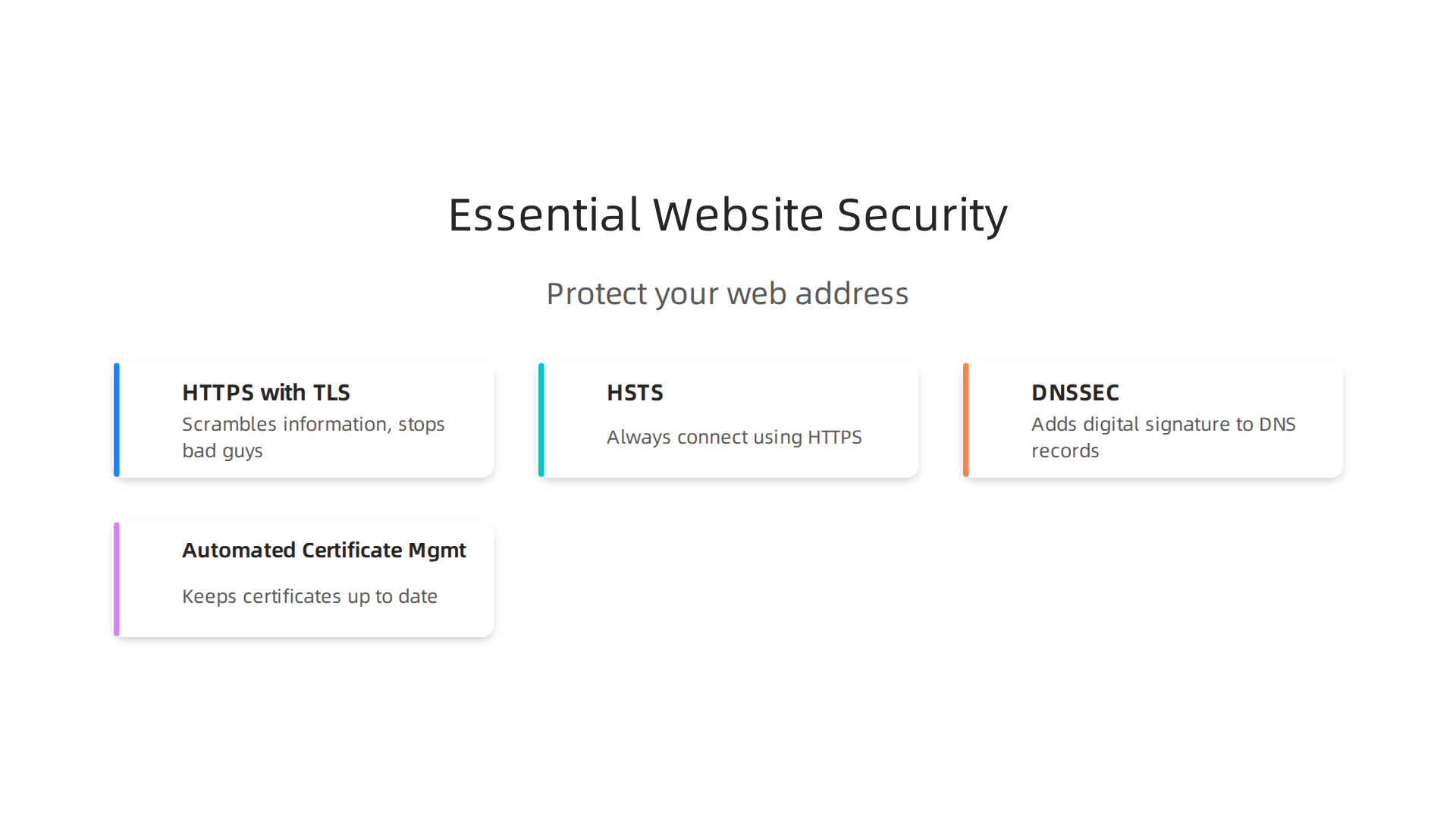
HSTS (HTTP Strict Transport Security) is a powerful security rule. Once a browser visits your website with HSTS enabled, it remembers to always connect using HTTPS, even if someone accidentally types http://. This stops sneaky attacks that try to force your browser to an unsecured connection. Experts say you should set HSTS to remember this for at least one year Website Security Guide 2026 and make sure it covers all parts of your website, even subdomains Web Security for Developers: 10-Point Checklist 2026.
DNSSEC (Domain Name System Security Extensions) helps protect the "phone book of the internet" that we talked about before. It adds a digital signature to your DNS records. This way, if a hacker tries to send visitors to a fake website by changing your web address’s entry in the DNS, DNSSEC can spot the change and stop it. It helps keep the translation from your domain name to an IP address safe and true. Enabling DNSSEC is part of essential website security best practices for 2026 Essential Website Security Best Practices for 2026.
Automated Certificate Management is also key. SSL/TLS certificates expire, and if yours isn’t renewed in time, your website will show a scary warning to visitors. Good web hosting services offer automated renewal, often using services like Let’s Encrypt. This ensures your certificate is always up to date, keeping your site secure without you having to worry about manual tasks New Developments In SSL Certificate Standards You Should Know.
A secure web address means your visitors can trust your website, and you can focus on running your business without constantly worrying about online threats.

Understanding the deeper meaning of your online presence can help you make better decisions, so explore more about the website domain definition for your business.
To sum it up, prioritizing security through HTTPS, TLS, HSTS, and DNSSEC helps build trust, improves your online visibility, and protects your business and your customers from harm.
Securing your web address is a must, but a safe website isn’t much good if it’s too slow to load or often offline. That’s why how your web address performs is just as important as its security. Think of it like a fast, reliable delivery service for your online business. In 2026, visitors expect websites to load almost instantly. If your site is slow, people will leave, and search engines like Google might rank you lower.
How Your Web Address Affects Speed
When someone types your web address into their browser, a lot happens very quickly. First, the browser needs to find out where your website lives on the internet. This is called DNS resolution, and it’s like looking up a phone number in a giant online directory. The faster this lookup happens, the quicker your website can start loading. Even small delays in DNS resolution can add up to a slower overall experience for your visitors DNS Response Time.
Content Delivery Networks (CDNs)
This is where a Content Delivery Network, or CDN, becomes a superhero for your web address. A CDN is a group of servers spread out all over the world. When a visitor tries to reach your website, the CDN sends the website’s content from the server closest to them. This greatly speeds things up because the information doesn’t have to travel as far. For example, studies in 2026 show that CDNs can make websites load much faster, sometimes 19% faster on mobile and 60% faster on desktop, compared to loading from just one main server CDN | 2025 | The Web Almanac by HTTP Archive.
Many businesses, especially small to medium-sized ones, use CDNs to make sure their site is fast for everyone, no matter where they are. In 2026, many CDNs use smart ways, like DNS-based steering, to direct users to the best server, though some newer methods are also being explored Who Holds the Steering Wheel? Opacity and Consolidation in CDN …. Top providers like Cloudflare and Google often show strong performance across the globe Investigating Web Content Delivery Performance over ….
Caching for Speed
Another trick to speed up your website is caching. When a visitor comes to your site, some parts of it, like pictures or page layouts, don’t change very often. Caching saves these parts closer to the visitor, either in their own browser or on servers closer to them. So, the next time they visit, or when another person nearby visits, the website loads even faster because it doesn’t have to fetch everything from your main web host again. This means quicker page loads and a smoother experience.
Load Balancing and Uptime
For businesses with many visitors, load balancing is key. This means spreading the incoming traffic across several servers, so no single server gets overloaded and slows down or crashes. It’s like having multiple cashiers at a busy store; everyone gets served faster.
Uptime is simply how much time your website is online and working. If your web address is down often, you’re losing customers and business. Good web hosting companies offer a Service Level Agreement (SLA) that promises a very high percentage of uptime, often 99.9% or more. This promise shows how reliable their web hosting meaning they are committed to keeping your site accessible. When you’re choosing your web hosting, look for providers that explain their uptime guarantees clearly.
The Role of Your Web Host
The choice of your web hosting provider and how your website is set up plays a huge part in all of this. Your host should offer:
- Fast DNS: Quick DNS resolution to help visitors find your website fast.
- CDN Integration: Easy ways to connect your website to a CDN.
- Caching Tools: Built-in tools to help your website use caching effectively.
- Reliable Infrastructure: Strong servers and networks that ensure your site is always up and running.
Understanding your web domain meaning goes beyond just having an online address; it’s about making sure that address serves your business well by being fast, reliable, and always available. Choosing the right web hosting company is a big part of achieving this balance. To learn more about how to make smart choices, explore guides on choosing a web hosting company for speed and security.
Prism Web Host provides reliable, secure, and high-performance website hosting infrastructure tailored for businesses and online brands. We focus on enabling customers to effortlessly launch and maintain their websites with features like enterprise-grade security checks, isolated hosting environments, automated scalability, and optimal speed. Check out how Prism Web Host can power your online presence by visiting Prism Web Host.
Making sure your web address is fast and reliable is key. But how do you actually get your website up and running securely? It takes a few practical steps. Think of it as a checklist to ensure your online home is built on a strong foundation. Understanding your web domain meaning goes beyond just knowing what it is; it’s about making sure you set it up right from day one.
Here is a simple checklist for small and medium businesses (SMBs) to register, set up, secure, and manage their web address.
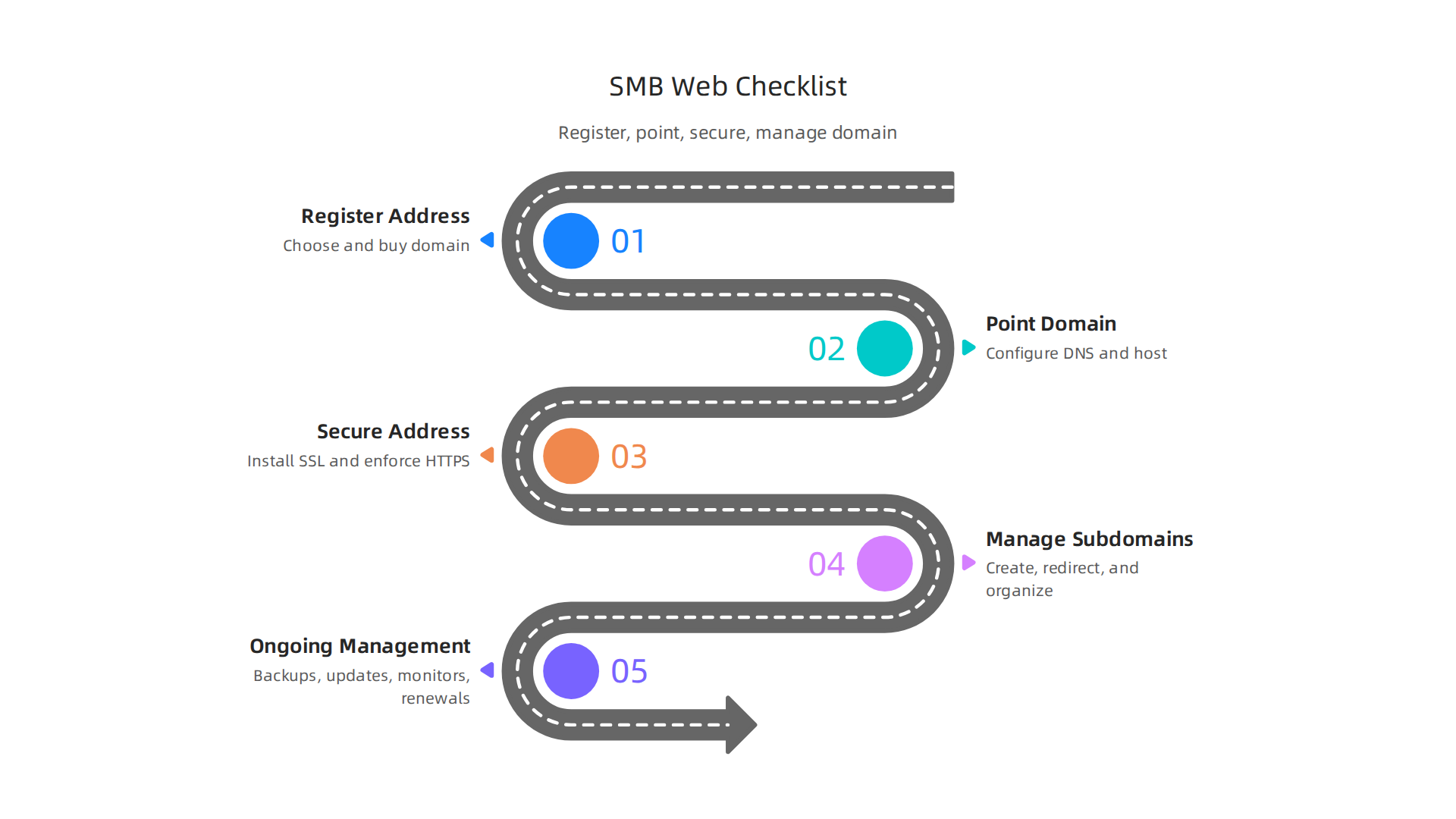

Practical Steps: Registering, Pointing, Securing, and Managing Your Web Address (Checklist for SMBs)
To get your business online, you need to follow a clear path. Each step builds on the last, helping you create a strong and safe online presence.
-
Register Your Web Address
- Choose a good domain name: This is your brand’s identity online. Pick something easy to remember and type. It should reflect what your business does.
- Check availability: Use a domain registrar’s tool to see if your chosen web address is free. Look for common endings like .com first.
- Purchase your domain: Once you find the right one, buy it through a trusted domain registrar. Remember that the initial cost can be low, but renewal prices might change, so it’s good to understand the full picture of the cost to buy a domain name in 2026.
- Set up automatic renewal: This is super important to avoid losing your web address by accident.
-
Point Your Domain (DNS Setup)
- Connect to your web host: After buying your domain, you need to tell it where your website files are stored. This involves updating your Domain Name System (DNS) records. Your web host will give you "nameservers" to point your domain to.
- Configure DNS records: You’ll typically set up an "A record" to point your main domain (like yourbusiness.com) to your web host’s server IP address. For "www.yourbusiness.com", you’d often use a "CNAME record". Your web hosting provider will guide you on how to do this in their control panel, often called cPanel. This connection tells browsers where to find your site files Configuring Domain Names and SSL/TLS Certificates.
- Wait for propagation: It takes a little time (sometimes a few hours, sometimes up to 48 hours) for these DNS changes to spread across the internet.
-
Secure Your Web Address (SSL/TLS)
- Get an SSL certificate: An SSL (Secure Sockets Layer) certificate encrypts the connection between your website and your visitors. This protects sensitive information like login details and payment info. It also changes your web address from "http://" to "https://", and shows a padlock icon in the browser, building trust. Most web hosts offer free SSL certificates, often from services like Let’s Encrypt, which can be set up to auto-renew Website Launch Checklist: Domain, DNS, SSL.
- Enforce HTTPS: Make sure all traffic to your website automatically redirects from HTTP to HTTPS. This means if someone types
http://yourbusiness.com, they are automatically sent tohttps://yourbusiness.com. This is a critical security step for 2026 Website Security Best Practices 2026: The Technical. - Implement HSTS: HTTP Strict Transport Security (HSTS) tells browsers to only connect to your site using HTTPS, even if someone tries to use HTTP. This adds an extra layer of security. Many security guides recommend setting HSTS with a long "max-age" and including subdomains SSL/TLS Configuration Best Practices for 2026: Hardening….
- This enforcement of HTTPS and use of SSL is a core part of your website domain definition in today’s digital world.
-
Manage Subdomains and Redirects
- Create subdomains: If you need separate sections for a blog (blog.yourbusiness.com) or an online store (shop.yourbusiness.com), you’ll create subdomains. These are easy to set up through your web hosting control panel.
- Set up redirects: Besides HTTP to HTTPS redirects, you might need others, like sending an old page address to a new one, or directing
yourbusiness.comtowww.yourbusiness.com(or vice-versa) to avoid duplicate content issues for search engines.
-
Ongoing Management and Monitoring
- Regular backups: Always back up your website files and database. This protects your business if something goes wrong.
- Software updates: Keep your website’s platform (like WordPress) and any plugins or themes updated. This fixes security holes and improves performance.
- Security scans: Regularly check your website for malware or other security threats.
- Monitor uptime and performance: Keep an eye on how fast your website loads and if it’s always online. Many web hosts offer tools for this.
- Scale as you grow: As your business gets more visitors, your web hosting meaning will change. You might need to upgrade your hosting plan to handle more traffic. Your host should offer easy ways to scale up.
Following this checklist helps you maintain a healthy, secure, and fast online presence for your business. It means understanding "what is a website domain" in a practical sense, and taking charge of its technical aspects.
Summary
This article explains why knowing the parts of a web address matters for entrepreneurs and small-to-medium businesses, and it breaks down URLs, domain names, IP addresses, DNS, hosting, performance and security in plain language. You will learn how a URL differs from a domain and an IP, how DNS records (A, AAAA, CNAME, NS) and TTL control where your site points, and why HTTPS/TLS, HSTS and DNSSEC protect your customers and brand. The guide also covers performance levers like CDNs, caching and load balancing, how hosting choices affect uptime and speed, and common DNS pitfalls that cause downtime. Finally, it gives a practical, step-by-step checklist for registering a domain, pointing it to hosting, securing it, and ongoing site management so you can launch and run a reliable, fast, and secure website for your business.
