




Choosing a Web Hosting Company A Business Guide to Speed and Security
Article
Having a good website is like having a strong home for your business online. But for your website to work well, you need the right web hosting. Think of web hosting as the land and house where your website lives. If the land is shaky or the house is poorly built, your business won’t do well.
Many small and medium-sized businesses (SMBs) find it tricky to pick a good web hosting company.

They often face common problems that can really hurt their online presence. For example, website security is a big worry. Businesses need to keep their customer information safe and protect against bad actors who try to break in or cause trouble like "DDoS attacks." Slow website loading speeds are another big headache. If your website takes too long to load, visitors might leave before they even see what you offer, which can hurt your sales and how well you show up in search results.
Also, businesses need their websites to be online all the time. If your web host often has problems, your website might go down. This means you lose money and trust from your customers. As your business grows, your website needs to grow too. This is called scaling. Many hosts make it hard to scale up, meaning your website might struggle as you get more visitors. And when things go wrong, good customer support from your hosting company is a must. Without it, you can feel stuck and frustrated.
The web hosting market is very large and keeps growing, with predictions showing it will reach hundreds of billions of dollars by 2034, starting from about USD 178.76 billion in 2026 alone Web Hosting Services Market Size, Share, Global Report, 2034. This growth means there are many companies vying to be the top web hosting companies.
Choosing the right partner from the long list of web hosting companies can feel like a huge task. But don’t worry. This guide is here to help you. We will help you understand what makes a host good, especially for businesses like yours. We will look at different types of hosting and what each one offers. You will also learn how to compare services to find the best web hosting for small business. By the end, you’ll have a clear plan for choosing a web hosting company that helps your business shine online.
Choosing the right web hosting partner is a big step for your business. It’s like picking the right foundation for your home.

To make a smart choice, you need to look at specific things that matter. Let’s break down how to pick a hosting company that really fits your needs.
Key Things to Look for in a Web Host
When you’re comparing web hosting options, especially if you’re looking at a big list of web hosting companies, these are the main points to consider:
- Uptime Guarantee (SLA): This tells you how often your website will be online. An uptime SLA (Service Level Agreement) of 99.9% or higher is what you want. It means your website will almost always be working, so customers can find you. For example, some top companies aim for 99.99% uptime, meaning very little downtime each year.
- Website Performance and Speed: How fast your website loads is super important. If it’s slow, people will leave, and search engines like Google might not show your site as much. Look for hosts that offer things like NVMe SSD storage and LiteSpeed servers, which are known to make websites load quickly. You can often see performance benchmarks when comparing hosts Comparison Of The Best Website Hosting Providers For 2026.
- Security Features: Protecting your website and customer information is a must. A good host will offer strong security. This includes protection against bad attacks like DDoS, free SSL certificates (which make your website address start with "https"), and regular backups. These features keep your site safe from harm and help you recover quickly if something goes wrong.
- Scalability: Your business will grow, and your website should too. A good web host makes it easy to add more power or space to your website as you get more visitors. You don’t want to switch hosts just because your business is doing well. Look for options that let you upgrade your plan easily.
- Customer Support: When you run into a problem, you need help fast. Check if the hosting company offers support through chat, phone, or email 24/7. Good support means quick answers and helpful solutions, so you don’t feel stuck.
- Clear Pricing: Web hosting costs can be tricky. Some companies offer very low prices at first, but then the price goes up a lot when you renew. Always look for clear pricing without hidden fees. Understanding the total cost over a few years is important to master your web hosting cost in 2026.
Cost vs. Reliability: Finding the Right Balance
It’s tempting to pick the cheapest option from a list of web hosting companies. But often, cheap hosting means you might get less uptime, slower speeds, and weaker security. For a small business, this can hurt your sales and your reputation.
Think of it this way: paying a little more for a reliable host is an investment in your business’s success. It means fewer headaches, happier customers, and a website that always performs its best. The best web hosting for small business might not always be the very cheapest, but it offers the best value for your money.
When you’re ready to choose, consider your business needs first. If your website is super important for sales, reliability should be a top priority. If it’s more of a simple online brochure, you might be able to save a bit more. The goal is to find a host that offers the right balance of features, performance, and support for your specific business without breaking the bank.
When you pick a web host, it’s not just about the price. It’s also about the kind of home your website needs. Different websites have different needs, much like different businesses have different sizes and goals. Knowing the main types of hosting helps you find the perfect match, ensuring your website runs well for your customers.
Let’s look at the different hosting types you’ll find when exploring a list of web hosting companies.
Shared Hosting
Think of shared hosting like living in an apartment building. Many websites share space and resources on one powerful server.
- What it is: Your website shares server space, speed, and other resources with many other websites.
- Best for: Small blogs, personal websites, and new businesses with simple "brochure" websites that don’t get a lot of visitors. It’s often the most budget-friendly choice.
- Your job: You mostly manage your website’s content. The hosting company takes care of the server’s health, updates, and overall security.
- Good to know: If another website on your server gets a lot of traffic, it might slow down your site too.
VPS Hosting (Virtual Private Server)
VPS hosting is like having your own condo in a larger building. You still share a physical server, but your space is separate and dedicated.
- What it is: A single physical server is split into several smaller, private virtual servers. Each VPS acts like its own server with its own resources (CPU, RAM).
- Best for: Growing businesses, small to medium-sized e-commerce stores, and websites that need more power and control than shared hosting offers.
- Your job: You get more control over your server environment, like choosing your operating system and installing custom software. The host still manages the physical server.
- Good to know: It offers better performance and security than shared hosting because your site isn’t as affected by others on the same physical machine. If you’re looking for
cheap VPS hosting in 2026 that doesn't sacrifice performance or security, this is a good place to start.
Cloud Hosting
Cloud hosting is like having a website that lives in many places at once. If one part of the system has an issue, another part steps in.
- What it is: Your website uses a network of many connected servers. Resources are pulled from this "cloud" as needed.
- Best for: Websites with unpredictable traffic, large e-commerce sites, or apps that need to scale up or down quickly. It’s very reliable because if one server fails, another takes over seamlessly.
- Your job: You usually manage your website and its applications. The hosting provider handles the complex cloud infrastructure.
- Good to know: Cloud hosting is known for its high uptime and flexibility. Statistics show that serverless hosting, a type of cloud hosting, can offer very fast response times compared to traditional shared hosting options, with median Time to First Byte (TTFB) around 89ms as of 2026 according to one report Website Speed & Performance Statistics 2026.
Managed WordPress Hosting
If your website uses WordPress, this type of hosting is made just for you.
- What it is: This hosting is specifically set up and optimized for WordPress websites. The hosting company handles many of the technical tasks involved with running a WordPress site.
- Best for: Any business using WordPress, from a small blog to a large online store. It’s ideal for those who want to focus on their content without worrying about technical details.
- Your job: You mainly create content and manage your WordPress design. The host takes care of WordPress updates, security, backups, speed improvements, and offers expert support for WordPress issues. Many
top rated web hosting companiesoffer excellent managed WordPress plans. - Good to know: Providers like WP Engine offer strong uptime guarantees, sometimes as high as 99.99%, for their managed WordPress plans Managed Hosting Plans for WordPress | WP Engine®. To learn more about selecting the right provider, check out our guide on how to choose the best WordPress hosting providers for 2026.
Dedicated Hosting
Dedicated hosting means you have a whole server to yourself. It’s like owning your own house.
- What it is: You rent an entire physical server, and all its resources are exclusively for your website(s).
- Best for: Very large businesses, high-traffic web applications, or websites that need maximum security, performance, and complete control over their server environment.
- Your job: You have full control over the server, including its operating system and software. This means you need more technical skills to manage it.
- Good to know: This is the most powerful and usually the most expensive option, but it offers unmatched performance and customization. If your business demands the highest level of resources, exploring the best dedicated hosting providers 2026 is a smart move.
Choosing the right type of hosting depends on your business’s size, traffic, and technical needs. For a truly professional and reliable setup, consider partners like Prism Web Host, who offer secure and high-performance hosting solutions for businesses of all sizes. For small businesses aiming to maximize their online presence, finding the best web hosting for small business means picking a host that can support growth without constant technical headaches.
Once you understand the different types of web hosting, your next big step is to make sure your website stays safe and always works. This means looking closely at how a web host handles security and uptime. These are two of the most important things to check before you pick from any list of web hosting companies.
Keeping Your Website Safe: Key Security Features
Just like you lock your doors at home, your website needs strong protection. Here’s what top web hosting companies should offer:
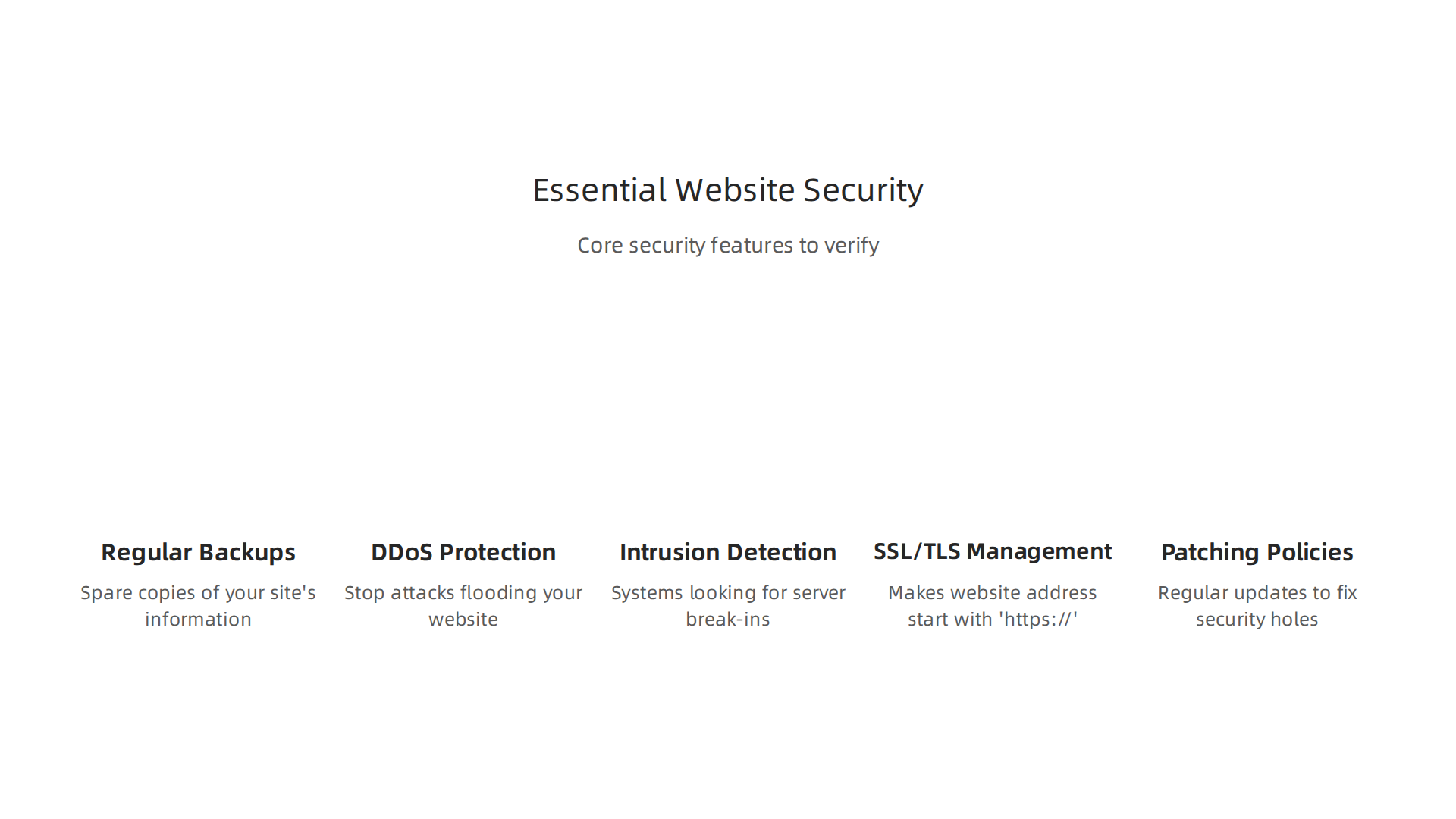
- Regular Backups: Imagine losing all your website’s information. Backups are like having spare copies of your site. Good hosts offer automatic, regular backups, sometimes even "point-in-time" backups. This means they can restore your site to how it was at an exact time, like yesterday morning, if something goes wrong.
- DDoS Protection: DDoS attacks are like a huge crowd trying to get into a small shop all at once, blocking real customers. These attacks try to flood your website with fake traffic to make it crash. In 2026, DDoS attacks are happening more often, with an average of 44,000 DDoS attacks daily reported by cybercriminals DDoS Attack Statistics 2026: 41 Key Facts and Trends. You need a host that can stop these attacks.
- Intrusion Detection: These are systems that act like security guards, looking for anyone trying to break into your server or website. They help spot and stop bad activity before it causes harm.
- SSL/TLS Management: An SSL (Secure Sockets Layer) certificate makes your website’s address start with "https://" instead of "http://". This little ‘s’ means your website is secure, protecting information like credit card numbers or login details. It’s also important for building trust with your visitors and helping with how your site ranks in search engines. Many hosts offer a free SSL certificate, but it’s good to understand the costs if you need more advanced options. You can learn more about this by reading about Godaddy SSL certificate cost 2026.
- Patching Policies: Web servers use special software to run. Just like your phone or computer needs updates, this server software needs regular "patches" to fix security holes. A good host will manage these updates for you.
For small businesses, these security features are not just nice to have, they are a must. Checking for these helps you find the top rated web hosting companies that truly care about your website’s safety.
Making Sure Your Website Is Always On: Uptime and SLAs
Uptime means how much time your website is online and working. If your site is down, customers can’t reach you, and you could lose sales or trust.
- Uptime Claims: Most good web hosts will promise high uptime, like 99.9% or even 99.99%. This sounds really close to 100%, but that small difference matters. For example, 99.9% uptime still means your website could be down for almost 9 hours a year. 99.99% means less than an hour a year.
- Service Level Agreements (SLAs): This is a formal promise from your host about their uptime. It’s a part of your contract. If they don’t meet their promise, the SLA might say they owe you money back or offer service credits. Always ask to see the SLA before you sign up.
- Monitoring After Launch: Even with a good SLA, it’s smart to use tools that check your website’s uptime regularly. This way, you’ll know right away if your site goes down and can contact your host.
When you compare options from a list of web hosting companies, look beyond just the price. Think about the peace of mind that comes with knowing your website is secure and available around the clock. Your website is your online home, and you want it to be a safe and reliable place for everyone who visits. Understanding these checks is a big part of choosing the best web hosting for small business in 2026.
After making sure your website is safe and always online, the next crucial step is to ensure it’s super fast and ready to grow. Speed matters a lot. When a website loads slowly, visitors often leave. This can hurt your business and even how well your site shows up in search results.

In 2026, people expect websites to load almost instantly.
How We Measure Website Speed
To pick a truly great web host from any list of web hosting companies, you need to know a few key speed terms:
- TTFB (Time to First Byte): This is how quickly your server sends the first piece of information to a visitor’s web browser. Think of it as how fast your host starts talking. For a fast experience, a TTFB under 200 milliseconds is excellent, though under 800 milliseconds is considered good by Google WordPress Performance Checklist 2026. Some modern hosting, like serverless options, can even offer median TTFB as low as 89ms, compared to traditional shared hosting at 320ms Website Speed & Performance Statistics 2026. Your hosting choice plays a big part in this.
- FCP (First Contentful Paint): This measures how long it takes for the first text or image to appear on your screen. It’s the first thing your visitor sees loading.
- LCP (Largest Contentful Paint): This measures when the main, biggest part of your website page finishes loading and becomes visible. Google says a good LCP should be under 2.5 seconds Core Web Vitals 2026: INP, LCP & CLS Optimization. If your TTFB is slow, your LCP will be slow too, as nothing else can load until the first byte arrives.
A top web hosting company will have fast servers and well-tuned systems to make sure these numbers are low. You want a host that actively works to give you the fastest WordPress hosting in 2026 to help your website perform its best.
Scaling Your Website for Growth
What happens when your website suddenly gets many more visitors? This is where "scaling" comes in. It means your website can handle more traffic without slowing down or crashing.
- Vertical Scaling: This is like upgrading your existing computer with more power. You add more resources to your current server, such as more memory (RAM) or a faster processor. It’s simple but has limits.
- Horizontal Scaling: This is like adding more computers to share the work. You add more servers to your setup, and traffic is spread among them. This is great for big growth and is often seen with cloud hosting options that can add or remove servers automatically.
- Auto-scaling: Modern cloud hosts can automatically adjust resources based on your traffic needs. If you suddenly get a lot of visitors, the system adds more power. When traffic drops, it scales back down to save costs.
Boosting Speed with a Content Delivery Network (CDN)
A CDN is a network of servers located all over the world. When someone visits your website, a CDN delivers your content (like images and videos) from the server closest to them.
This makes your website load much faster for visitors globally. For example, CDNs can greatly improve TTFB, with some benchmarks showing edge caching CDNs average 154ms Global TTFB compared to 478ms for hosts without a CDN WordPress Hosting Benchmarks 2026. Leading CDN services like YewSafe, Cloudflare, and Akamai show median TTFB values as low as 71ms to 89ms in 2026 benchmarks 2026 CDN Benchmark. Many good web hosting companies include CDN services as part of their plans, which is a great bonus for performance and user experience.
When you’re looking at a list of web hosting companies, always consider how they handle speed and growth. A fast, scalable host ensures your website can keep up with your business as it gets bigger.
But a fast, growing website needs more than just good tech. It also needs good people behind it. That’s why support, easy migrations, and helpful tools are super important when you’re picking from any list of web hosting companies.
What Good Support Looks Like
Imagine your website has a problem. You need help fast! Good web hosts offer different ways to get help:

- Live Chat: This is often the quickest way to get answers to simple questions. You type your problem, and someone helps right away.
- Phone Support: For bigger, more complex issues, talking to someone on the phone can be best.
- Ticketing System: For problems that need more time to fix, you can send a "ticket." The support team will work on it and get back to you.
- Managed Services: Some of the top web hosting companies offer "managed" plans. This means they handle a lot of the technical work for you, like updates and security checks. It’s like having your own expert team!
For small businesses, quick help is a must. Many hosts aim for fast replies. Kinsta, for example, reports helping customers in under two minutes with a 98% satisfaction rate, and InMotion Hosting is also known for its good response times Kinsta Reviews 2026: What Users Really Think. You should look for hosts that promise specific response times, often called an SLA (Service Level Agreement) What SLAs should you require from a WordPress development ….
Moving Your Website (Migrations)
Sometimes you might want to move your website from one host to another. This is called migration. It sounds scary, but good hosts make it easy. When picking from a list of web hosting companies, ask about their migration help.
Here’s what a good migration looks like:
- Easy Data Transfer: Your host should help move all your website’s files and information safely.
- DNS Planning: This is like changing your website’s address. The host should help make sure your site points to its new home without downtime.
- Testing: Before your site fully moves, you need to test it to make sure everything works perfectly. Many good hosts offer a "staging environment" where you can test changes safely before they go live WordPress Maintenance Contract & SLA (Free Template) | WebCare Studios.
- Backup Plans: What if something goes wrong? A good host will have a plan to go back to the old setup if needed.
- Free Migration Services: Many of the top rated web hosting companies offer to move your site for free. Red Wagon, for instance, includes free website migration with their plans Red Wagon Nashville – Managed WordPress Hosting. This saves you time and worry.
Learning how to migrate WordPress site to new domain safely in 2026 is a great skill, but having a host that helps is even better.
Handy Management Tools
Finally, look for hosts that give you easy tools to manage your website. Things like cPanel are popular because they make it simple to do many tasks, from setting up emails to managing files. When you choose a host from a list of web hosting companies, make sure it offers a user-friendly way to control your site.
Picking the best web hosting for small business means finding a partner that offers not just fast servers, but also strong support, simple migration, and good tools. This way, you can focus on your business, not on technical headaches.
When you pick a web host, you want a partner that offers good service and tools. But you also need to think about money. Understanding the full cost of web hosting is super important so you don’t get surprised later. This means looking beyond the first price you see and checking for hidden fees.
Pricing Models and Hidden Fees: How to Compare Total Cost of Ownership
Not all hosting prices are what they seem at first glance. It’s like buying a new phone that looks cheap, but then you find out the monthly plan is very expensive after a year. Web hosts use different ways to charge you. Here are the main ones:
Understanding Common Pricing Models
- Introductory vs. Renewal Pricing: Many of the top web hosting companies offer very low prices when you first sign up. This is usually for the first year or two. But after that, the price can jump a lot, sometimes 3 to 6 times higher! It’s important to always check the renewal price, not just the first offer, when you compare different hosts Web Hosting Hidden Costs 2026: Renewal Traps, Upsells & What …. Some hosts, like InterServer, offer "price lock" plans where your renewal price stays the same as your first price How Much Does Web Hosting Really Cost in 2026? (Hidden Fees Exposed).
- Resource-Based Billing: This means you pay for the things your website uses, like CPU power, memory (RAM), and storage space. If your website grows and uses more, your bill might go up.
- Usage Charges and Overage Fees: These are extra costs if your website goes over certain limits, especially for bandwidth. Bandwidth is how much data your website sends to visitors. If many people visit your site or download big files, you might hit your limit and pay more.
Watch Out for Hidden Fees
Beyond the main plan, there are often extra costs. These "hidden fees" can really add up! When you look at any list of web hosting companies, ask about these extras:
- Backups: Some hosts charge extra to make copies of your website. This can be $2 to $10 each month if it’s not part of your plan Pricing Analysis of Web Hosting Services 2026 | fouzanadil.com.
- SSL Certificates: These are important for making your website secure (you see "https" in the address). Many good hosts include a free SSL certificate, but some might charge for them The Hidden Costs of Web Hosting: Renewal Fees, Add-Ons, and Upsells to Watch Out For – WebVibo.
- Domain Privacy: This keeps your personal information hidden when someone looks up your website’s owner. It often costs extra.
- Migration Fees: While some hosts offer free migration, others might charge if you need help moving your website.
- Setup Fees: A few hosts might ask for a one-time fee to get your account started.
- DDoS Protection: This helps protect your site from attacks. Basic protection might be free, but more advanced options can cost extra Frequently Asked Questions.
To avoid surprises, you need to calculate the true cost. Learn how to calculate your true web hosting cost and avoid hidden fees in 2026.
Checklist for Total Cost of Ownership
To figure out what you’ll really pay, use this simple checklist:
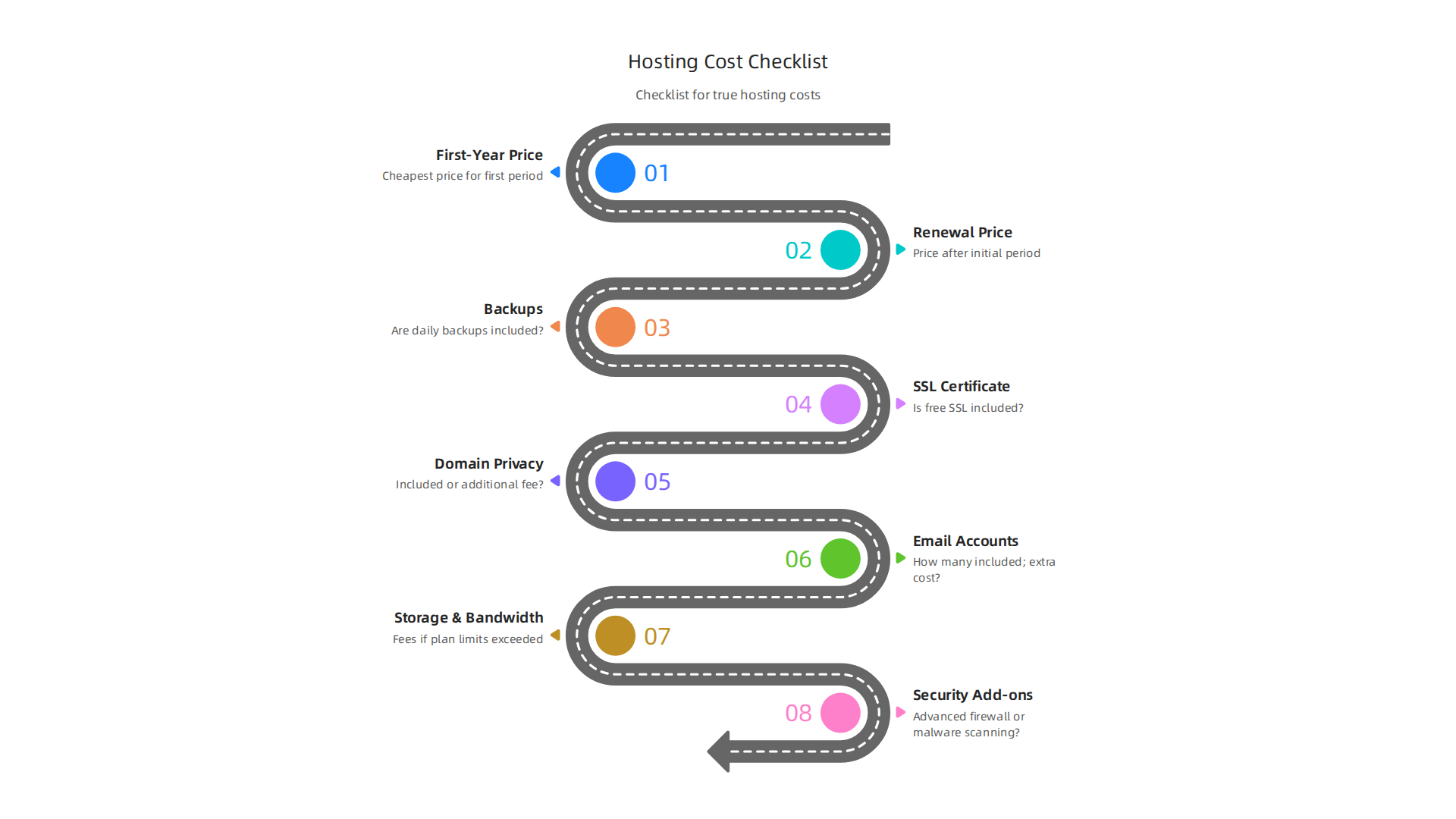
- First-Year Price: What is the cheapest price for the first billing period?
- Renewal Price: What will you pay after the first period ends? This is often the biggest jump Web Hosting Cost Comparison: Real 2026 Prices, Renewal Rates, and Hidden Fees.
- Backups: Are daily backups included? If not, how much extra do they cost?
- SSL Certificate: Is a free SSL included for all your sites?
- Domain Privacy: Is this included or an extra fee?
- Email Accounts: How many are included, and what’s the cost for more?
- Extra Storage/Bandwidth: What are the fees if your site grows beyond the plan’s limits?
- Security Add-ons: Does your plan include advanced firewalls or malware scanning, or are those extra?
By asking these questions, you can truly master your web hosting cost in 2026 and pick the best web hosting for small business without any costly surprises.
Now that you know how to look for hidden costs and understand different ways web hosts charge, it’s time to compare your options. The web hosting market is big, growing to about $178.76 billion in 2026 alone, so there are many choices Web Hosting Services Market Size, Share, Global Report, 2034. To make a good choice, you need a clear way to see what each company offers side by side.
Comparison Table and Step-by-Step Decision Checklist
Comparing different web hosting companies can feel like a big job. There are so many options, like those on a Compare Web Hosting list or a Web Hosting Comparison tool. But with a simple table and a checklist, you can easily find the best fit for your website.
Quick Look at Top Hosting Providers
Here is a simple table to help you compare what different types of web hosts offer. Remember, actual prices and features can change, so always check the latest details.
| Provider Type (Example) | Best for Use-Case | Key Strengths | Uptime Promise (SLA) | Pricing Guidance |
|---|---|---|---|---|
| Budget Shared Hosting | Small blogs, simple websites | Very low intro price, easy to start | Often 99.9% | Low intro, high renewal |
| Managed WordPress | Growing blogs, small businesses | Fast speed, WordPress help, security | Often 99.95% | Higher intro, moderate renewal |
| E-commerce Hosting | Online stores, product catalogs | Strong security, fast checkout, scalable | Often 99.99% | Higher intro, stable renewal |
| Prism Web Host (Shared) | Small to medium businesses, online brands | Enterprise security, fast LiteSpeed servers, 17Tbps+ DDoS protection, NVMe SSD storage, 99.99% uptime SLA, automated scalability, point-in-time backups | 99.99% | Clear pricing, good value |
Many good hosts aim for excellent uptime, with some even offering a 99.9% Uptime Guarantee. If they don’t meet this, some companies will give you service credits, like a 10% credit for uptime between 99.0% and 99.9% The Anatomy of a Pro-Level SLA.
Your Easy Checklist to Pick a Web Host
Follow these steps to choose from the many top web hosting companies and set up your website right.
-
What Does Your Website Need?
- Know your goal: Are you starting a personal blog, a business website, or an online shop?
- How much traffic? How many people do you expect to visit your site each month? This affects how much power and bandwidth you need.
- Special features: Do you need WordPress, a lot of storage for pictures, or email accounts?
-
Look at Reviews and Comparisons.
- Check different websites that compare a [list of web hosting companies]. Sites like Top 10 Best Web Hosting Services (2026 Review) can give you a good starting point.
- Read what other users say about their experiences.
-
Check the Uptime Promise.
- This is called an SLA (Service Level Agreement). It tells you how much of the time your website is guaranteed to be online. Look for 99.9% or higher. For example, Prism Web Host offers a 99.99% uptime SLA.
-
Think About Speed.
- A fast website keeps visitors happy and helps your site show up higher in search results.
- One important speed number is TTFB (Time to First Byte). This is how fast your server starts sending information. Google aims for TTFB under 200ms for excellent performance Core Web Vitals 2026: INP, LCP & CLS Optimization, and a good global experience means TTFB under 300ms Web Hosting Performance Benchmark Guide 2026. You can also find benchmarks for WordPress hosting to compare.
-
Look at Customer Support.
- Can you get help whenever you need it, day or night? Is it easy to reach them by phone, chat, or email?
-
Understand All the Costs.
- Go back to our checklist from the last section. Make sure you know the renewal prices and all possible hidden fees for backups, SSL certificates, and domain privacy.
What to Do After You Sign Up
Once you choose a web host from the [top 10 web hosting companies] and sign up, these next steps are important:
- Test Your Website: Make sure everything works well. Check all your links, forms, and pages.
- Set Up Backups: Even if your host offers backups, it’s smart to have your own plan too. This way, you always have a copy of your site if anything goes wrong.
- Boost Security: Turn on any extra security features your host offers, like advanced DDoS protection (which Prism Web Host includes).
Choosing the right host is a big step for your online success. If you’re looking for hosting that focuses on strong security, consistent speed, and easy setup, consider checking out Prism Web Host.
Ready to launch your website with a reliable, secure, and fast host? Learn more about our webhosting products and services today. You can also look at our Web Hosting Template Checklist for Small Business Growth in 2026 to make sure you have everything covered.
Summary
This guide helps small and medium businesses choose the right web hosting by explaining what matters most—reliability, speed, security, scalability, support, and true cost. It outlines the main hosting types (shared, VPS, cloud, managed WordPress, dedicated), explains key performance metrics like TTFB and LCP, and shows how CDNs and auto-scaling improve global speed and uptime. The article reviews essential security features such as automatic backups, DDoS protection, SSL management, and patching, and it explains Service Level Agreements (SLAs) and realistic uptime expectations. It also walks you through pricing models, common hidden fees, and a practical checklist to compare providers side-by-side. Finally, you get guidance on migrations, support expectations, and post-launch checks so you can pick a host that protects your brand and grows with your business.
