




Set Up Your Notion Custom Domain with Vercel
Article
Notion is a super helpful tool for many things, from keeping notes to planning big projects. Did you know you can also use it to make simple websites?
It’s true! You can quickly set up a page in Notion and share it with the world. But here’s the thing: when you first share a Notion page, its web address looks a bit long and not very professional. It often includes "notion.site" and a string of random letters and numbers.
This is where connecting a notion custom domain comes in handy. Instead of a messy address, you can use your own, like www.yourcompany.com or www.yourname.online. This makes your online presence look much more polished and trustworthy. Think of it like giving your Notion website its very own special address on the internet.
Why is having your own notion custom domain so important?
- Professional Look: A custom domain makes your website seem serious and official. It builds trust with visitors, whether they are customers, clients, or fans.

- Better Branding: Your domain name is a big part of your brand. When you use your own name or business name in the web address, it helps people remember you. It’s like having your own sign outside your store.
- Easier to Find (SEO): Search engines like Google understand custom domains better. This means it can be easier for people to find your Notion site when they search for things related to your business or topic. This is a big step up from the default Notion address and much more effective than just trying to guess what a
wordpress domain costmight be to get better SEO. - Full Control: When you own your domain, you have more control over your online identity. You are not just borrowing a small piece of Notion’s space; you have your own dedicated spot. Learning what a website domain definition means can help you understand this better.
So, how do you take your Notion site from a simple shared page to a professional website with its own address? This is where Vercel comes in. Vercel is a tool that helps connect your Notion-built site to your chosen domain.
It acts like a bridge, making it possible to publish your Notion content under your very own web address. This whole process is often called setting up a vercel custom domain.
The good news is that the steps are pretty straightforward. First, you’ll need to prepare your domain. This means choosing and registering a domain name if you don’t have one already. You can learn more about finding reputable companies for this by checking out tips on how to find reputable domain name registrars that protect your business. Next, you will use Vercel to connect your Notion site to that domain. This guide will walk you through exactly how to set up your notion custom domain using Vercel, making sure your website looks great and is easy for everyone to find.
If you’re looking for reliable hosting services or want to explore your domain options, consider checking out Prism Web Host – Web Hosting & Domains. They offer secure and high-performance hosting solutions that can help your online presence thrive.
The process of getting your own notion custom domain involves three key players: Notion, Vercel, and DNS (which stands for Domain Name System).

Think of it like building a house, hiring a builder, and then telling everyone its address.
First, you have Notion. This is where you create all your content. You write your blog posts, set up your service pages, or list your products there. It’s like your digital notebook or workspace. When you share a Notion page, it gets a default web address, but it’s not truly your own.
Next, there’s Vercel. Vercel acts as a special helper that takes your Notion content and makes it ready for the internet under your own address. It’s like a smart builder that takes your plans from Notion and builds a proper website from them. When you set up a vercel custom domain, Vercel becomes the host for your Notion-powered site. This kind of hosting infrastructure is key for many businesses today, as highlighted in the latest Web Hosting Trends Report – 2026 – WebPros, showing how important reliable hosting is.
Finally, we have DNS. This is like the internet’s phone book. When someone types your notion custom domain (your special web address) into their browser, DNS tells their computer exactly where to find your website on Vercel. It points your chosen domain name to the right place.
So, the flow generally works like this:
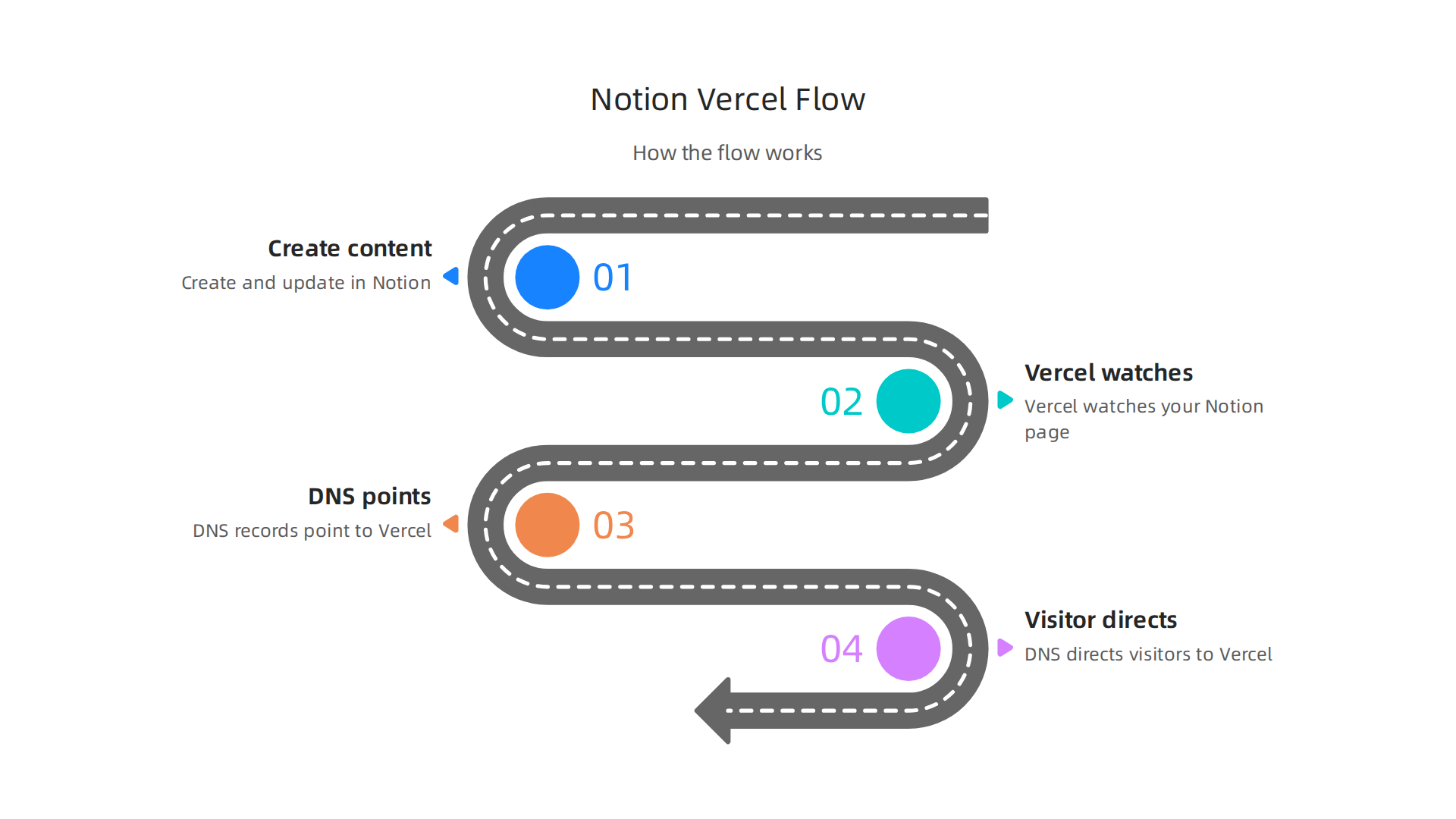
- You create and update your content in Notion.
- Vercel is set up to watch your Notion page. When changes happen or someone visits your custom domain, Vercel pulls the latest content from Notion.
- Your custom domain, registered with a domain provider, uses DNS records to point to Vercel.
- When a visitor types your notion custom domain, DNS directs them to Vercel, which then displays your Notion content beautifully.
Where do things sometimes go wrong? Most often, it’s in the connection points.
- Vercel setup: Making sure Vercel is correctly linked to your Notion page.
- DNS settings: These are the most common source of trouble. If the DNS records for your notion custom domain aren’t set up exactly right to point to Vercel, your website won’t show up. This step requires careful attention to detail.
This whole setup gives you the professional look and control you want for your online presence, without needing to become a web development expert.
Setting up your own notion custom domain starts with making sure your domain name itself is ready. Think of it like preparing the land before building a house. If your land isn’t ready, the whole project can get stuck.
Here’s what you need to check:
Domain Ownership and Access
First, you must own the domain name you want to use. This sounds simple, but it’s important. You also need to be able to log in to your domain registrar. The registrar is the company where you bought your domain name (like GoDaddy, Namecheap, or Google Domains).
Make sure you have:
- Ownership: You are the legal owner of the domain name.
- Login details: You have the username and password for your registrar account.
- Admin access: You can change important settings for your domain, especially DNS records.
If you’re not sure about the basics of domain names, a clear website domain definition can help. Also, choosing a good registrar is key. You’ll want to find reputable domain name registrars to make sure your domain is safe and easy to manage.
Understand Your DNS Settings
DNS, or Domain Name System, is where you’ll do most of the work to link your domain to Vercel and your Notion content. You’ll be adding special records that tell the internet where to find your website.
The key records you will likely need to set up for your notion custom domain are:
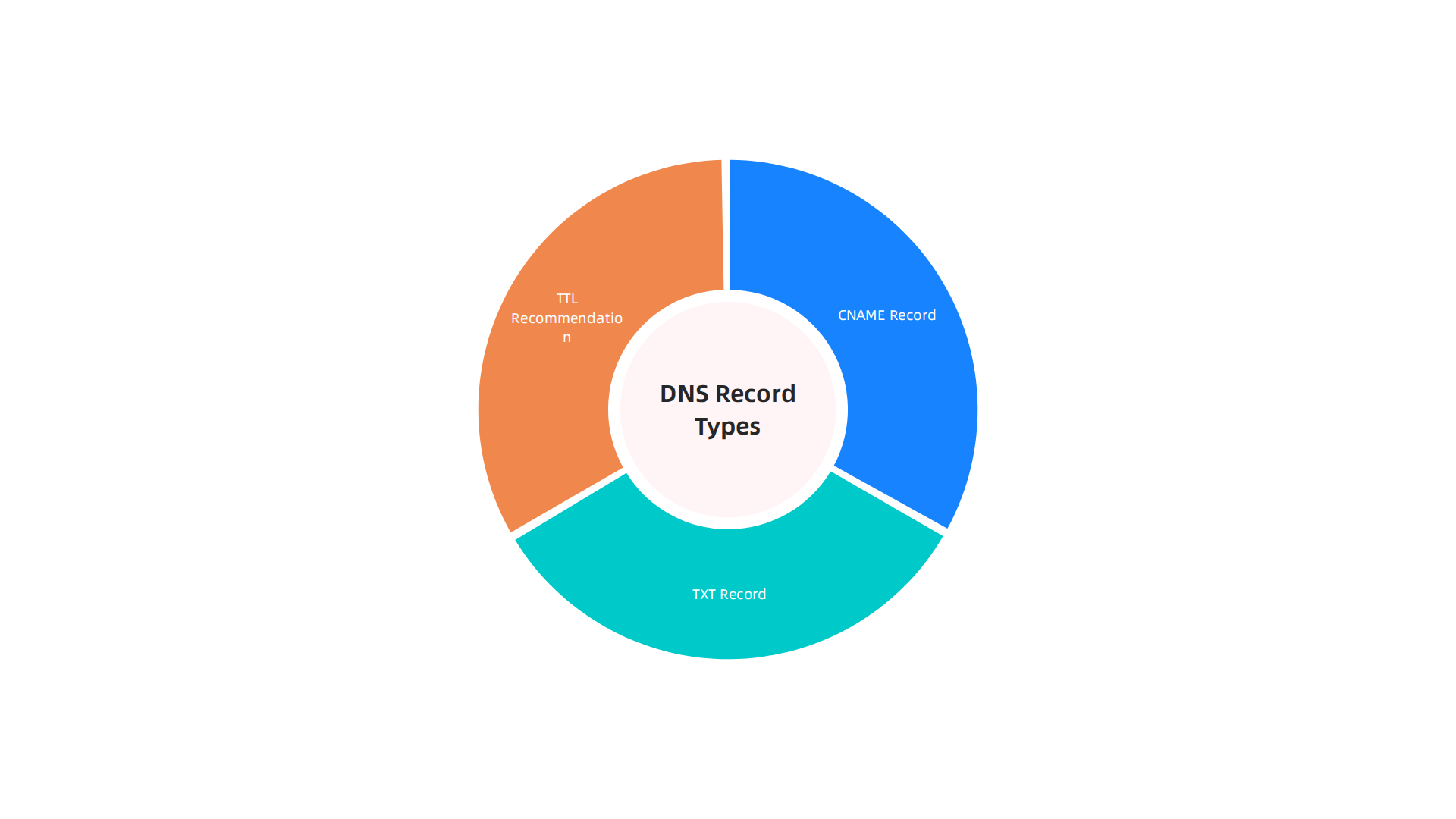
- CNAME Record: This record points your custom domain (like
www.yourdomain.com) to Vercel’s server. Vercel will give you a specific address to use here. You’ll also set up a CNAME record or similar redirection for your main domain (likeyourdomain.com) to make sure both work. - TXT Record: Sometimes, a TXT record is needed to prove you own the domain or for other special settings. Both Notion and Vercel may ask for these. For instance, to connect a custom domain with Notion Sites, you often need to add specific CNAME and TXT records.
When you’re setting up these records, you’ll see something called TTL, which stands for "Time To Live." This tells internet servers how long to remember your domain’s old settings before checking for new ones.
- TTL Recommendation: While setting up, a lower TTL (like 300 seconds or 5 minutes) can make changes happen faster. Once everything is working, you can set it back to a higher number (like 3600 seconds or 1 hour) for better performance.
You can find detailed steps on Adding and Configuring a Custom Domain in Vercel directly from Vercel’s documentation.
Registrar-Specific Checks
Some domain registrars have quirks you need to watch out for:
- Locked Domains: Your domain might be "locked" to prevent unauthorized changes. You’ll need to unlock it in your registrar’s settings before you can update the DNS records. Remember to lock it again once your changes are complete for security.
- Proxy Services (WHOIS Privacy): Many registrars offer privacy services that hide your personal information from public view. While good for privacy, sometimes these services can interfere with DNS changes or domain verification. If you run into issues, you might need to temporarily disable your proxy service or check your registrar’s specific instructions.
- Default Records: Some registrars add default DNS records automatically. Make sure these don’t conflict with the new CNAME records you’re adding for your vercel custom domain. You might need to delete some old records.
Taking these steps before you dive into Vercel’s setup will help ensure a smoother process for getting your notion custom domain up and running.
Now that your domain name is all set, it’s time to bring your Notion content to life online. This next step involves setting up a project on Vercel and linking it to your Notion page.

Think of Vercel as the special builder that takes your Notion ideas and puts them on the internet under your own custom web address.
Start Your Vercel Project
First, you’ll need a Vercel account. If you don’t have one, it’s easy to sign up. Once logged in, you’ll create a new project. Many people use a tool like NotionNext or similar templates that help Vercel understand how to show your Notion pages as a website. You can find guides on how to build a website in Notion using tools like NotionNext for free with Vercel, which will walk you through these early steps.
To create your project:
- Import Your Template: You’ll often start by bringing in a special template or starter kit from GitHub into Vercel. These templates are designed to work well with Notion. A video guide on Free Blogging Using Notion (Free Deploy with Vercel) can show you how to get started.
- Connect to GitHub: Vercel often works best when connected to a code platform like GitHub. This way, any changes you make to your template can be easily updated on your live site.
- Basic Settings: Vercel will ask about your project name and some settings. For most Notion-based sites, the default settings work fine.
Important Build Settings and Environment Variables
This is a key part. Vercel needs to know which Notion page to turn into your website. It also needs to know how to build your site correctly.
- Build Settings: Vercel will try to guess the right build settings, like the framework your template uses. Usually, this is automatic.
- Environment Variables: This is where you tell Vercel your Notion page ID. This ID is like a secret code for your specific Notion page. You add it in Vercel’s project settings under "Environment Variables." For example, if you’re using a tool like NotionNext, you would copy your Notion page ID and paste it into a variable named
NOTION_PAGE_ID(or similar). This tells Vercel exactly which content to display. You can follow a detailed Step-by-Step Guide for Free Website with Notion to ensure you set up these variables correctly.
How Vercel Serves Your Notion Content
Once you’ve set up your project and added your Notion page ID, Vercel does a clever thing. When someone visits your new notion custom domain, Vercel acts as a middleman. It takes that visit request, goes to your Notion page (using the ID you provided), gets all the content, and then shows it beautifully on your custom domain. It basically transforms your Notion page into a fast, public website.
This process is why setting up your DNS records was so important in the first place. You told the internet that your custom domain should point to Vercel. Now, Vercel is ready to receive those visitors and show them your Notion content.
After deploying your Vercel project, the final step is to actually connect your domain. Vercel makes this easy. You’ll go to your project settings, find the "Domains" tab, and add your domain name. Vercel will then give you the specific CNAME or A records you need to add to your domain registrar’s DNS settings, just like we talked about in the last section. For a visual guide, check out this video on How to Add Custom Domain to Vercel. This ties everything together, making your vercel custom domain fully functional.
If you’re looking for reliable hosting services for your other online projects, whether it’s a blog or an e-commerce store, consider exploring our offerings. Prism Web Host provides secure, high-performance web hosting tailored for businesses and online brands. Getting your hosting right is important to avoid issues, and you can learn more about how to set up a Vercel custom domain and avoid surprise bills to ensure a smooth experience.
After deploying your Vercel project, the final step is to actually connect your domain. Vercel makes this easy. You’ll go to your project settings, find the "Domains" tab, and add your domain name. Vercel will then give you the specific CNAME or A records you need to add to your domain registrar’s DNS settings, just like we talked about in the last section. This ties everything together, making your vercel custom domain fully functional.
DNS Deep Dive: CNAME, A, ALIAS/ANAME, and TTL for Vercel + Notion
When you set up your custom domain for a Notion website on Vercel, you’ll work with different types of DNS records. These records tell the internet where to find your website. It’s like giving GPS coordinates for your notion custom domain.
Let’s look at the main types you’ll use:
A Records
An "A" record points your domain name to a specific IP address, which is like a street address for a server. If you want your main website (like yourdomain.com) to point directly to Vercel, you’ll usually use "A" records. You might be asked to point your root domain to specific Vercel IP addresses.
CNAME Records
A "CNAME" record is like a nickname. It points one domain or subdomain to another domain name, not directly to an IP address. For your notion custom domain, you’ll often use a CNAME record for subdomains. For example, if you want www.yourdomain.com or blog.yourdomain.com to point to Vercel, you’d create a CNAME record. Vercel will give you the exact CNAME value to use, which often looks like cname.vercel-dns.com. When connecting a custom domain with Notion Sites, you might also be asked to add a CNAME record directly to Notion’s servers if not using a tool like Vercel directly for hosting a Notion page itself Connect a custom domain with Notion Sites. You can find more details on how to add and configure a custom domain in Vercel’s documentation Adding & Configuring a Custom Domain – Vercel.
ALIAS/ANAME Records
Sometimes, you need the root domain (like yourdomain.com) to behave like a CNAME, but traditional DNS rules don’t allow CNAMEs for root domains. That’s where "ALIAS" or "ANAME" records come in. These are special records offered by some domain registrars or DNS providers. They act like a CNAME for your root domain, pointing it to another domain name (like Vercel’s address) instead of a direct IP address. This is very helpful for services like Vercel, which use a changing network of servers. Some hosting guides describe an ANAME record as working like a CNAME record, but for your main domain AWS Amplify Hosting – User Guide.
TTL (Time To Live)
"TTL" stands for "Time To Live." This setting tells other computers on the internet how long they should remember your DNS settings before checking for new ones.
- A low TTL (like 300 seconds or 5 minutes) means changes will update quickly across the internet. This is good when you’re first setting up your
vercel custom domainor making changes. - A high TTL (like 3600 seconds or 1 hour) means changes take longer to show up, but it can make your site load a tiny bit faster for repeat visitors as their computers don’t have to check for updates as often.
When you’re first connecting your domain, a lower TTL helps you see if your settings are correct faster.
Propagation and Verification
After you change your DNS records at your domain registrar, it takes time for these changes to spread across the internet. This process is called "propagation." It can take anywhere from a few minutes to 48 hours, though it’s often much quicker in 2026.
To verify your DNS is set correctly and your notion custom domain is live, you can:
- Check Vercel: Vercel itself will often show you the status of your domain, telling you if it’s connected and live.
- Use online DNS checker tools: Websites exist where you can type in your domain, and they’ll show you its current DNS records from different locations around the world. This helps you see how propagation is happening.
Understanding these DNS records is key to managing your website’s online presence, whether you’re setting up a notion custom domain or even if you decide to later migrate wordpress site to new domain. Knowing the domain name meaning how to understand your web address and choose the right one is a foundational skill for any online project.
Understanding DNS records is important, but making sure your website is safe and secure is even more crucial. When you set up a notion custom domain or any website, you need to think about how to protect it from bad things on the internet.
Security Essentials: HTTPS, SSL, DDoS Protection and Access Controls
Security for your website involves several important parts. Think of it like putting strong locks on your house and hiring a good security guard.
HTTPS and SSL Certificates
When you visit a website and see "HTTPS" in the web address, that "S" means "secure." This is thanks to something called an SSL/TLS certificate. It’s a small digital file that links a website to a special key. This key helps scramble the information sent between your website and its visitors, keeping it private and safe from people who shouldn’t see it. This is called encryption.
Vercel makes this part easy for your vercel custom domain. When you connect your domain, Vercel automatically gives you a free SSL certificate. It also handles "SSL termination," which means Vercel takes care of the encryption and decryption for you, making your site fast and secure. You don’t usually need to do anything extra. Just know that these certificates need to be renewed. In 2026, many SSL/TLS certificates last for about 200 days before needing renewal, so providers like Vercel manage this behind the scenes to keep your site always secure without you having to worry about it Certificates – CDT Services – California Department of Technology.
Protection from DDoS Attacks
Imagine many people all trying to call your phone at the exact same time so that no one else can get through. That’s a bit like a Distributed Denial of Service (DDoS) attack on your website. Bad actors use many computers to send huge amounts of fake traffic to your site, trying to make it slow down or crash so real visitors can’t use it. These attacks are a real threat, with millions of mitigations expected globally in 2026 DDoS Statistics 2026: Attack Data, Records & Trends.
To protect your notion custom domain from DDoS attacks, you can use several layers of security:
- Content Delivery Networks (CDNs): Services like Vercel often include CDN features. A CDN spreads your website’s content across many servers worldwide. If an attack happens, the traffic is spread out, making it harder to overwhelm any single server. It’s like having many doors to your house instead of just one.
- Web Application Firewalls (WAFs): A WAF is like a smart guard that stands in front of your website. It checks all the incoming traffic and blocks anything suspicious before it reaches your site.
- Rate Limiting: This sets a limit on how many requests a user or an IP address can make to your server in a certain amount of time. If someone tries to send too many requests too quickly, the system blocks them.
By using these tools, your vercel custom domain will be much safer. Providers like Prism Web Host also focus on enterprise-grade security, including 17Tbps+ DDoS protection, ensuring your site stays online and secure. To learn more about setting up your secure hosting, consider checking out how to find a reliable partner for your website Prism Web Host – Web Hosting & Domains. For a deeper dive into the technical setup of your Vercel domain, you might find our guide on How to Set Up a Vercel Custom Domain and Avoid Surprise Bills helpful.
Making your website safe is one thing, but making it fast is another key part of a good online experience. Nobody likes waiting for a webpage to load. When you use a Notion custom domain, especially with Vercel, how quickly your pages show up can make a big difference for your visitors.
Smart Speed Tricks: Caching and CDNs
Imagine you have a favorite toy. If you keep it right next to you, you can grab it super fast. If it’s in another room, it takes a bit longer. Websites work similarly.
- Caching: This is like keeping a copy of your Notion page closer to your visitors. When someone visits your Notion custom domain, Vercel can save a copy of that page for a short time. The next person who visits doesn’t have to wait for the page to be built from scratch. They get the saved copy right away. This makes pages load much faster. Vercel automatically handles caching for your Vercel custom domain, which saves time and effort.
- Content Delivery Networks (CDNs): We talked about CDNs for security, but they are also champions of speed. A CDN spreads copies of your website’s content to many different servers around the world. So, if someone in Europe visits your website, they get the content from a server closer to them, not one all the way across the globe. This cuts down the travel time for your website’s data, making it load much quicker. A study in 2026 found that hosting providers continue to focus on fast, reliable services as a top priority for customers Web Hosting Trends Report – 2026 – WebPros.
Making Your Pages Zoom: Core Web Vitals
Google uses "Core Web Vitals" to measure how fast and smooth a website feels to users. These are important for how well your site shows up in search results. For your Notion + Vercel setup, you can check these vital signs using tools like Google PageSpeed Insights.
To make your pages even faster:
- Keep your Notion pages simple: Too many big images or complicated blocks can slow things down. Think about what’s really needed on each page.
- Optimize images: Make sure images are not too large in file size. There are free online tools that can shrink images without losing much quality.
- Use Vercel’s features: Vercel automatically makes many speed improvements, like image optimization and code splitting, but ensuring your setup is correct helps a lot. You can find out more about fast and secure hosting with guides like Best Magento Web Hosting UK providers to keep your store fast and secure.
By paying attention to caching, CDNs, and Core Web Vitals, you can make sure your Notion custom domain gives visitors a lightning-fast experience.
Even with a perfect setup for your Notion custom domain, sometimes things can go wrong. When your website isn’t working right, it can be frustrating. This checklist will help you find and fix common problems so your Notion + Vercel site gets back on track quickly.
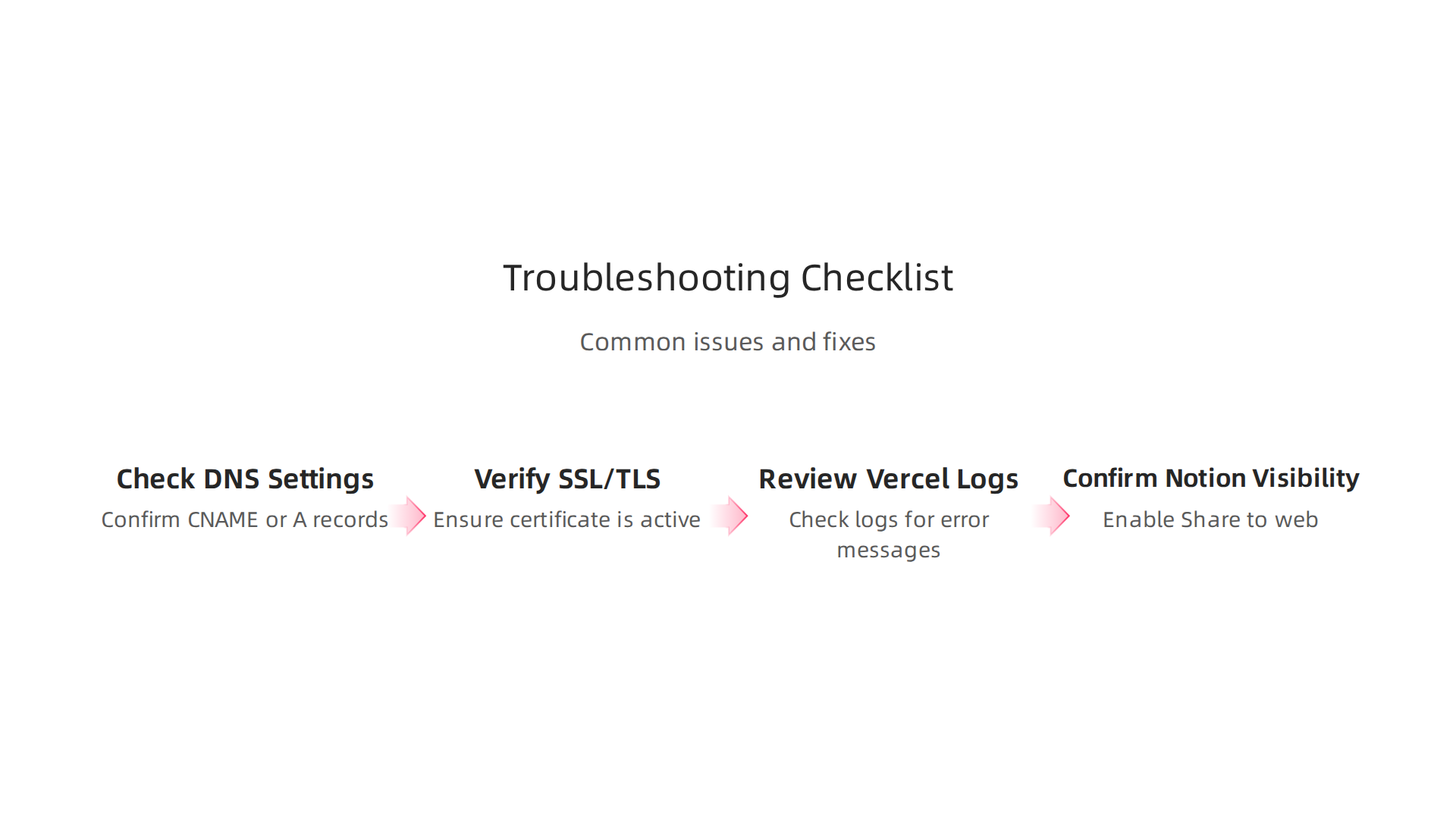
Step-by-Step Debugging Flow
When your website isn’t showing up or is showing an error, start here:
-
Check Your DNS Settings:
Think of DNS like a phone book for the internet. It tells browsers where to find your website. If your Notion custom domain isn’t working, the first place to look is your DNS records.- What to look for: Make sure the CNAME or A records you set up for your Vercel custom domain are exactly right. Even a small typo can cause big problems. You can often find step-by-step guides for updating your DNS zone records with your domain registrar to make sure they are correct.
- Quick fix: Double-check the values Vercel gave you and compare them to what’s at your domain registrar. Tools like
DNS Checkercan help you see if your changes have spread across the internet. Changes to DNS records can take some time to update everywhere, which is called "DNS propagation." If you recently changed your records, you might just need to wait a bit.
-
Verify Your SSL/TLS Certificate:
SSL/TLS certificates make your website secure by encrypting the connection. If your certificate isn’t working, visitors might see a "Not Secure" warning or be blocked from your site.- What to look for: Vercel usually handles SSL/TLS certificates for your custom domain automatically. However, certificates have lifespans and need to be renewed. In 2026, certificate lifespans continue to decrease, so keeping track of renewals is important, even if Vercel mostly automates it for you.
- Quick fix: Check your Vercel project settings to confirm the certificate is active and not expired. If there’s an issue, Vercel often provides tools to re-issue or refresh the certificate. Using a single certificate to secure multiple alternate domain names can sometimes simplify management.
-
Review Vercel Project Logs:
Vercel keeps logs of what happens when it tries to build and serve your Notion page. These logs are like a diary that can tell you if something went wrong on Vercel’s side.- What to look for: Go to your Vercel dashboard and find your project. Look for the "Logs" or "Deployments" section. Error messages here can point to problems with your Notion integration or how Vercel is trying to build your site.
- Quick fix: The logs often provide clues. For example, if Vercel can’t access your Notion page, it might tell you there.
-
Confirm Notion Page Visibility:
Is your Notion page actually shared publicly? If it’s not, Vercel won’t be able to grab its content.- What to look for: Open your Notion page and check its "Share" settings. Make sure "Share to web" is turned on and that public access is allowed.
- Quick fix: Adjust your Notion sharing settings to make the page accessible to the public. If you also use a platform like WordPress, you might need to check privacy settings there too, especially if you plan to migrate WordPress site to new domain.
Quick Fixes for Common Issues
- 404 Errors (Page Not Found): This often means Vercel can’t find the Notion page you linked, or the link itself is broken.
- Fix: Check your Notion page link in Vercel to make sure it’s correct. Also, ensure the Notion page is published and publicly shared.
- Certificate Mismatches (HTTPS errors): If your site is showing security warnings, it’s usually a certificate problem.
- Fix: Vercel should auto-renew your SSL certificate. If not, try manually refreshing it in your Vercel project settings. You want to make sure your site is always using secure TLS encryption.
- Redirect Loops: This happens when your website keeps trying to send you to another page, which then sends you back, and so on.
- Fix: Check any custom redirect rules you might have set up in Vercel. Also, sometimes old cached versions of your site can cause this. Clear your browser cache.
- Slow DNS Propagation: You made changes, but your website still isn’t working for everyone.
- Fix: This simply means you need to wait. It can take up to 48 hours for DNS changes to spread across the entire internet. While you wait, you can verify your DNS zone records are correct with your registrar.
By systematically going through these steps, you can usually pinpoint and solve most issues with your notion custom domain on Vercel, ensuring a smooth experience for your visitors.
Summary
This guide explains how to publish a Notion page under your own professional web address by connecting it to a custom domain via Vercel. It walks through the three key parts — Notion (your content), Vercel (the host/bridge), and DNS (the internet phonebook) — and shows what to prepare at your domain registrar, which DNS records to add (CNAME, A, ALIAS), and how to configure a Vercel project with the Notion page ID. You’ll also learn how Vercel serves and caches Notion content, how automatic SSL/TLS works, and which performance and security settings matter. The article covers common registrar quirks, propagation timing, quick debugging steps for 404s, SSL errors and redirect loops, plus practical speed and security tips. After reading, you’ll know the exact steps to deploy a Notion-powered site on your own domain, verify it, and troubleshoot typical problems so your site looks polished and runs reliably.
