




Optimize Your Business with Expert Web App Hosting Choices
Article
Every business owner wants their website to work perfectly. Think of your website or app as your online store or office. It needs to be open and welcoming to customers all the time. This is where web app hosting comes in. It’s like the landlord for your online space. Good web app hosting makes sure your site runs smoothly, stays safe, and can handle more visitors as your business grows.
Many small businesses and entrepreneurs face common problems with their hosting. Your website might be too slow, which can make customers leave before they even see what you offer. Imagine a slow line at a real store; people just walk away. Also, there are worries about security. You need to protect your customer’s information and your own business from online attacks. Then there’s uptime, which means how much time your website is actually online and working. If your site is down, even for a short time, you miss out on sales and lose trust. In fact, even with a "good" 99.9% uptime, your website could still be down for nearly nine hours each year, which adds up to a lot of lost opportunities for a small business Web Hosting Statistics 2026: 70+ Facts, Trends & Data.
Choosing the right web application hosting for your business is a very important decision in 2026.

A good host helps your website load super fast, keeping your visitors happy and making them more likely to buy from you. This directly affects how many sales you make, which we call conversions. Fast websites also help your business show up higher in search results, bringing in more potential customers.
Beyond speed, strong security from your host builds trust with your customers. They know their information is safe when they visit your site. Reliable uptime means your online store is always open, ready for business day and night. And as your business gets bigger, your hosting needs to grow with you. This is called scalability. If you pick the right host now, it will save you money and headaches later on because you won’t need to switch or upgrade often.
Finding the best solution for your business can feel like a big task, but understanding what web app hosting is and why it matters is the first step. To learn more about how hosting works, you can read our guide on what is web hosting services.
You already know that a fast website keeps customers happy. But what exactly makes a website quick, and how does your choice of web app hosting play a big part? It’s like asking what makes a car fast: it’s not just the engine, but many things working together.
Performance & Speed: What actually impacts load times
Many things affect how fast your website loads for visitors.
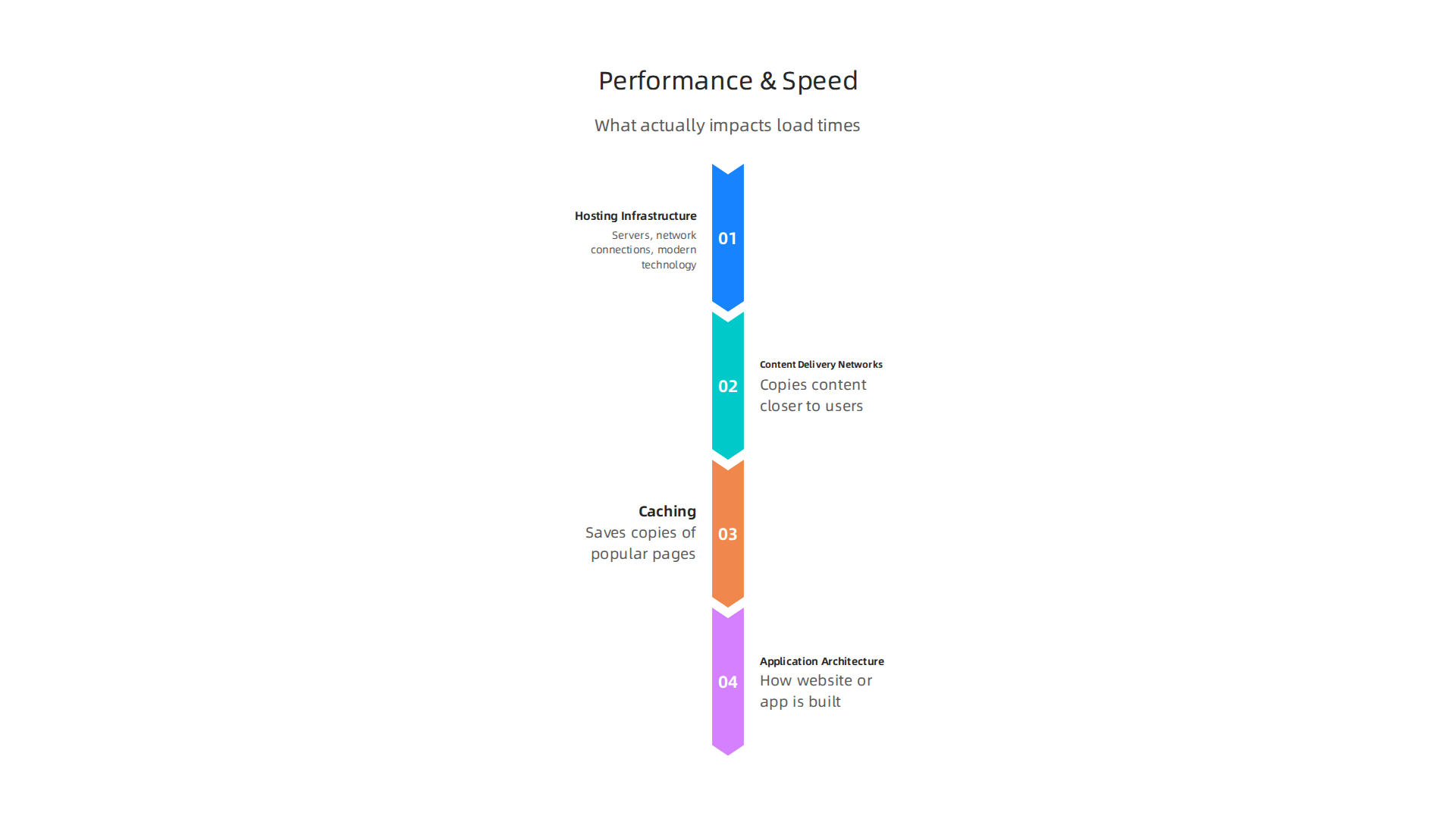
These parts work together to give your customers a good experience.
-
Hosting Infrastructure: This is the basic setup of your hosting. It includes the computers (servers) where your website lives and how they connect to the internet. Good web application hosting uses strong, fast servers and quick network connections. If your server is slow or far away from your visitors, your site will load slowly. For example, if your hosting company uses old machines, it won’t matter how well your website is built; it will still feel sluggish. Choosing a host with modern technology, like NVMe SSD storage and LiteSpeed servers, can make a huge difference.
-
Content Delivery Networks (CDNs): Imagine you have customers all over the world. Without a CDN, every customer’s request goes all the way to your main server, which could be far away. A CDN has copies of your website content stored in many places closer to your users. When someone visits your site, the CDN sends the content from the closest spot, making it load much faster. This is super helpful for reducing wait times.
-
Caching: Think of caching like saving a copy of your website’s most popular pages or pictures. When a visitor comes back to your site or another visitor asks for the same page, the host can give them the saved copy instead of building the page from scratch every time. This saves a lot of time and makes your website feel quicker.
-
Application Architecture: This refers to how your website or app is actually built. Even with great web app hosting, if your website code is messy, or it uses too many big images, it can still be slow. Modern websites built with tools like
Webflow hostingor even aself hosting websitesetup need to be designed to be lean and efficient. The design of your website is just as important as the strength of your hosting. For example, if you use a lot of complex tools in your website, that might take longer to load. This is true whether you use specializedrender web hostingor a standard shared plan.
Why Speed Matters for Your Business
Faster websites don’t just make visitors happy; they also help your business grow.
-
Better Search Rankings (SEO): Search engines like Google want to show users the best, fastest websites. If your site loads quickly, Google sees it as more helpful and is more likely to show it higher in search results. This means more people will find your business. Reports from 2026 show that passing Core Web Vitals, which measure page speed, is important for many websites Core Web Vitals Statistics 2026.
-
More Sales (Conversion Rates): When your website is fast, people stick around longer. They browse more pages, learn more about what you offer, and are more likely to buy something or sign up for your service. A slow website, however, can make people frustrated and leave before they even see your best products. This means lost sales for you.
Choosing the right web application hosting is a key step to make sure all these speed factors work in your favor. If you want to dive deeper into how to pick the best hosting, you can learn more about choosing web application hosting secure fast and scalable solutions.
Picking the right web app hosting is also super important for keeping your website safe from bad guys. Just as you want your website to be fast, you also want it to be a strong castle against threats.
Security & Compliance: Protecting your app from threats
Making sure your website is secure means protecting it from attacks and keeping your customer’s information private. A good hosting company offers many tools to help with this.
- DDoS Protection: Imagine a huge crowd trying to get into a small store all at once. That’s a DDoS attack for your website. It tries to overload your site with so much traffic that real customers can’t get in. Good web application hosting has systems that can spot these fake crowds and block them, keeping your site open for business. Many top hosting services in 2026 offer strong DDoS protection to guard against such traffic floods.
- Web Application Firewall (WAF): A WAF is like a guard at the entrance of your website. It checks all incoming requests to make sure they are not harmful. This firewall can stop common attacks, like those trying to find weaknesses in your website’s code, before they even reach your actual site. This is a key part of protecting your business online, as mentioned in Essential Website Security Best Practices for 2026.
- Encryption (SSL/TLS): When you see "https://" in your website address, that "s" means your site uses SSL/TLS encryption. This scrambles the information moving between your website and your visitors, like their passwords or credit card numbers. This makes it much harder for anyone else to read that information. It’s a must-have for any website today.
- Regular Backups: What if something goes wrong, like a hack or a mistake that breaks your site? Backups are like having spare copies of your entire website. A good web app hosting provider will make automatic, regular backups and store them safely. This means you can quickly bring your website back to normal if anything bad happens, as highlighted in this Web Hosting Security Checklist.
Following the Rules: Compliance for Your Business
Beyond just security, some businesses need to follow special rules about how they handle customer data. This is called compliance. For example, if you collect health information or customer details in certain regions, there might be laws like HIPAA or GDPR you need to follow.
- Data Residency: This means knowing where your customer’s data is stored. Some laws require that data from certain countries must be kept on servers in those same countries. Your hosting provider should be able to tell you exactly where your data lives and offer options if you need specific locations.
- Basic Regulatory Controls: For small and medium businesses (SMBs), this often means making sure your hosting setup helps you meet common privacy rules. This includes things like having strong access controls (who can see what data), keeping records of who accesses data, and encrypting sensitive information. For example, some rules require your hosting provider to sign a special agreement if you handle health data, as explained in Compliance and Hosting: GDPR, HIPAA, and More. If you’re building a website using tools like
Webflow hostingor even setting up aself hosting website, these rules still apply to how you handle data. For some specialized needs,render web hostingcan also offer enhanced compliance features.
Choosing a host that takes security seriously and helps you meet these rules protects your business from legal troubles and builds trust with your customers. You can learn more about how to stay compliant with secure web hosting.
Now that we’ve talked about keeping your website safe and following the rules, let’s look at the different kinds of web app hosting available. Picking the right type of hosting is like choosing the right home for your business website. It affects how fast your site runs, how much control you have, and how much it costs.
Not all websites are the same, so not all hosting is the same.

Here are the main types you’ll find:
Shared Hosting
Think of shared hosting like living in an apartment building. Many websites live on one big server, sharing its resources like power and space.
- Pros: This is usually the cheapest option and very easy for beginners. The hosting company handles most of the technical stuff. It’s perfect for small personal websites, blogs, or new businesses just starting out with low traffic.
- Cons: Because you share with others, your website’s speed might slow down if another website on the same server gets a lot of visitors. You also have less control over the server settings.
- Best for: Small businesses, brochure sites, or simple blogs that do not expect a lot of visitors. Experts agree that shared hosting is great for beginners and sites with low traffic, costing around $2 to $15 per month in 2026 according to Shared Hosting vs VPS vs Cloud Hosting: Which Is Right for Your Business in 2026?.
VPS Hosting
VPS stands for Virtual Private Server. This is like having your own apartment in a bigger building. You still share the main server with others, but you get your own dedicated space and resources. This means more power and privacy than shared hosting.
- Pros: You get more speed, better reliability, and more control over your server environment. You can install custom software and handle more traffic. This is a good step up for growing businesses.
- Cons: It costs more than shared hosting and requires a bit more technical know-how to manage.
- Best for: Growing websites, online stores, or businesses that need specific software or more control. It’s often recommended for sites that need custom setups, as detailed in this Shared Hosting vs VPS: Complete Comparison 2026. If you’re looking for cheap VPS hosting in 2026 that doesn’t sacrifice performance or security, there are many great options available.
Cloud Hosting
Cloud hosting is like having a house that can magically get bigger or smaller as needed. Instead of one physical server, your website is hosted across many connected servers. If one server has a problem, your site just moves to another.
- Pros: Super reliable and can handle huge spikes in traffic easily. You only pay for the resources you use, making it very flexible. It’s great for quickly growing or changing websites.
- Cons: The cost can be harder to predict because it’s based on usage. It can also be more complex to set up and manage without technical help.
- Best for: Large e-commerce sites, apps with unpredictable traffic, or businesses needing a lot of flexibility and power. For some advanced needs, render web hosting is a type of cloud hosting that offers great performance and scalability.
Managed Hosting
Managed hosting isn’t really a type of server; it’s more about who takes care of the server. It can be applied to shared, VPS, or cloud hosting. With managed hosting, the provider handles all the technical tasks like updates, security, and backups.
- Pros: You don’t have to worry about the technical details. The hosting company’s experts do it all, letting you focus on your business. This often includes special features like better caching or expert support, as seen in many 7 Managed Hosting Providers: 2026 Comparison.
- Cons: It’s usually more expensive because you’re paying for expert service.
- Best for: Businesses that want a "hands-off" approach to their hosting, especially those without a dedicated IT team. Platforms like Webflow hosting often provide a managed experience for easier website creation and maintenance. Even if you’re thinking about a self hosting website, managed hosting can take away a lot of the hassle.
Choosing the right web application hosting depends on your current needs, your budget, and how much your website is expected to grow.

It also depends on your team’s skills. If you’re unsure, starting small and upgrading later is always an option. To understand more about the basics of web app hosting, you can check out what is web hosting services a clear definition for business owners.
After picking the right kind of home for your website, the next big step is making sure it’s always open for visitors and can handle lots of them when needed. This is where reliability and scalability come in. They are super important for any successful web app hosting setup.
High Availability and Auto-Scaling
Imagine your website as a store. You want that store to be open 24/7, right? That’s what "high availability" means for your website. It’s about making sure your site is almost always online and ready for people to use. Even if one server has a problem, another one takes over quickly. This is often done by spreading your website across many servers, especially with cloud hosting.
"Auto-scaling" is like having a store that can magically get bigger when many customers come in, and then shrink back down when it’s quiet. For your website, this means your hosting can automatically add more power and space when lots of people visit, or reduce it when traffic is low. This saves you money and keeps your site fast. This is a key feature for many modern web application hosting services, especially those offering cloud options or specialized platforms like render web hosting. This kind of smart setup helps your site grow without you having to do a lot of technical work.
Monitoring, SLAs, and Failover Planning
To ensure your website stays up, good hosting providers constantly watch over their systems. This is called monitoring. They use special tools to check if everything is running smoothly.
An important part of this is the Service Level Agreement (SLA). This is a promise from your hosting provider about how much uptime they guarantee. For example, a 99.9% uptime means your website might be down for about 8 hours and 46 minutes in a whole year. But 99.99% uptime means less than an hour of downtime each year, which is a big difference for your business. In 2026, many reliable hosts aim for 99.99% uptime or better for critical services, with some industry reports showing an average of 99.9573% uptime across many hosts WordPress Hosting Benchmarks 2026: 24/7, 365 Days …. Leading cloud hosting providers average about 99.96% uptime in their SLAs Web Hosting Statistics (2026): 48 Data Points on Cloud Market Share, Server Software, and Uptime — VoxBooster.
Downtime can be very costly for businesses, sometimes thousands of dollars per minute. So, choosing a host with a strong SLA is smart.
What happens if something unexpected goes wrong? That’s where "failover planning" comes in. It’s like having a backup generator for your store. If the main power goes out, the backup kicks in. For web app hosting, it means having other servers ready to take over if the main ones fail. Good hosting also includes regular backups of your website’s data. This way, if anything happens, your site can be restored to an earlier, working version. If you’re looking for hosting that takes these concerns seriously, check out how to make a smart decision by reviewing a business guide to speed and security.
Having these plans in place greatly reduces the risk of your website being unavailable, ensuring that your online store or service is almost always ready for your customers.
Choosing the right home for your online application is a big decision, especially after learning how important constant availability and scaling are.

Picking a web app hosting provider means looking at many things carefully. Here’s a simple checklist to help you choose the best fit for your business in 2026.

How to Choose a Web App Hosting Provider: A Practical Checklist
Making sure your website or app is always fast, safe, and available means you need a good hosting partner. Don’t just pick the cheapest option. Look for a provider that checks all these boxes:
-
Performance and Speed
Your website’s speed is super important. People don’t like slow sites. A good host will use fast storage, like NVMe SSDs, and smart caching systems to make your app load quickly. Before you decide, check that the host offers solutions that keep your site snappy. A website should load in under 1.5 seconds for static pages to be considered good performance in 2026. A good provider makes sure your visitors have a smooth experience, which helps with search rankings and keeping customers happy. For more details on choosing a fast host, consider checking a business guide to speed and security. -
Top-Notch Security
Your web app needs to be safe from bad guys on the internet. This is a must. Look for features like:- Web Application Firewall (WAF): This acts like a shield, stopping bad traffic before it gets to your site. Many top providers now include strong WAF protection Best Cloud WAF in 2026.
- DDoS Protection: This stops huge floods of fake traffic that try to knock your site offline. Many hosts now offer basic to advanced DDoS help Hosting Security Checklist Before You Buy. Some providers even integrate specialized anti-DDoS rule groups for application-layer protection, which is very effective against certain types of attacks.
- SSL/TLS Certificates: These make sure information sent between your site and your visitors is encrypted and safe. Your site should always use
https://. - Regular Backups: A good host will automatically make copies of your website’s data daily and store them safely somewhere else. This way, if anything goes wrong, your site can be restored quickly Web Hosting Security Checklist: 9 Features Your Host Should Offer in 2026.
- Compliance: If your app handles sensitive data, like health information or credit card details, make sure your host follows important rules like HIPAA or PCI DSS Compliance and Hosting: GDPR, HIPAA, and More.
-
Reliable Support
When something goes wrong, you need help fast. Check if the hosting company offers 24/7 support. Can you reach them by phone, chat, or email? How quickly do they usually respond? For complex web application hosting needs, having expert help available at all times is crucial. Some hosts, like those offering managed services, will even take care of many technical tasks for you, such as updates and security checks. -
Clear Pricing and No Hidden Costs
The price you see first might not be the actual price. Many hosts offer a low starting price, but then the renewal rate jumps up a lot. Always check the full cost, including renewal prices, domain privacy, SSL certificates, and backup services Website Hosting Cost for Small Business: 2026 Price Guide. For a business, this can make a big difference in your budget over time. Look for transparent pricing to avoid surprises. To understand more about different pricing models, read our guide on web hosting cost in 2026 how to compare pricing models and avoid hidden fees. -
Easy Migration Policies
What if you need to move your website to a new host later? Some providers offer free migration services, making it easy to move your site without downtime. Others might charge a fee or require you to do all the work yourself. Knowing their migration policy upfront can save you a lot of headaches if you ever need to switch. Before moving, it’s wise to review a Hosting Migration Checklist: Step-by-Step Guide (2026 Edition).
By using this checklist, you’ll be much better prepared to choose a web app hosting provider that truly meets your needs, helping your online presence grow securely and efficiently. For reliable, secure, and high-performance website hosting, learn more about what we offer at Prism Web Host.
Moving your web app to a new host can seem like a big job. But with a good plan, you can switch providers without trouble. The key is to reduce any technical problems along the way.
Migration, Setup & Support: Reducing Technical Friction
A successful move from one web app hosting provider to another depends on careful planning. It’s not just about copying files; it’s about making sure your website works perfectly in its new home.
Here’s a simple checklist for a low-risk migration:
- Plan Ahead: Before you even start, know what you need. Make a list of all your website’s parts: domains, emails, databases, and special settings. Define what a successful move looks like for your business. You should also set clear goals and measure how well the migration goes, for example, by tracking website visits or sales after the move Smooth Website Migration Checklist in 2026.
- Back Everything Up: Always make a full copy of your website and database before moving anything. Store this copy somewhere safe, not just on your old server. This is your safety net in case something goes wrong during the transfer.
- Use a Staging Site: A staging site is a private copy of your website where you can test the new host without anyone seeing it. This lets you check that everything works as it should, like forms, logins, and your online store, before your real site goes live Web Hosting Migration Tutorial (2026): Move Sites from Shared ….
- Careful File Transfer: Copy all your website files and databases to the new host. Many hosts offer tools to help with this, or you might use a program like FTP.
- Test Before Going Live: After moving your files, test the new site very carefully using a special trick called a hosts file edit. This lets you see the new site before anyone else does. Check all your pages, links, and forms. Look for any errors Hosting Migration Runbook for Agencies (2026).
- Update Your Domain: Once you are sure the new site works, you will tell the internet that your website’s new home is with the new host. This is done by changing your DNS settings. To avoid your site being down, plan this step carefully and lower the "TTL" setting on your old DNS records first. This makes the change happen faster. Sometimes, putting your site in a quick "maintenance mode" can help prevent issues during the final switch, especially if it’s a busy site Website Migration Downtime Strategy for Hosting in 2026 – Hostperl.
- Verify and Monitor: After the change, keep a close eye on your website. Make sure traffic is going to the new host and that everything is running smoothly.
Choosing a provider with good onboarding and clear documents is just as important. A host that offers helpful guides and easy setup tools can save you a lot of time and frustration. If you’re considering a more hands-on approach, exploring options for self-hosting your website means you’ll need even better documentation and technical know-how.
Finally, dependable customer support is key. When problems arise, you need quick, expert help. Look for providers that offer 24/7 support through different ways, like chat or phone. This ensures you can always get the help you need, whether you are using a standard web application hosting service or a specialized one like Webflow hosting for business websites.
Beyond great support, another big part of picking the right place for your web app hosting is understanding what it truly costs. It is easy to just look at the monthly price, but the real cost is often much more. This is called the Total Cost of Ownership, or TCO. It means looking at all the money you will spend, not just the basics.
Pricing Models: How hosts charge you
Web hosts use different ways to charge for their services. Knowing these helps you pick the best one for your budget:
- Flat Rate: This is the simplest. You pay a set amount each month or year for certain features. It is like a subscription. This works well for small websites with steady traffic.
- Usage-Based: Here, you pay for what you use. This could be how much data visitors download (bandwidth), how much storage your website takes up, or how much processing power your site needs. This is common for bigger websites or those with traffic that changes a lot. Cloud hosting often uses this model. For example, some cloud providers charge for things like weekly backups based on your storage use, as seen in DigitalOcean Pricing 2026: Droplet Costs, Backups and ….
- Reserved or Fixed Plans: Some hosts let you pay ahead for a certain amount of resources. This might be cheaper in the long run if you know exactly what you need. It is like buying in bulk.
Hidden Costs to Watch Out For
The advertised price is rarely the full price. Many hosts have extra costs that add up. These hidden fees can surprise you:
- Domain Name Renewal: After the first free year, you usually have to pay yearly for your website address. These costs can be anywhere from $10 to $20 per year Website Hosting Cost for Small Business: 2026 Price Guide | Prestige Technologies.
- SSL Certificates: These are for security, making your website address start with "https" instead of "http." Some hosts offer them for free, but others charge extra, sometimes up to $200 per year Website Hosting Cost for Small Business: 2026 Price Guide | Prestige Technologies.
- Website Backups: While crucial, automatic backups might come with an extra fee.
- Email Services: Sometimes, business email accounts are not included and cost extra per mailbox.
- Migration Fees: If you need help moving your website, some hosts charge a one-time fee.
- Renewal Price Hikes: Be careful! Many hosts offer a super low price for the first year, but the renewal price can jump much higher. Always check the renewal cost. This is a common practice, and it is vital to know the real price beyond the first offer. You can learn more about finding the true cost of your hosting by reading about web hosting cost in 2026.
Estimating Total Cost of Ownership (TCO)
To truly know what your web application hosting costs, you need to think about more than just the monthly bill.

Your TCO includes:
- Monthly Hosting Fees: The basic price.
- Add-ons: Any extra features like more storage, special security, or faster speeds.
- Domain & SSL Costs: Yearly fees for your website address and security certificates.
- Support & Maintenance: The value of good customer service and how much time you or your team spend fixing issues. Bad support can mean more time spent by you, which costs money.
- Downtime Costs: If your site goes down, you lose potential sales or visitors. This has a real cost for your business.
- Developer Time: If you’re managing a complex render web hosting setup, the hours a developer spends on it are part of your TCO Why Web Hosting Is a Financial Decision for Startups in 2026.
A business with moderate traffic might spend $25-60 per month for good hosting in 2026, but this does not count all the hidden costs How Much Does Web Hosting Really Cost.
When Paying More Makes Sense
Sometimes, paying a little more upfront for your web app hosting can save you a lot of trouble and money later. It is justified when:
- Reliability is Key: If your website needs to be online all the time, paying for a host with a strong uptime guarantee is worth it.
- Top-Notch Support: Quick, helpful support means you can solve problems fast and get back to business. This saves you time and stress.
- Security Matters: More secure hosting protects your website and customer data from attacks. This is a must for any business.
- Performance is Important: A faster website means happier visitors and better rankings in search engines. This leads to more business.
Always consider the bigger picture when choosing your web app hosting. It’s an investment in your business, not just a monthly bill.
Summary
This article explains web app hosting for business owners, showing why the right host matters for speed, security, uptime, scalability and overall costs. It breaks down the technical factors that affect load times—server hardware, CDNs, caching and application design—and explains how faster hosting improves SEO and conversions. The guide walks through key security features like DDoS protection, WAFs, encryption, backups and basic compliance needs such as data residency. It compares hosting types (shared, VPS, cloud, managed), describes reliability mechanisms like auto-scaling and failover, and gives a practical checklist for picking a provider. You’ll also find a step-by-step migration plan to move hosts with minimal downtime and a clear look at pricing models, hidden fees and total cost of ownership. After reading, you’ll know what to evaluate in a host, how to plan a safe migration, and how to budget for real hosting costs that match your business needs.
