




Master Your Web Hosting Cost in 2026 Compare Pricing and Avoid Hidden Fees
Article
Having a good website is like having a helpful store that’s always open for your customers. But just like a store, a website needs a place to live online. This place is called web hosting. Understanding the true web hosting cost is super important for any business owner in 2026. It’s not just about the monthly bill you see at first glance. There are many hidden parts that can add up quickly.
Many small and medium-sized businesses (SMBs) face big worries when it comes to their website hosting.

They might deal with websites that run too slow, making customers leave without buying anything. This slow speed can cost you sales and make your brand look bad. Nobody wants to wait for a webpage to load, right?
Then there’s the big worry of security. Your website holds important information, like customer details or your own business secrets. If your hosting isn’t secure, it could lead to hackers attacking your site or stealing data. This can cause big problems, hurt your good name, and even lead to fines. Keeping your website safe from threats like DDoS attacks is a must for any business today, as highlighted by experts discussing IT budget planning for SMBs in 2026 The Smart SMB’s 2026 IT Budget Checklist: Plan Your ….
Another common issue is website uptime. If your website is often down, your customers can’t reach you. This means lost business and frustrated clients. Imagine your store closing without warning in the middle of the day. That’s what website downtime feels like to your online visitors. Many general hosting providers often have a basic "99.9% uptime" claim, but even small drops can mean hours of lost business each year.
Finally, there’s the stress of unpredictable bills. You might sign up for what looks like the cheapest domain hosting or basic hosting, only to find the price jumps much higher when it’s time to renew. Some companies also charge extra for things like backups, security tools, or more storage if your website grows. Even if you’re considering options like AWS hosting cost for more powerful cloud solutions or thinking about a [self hosting website] solution, understanding all the costs upfront is key. Forbes Advisor notes that considering longer-term contracts can often reduce overall hosting costs for businesses Website Hosting Cost Guide 2026 – Forbes Advisor.
This guide will help you understand all the different parts that make up the real [web hosting cost]. We will look at what makes prices go up or down. We want to help you pick a hosting plan that fits your budget without putting your business at risk. For a deeper look at reliable and secure hosting options, you can explore the services offered by PrismWebHost.
Now that you know how important it is to look at the real web hosting cost, let’s dive into the different kinds of hosting. The type of hosting you pick greatly changes how much you pay, how fast your website is, and how much work you need to do to keep it running.
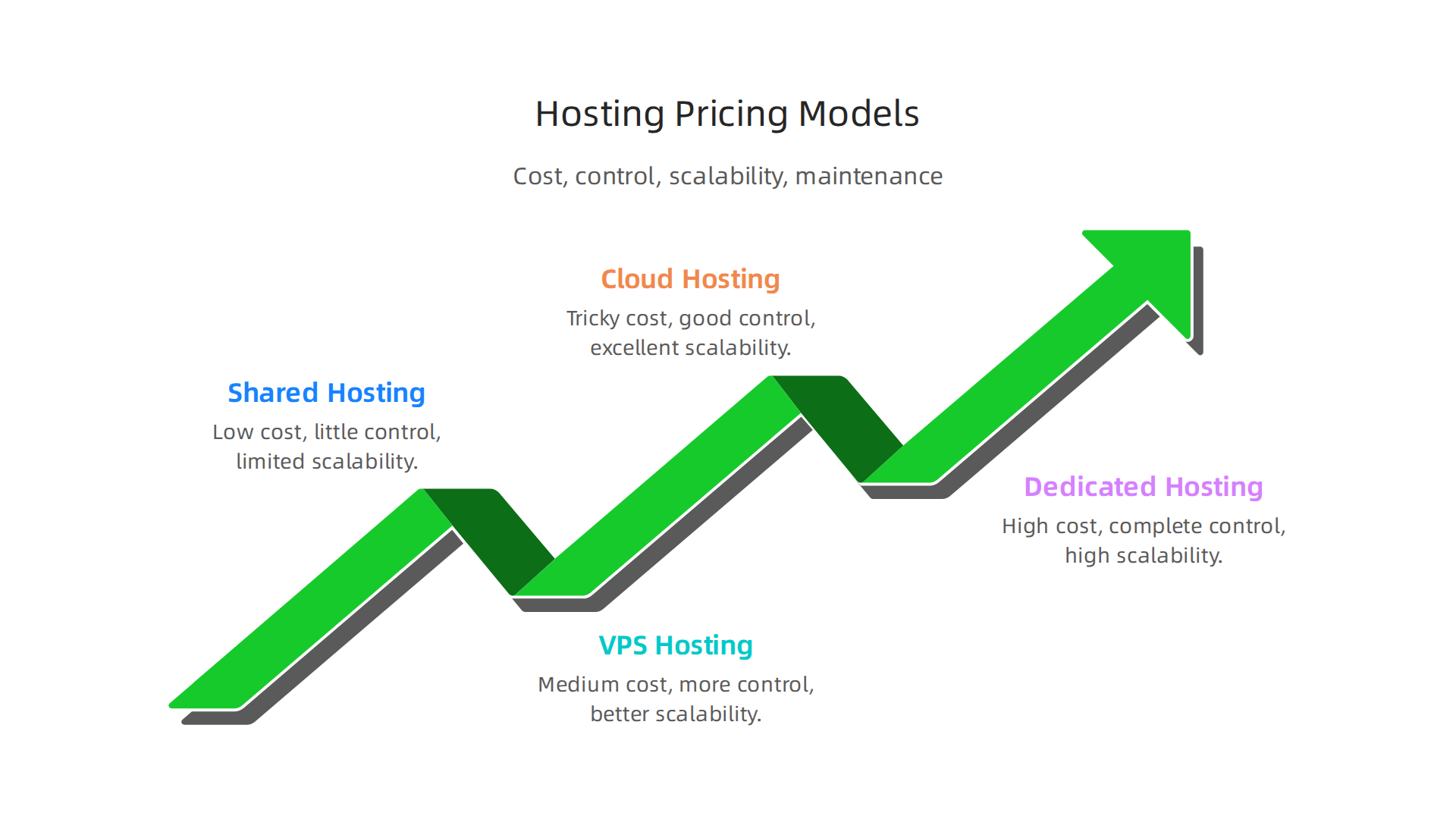
Think of it like choosing a place to live: a shared apartment costs less but offers less privacy, while owning a whole house costs more but gives you total control.
Shared Hosting
This is usually the cheapest way to host a website, often picked by new businesses or students just starting out. With shared hosting, your website lives on a server with many other websites. All these websites share the server’s power, memory, and space. It’s like living in a big apartment building where everyone shares the same electricity and water lines.
- Cost: Low, usually just a few dollars a month. This is why it often appears as the cheapest domain hosting option for a basic setup.
- Control: Very little. The hosting company manages almost everything.
- Scalability: Limited. If your website gets a lot of visitors, it might slow down because other websites are using the shared resources.
- Maintenance: Easy. The hosting company handles all the technical stuff.
VPS Hosting (Virtual Private Server)
VPS hosting is a step up from shared hosting. It’s like having your own apartment within that same building. You’re still on a shared physical server, but a special technology creates a private section just for your website. This section has its own set of resources, like power and memory, that aren’t shared with other websites.
- Cost: Medium, more than shared but less than dedicated. You can find cheap VPS hosting in 2026 that gives good value.
- Control: More control than shared. You can set up your server software how you like.
- Scalability: Better than shared. You can often get more resources as your website grows.
- Maintenance: Requires some technical knowledge, as you’re responsible for some server upkeep.
Cloud Hosting
Cloud hosting is very flexible and popular in 2026, especially for websites that need to grow quickly. Instead of one physical server, your website uses a network of many virtual servers. If one server has issues, another takes over, meaning your site stays online. It’s like having your electricity come from a whole city grid instead of just one power plant.
- Cost: Can be tricky. You often pay for what you use, which means costs can change. This is sometimes called AWS hosting cost if you use Amazon’s services, or simply cloud hosting cost with other providers. Cloud providers offer different price-to-performance ratios depending on your needs Which Cloud Provider Gives the Best Price-to-Performance in 2026?.
- Control: Good, often with tools to manage your resources.
- Scalability: Excellent. Your website can easily handle sudden bursts of traffic without slowing down.
- Maintenance: Usually handled by the cloud provider, but managing your cloud setup can be complex. You can learn more about the true cost of cloud hosting in 2026.
Dedicated Hosting
This is the most powerful option. With dedicated hosting, you get an entire physical server all to yourself. No other websites share your resources. This is like owning a whole house, giving you maximum privacy and power.
- Cost: High. It’s the most expensive option because you’re renting the entire machine.
- Control: Complete control. You can configure everything on the server.
- Scalability: High. You have all the server’s resources. If you need more, you’d get another dedicated server or upgrade to a more powerful one. You can compare dedicated server vs cloud in 2026 to see which fits your business needs.
- Maintenance: You’re responsible for almost everything, including software updates and security. This requires a lot of technical skill. For more information, explore best dedicated hosting providers 2026.
Self-Hosting
You might also consider a [self hosting website] option. This means you buy your own server hardware and keep it in your office or home. While it gives you total control, it also comes with all the responsibility of maintenance, security, power, and internet connection. The total web hosting cost for self-hosting can be very high when you factor in all these hidden expenses.
Choosing the right hosting type depends on your website’s size, expected traffic, technical skills, and budget. Each option has its own web hosting cost and set of benefits, so it’s important to understand them before making a choice. To help you figure out all the costs, you can use a tool to calculate your true web hosting cost.
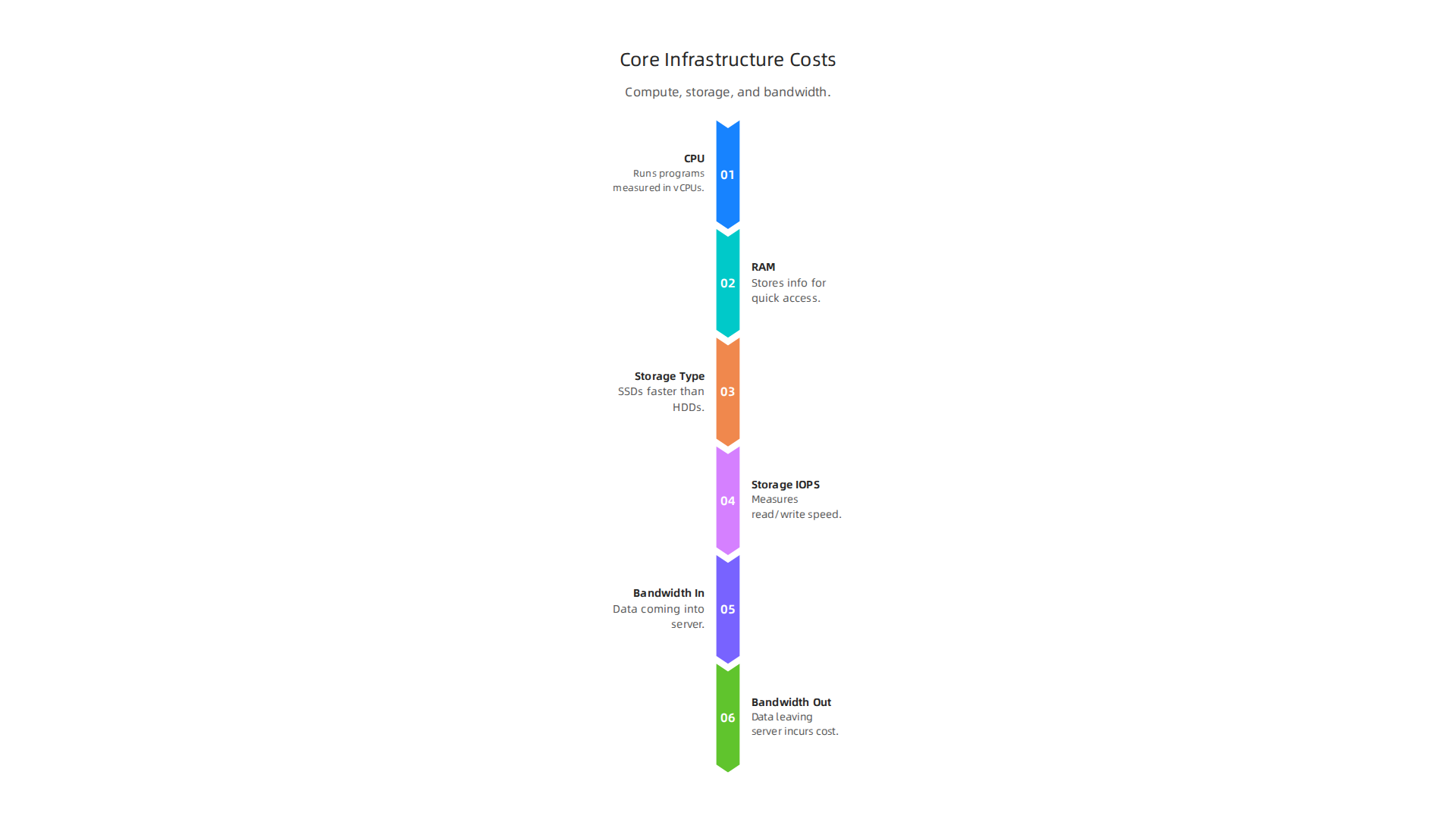
Choosing the right hosting type is just the start. To truly understand your web hosting cost, you need to break down the main parts that make up the bill. These are the core infrastructure costs: compute, storage, and bandwidth. Each plays a big role in how well your website works and how much you pay.
Compute: The Brains of Your Server (CPU and RAM)
"Compute" refers to the processing power and memory your server uses. Think of it as the brain and short-term memory of your website.
- CPU (Central Processing Unit): This is like the engine that runs all the programs and processes on your server. The more visitors your website gets or the more complex tasks it does (like running an online store), the more CPU power it needs. You’ll often see this measured in "vCPUs" (virtual CPUs) for cloud or VPS hosting.
- RAM (Random Access Memory): This is where your server stores information it needs to access quickly. More RAM means your website can handle more tasks at once without slowing down.
For example, a basic virtual machine might cost around $50-$120 per month for 2 vCPUs and 8 GB of RAM in 2026. If you need more power, like 4 vCPUs and 16 GB of RAM, the cost can jump to $150-$350 per month or even more for powerful setups HIPAA-Compliant Server Cost: What You’ll Pay in 2026 for …. If your website needs to be super fast, especially for many users, choosing enough compute power is key. You can find options to find the fastest WordPress hosting in 2026 to boost sales SEO by looking at these specifications.
Storage: Where Your Website Lives (Disk Space)
Storage is the hard drive space where all your website’s files, pictures, videos, and database information are kept.
- Type of Storage: Most modern hosting uses SSD (Solid State Drives) because they are much faster than older HDD (Hard Disk Drives). This speed helps your website load quicker. Some providers, like Hetzner, offer large NVMe SSD storage with their cloud plans Which Cloud Provider Gives the Best Price-to-Performance in 2026?.
- IOPS (Input/Output Operations Per Second): This measures how fast the storage can read and write data. Higher IOPS means your website can access and save information more quickly, which is super important for busy sites.
- Cost: Storage costs are usually charged per gigabyte (GB) per month. For example, standard cloud storage can be around $0.02 to $0.03 per GB per month Best Cloud Hosting & Infrastructure Pricing Compared (2026). Some cloud services also have different "tiers" for storage:
- Hot/Standard Storage: For data that is used often. It costs more per GB but is quick to access.
- Archive Storage: For data you rarely need. It’s much cheaper per GB, but it takes longer to get your data back OCI Pricing 2026: Compute, Storage, Database, BYOL Pillar.
Bandwidth: Data Moving In and Out
Bandwidth is the amount of data that can travel between your website’s server and your visitors. Think of it as the size of the road connecting your website to the internet.
- Inbound vs. Outbound: Data coming into your server (like when someone uploads a file) is called ingress and is usually free. Data leaving your server (like when visitors view your web pages or download something) is called egress, and this is where costs often come in.
- Egress Fees: These are hidden web hosting costs that can surprise many users, especially with
AWS hosting costand other major cloud providers. When data leaves the cloud provider’s network, they charge a fee. These fees can make up a large part of your total bill, sometimes 70-95% for services that handle a lot of video Server Cost for a Video Platform in 2026: The Four-Line Model, Real …. In 2026, egress fees often range from $0.08 to $0.12 per GB, depending on the provider and how much data you transfer Cloud Egress Costs: AWS $0.09/GB, How to Pay Less (2026).
Predictable vs. Variable Costs
Understanding these core infrastructure costs also means knowing the difference between predictable and variable costs.
- Predictable Costs: These are usually fixed monthly fees for a set amount of compute and storage. Many shared or VPS hosting plans work this way. You pay a certain amount each month, and you know what to expect. Reserved instances in cloud hosting also offer predictable pricing if you commit to a certain amount of resources for a longer time.
- Variable Costs: These change based on your actual usage. Cloud hosting often has variable costs, especially for bandwidth. If your website suddenly gets a lot of traffic, your bandwidth usage (and cost) will go up. This "pay-as-you-go" model is flexible but can lead to unexpected bills if you don’t manage your resources carefully. Egress fees are a prime example of variable costs that can really add up Bandwidth Egress Fees: The Biggest Hidden Cost in Cloud Hosting.
To truly get a handle on your web hosting cost, it’s vital to compare how different providers price these core components. Look for providers that offer clear pricing models to avoid surprises. You can learn more about how to compare these specific pricing models and avoid hidden fees by checking out our guide on web hosting cost in 2026 how to compare pricing models and avoid hidden fees.
After looking at the basic parts like compute and storage, it’s clear that understanding your web hosting cost needs more thought. Now, let’s talk about things that make your website work even better and handle more visitors: performance features and how your website grows. These add to your web hosting cost but are often worth it.
Performance Helpers: Speeding Up Your Site
When many people visit your website, or your website has lots of pictures and videos, you need special tools to keep it fast. These tools often come with their own costs.
- Content Delivery Network (CDN): Imagine your website files stored on servers all over the world. A CDN makes sure that when someone visits your site, the files come from the server closest to them. This makes your website load super fast. Using a CDN can lower your usual bandwidth costs, but the CDN itself adds to your total bill. Prices for CDNs can be simple monthly plans or based on how much data gets sent CDN Pricing 2026 Verified: Cloudflare, Fastly, AWS, Bunny, Akamai.
- Caching: Think of caching as a quick memory for your website. When someone visits a page, your server remembers how to build that page. The next time someone asks for it, the server can show it much faster without doing all the work again. Caching can be set up in different ways, some free and some needing special tools or server setups that add to your web hosting cost.
- Load Balancers: If your website gets a huge amount of traffic, one server might not be enough. A load balancer acts like a traffic cop, directing visitors to different servers so no single one gets overloaded. This helps your website stay up and fast. Load balancers are usually added costs for bigger, busier websites.
- Protection Against Attacks (WAF & DDoS): Keeping your website safe from bad online attacks is very important. A Web Application Firewall (WAF) helps stop hackers from getting into your website. DDoS protection stops many fake visits that try to crash your site. These security layers protect your performance and often come with extra costs. For example, AWS WAF can cost based on how many rules you set and how many requests your site gets AWS Web Application Firewall Review. Bigger protection like AWS Shield Advanced can be around $3,000 per month for serious threats AWS Shield Pricing – Managed DDoS Protection.
Adding these features improves your website’s speed, helps more people visit without problems, and keeps them on your site longer. This can mean more sales or engagement for your business.
How Your Website Grows: Scaling Costs
As your business grows, your website needs to grow too. This is called scaling, and it affects your long-term web hosting cost.
- Vertical Scaling: This means making your existing server stronger. You add more CPU (brain power) or RAM (short-term memory) to a single machine. It’s like upgrading your computer. This can be simple to do, but after a certain point, it can get very expensive because bigger servers cost more per unit of power.
- Horizontal Scaling: This means adding more servers instead of just making one bigger. Your website runs across many smaller servers. This is common in cloud hosting. If your website suddenly gets a lot more visitors, you can quickly add more servers to handle the load, then remove them when traffic goes down. This "pay-as-you-go" style offers a lot of flexibility. While it keeps your website running smoothly during busy times, it also means your web hosting cost can change a lot from month to month, much like the variable costs we talked about earlier. Managing horizontal scaling effectively is key to controlling your total cloud hosting costs.
Choosing the right way to scale depends on your website’s needs. Having features that can scale up or down automatically, called autoscaling, can save you from manual work and ensure your site is always ready. However, these helpful automated features usually come with an added price tag.
Understanding these costs helps you make smart choices for your website. It’s an investment in a fast, reliable online presence. To get a full picture of all the costs, it’s wise to plan and calculate your true web hosting cost and avoid hidden fees in 2026. When you are ready to explore reliable and secure hosting solutions designed for growing businesses, you can learn more about PrismWebHost.
A fast and growing website is great, but it won’t help much if it’s not safe. Think of security as the shield that protects your website from bad guys and accidents.

These important safeguards add to your overall web hosting cost, but they are absolutely necessary to keep your online business safe and trustworthy.
4) Security and compliance: real costs and risk mitigation
Essential Security Services and Their Costs
Many services exist to keep your website secure. Here are some of the main ones you might pay for:
- SSL Certificates: These are like a special lock for your website’s address (you see "https" instead of "http"). An SSL certificate encrypts the information sent between your visitors and your website. This keeps things like login details and credit card numbers private. Without an SSL, browsers will warn visitors that your site isn’t safe, which can scare them away. While some basic web hosting plans include free SSL certificates, you might need to buy a stronger one for specific needs, which can add to your web hosting cost. You can learn more about specific costs in our guide on godaddy ssl certificate cost 2026 avoid hidden fees and renewal surprises.
- Managed Backups: What if something goes wrong? A website crash, a bad update, or even a hacker attack could wipe out all your hard work. Managed backups regularly save copies of your website. If a problem occurs, you can quickly bring your site back online to an earlier, safe version. These backup services often cost extra, especially if you need to store many copies or get them back quickly. For example, understanding AWS Backup Pricing: Full Cost Breakdown + How to Save can help you plan this part of your budget.
- DDoS Protection and Web Application Firewalls (WAF): We talked about these briefly before as performance helpers, but they are also key security tools. DDoS protection stops floods of fake traffic meant to crash your site, while a WAF blocks harmful hacker attacks. Different providers have different costs for these. Some, like Cloudflare, offer basic WAF and DDoS protection with free plans, but more advanced features come with a price. For instance, the cost of a WAF can vary greatly, with some providers charging based on rules and requests, while others offer flat-rate subscriptions WAF Pricing Compared: What 5 Providers Actually Cost in 2026. Advanced DDoS protection, such as AWS Shield Advanced, can start around $3,000 per month for serious threats Uncovering AWS Shield Pricing, Features, and Benefits. If you’re looking into specific AWS WAF Pricing, you can find more details there.
- Intrusion Detection Systems: These systems constantly watch your website for any signs of strange or harmful activity. If they see something suspicious, they alert you or even try to stop the attack. This is like having a security guard for your website 24/7. These advanced monitoring tools definitely add to your web hosting cost.
Compliance: Rules That Add to Your Bill
For some businesses, just being secure isn’t enough. They also need to follow special rules set by certain industries or governments. This is called compliance, and it can significantly affect your web hosting cost.
- Data Residence: Some laws say that customer data must be stored in a specific country or region. For example, European data might need to stay in Europe (GDPR rules). This means your web host must have servers in those places, which can be more expensive than general hosting.
- PCI DSS (Payment Card Industry Data Security Standard): If your website handles credit card payments directly, you must follow strict PCI DSS rules. This means your hosting needs to meet high security standards, often requiring special servers and regular audits.
- GDPR (General Data Protection Regulation): This set of rules protects personal data for people in Europe. It affects how you collect, store, and process customer information. Meeting GDPR requirements might mean more work for your web host to set up data privacy features, which adds to your bill.
- HIPAA (Health Insurance Portability and Accountability Act): For websites dealing with health information in the U.S., HIPAA compliance is a must. This requires very strict security and privacy controls to protect sensitive patient data.
Making sure your web hosting setup meets these compliance needs can involve special server setups, regular security scans, and sometimes even legal advice, all of which raise your overall web hosting cost. It’s a critical part of running a responsible online business, especially if you’re in a regulated industry. To understand how to keep your site compliant, you can read more about how to stay compliant with secure web hosting.
Now, let’s think about the people behind the scenes who keep your website running. Even with the best security, a website needs constant care. This brings us to another part of your overall web hosting cost: support, managed services, and the daily tasks needed to keep things smooth.
5) Support, managed services, and operational costs
Running a website is a bit like owning a car. You can either fix everything yourself or pay someone to take care of it. The choice you make here really changes your web hosting cost.
Do-It-Yourself (DIY) Hosting vs. Managed Hosting
When you choose web hosting, you usually pick between doing it yourself or having a service manage it for you.
DIY Hosting: More Work, Lower Direct Cost
With DIY hosting, also known as self hosting website, you are in charge of almost everything. This means:
- Updates: You need to make sure all your software, like WordPress or other programs, is up to date. This helps keep your site safe and working well.
- Backups: Remember how important backups are? You have to set them up and make sure they work.
- Monitoring: You are the one watching for problems, like if your site goes down or runs slowly.
- Fixing problems: If something breaks, you’re the tech expert who has to fix it.
This path often seems cheaper at first glance. For example, some basic VPS hosting might start at $15-$60 a month, but that’s just for the server itself, not the work to run it. If you have the time and know-how, this can save you money on direct web hosting cost. However, it takes a lot of your "staff-hours" or personal time.
Managed Hosting: Less Work, Higher Direct Cost
Managed hosting is like having a team of experts look after your website for you. They handle many of the tricky technical jobs.

This includes:
- Updates and patching: Your host keeps your server software and other important parts up to date.
- Regular backups: They manage and run backups for you, so you don’t have to worry.
- Security monitoring: They watch for threats and often respond to problems before you even know about them.
- Technical support: If you have a question or a problem, you can reach out to their support team.
The web hosting cost for managed services is higher, but it can save you a lot of time and worry. For instance, managed WordPress hosting can range from $15 to $60 per month for small to medium sites in 2026. Fully managed IT services for businesses can cost even more, often between $85 and $175 per user per month, depending on how much support you need. The key benefit is that your host takes care of the hard parts, letting you focus on your business. This means fewer staff-hours spent on technical issues and faster "response times" if something goes wrong. Some providers even offer guaranteed "support SLAs" (Service Level Agreements) that promise how quickly they will respond to your issues.
For a clearer picture of how these services affect your budget, you can explore guides on how much web hosting actually costs in 2026.
Recurring Operational Costs
Beyond the initial setup, there are ongoing tasks that add to your total web hosting cost, no matter if you DIY or go managed. These are "operational costs."
- Backups: Even if managed, storing many backups or needing to restore them often can add to the cost. We talked about how managed backups protect your site, but it’s important to remember they are a continuous service.
- Monitoring: Keeping an eye on your website’s health, speed, and uptime requires tools and staff. Managed hosting usually includes this, but if you self-host, you’ll need to pay for monitoring tools or spend time checking things yourself.
- Patching and Maintenance: Software updates and security patches need to be applied regularly to prevent problems. This is a constant task that takes time or money.
- Incident Response: If a problem does happen, like a hacker attack or a server crash, fixing it quickly is crucial. This "incident response" can be costly, either in terms of expert help or lost business if your site is down for too long.
Understanding these ongoing costs helps you see the true value of managed hosting. While the upfront web hosting cost might be higher, the time and stress saved can make it a smart choice for many businesses. Prism Webhost offers reliable hosting solutions that handle many of these operational tasks for you, letting you focus on your business goals. You can learn more about how we can help you achieve optimal website performance and security by visiting our main page to explore our services and offerings.Now, let’s think about the people behind the scenes who keep your website running. Even with the best security, a website needs constant care. This brings us to another part of your overall web hosting cost: support, managed services, and the daily tasks needed to keep things smooth.
5) Support, managed services, and operational costs
Running a website is a bit like owning a car. You can either fix everything yourself or pay someone to take care of it. The choice you make here really changes your web hosting cost.
Do-It-Yourself (DIY) Hosting vs. Managed Hosting
When you choose web hosting, you usually pick between doing it yourself or having a service manage it for you.
DIY Hosting: More Work, Lower Direct Cost
With DIY hosting, also known as self hosting website, you are in charge of almost everything. This means:
- Updates: You need to make sure all your software, like WordPress or other programs, is up to date. This helps keep your site safe and working well.
- Backups: Remember how important backups are? You have to set them up and make sure they work.
- Monitoring: You are the one watching for problems, like if your site goes down or runs slowly.
- Fixing problems: If something breaks, you’re the tech expert who has to fix it.
This path often seems cheaper at first glance. For example, some basic unmanaged servers might start around $80 to $150 a month in 2026, but that’s just for the server itself, not the work to run it. If you have the time and know-how, this can save you money on direct web hosting cost. However, it takes a lot of your "staff-hours" or personal time.
Managed Hosting: Less Work, Higher Direct Cost
Managed hosting is like having a team of experts look after your website for you. They handle many of the tricky technical jobs. This includes:
- Updates and patching: Your host keeps your server software and other important parts up to date.
- Regular backups: They manage and run backups for you, so you don’t have to worry.
- Security monitoring: They watch for threats and often respond to problems before you even know about them.
- Technical support: If you have a question or a problem, you can reach out to their support team.
The web hosting cost for managed services is higher, but it can save you a lot of time and worry. For instance, managed WordPress hosting can range from $15 to $60 per month for most small to medium sites in 2026. Fully managed IT services for businesses can cost even more, often between $85 and $175 per user per month, as shown in 2026 comparisons for Charlotte SMBs. This higher cost often brings guaranteed "support SLAs" (Service Level Agreements) that promise how quickly the host will respond to your issues.
The key benefit is that your host takes care of the hard parts, letting you focus on your business. This means fewer staff-hours spent on technical issues and faster "response times" if something goes wrong. To see how these services impact your budget, you can read more about how much managed IT services cost in 2026.
Recurring Operational Costs
Beyond the initial setup, there are ongoing tasks that add to your total web hosting cost, no matter if you DIY or go managed. These are "operational costs."
- Backups: Even if managed, storing many backups or needing to restore them often can add to the cost. We talked about how managed backups protect your site, but it’s important to remember they are a continuous service.
- Monitoring: Keeping an eye on your website’s health, speed, and uptime requires tools and staff. Managed hosting usually includes this, but if you self-host, you’ll need to pay for monitoring tools or spend time checking things yourself.
- Patching and Maintenance: Software updates and security patches need to be applied regularly to prevent problems. This is a constant task that takes time or money.
- Incident Response: If a problem does happen, like a hacker attack or a server crash, fixing it quickly is crucial. This "incident response" can be costly, either in terms of expert help or lost business if your site is down for too long.
Understanding these ongoing costs helps you see the true value of managed hosting. While the upfront web hosting cost might be higher, the time and stress saved can make it a smart choice for many businesses. Prism Webhost offers reliable hosting solutions that handle many of these operational tasks for you, letting you focus on your business goals. You can learn more about how we can help you achieve optimal website performance and security by visiting our PrismWebHost — Main Landing Page.
Running a website is not just about the big monthly bill you see at first. There are often other charges that can sneak up on you. These are called add-ons, extra services, or "hidden fees." Knowing about them helps you figure out the real web hosting cost.
6) Add-ons, integrations, and hidden fees to watch for
Many web hosting companies have small print or extra services that can change your total web hosting cost. It’s like buying a new phone that looks cheap, but then you find out the charger and headphones cost extra.
Common Hidden Fees That Add Up
Let’s look at some things that might increase your web hosting cost:
- Migration Costs: If you already have a website with one host and want to move it to another, this is called migration. Sometimes, the new host will move your site for free. Other times, they charge a fee. It’s good to ask about this upfront.
- Domain Renewals: You need a domain name for your website, like
yourbusiness.com. Many hosts offer a super low price for the first year. But watch out! The price often jumps up a lot when it’s time to renew it for the second year. Always check the renewal cost, not just the first-year deal, to get the true web hosting cost for your domain. You can learn how to avoid surprises by understanding your domain name registration cost and hidden fees. - Data Egress Fees: This is a big one, especially if you use cloud hosting like AWS. "Egress" means data leaving the cloud service. For example, when your visitors view your website, or you download your website’s backups, data is moving out of the host’s network. Cloud providers like AWS, Azure, and Google Cloud often charge you for this data movement. These "egress charges" can sometimes make up a large part of your total cloud bill, even 10-15% of your costs, according to experts in 2026. For example, AWS might charge around $0.09 per GB for data leaving their network after a certain free amount, as detailed in reports on cloud egress fees. This is a tricky charge because data coming into the cloud is often free.
- API Call Charges: Some advanced services and tools on your website talk to other services using something called an API (Application Programming Interface). If your website makes many "calls" to these APIs, some hosts or services might charge you for each call after a certain limit.
- Overage Fees: Most hosting plans come with limits on things like storage space or how much data can leave your site each month (bandwidth). If your website suddenly gets very popular and uses more than your plan allows, your host might charge you "overage fees" for the extra usage. These can add a lot to your web hosting cost.
How to Find Hidden Charges
To really know your total web hosting cost, you need to be a careful shopper.
- Read the Fine Print: Don’t just look at the big numbers on the pricing page. Look for small text, footnotes, or links to "terms and conditions." That’s where extra costs often hide.
- Ask Questions: If something isn’t clear, ask the hosting company directly. Ask about renewal prices, migration policies, and what happens if your website uses more resources than planned.
- Look for All-Inclusive Plans: Some hosts offer plans where many common add-ons are already included. This can make the upfront cost look higher, but it might save you money and headaches in the long run.
- Audit Your Bills: If you already have a host, look closely at your monthly or yearly bills. Are there charges you don’t recognize? Ask your host to explain them.
By being aware of these potential hidden fees, you can better calculate your true web hosting cost and avoid surprises. This way, you can pick a hosting plan that fits your budget without unexpected expenses.
Choosing the right web hosting plan is a big step after understanding all the costs. It’s like picking a car: you don’t just look at the monthly payment, but also how much gas it uses, how much maintenance it needs, and how much it costs to insure. The goal is to find a plan that works for you now and as your website grows. This means looking at the Total Cost of Ownership or TCO.
What is Total Cost of Ownership (TCO)?
TCO is a fancy way of saying "all the money you will spend" on something over a certain time. For web hosting, it includes the basic monthly fee, plus all those add-ons, renewal prices, and any extra help you might need. It’s not just the sticker price. Experts often suggest looking at costs over 3 to 5 years to get a full picture of TCO for things like hosted services or software, including both upfront and ongoing costs like labor and power usage
How to Calculate Total Cost of Ownership for Hosted ….
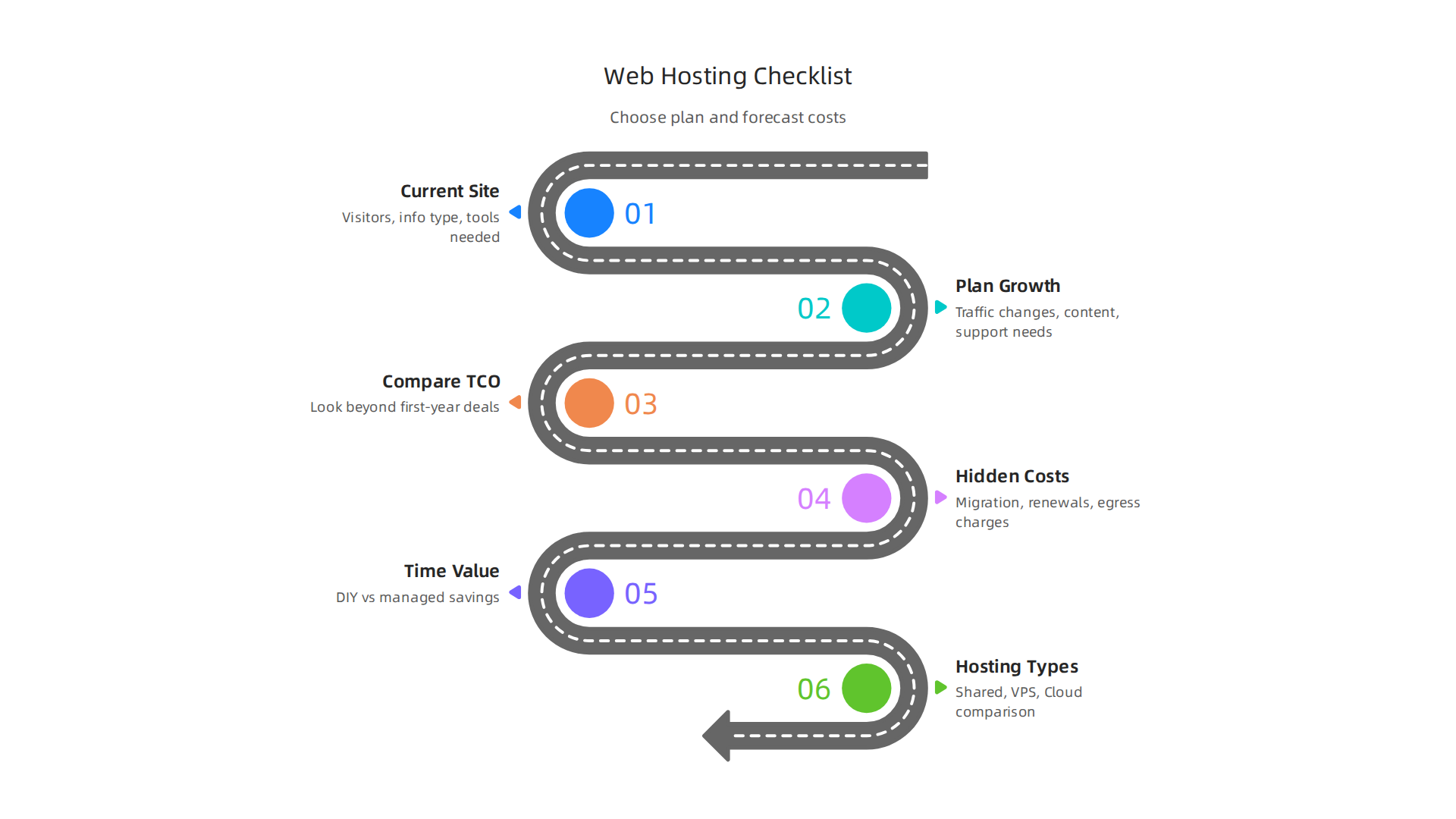
Your Decision Checklist for Web Hosting Cost
Here’s a simple checklist to help you choose the best plan and understand your full web hosting cost:
-
Think About Your Website Today
- How many visitors do you expect? Is it a small personal blog or a busy online store? A website with a lot of visitors needs more powerful hosting to stay fast. For a student project, you might look for cheapest domain hosting.
- What kind of information is on your site? If you handle private customer details, you need top-notch security features. This might mean a higher web hosting cost for more secure options.
- What tools do you need? Do you need a special kind of email, extra backup services, or specific programs? Make a list so you don’t miss anything.
-
Plan for Your Website Tomorrow (Growth)
- How might your traffic change? Will your website get much busier during certain times of the year, like holidays? Or do you expect it to slowly grow over time? You’ll need a host that can easily handle more visitors or data without crashing or charging huge overage fees. This is known as "scalability."
- Will you add more content or features? More photos, videos, or new website parts mean you’ll need more storage and power. Think about how much data you might have in a year or two.
- What if you need more help? Good customer support is key. Do they offer help 24/7? Is it fast? This can save you a lot of headache and extra costs down the road if you’re not planning to self hosting website yourself.
-
Compare Total Cost of Ownership (TCO) Across Providers
- Look past the first-year deals. As we talked about before, renewal prices can be much higher. Always check the long-term cost.
- Factor in "hidden" costs. Remember those migration fees, domain renewals, and possible data egress charges if you choose cloud hosting, like with aws hosting cost. These all add to your total web hosting cost.
- Think about your time. If a super cheap host requires you to do a lot of technical work yourself, your time is money. A slightly more expensive but fully managed plan might actually save you money in the long run because you spend less time fixing problems.
- Compare different types of hosting. Shared hosting is usually the cheapest, good for beginners. VPS (Virtual Private Server) offers more power for growing sites. Cloud hosting is very flexible, but can have complex pricing.
By looking at all these points, you can pick a web hosting plan that not only fits your current budget but also supports your website’s future without costly surprises. Understanding your web hosting cost in 2026, including how to compare pricing models and avoid hidden fees, is vital for long-term success.
We at PrismWebHost understand these concerns and strive to make web hosting straightforward and transparent for businesses and online brands.
Summary
This article explains the real web hosting cost for businesses in 2026, going beyond the headline monthly price to show what actually drives your bills. It walks through the main hosting types (shared, VPS, cloud, dedicated, self-hosting), then breaks hosting costs into core components — compute (CPU/RAM), storage (SSD/IOPS), and bandwidth (especially egress fees). You’ll learn how predictable fixed fees differ from variable usage charges, which performance and security add-ons (CDN, WAF, backups) raise costs, and how compliance or managed services affect pricing. The guide also covers scaling strategies, common hidden fees like renewals and migration charges, and operational costs whether you DIY or pay for managed hosting. By the end you’ll know how to compare providers, estimate total cost of ownership over time, and use a practical checklist to choose a hosting plan that fits your budget and growth needs.
