




Find the Fastest WordPress Hosting in 2026 to Boost Sales & SEO
Article
Why speed should be your top hosting priority (and what this guide will deliver)
Imagine waiting forever for a website to load. It’s frustrating, right?

For small businesses and online brands in 2026, a slow website isn’t just annoying; it actually costs you money and customers. If your WordPress site takes too long to appear, visitors might leave before they even see what you offer. This means lost sales, fewer people signing up for your emails, and a bad first impression.
Slow websites can also hurt how people find you online. Search engines like Google want to show fast, helpful websites to their users. If your site is slow, it might not show up as high in search results. This makes it harder for new customers to find your business. Managing a website shouldn’t feel like a big technical puzzle, but many business owners struggle with slow loading times, worries about security, and sites that often crash. They need hosting that keeps their site fast, safe, and always online.
That’s why having the fastest WordPress hosting is so important. It’s not just about bragging rights; it’s about keeping your customers happy, boosting your sales, and making sure your website works hard for your business.
In this guide, we’ll give you clear, easy-to-understand advice. We will show you how to pick the best WordPress hosting providers that are truly fast and reliable. You’ll learn what makes hosting quick, what to look for, and how to make sure your website stays speedy. Whether you’re trying to figure out how to choose the best WordPress hosting providers for 2026 or just want to make your current site faster, this guide is for you. We’ll help you find the perfect match for your business needs, so your online presence can grow without any slowdowns.
Why site speed matters: conversions, SEO, and user trust
As we talked about, a slow website is more than just a little problem. In 2026, it can really hurt your business.
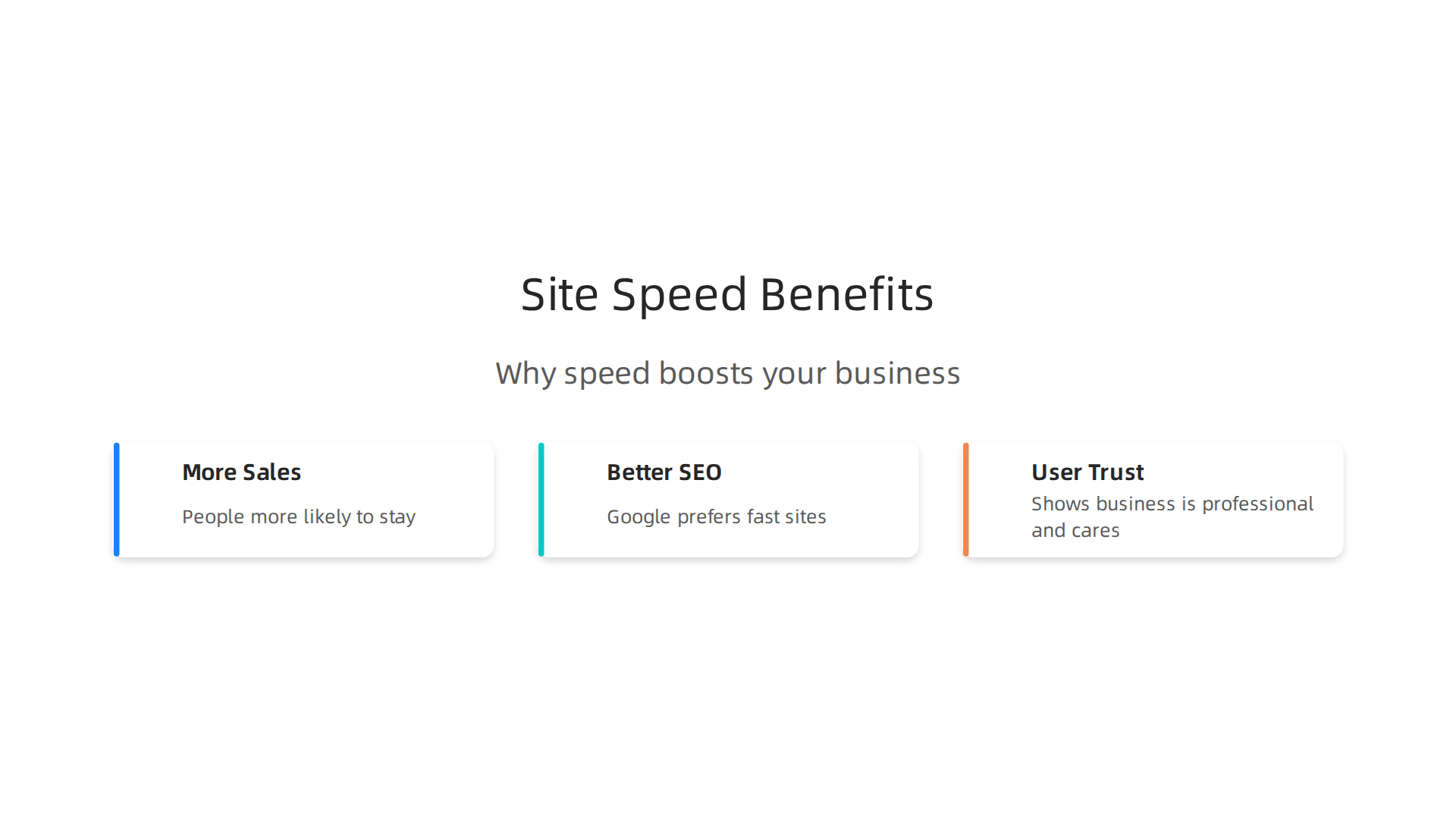
Think about it this way: when people visit your site, they expect things to happen fast. If your pages take too long to load, they might just leave. This is called a "bounce." A high bounce rate means people aren’t sticking around to see what you offer. When this happens, you lose chances to sell something, get new sign-ups, or share your message.
Having the fastest WordPress hosting helps a lot with this. Studies in 2026 show that even a small delay can make people leave your site.
For example, some benchmarks track how quickly a server starts responding, known as Time to First Byte (TTFB). The industry average TTFB in 2026 was 485ms, but top hosts achieve much faster times, like Kinsta at 180ms or Cloudways at 200ms in some tests, which makes a big difference for visitors waiting for your page to load WordPress Hosting Benchmarks 2026: 24/7, 365 Days Tested and Best WordPress Hosting 2026 | Fast, Cheap & Managed ….
How speed helps you get more sales
When your website loads quickly, people are more likely to stay, look around, and do what you want them to do. This could be buying a product, filling out a form, or reading an article. This is called a "conversion." A fast website smooths the path for your customers, making them happy and more likely to complete their goal. This directly helps your business grow and make more money.

For small businesses and online shops, every second counts. If your e-commerce site is slow, shoppers might get impatient and go to a competitor instead. Fast page loading means they can browse products, add items to their cart, and check out without any frustrating waits. This leads to more sales and loyal customers.
The power of speed for finding customers online
Search engines like Google care a lot about how fast your website is. They want to give their users the best experience, and a fast site is a big part of that. If your website is slow, Google might not show it as often or as high up in search results. This means fewer people will discover your business when they search for what you offer.
Google uses special measures called Core Web Vitals to check how well a website performs. These look at things like how quickly the biggest part of your page shows up (Largest Contentful Paint), how fast your site reacts when someone clicks on it (Interaction to Next Paint), and if things on your page jump around unexpectedly while loading (Cumulative Layout Shift) 25+ Core Web Vitals Study and Statistics 2025. To rank well and get found, your website needs to meet these speed standards. Choosing good hosting is a main part of improving these scores. For businesses looking for reliable options that align with Google’s expectations, exploring providers that specialize in Google WordPress hosting 2026 can be a smart move.
Building trust and growing your brand
A fast website also builds trust with your visitors. When a site loads quickly and works well, it shows that your business is professional and cares about its customers’ experience. On the other hand, a slow or buggy website can make people think your business isn’t reliable or well-managed. This can damage your brand’s image and make it harder to keep customers coming back.
Over time, this trust turns into long-term income. Happy customers are more likely to tell others about your business, leave good reviews, and become repeat buyers. This is especially true for online stores. Investing in the fastest WordPress hosting is an investment in your brand’s future. It helps you keep customers, attract new ones, and build a strong online presence that lasts. When considering your options, looking at the best dedicated hosting providers 2026 can offer top-tier performance for growing businesses, ensuring your site always performs its best.
How speed is measured: the metrics every SMB should track
Now that we know why a fast website is so important, let’s talk about how we actually measure that speed. It’s not just about how fast a page "feels" to load. There are specific numbers, called metrics, that tell us exactly how well your website is doing. Understanding these helps you pick the fastest WordPress hosting and improve your site.
Here are the main speed numbers every small business should keep an eye on:
- Time to First Byte (TTFB): Imagine you ask your website’s server for a page. TTFB is how long it takes for the server to send back the very first piece of information. It’s like waiting for a friend to answer the phone before they even start talking. A low TTFB means your server is quick to respond, which is a great sign of good hosting. Many top hosting providers are tested on their TTFB because it shows how fast their servers are at the very start of a page load, with some benchmarks looking at over half a million TTFB measurements per year for each provider WordPress Hosting Benchmarks 2026: 24/7, 365 Days ….
- Largest Contentful Paint (LCP): This metric measures how long it takes for the biggest block of content on your page to show up. This could be a large image or a big heading. It tells you when the main part of your page is ready for people to see and read.
- Interaction to Next Paint (INP): This one checks how quickly your website responds when someone clicks on something. Did you click a button and nothing happened for a bit? A good INP means your site reacts fast to user actions, making it feel smooth and responsive. INP is actually a newer and better way to measure responsiveness than an older metric called First Input Delay (FID).
- Cumulative Layout Shift (CLS): Have you ever been reading a website, and suddenly an ad or picture loads and pushes everything else down? That’s a layout shift. CLS measures how much your page moves around as it loads. A low CLS means your page loads smoothly without things jumping unexpectedly, which is much better for user experience.
These three metrics together (LCP, INP, and CLS) are very important. Google calls them Core Web Vitals. They are a big part of how Google decides where to rank your website in search results. For a website to be considered "good" by Google in 2026, LCP should be under 2.5 seconds, INP under 200 milliseconds, and CLS under 0.1.
Real-world versus lab tests
When you look at speed, there are two ways to check:
- Lab Tests: These are done using tools that pretend to be a user on a certain kind of internet connection and device. Think of Google PageSpeed Insights. It gives you a score based on a simulated visit. These are good for finding problems before real users see them.
- Real User Monitoring (RUM): This is data gathered from actual people visiting your website. It shows how fast your site loads for visitors with different internet speeds, devices, and locations. This "field data" is what Google cares about most for Core Web Vitals.
For small businesses, paying attention to both types of tests is smart.

However, because Google uses real user data for rankings, making sure your site performs well for actual visitors is key. This is where choosing good hosting, like providers known for Google WordPress hosting, really helps. When comparing different options, many benchmarks evaluate best WordPress hosting providers by checking these exact metrics to help you make the right choice.
Now, let’s look at the special parts inside the computers that host websites, called servers. These parts and how they are set up are super important for making a website fast. Think of it like building a race car. You need the right engine, tires, and special fuel to win the race.
Here are some important things that make a hosting provider offer the fastest WordPress hosting:
Fast Computer Parts (Hardware)
- NVMe SSD Storage: Imagine your website’s files and pictures are stored on a hard drive. Old hard drives are like slow roads. SSDs (Solid State Drives) are much faster. But NVMe SSDs are like super-fast highways for your website’s information. They can read and write information many times quicker than older SSDs, which means your pages load much faster. Many best WordPress hosting providers use NVMe drives for top speed in 2026. This is a must-have for speed.
- Lots of Power (CPU and RAM): Your server needs a strong computer brain (CPU) and good memory (RAM) to handle all the work your website does. This is especially true for busy WordPress sites. Good hosts use the newest and most powerful computer parts, like special AMD EPYC or Intel Xeon chips and fast DDR5 memory, to make sure your site runs smoothly even when many people visit at once. These powerful parts are key for best dedicated hosting providers.
Smart Software (Optimizations)
- PHP-FPM and OPcache: WordPress websites use a computer language called PHP. PHP-FPM is like a super-efficient worker for PHP, helping it process requests much faster. OPcache is like a smart memory tool that remembers parts of your website that don’t change often, so it doesn’t have to rebuild them every time someone visits. This makes your website respond much quicker.
- Modern Web Servers (LiteSpeed or Nginx): The web server is like the traffic cop for your website. Older servers, like Apache, are still good, but newer ones like LiteSpeed or Nginx are much better at handling a lot of visitors and delivering pages quickly. They are often found in the fastest WordPress hosting setups.
- HTTP/2 and HTTP/3: These are like special rules for how your browser talks to the website server. HTTP/2 sends many pieces of information at once, which is faster than sending them one by one. HTTP/3 is even newer and faster, especially for people with less reliable internet connections.
- Server-Side Caching: This is one of the biggest speed boosters. Instead of building your entire web page from scratch every time someone visits, server-side caching saves a ready-to-go copy. When a visitor asks for the page, the server just hands them the saved copy. This is much faster. Some hosts use tools like Redis for even better caching.
How Hosting is Set Up (Architecture)
- Dedicated Resources versus Shared Hosting: In shared hosting, your website shares server resources (like CPU and RAM) with many other websites. This can be slower if other sites get busy. With dedicated resources, your website gets its own slice of the server power, like having your own fast lane on a highway. This is why some businesses choose best dedicated hosting providers for maximum speed and control.
- Containerization: This is a fancy way of saying your website runs in its own special, separate box on the server. This keeps your website safe from problems on other websites and helps it perform better.
- Edge Compute and CDNs: Imagine your website is hosted in New York. If someone in London visits, the information has to travel a long way. A Content Delivery Network (CDN) puts copies of your website’s images and files on many mini-servers all around the world. So, when someone in London visits, they get the files from a server much closer to them, making the site load almost instantly. This "edge compute" brings your content closer to your visitors.
When you’re looking for fastest WordPress hosting, choosing a provider that uses these modern parts and smart setups is very important. These features work together to make your website incredibly quick for every visitor, which helps with those Google speed scores we talked about earlier.
The previous section showed how your web host’s setup impacts speed. Now, let’s talk about making your website super fast for everyone, no matter where they live. This is where Content Delivery Networks (CDNs) and smart caching come in. They are crucial for delivering fast experiences worldwide, especially for the fastest WordPress hosting.
CDN, Global Edge, and Caching: Delivering Fast Experiences Worldwide
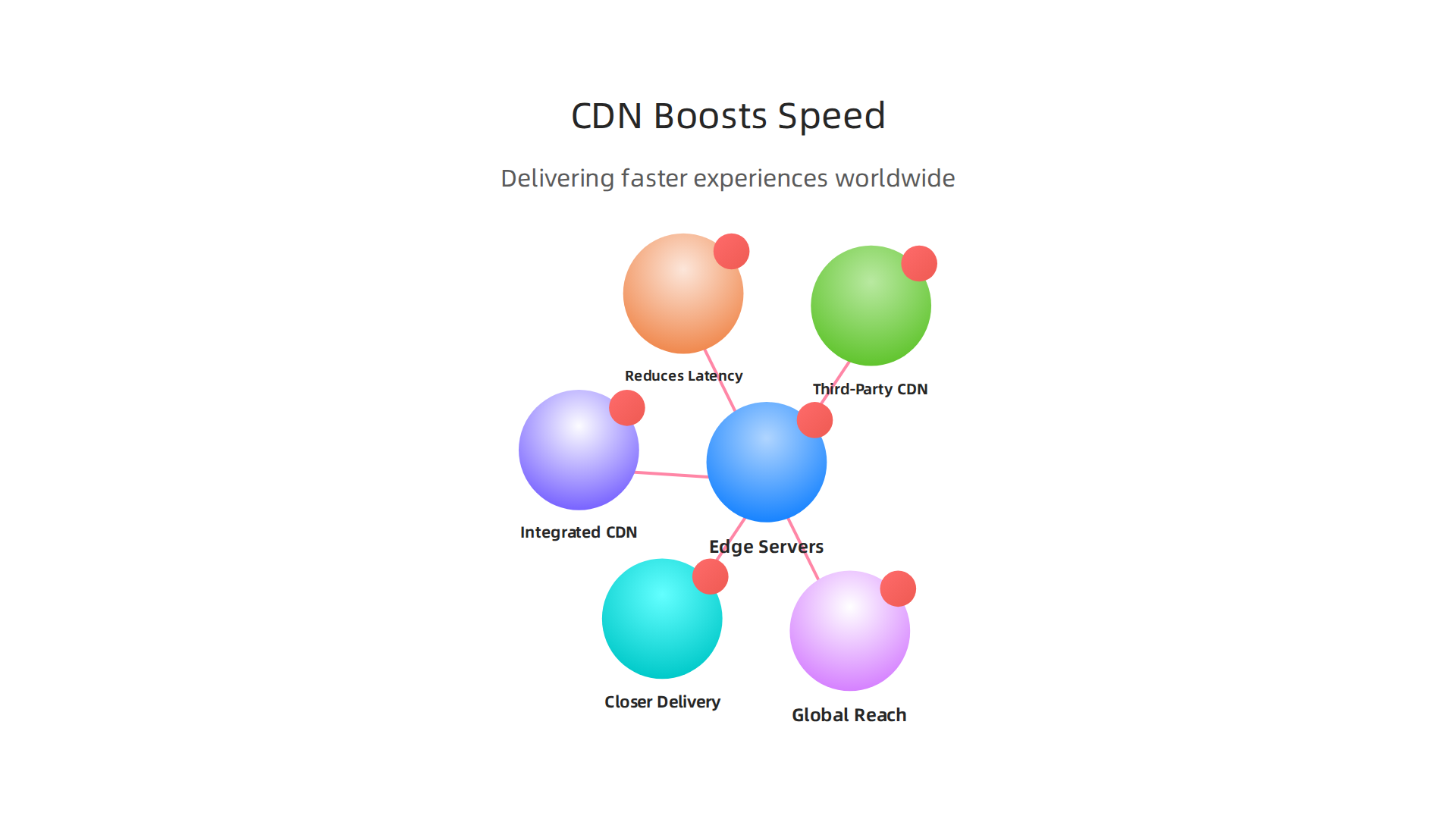
Imagine your website’s main computer (server) is in New York. If someone in Australia wants to visit your site, all the pictures and text have to travel across the world. This takes time, making your site feel slow. A Content Delivery Network (CDN) solves this problem by placing copies of your website’s most common files (like pictures, videos, and design files) on many smaller computers called "edge servers" all around the globe.
How CDNs Make Your Site Faster
When someone visits your website, the CDN sends them the files from the closest edge server. This means less distance for the information to travel. For example, a visitor in London would get your website’s pictures from a server near London, not all the way from New York. This "edge caching" dramatically speeds up how quickly your pages appear. It’s one of the key reasons why some hosts are considered among the fastest WordPress hosting providers in 2026.
This is super important if your website has visitors from many different countries.

A global CDN ensures that everyone has a quick loading experience, which is great for keeping people on your site and helping your site rank better in search engines. Many best wordpress hosting providers include a CDN to help with loading times for international audiences.
Integrated vs. Third-Party CDNs
When choosing a web host, you’ll see different options for CDNs:
- Integrated CDNs: Many hosting companies offer their own CDN or include a popular one as part of their service. This is often the easiest option because it’s already set up and works seamlessly with your hosting. For example, some reliable providers offer a global CDN with many locations and built-in protection against attacks Secure WordPress Hosting: 7 Most Reliable Providers in 2026.
- Third-Party CDNs: You can also choose a separate CDN service, like Cloudflare, and connect it to your hosting. This gives you more control and often comes with extra features. These services also add an important layer of security, protecting your site from harmful attacks like DDoS (Distributed Denial of Service) attacks by filtering bad traffic at the network’s edge Professional Guide to WordPress Hosting Security – HostWP. This is a smart choice for serious online brands.
Whether you use an integrated or third-party CDN, the goal is the same: to make your site faster and more reliable for every visitor. This is a must-have for great google wordpress hosting performance.
If you’re looking for hosting that takes speed and global reach seriously, you need a provider that uses these modern solutions. Find a host that offers top-tier CDN and caching to ensure your website always performs its best.
Ready to see how fast your WordPress site can be with the right hosting?
Explore Our Fast WordPress Hosting Plans
A truly fast website isn’t just about quick loading times; it’s also about staying fast and online no matter what. Imagine your site being attacked or suddenly getting lots of visitors. Without proper protection and ways to grow, even the fastest WordPress hosting can slow to a crawl or completely stop. This is where security features, promises about uptime, and smart ways to handle more traffic become super important.
Security: Keeping Your Speed Safe from Attacks
Your website faces threats all the time, from simple scams to big attacks like DDoS (Distributed Denial of Service). A DDoS attack is like many, many people trying to visit your website at the exact same moment, not to look at it, but to crash it. This flood of fake traffic can make your site very slow or even take it offline.
Good hosting plans offer strong DDoS protection that works like a security guard for your website. They identify and block this bad traffic before it even reaches your server. Many hosts also use something called a Web Application Firewall (WAF). This special firewall helps stop other kinds of bad attacks by checking the traffic and blocking anything suspicious, further safeguarding your site’s speed and security even for busy sites that need the best dedicated hosting providers. Choosing a host with good DDoS protection is key to keeping your site online and fast, as many experts agree you need a protected host and services like Cloudflare to block these attacks effectively How can I Protect my WordPress from DDoS attacks – Reddit. Some providers even offer multiple layers of security, like firewalls, DDoS protection, and automatic backups, to keep your WordPress site safe Professional Guide to WordPress Hosting Security – HostWP.
Uptime: Always Being There for Your Visitors
Uptime is simply how long your website stays online and working. If your host promises 99.9% uptime, that means your site should almost always be available. If your site goes down often, even for short times, it hurts your visitors’ experience and can make them leave. Consistent uptime is a big part of what makes a website feel fast and reliable, because it’s always there when people need it.
Scaling: Growing Without Slowing Down
What if your website becomes super popular overnight? This is a good problem to have, but it can quickly turn into a bad one if your hosting can’t handle the sudden rush of visitors. This is where "scaling" comes in.
- Autoscaling: Some of the best WordPress hosting providers offer autoscaling. This means your hosting automatically adds more power or resources to your website when traffic spikes, then reduces them when things calm down. It’s like having extra lanes open on a highway only when traffic is heavy.
- Load Balancing: This feature spreads your website’s traffic across several servers instead of just one. If one server gets too busy, the load balancer sends new visitors to a less busy one. This keeps your site fast for everyone.
- Vertical vs. Horizontal Scaling: Think of vertical scaling as making your single computer bigger and more powerful (more memory, faster CPU). Horizontal scaling means adding more computers to work together. For truly robust and fastest WordPress hosting, horizontal scaling with load balancing is often the way to go because it allows for much more flexibility and handles huge amounts of traffic better.
Picking a host that includes these security and scaling features means your site will not only be fast but will stay fast and online, no matter what challenges come its way in 2026. To really understand what makes a host reliable, it’s smart to look at reviews that consider all these factors. You can compare different options by looking at Web Hosting Services Reviews 2026.
When you are looking for the fastest WordPress hosting, it’s not just about speed anymore. You need to think about many things to make sure your website works well and helps your business grow. To pick the best WordPress hosting providers for your needs in 2026, here’s a simple checklist and some things to think about.
Your WordPress Hosting Checklist
- Speed and Performance: This is still number one. Look for hosts that offer very fast response times, like a low Time to First Byte (TTFB). Many tests in 2026 show providers like Kinsta leading in speed benchmarks, often with TTFB under 200ms globally Best WordPress Hosting 2026 | Fast, Cheap & Managed …. Also, check for special speed features like server-level caching.
- Expert Support: Can you get help quickly when you need it? The best hosts offer 24/7 support with people who really know WordPress. Some even claim average response times of about 4 minutes The Best WordPress Hosting 2026: 36 Tested, 5 Recommended.
- Easy Migrations: If you’re moving your website from another host, how easy is it? Many top providers offer free and simple ways to move your WordPress site.
- Automatic Backups: Things can go wrong. A good host will make daily backups of your site automatically. This means you can get your site back to normal quickly if something happens, often with just one click Best Managed WordPress Hosting in 2026: 8 Hosts Tested.
- Security Features: We talked about DDoS protection and firewalls. Make sure your chosen host keeps these important protections active to keep your site safe.
- Scaling Options: As your business grows, your website traffic will too. Choose a host that can easily add more power when needed without your site slowing down.
- Pricing and Value: Look beyond the cheap first-year price. Understand the renewal costs and what is truly included in the plan. Sometimes, paying a bit more upfront saves you trouble later.
- Staging Environment: This is a safe copy of your website where you can test new changes or updates without affecting your live site. It’s a key feature for many managed WordPress hosting plans.
Deciding What’s Right For You
Choosing the right fastest WordPress hosting often means making some trade-offs. What’s best depends on your specific needs:
- Small Stores and New Blogs: If you’re just starting, you might want easy-to-use hosting with good basic features and solid support. Cost can be a big factor here, but don’t cut corners on essential security and backups. Many providers offer great managed WordPress options for small businesses.
- Growing E-commerce and High-Traffic Sites: If your website gets a lot of visitors or sells many products, you’ll need higher performance, advanced scaling, and very strong security. You might look into specialized managed hosting solutions or even explore options for Google WordPress hosting 2026. Performance benchmarks from 2026 show that upgrading to managed hosting can greatly reduce your website’s TTFB (Time To First Byte) Fastest WordPress Hosting 2026: Kinsta, WP Engine, More.
- Large Enterprises and Global Brands: For very big sites with global reach, you might need highly customized setups, often involving multiple servers and advanced content delivery networks (CDNs). In these cases, you might even consider best dedicated hosting providers or cloud-based solutions to get the maximum speed and reliability.
By using this checklist and thinking about your business’s size and goals, you can find a hosting plan that helps your website not just be fast, but stay fast and reliable for years to come. To explore options and see how different features stack up, you can learn more about finding reliable, secure, and high-performance hosting on Prism Web Host — Fast WordPress Hosting. You can also compare specific providers like Kinsta vs SiteGround managed WordPress hosting to see which fits your needs.
Summary
This guide explains why speed must be the top priority when picking WordPress hosting in 2026 and shows exactly what to look for to keep your site fast, secure, and reliable. It covers how slow performance damages conversions, SEO, and brand trust, then walks through the key metrics (TTFB, LCP, INP, CLS) that you should monitor. You’ll learn which server hardware, software optimizations, and architectures (NVMe SSDs, PHP-FPM, LiteSpeed/Nginx, containerization) drive real-world performance and why CDNs and edge caching matter for global reach. The article also explains security and scaling features—DDoS protection, WAF, autoscaling, and load balancing—that prevent slowdowns during traffic spikes. Finally, it gives a practical checklist for different business sizes so you can choose between managed, shared, or dedicated hosting without sacrificing speed or uptime. After reading, you’ll be able to compare providers using the right metrics and pick a hosting plan that keeps customers on your site and improves search visibility.
