




How to Choose the Best WordPress Hosting Providers for 2026
Article
Having a website is super important for any business or online brand today. It’s like your digital storefront or office. If you use WordPress, which many people do, choosing the right place to "host" your website is a really big deal. Your website host is where all your website files live online. Think of it as the foundation for your house. A strong foundation makes for a strong house.
One of the first things people notice is how fast your website loads. Imagine clicking on a link and waiting too long for the page to show up. Most people get annoyed and leave slow websites. This means fewer customers or less interest in what you offer. That’s why having the fastest wordpress hosting is key for keeping visitors happy and engaged.
Next, let’s talk about safety. In 2026, online bad guys are always trying to get into websites to cause trouble or steal information. Good hosting helps keep your site safe from these attacks. This protects your customers and keeps your business’s good name strong. Secure WordPress hosting includes important features like firewalls and malware checks to keep your site protected, as highlighted in a guide on WordPress Hosting Security Best Practices 2026.
Your website also needs to be available all the time, just like a shop that’s always open. This is called uptime. If your site often goes down, customers can’t find you, and you might lose sales or trust. What if something goes wrong? You need help. Good customer support from your host can save you a lot of headaches and keep your business running smoothly.
Many small business owners and online brands find it hard to pick the right hosting.

They worry about slow sites, getting hacked, or their site suddenly disappearing. They also wonder if they can grow their site later without problems, or if they need special features like those for Google WordPress hosting. It can feel confusing to compare all the options out there.
This is why finding the best wordpress hosting providers matters so much. You want a service that understands these needs, offering speed, strong security, and helpful support. When looking for top 10 web hosting companies of 2026, especially for a best web hosting for small business, it’s wise to compare what each one offers. When you’re looking for hosting that gives you peace of mind, consider a provider like Prism Web Host WordPress Hosting & Services.
After understanding why great hosting is important, let’s look at the different kinds you can choose from.
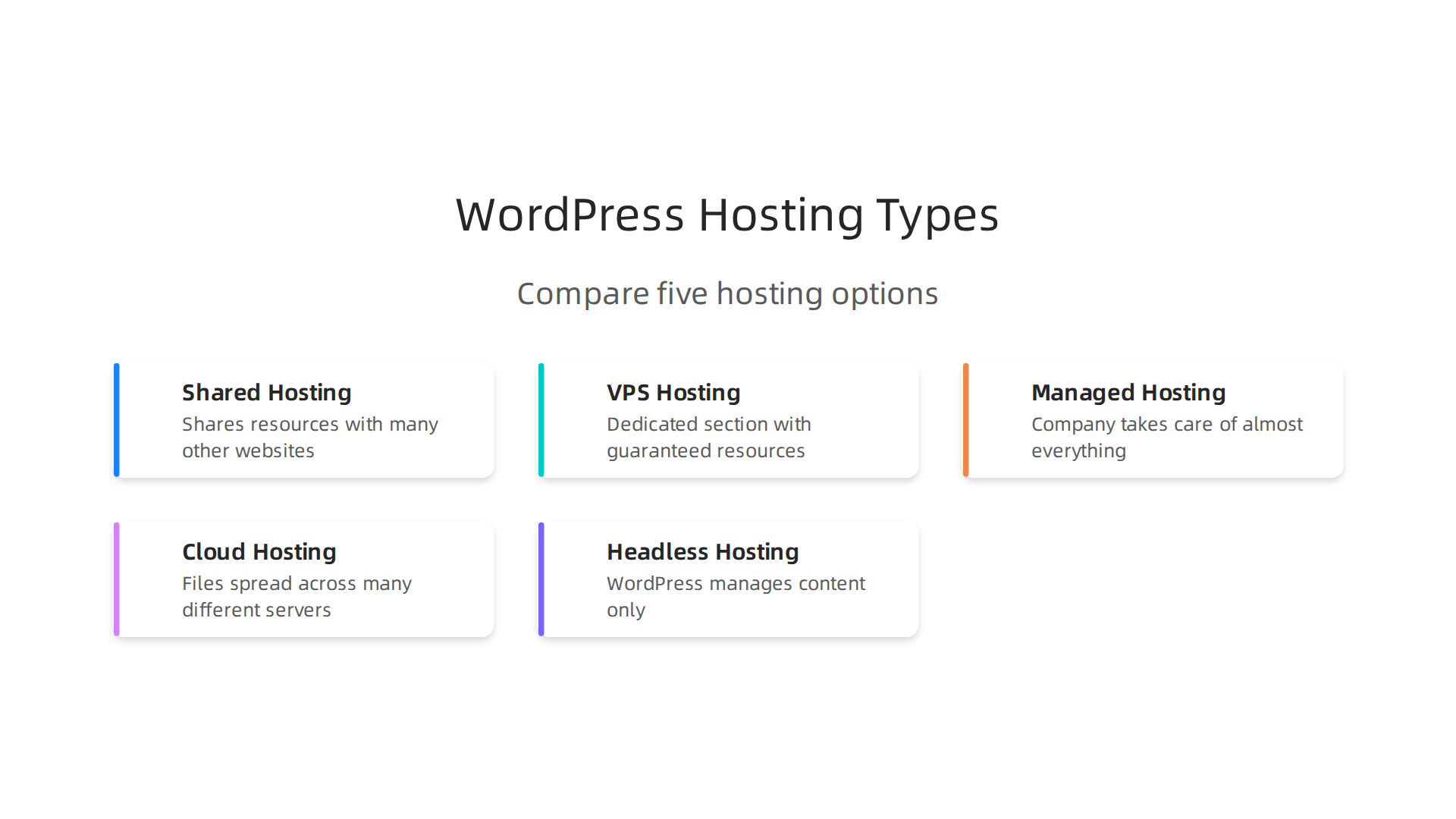
Picking the right type of hosting is like choosing the right vehicle for your journey. A small scooter is fine for quick trips, but a big truck is better for carrying lots of goods. The best WordPress hosting providers offer many options, so it helps to know what each one does.
Shared Hosting: Your Website’s Apartment Building
Shared hosting is often the first step for new websites. It’s like living in an apartment building where many people share the same main resources like electricity and water.
- What it is: Your website shares space and resources (like computer power and memory) with many other websites on one big server.
- Good for: Small blogs, new businesses, or personal websites that don’t get a lot of visitors yet. It’s the most budget-friendly option.
- Trade-offs: If one website gets very busy, it can slow down everyone else’s site. You have less control over the server settings.
- When to upgrade: When your site starts getting more visitors or needs more speed, it’s time to think about something bigger.
VPS Hosting: Your Website’s Condo
VPS stands for Virtual Private Server. It’s a step up from shared hosting.
- What it is: You’re still on a server with others, but your website gets its own dedicated section with its own guaranteed resources. Think of it as a condo unit in the same building.
- Good for: Growing small to medium businesses or online stores that need more power and security than shared hosting can offer. You get more control over your website’s environment. If you’re looking for value, some services offer cheap VPS hosting in 2026 that still provides good performance.
- Trade-offs: Costs more than shared hosting and might need a little more technical know-how to manage.
- When to upgrade: When your site needs consistent speed and can’t afford slowdowns from other websites.
Managed WordPress Hosting: A Full-Service Hotel for Your Site
This type of hosting is designed especially for WordPress websites.
- What it is: The hosting company takes care of almost everything for you. This includes updates, backups, security checks, and making sure your site runs fast. They are experts in WordPress.
- Good for: Businesses that want hands-off management, top speed, strong security, and excellent support. It lets you focus on your business, not on technical tasks. Many consider these to be some of the fastest WordPress hosting solutions. If you are comparing providers, you might look at a Kinsta vs Siteground managed WordPress hosting review to see which fits best.
- Trade-offs: It costs more than shared or basic VPS hosting.
- When to upgrade: When your business website is very important, and you need the best performance and peace of mind.
Cloud Hosting: Power from Many Places
Cloud hosting is very flexible and powerful.
- What it is: Your website’s files are spread across many different servers that work together. If one server has a problem, another one takes over, so your site stays online.
- Good for: Large websites, online shops, or apps that have a lot of traffic or sudden spikes in visitors. It offers great reliability and scalability.
- Trade-offs: Pricing can be a bit more complex, and it usually requires some technical skills to manage effectively.
- When to upgrade: When you need your website to handle huge amounts of visitors at any time, without breaking.
Headless WordPress Hosting: A High-Tech Solution
This is a more advanced type of hosting.
- What it is: WordPress is used only to manage your content (like blog posts or product descriptions). The "front end" (what visitors see) is built separately using other tools.
- Good for: Big companies or developers building very fast, custom web applications that use WordPress as a content manager. It offers top-notch speed and security.
- Trade-offs: This is for advanced users only and needs special development work. It’s usually the most expensive option.
- When to upgrade: When your business needs ultimate performance and a highly custom online experience that traditional WordPress can’t fully support.
Choosing among these types of hosting means thinking about your budget, how much control you want, and how many visitors you expect. No matter which you pick, making a wise choice now can save you trouble later, especially if you ever need to transfer your site using a WordPress Migration Guide 2026.
No matter which type of hosting you pick, making a wise choice now can save you trouble later. A very important part of that choice is looking at how secure and reliable your hosting will be.
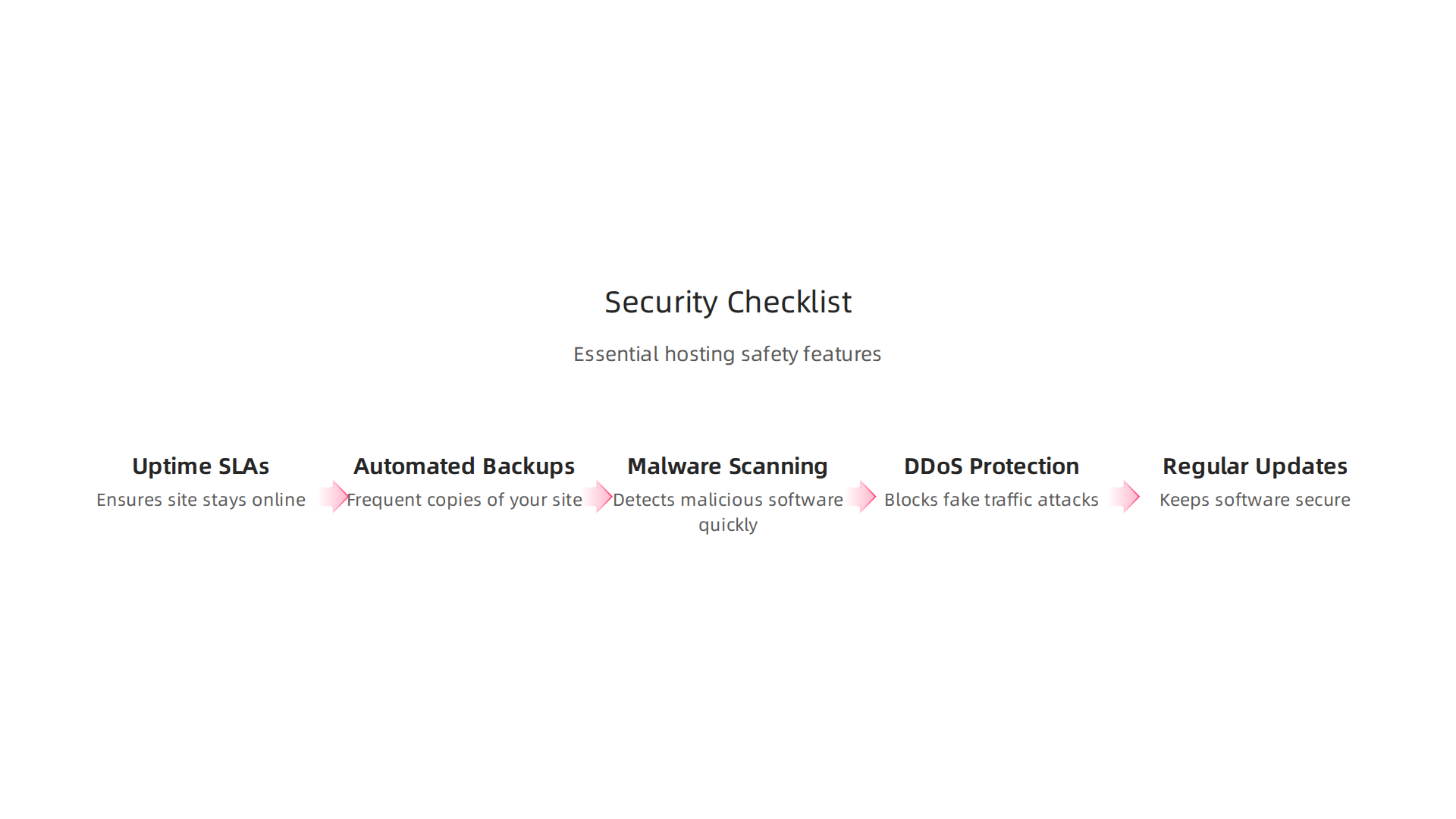
Think of it like buying a car. You wouldn’t just look at how fast it goes; you’d also want to know if it has good brakes and airbags, right? Your website needs strong protection and a promise that it will stay online. This is especially true for the best WordPress hosting providers, which should offer top-notch security features.
Uptime & Service Level Agreements (SLAs)
Uptime is simply how long your website stays online and working. A good hosting company promises high uptime, like 99.9% or even 99.99%. This promise is called a Service Level Agreement, or SLA. If your site goes down often, people can’t find you. This means you might lose sales or trust from your visitors. For businesses, downtime equals lost money and a bad reputation. Good hosts have plans ready to fix problems fast if they happen.
Automated Backups
Imagine losing all your website’s hard work in a blink. It happens! That’s why automated backups are a must-have. Your hosting company should make copies of your website often, sometimes daily, and store them in a different place. This way, if something goes wrong, you can easily bring your website back to life. Experts suggest looking for daily, off-server backups with a good storage period, like 30 days, to keep your data safe WordPress Security 2026: 8 Measures Your Host Doesn’t Take For ….
Malware Scanning & Web Application Firewalls (WAFs)
Your website can get sick, just like a computer can get a virus. Malware is bad software that can steal information or mess up your site. Good hosting plans include tools that constantly scan your website for malware and clean it up. A Web Application Firewall (WAF) acts like a strong guard, checking all traffic coming to your site. It helps block bad visitors or attacks before they can harm your website. Secure WordPress hosting often includes these features at the server level WordPress Security Guide | Protect Your Site with WooNinjas.
DDoS Protection
Sometimes, bad actors try to flood a website with so much fake traffic that it crashes. This is called a DDoS attack. It’s like too many cars trying to use a small road at once. Good hosting providers have special systems to stop these attacks, making sure your site stays open for real visitors. For example, some offer very high levels of DDoS protection to keep sites running smoothly.
Regular Updates & Patch Management
WordPress and its parts (themes and plugins) get updated all the time to fix small problems and close security holes. A good host helps you keep everything updated. This is called patch management. It’s important because outdated software is an easy target for hackers. The best web hosting for small business will often include automatic updates for WordPress and its key components, saving you time and keeping your site safe. When you choose a host, make sure they prioritize these security and reliability features. It’s the foundation for a successful online presence in 2026.
Once your website is safe, making it fast is the next big step. A quick website makes visitors happy and helps you rank better on search engines like Google. This means more people will find your business. The best WordPress hosting providers know this and offer special features to boost speed.
Key Speed Boosters for WordPress Hosting
Think of these as upgrades for your website’s engine:
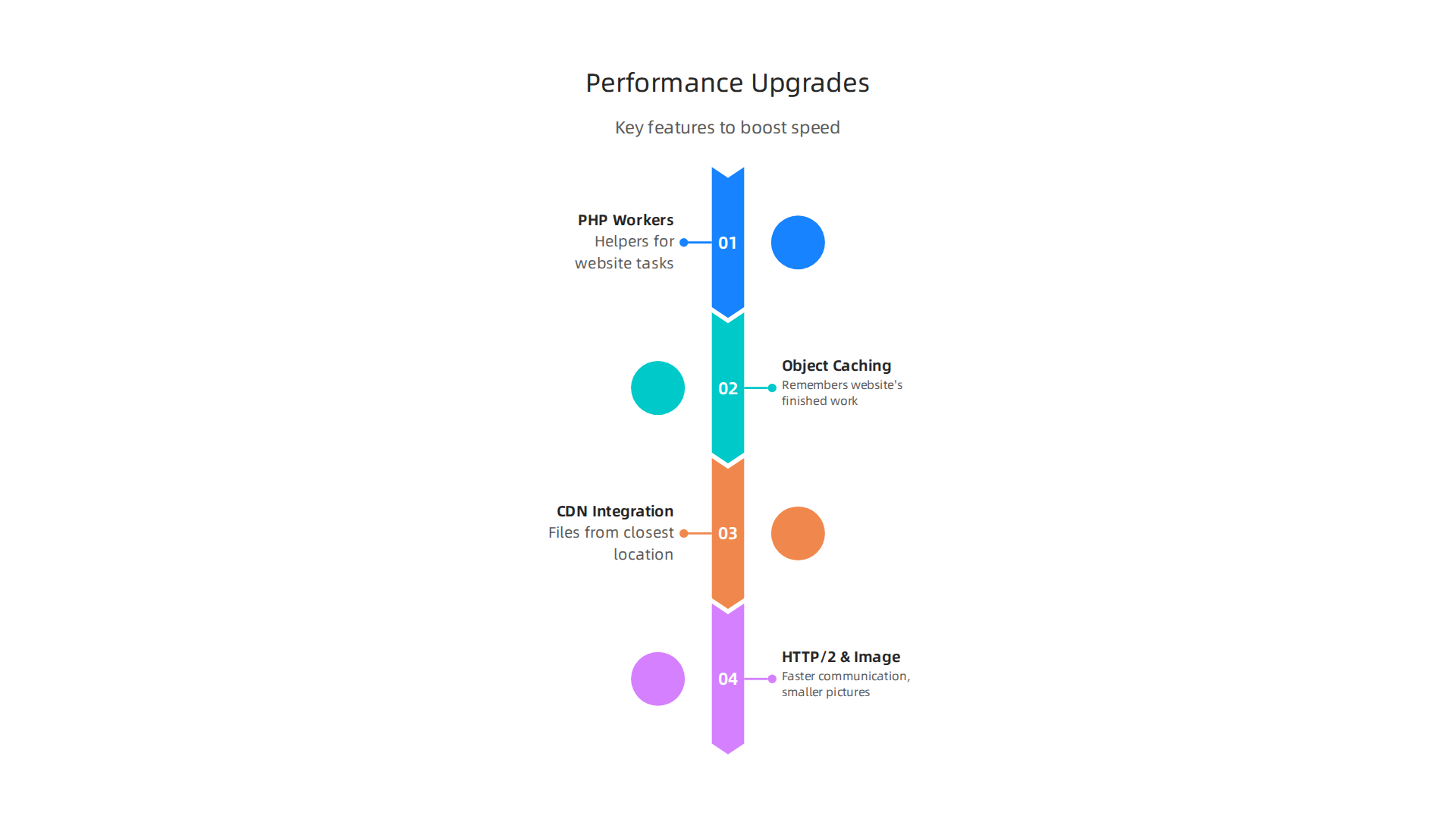
- PHP Workers: PHP is the main language WordPress uses. PHP workers are like the number of helpers your host provides to handle tasks on your website. If many people visit your site at once, more PHP workers mean your site can handle all those requests without slowing down. Hosting companies like to use the latest PHP versions, like PHP 8.2 or 8.3, because they are faster and safer than older ones WordPress Hosting Performance: 2026 Benchmarks & Fixes.
- Object Caching: This is a smart way to remember things your website has already figured out. When a visitor asks for a page, your site might do a lot of work to build it. Caching saves that finished work so the next visitor gets the page super fast, without your site having to do all the work again.
- CDN Integration: CDN stands for Content Delivery Network. Imagine your website files are stored in many different places around the world. When someone visits your site, the CDN sends them the files from the place closest to them. This makes your site load much faster for everyone, no matter where they are.
- HTTP/2 and Image Optimization: These are technical terms for making sure your website talks to browsers in the fastest way possible and that your pictures don’t make your site heavy and slow. Good hosting will use HTTP/2 and help you make your images smaller without losing quality.
Why Speed Matters for Your Business
A fast website is not just a nice-to-have, it’s a must-have in 2026. If your site is slow, people get annoyed and leave. This means fewer sales and less trust. Google also likes fast websites and tends to show them higher in search results. This directly helps your Google WordPress hosting efforts.
For small businesses, every visitor counts. A slow site can hurt your chances to turn visitors into customers. Choosing fastest WordPress hosting helps you keep those potential customers.
Real-World Benchmarks and What to Ask For
How do you know if a host is truly fast? Look for real-world benchmarks. These are tests that show how a host’s servers perform under different conditions. Many websites, like NorthiScale, publish yearly benchmarks comparing different providers WordPress Hosting Performance Benchmarks 2026 | NorthiScale. They test things like how long it takes for a page to load or how well a site handles many visitors at once.
When picking a host, ask to see their benchmark results or look for independent reviews. This will show you how they stack up against other top rated web hosting companies. A quick video can show you how to check if your WordPress host is performing well in real-world scenarios, so you know exactly what to look for Is your WordPress host slow? Real world performance test. Make sure the host you pick focuses on these technical details so your WordPress site can be as quick and responsive as possible. If you want to dive deeper into how different providers handle these details, you might want to compare options like Kinsta vs SiteGround managed WordPress hosting.
After understanding what makes a website fast, the next big choice for your WordPress site is picking the right kind of hosting. Not all hosting is the same. Each type offers different levels of help, speed, and cost. Knowing the differences can help you pick the best WordPress hosting providers for your needs. To start, let’s learn a bit about what web hosting services actually are.
Let’s look at the main types of WordPress hosting available in 2026:
Managed WordPress Hosting: Easy and Powerful
Managed WordPress hosting is like having a special team take care of your website’s home. These providers handle all the tough stuff for you.
- Pros:
- Automatic Updates: Your WordPress software, themes, and plugins get updated automatically. This keeps your site safe and running smoothly without you lifting a finger.
- Tuned for Speed: The servers are set up just for WordPress. This means they often include advanced caching and other speed boosters right out of the box. Managed WordPress hosting can offer some of the fastest WordPress hosting solutions.
*   **Expert Support**: If something goes wrong, you get help from people who know WordPress inside and out. They can fix problems quickly.
*   **Security**: They have special security features to protect your site from attacks. This is a big plus for businesses concerned about keeping their [Google WordPress hosting](https://hostingoffertoday.com/managed-wordpress-hosting/) safe.
*   **Staging Environments**: Many offer a "staging" site, which is like a practice area. You can test changes there before putting them live on your real website.
- Cons:
- Higher Cost: Because you get more help and features, it costs more than other types of hosting.
- Less Control: You might not be able to make some deep technical changes to the server, as the host manages most things.
A recent report shows that managed WordPress hosting generally has better performance and fewer outages compared to shared hosting, with an average of 66ms faster "Time to First Byte" (TTFB) and six times fewer outages per year, according to WordPress Hosting Benchmarks 2026: 24/7, 365 Days Tested. Many consider it the best web hosting for small business that wants a hands-off approach.
Shared Hosting: Budget-Friendly for Beginners
Shared hosting is like living in an apartment building. Your website shares a server with many other websites.
- Pros:
- Very Cheap: It’s usually the most affordable way to host a website.
- Easy to Start: Great for new websites or blogs that don’t get much traffic.
- Cons:
- Slower Performance: If a neighbor’s website gets busy, it can slow down your site because you’re sharing resources.
- Less Secure: Sharing a server can sometimes mean more security risks if one site is compromised.
- Limited Scalability: Not good for growing businesses because it can’t handle a lot of visitors as your site gets more popular.
VPS Hosting: More Power, More Responsibility
VPS stands for Virtual Private Server. Think of it as owning a condo in that apartment building. You still share the building, but you have your own dedicated space and resources.
- Pros:
- More Power and Speed: Your site gets its own share of server resources, making it faster and more reliable than shared hosting.
- More Control: You get more control over the server settings.
- Good for Growth: It can handle more traffic than shared hosting. If you are looking for cheap VPS hosting in 2026 that doesn’t sacrifice performance or security, this could be an option.
- Cons:
- Needs Technical Skill: You need some technical knowledge to set it up and manage it.
- More Expensive: Costs more than shared hosting but less than managed or cloud.
Cloud Hosting: Flexible and Scalable
Cloud hosting is like having your website spread across many computers connected through the internet. If one computer fails, another one takes over.
- Pros:
- Highly Reliable: Your site is less likely to go down because it’s not on just one server.
- Super Scalable: You can easily add more resources if your site gets a lot of traffic all at once. You only pay for what you use.
- Cons:
- Complex: Can be tricky to set up and manage without technical help.
- Variable Costs: Costs can change a lot depending on how much you use, which can make budgeting hard.
The True Cost of Ownership: Beyond the Monthly Bill
When you pick hosting, don’t just look at the monthly price. Think about the total cost.

- Hidden Fees: Some hosts offer a very low starting price, but then the renewal price jumps up a lot. Also, some charge extra for things like backups or security features.
- Developer Time: If you choose shared or VPS hosting and aren’t technical, you might need to pay someone to help you manage it. This includes things like migrations to a new host or fixing issues.
- Premium Plugins: While WordPress has many free tools, you might need to buy special plugins for better security, speed, or specific features.
- Support Gaps: With cheaper hosting, support might be slow or less helpful. If your site goes down and you can’t fix it, the lost business can be a huge cost.
Looking at the full picture of your web hosting cost in 2026 helps you choose the right fit. Sometimes, paying a bit more for managed hosting means fewer headaches and hidden costs later, making it a better value overall.
After thinking about the total cost of ownership for your website, it’s clear that the cheapest option isn’t always the best. A big part of that value comes from the support you get and the special tools available. These can make managing your website much easier and keep it running smoothly.
Support, Backups, and Developer Tools: What Good Support Looks Like
When you’re choosing among the best WordPress hosting providers, don’t forget about support. Good help means less stress and faster fixes if something goes wrong.

Here’s a simple checklist for what to look for in great hosting support:
- Quick Help Times: Look for a host that promises fast answers, often called a "Service Level Agreement" or SLA. This means they will tell you how quickly they plan to get back to you.
- Ways to Get Help: Can you chat with them online, send an email, or call them on the phone? Having different ways to reach out is helpful, especially when your site is down. Many of the best managed WordPress hosting options offer 24/7 support.
- What They Help With: Does their team know a lot about WordPress? Do they help with slow performance, security issues, or problems with your plugins? Expert support is a big plus, as mentioned in guides to best managed WordPress hosting in 2026.
Good support also comes with important backup features. Imagine if your site suddenly breaks. With good backups, you can go back to an earlier working version. This is like having an "undo" button for your whole website. Look for hosts that offer daily automatic backups and easy ways to restore your site. This protects your hard work and peace of mind.
Essential Tools for Website Builders
For those who like to build and change their website, certain tools are a must. These "developer tools" give you more power and flexibility.
- Staging Sites: This is a safe place to test changes to your website without breaking your live site. It’s like having a practice version of your site. This feature is a hallmark of many top rated web hosting companies for WordPress.
- SSH Access: This is a secure way to connect to your server and make advanced changes using text commands. It’s helpful for those with more technical skills.
- Git Integration: If you work with code, Git helps you keep track of all your changes. It’s a lifesaver for teamwork and making sure nothing gets lost.
- WP-CLI: This is a special tool for WordPress that lets you manage your site from the command line. You can update plugins, manage users, and more, all with simple text commands.
- Database Access: Tools like phpMyAdmin let you look at and change your website’s database. This is where all your content and settings live.
- Rollback Options: Beyond backups, some hosts let you "rollback" changes you made, especially after updates. This can save you from big headaches if an update causes problems.
Choosing a hosting provider that offers strong support and these useful developer tools means you’re investing in the long-term health and growth of your website. It’s an important part of finding the best web hosting for small business that truly meets your needs in 2026. A good host will make sure your Google WordPress hosting is always in good hands.
When looking for a host that combines great features with excellent support, you might want to explore a provider like Prism Web Host, which focuses on providing reliable, secure, and high-performance hosting with enterprise-grade security checks and automated scalability.
Scalability, migrations, and uptime SLAs: preparing for growth
After making sure your website has strong support and useful tools, the next big step is to think about its future. Your website will hopefully grow, and when it does, you need a host that can grow with it.

This is where looking at scalability, how easy it is to move your site, and uptime promises (SLAs) becomes very important. These are key factors when picking the best WordPress hosting providers for long-term success.
Scalability means your website can handle more visitors or more content without slowing down. There are two main ways hosting can scale:
- Vertical Scaling: This is like giving your existing server more power. Think of it as upgrading to a bigger engine in the same car.
- Horizontal Scaling: This means adding more servers to share the work. This is like adding more cars to a fleet to carry more passengers.
Many good hosts offer ways to automatically scale up when traffic spikes, like during a big sale or viral moment. They also use smart caching strategies to deliver content faster, which is key for fastest WordPress hosting. This helps your Google WordPress hosting stay speedy, even when many people are visiting at once.
Sometimes, even with great scalability, you might need to move your website to a new host or server. This is called a migration. It sounds scary, but with a good plan, it doesn’t have to be. When moving your site, consider:
- Downtime: How long will your site be offline during the move? Good hosts help keep this very short.
- Data Safety: Make sure all your website files and information are moved correctly and completely.
- DNS Switchover: This is like changing your website’s address. It needs to be done carefully so visitors can still find your site.
- Rollback Plans: Always have a way to go back to your old site if something goes wrong.
Following WordPress Migration Guide 2026: Tips and Best Practices can help make sure your move goes smoothly. It’s also helpful to read about how to Migrate WordPress Site To New Domain Safely In 2026 if you’re making that change.
Lastly, look for a host with a strong "Uptime SLA." An SLA (Service Level Agreement) is a promise from your hosting company about how much of the time your website will be online and working. A common promise is 99.9% uptime, but some top rated web hosting companies offer even higher, like 99.99%. This means your site will almost always be available to your visitors. For any best web hosting for small business, high uptime is crucial so you don’t lose sales or trust from your customers. Prism Web Host, for example, offers a 99.99% uptime SLA to keep your online business running without interruptions.
How to choose: a step-by-step comparison checklist and pricing considerations
Knowing about scalability and uptime is great, but how do you actually pick a host that fits your needs right now and for the future? It can feel like a big puzzle to find the best WordPress hosting providers. The trick is to have a clear plan. Let’s walk through a simple checklist to help you compare your options and think about the costs involved.
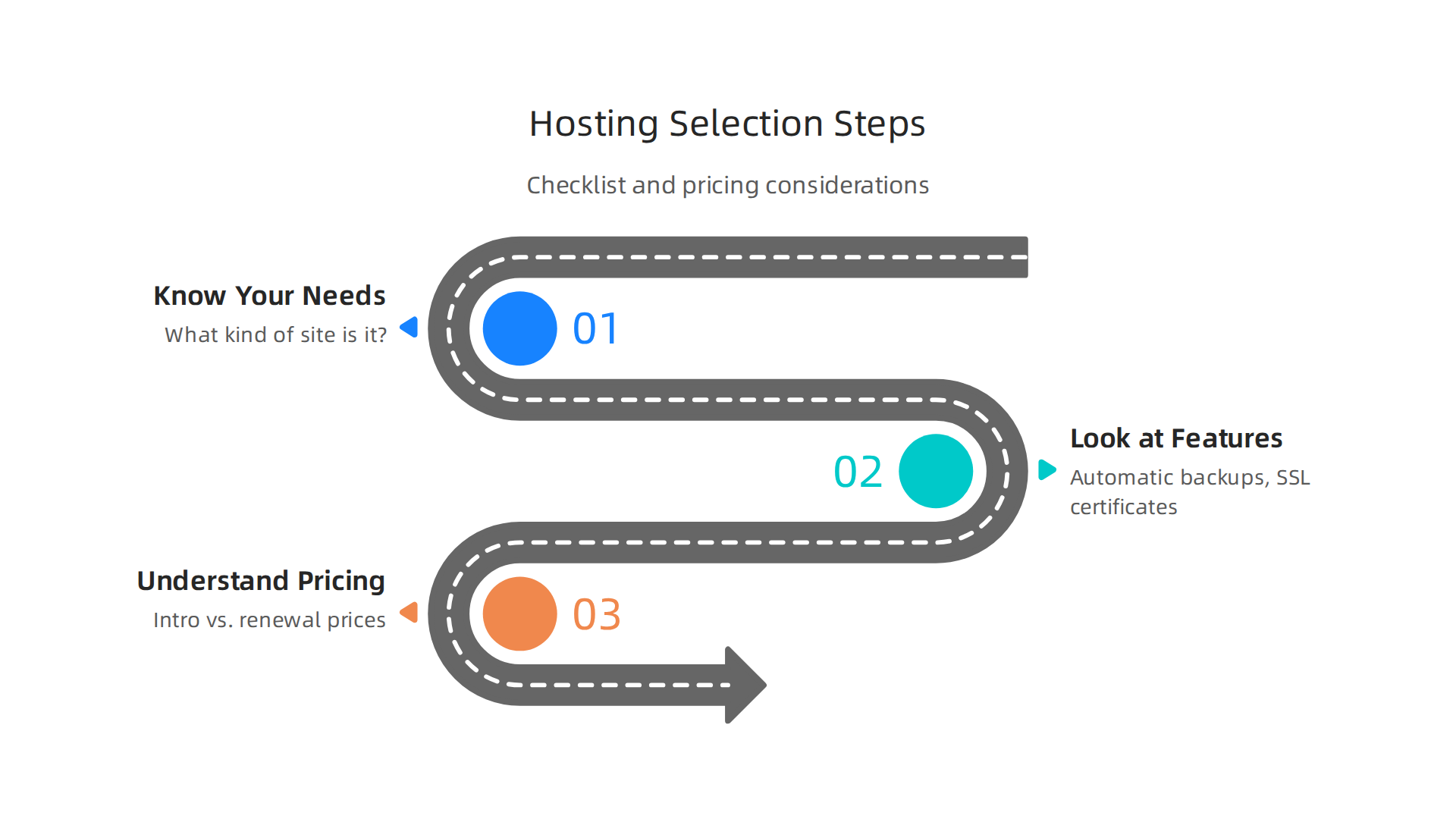
Step 1: Know What Your Website Needs
Before you look at any hosting company, think about your own website.
- What kind of site is it? Is it a simple blog, an online store, or something else?
- How many visitors do you expect? A new blog won’t need as much power as a busy online shop.
- What special features do you need? Do you handle sensitive customer info? Need many email accounts?
- How important is speed? Everyone wants a fast site, but some sites need to be the absolute fastest WordPress hosting possible, like e-commerce stores. You can often see performance benchmarks for different hosts to help compare 2026 data points, as many tests are done each year 2026 WordPress Hosting Performance Benchmarks.
Make a list of your "must-have" features and your "nice-to-have" features. This helps you map out exactly what you’re looking for in a hosting solution.
Step 2: Look at Features, Performance, and Support
Once you know your needs, you can start comparing what different hosting companies offer. This is where features, performance, and good customer support become very important.
- Features: Does the host offer things like automatic backups, free SSL certificates for security, or easy one-click WordPress installs? Some companies offer specialized managed WordPress hosting, which handles many technical tasks for you.
- Performance: Check independent reviews and benchmark reports. Websites like NorthiScale or others often test how fast hosts are and how well they handle many visitors at once in 2026, giving you an idea of true WordPress hosting performance. Good performance means your visitors won’t get frustrated with slow loading times.
- Support: If something goes wrong, you need help quickly. Look for hosts with 24/7 support through chat, phone, or email. Read reviews to see what other customers say about their experience with support. Many top rated web hosting companies are known for their great customer service.
Step 3: Understand Pricing and Hidden Costs
Pricing is a big part of choosing the right host. But it’s not always as simple as the price you see on the front page.
- Introductory vs. Renewal Prices: Many hosts offer a low price for your first year or two. Be sure to check the renewal price, which can often be much higher. This is a common trick in the hosting world.
- Included vs. Extra Features: Does the low price include everything you need, like a free domain name or email hosting? Or will you have to pay extra for important add-ons?
- Long-Term Value: Sometimes paying a little more upfront for a host with better features, performance, and support saves you money and headaches in the long run. Don’t just pick the cheapest option if it doesn’t meet your essential needs.
- Money-Back Guarantees: A good host will often offer a money-back guarantee, letting you try their service without risk. This is a good sign of their confidence in their service.
Looking at detailed reports can help you weigh value against price. For example, some benchmarks compare hosts not just by speed, but also by their overall value score and monthly price, giving you a clearer picture of what you’re actually getting for your money, according to a 2026 Reddit discussion on WordPress hosting benchmarks.
By using this checklist, you can compare different options more easily. You can rule out hosts that don’t meet your basic needs and narrow down your choices to a few strong contenders. This careful comparison helps ensure you pick a host that will keep your website running smoothly and help your small business grow. You want a host that offers great value for your money. If you’re looking for help understanding all these factors for your online brand, consider exploring a platform designed for reliable, secure, and high-performance hosting.
Summary
This article explains why picking the right WordPress hosting matters for speed, security, uptime and long-term costs, and then walks you through the most common hosting types — shared, VPS, managed, cloud and headless — so you can match a plan to your needs. It covers essential security features (automated backups, malware scans, WAFs, DDoS protection), performance drivers (PHP workers, object caching, CDN, HTTP/2), and the support and developer tools that save time when things go wrong. You’ll also learn how to evaluate uptime guarantees and SLAs, estimate total cost of ownership beyond the sticker price, and plan for scaling or migrating your site. Practical buying advice and a step-by-step checklist help small businesses and site owners compare providers and avoid common price and performance traps. After reading this, you’ll be able to shortlist hosting options that balance budget, control and growth, and ask the right questions when evaluating providers.
