




Google WordPress Hosting 2026 Compare the Best Providers for Your Small Business
Article
Introduction
If you run a small business, your WordPress site is your hardest worker. It brings in customers, builds trust, and tells your brand’s story.
But let’s be real. Running it can sometimes feel like a pain. You constantly worry about slow loading times, security threats, and confusing technical dashboards. You hear about Google Cloud and how powerful it is. Yet the idea of setting it up yourself sounds like a full time job you did not ask for.
Many business owners we talk to feel stuck. They want the reliability and speed of Google WordPress hosting but need the simplicity of a setup that just works. The middle ground often feels impossible to find.
Here is the good news. This guide changes that.
We have looked closely at the best WordPress hosting providers that run on Google Cloud in 2026. We cut through the marketing hype and technical jargon to show you what actually matters for your growing business.
You will learn how to find the fastest WordPress hosting for your budget. We also break down common tasks like how to change a WordPress domain or migrate a WordPress site to a new domain without losing your sanity.
Google Cloud’s infrastructure gives your site improved performance and strong security. For a closer look at how this works for small businesses, check out this overview of google web hosting services explained.
If you are ready for a hosting partner that handles the technical side for you, explore Prism Web Host’s WordPress solutions. You get enterprise grade tools without the costly headache.
Let’s find the perfect home for your website in 2026.
What Is Google WordPress Hosting? Breaking Down the Options
You have probably heard the term "Google WordPress hosting" thrown around a lot in 2026. But what does it actually mean?
Here is the simple truth. Google Cloud is not a one-click hosting company like the shared plans you might have used before. Google Cloud is the powerful engine running underneath. Think of it as the world’s strongest server farm, spread across dozens of data centers globally. Your WordPress site sits on that infrastructure.
The confusion comes from the different ways you can access it. You have two main paths.
Path one: You build it yourself (self-managed).
This uses Google Compute Engine. You get a virtual server. You install WordPress manually or use the Click to Deploy tool from the Google Cloud Marketplace. This gives you total control. You can tune every setting. You also get Google’s built-in security tools and a global content delivery network (CDN) that speeds up your site for visitors anywhere in the world.
Sound like a lot of work? It is. For most small business owners, self-managed hosting feels like building a car engine from scratch when you just want to drive.
Path two: You let a partner handle everything (managed hosting).
This is where the best WordPress hosting providers come in. Companies like Kinsta, WP Engine, SiteGround, and Cloudways host your site on Google Cloud infrastructure.

They handle the technical setup, security patches, daily backups, and performance tuning. You get all the speed and reliability of Google Cloud without touching a command line.
These partners are exactly what we mean when we talk about managed WordPress hosting on Google Cloud. They add their own optimization layers on top, like advanced caching and staging environments. For a detailed look at how different hosts compare, check out our guide on the best web hosting for WordPress UK to see which one fits your budget.
The big performance jump comes from Google’s global network. Traditional shared hosting puts your site on one server in one location. If a visitor is on the other side of the world, the page loads slowly. Google Cloud uses load balancers and a CDN to serve your content from the nearest data center. Your site loads in seconds, not seconds plus lag.
That is the fastest WordPress hosting experience you can get in 2026. And you do not need a computer science degree to use it.
For an official overview of what Google Cloud offers directly, you can visit their WordPress hosting services page for the full technical breakdown. But for most business owners, going with a managed partner is the smarter, simpler choice.
In the next section, we will compare the top managed providers so you can see exactly what each one brings to the table.
Google WordPress Hosting vs. Traditional Managed Hosting: A Head-to-Head Comparison
Now that you understand the two paths to Google WordPress hosting, let’s get real about how they stack up against each other.

You need to know which one actually saves you money, which one keeps your site online, and which one you can actually manage without a developer on speed dial.
Cost Structure: Pay-as-you-go vs Flat Monthly Fees
This is the biggest trap for small business owners. Google Cloud pricing works on a pay-as-you-go model. You pay for what you use. Sounds fair, right? The problem is that traffic spikes can surprise you. One viral post or a seasonal rush, and your bill jumps.
With managed hosting, you pay a flat monthly fee. No surprises. The pricing is predictable, which matters a lot when you are budgeting.
To help you compare, here is a quick breakdown:
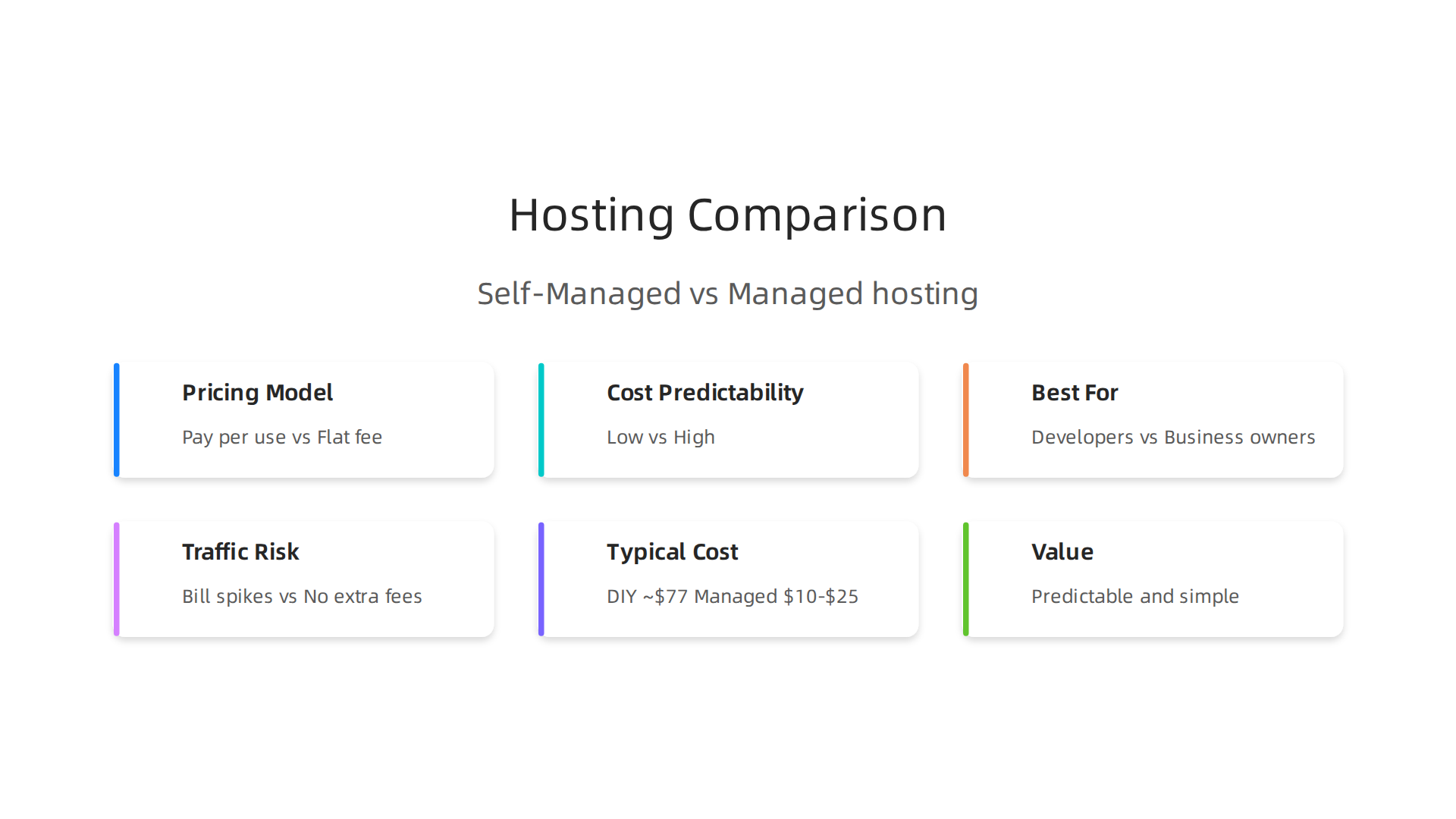
| Feature | Google Cloud Self-Managed | Managed Hosting (Google Cloud Partner) |
|---|---|---|
| Pricing Model | Pay per use | Flat monthly fee |
| Cost Predictability | Low | High |
| Best For | Developers with time to tune | Business owners who want simplicity |
| Traffic Risk | Bill can spike | No extra charges within plan limits |
For a closer look at which providers consistently deliver reliable Google Cloud hosting at fair prices, check out this overview of the best Google Cloud WordPress hosts of 2026.
Performance and Uptime: Google’s SLA vs Typical Managed Host Guarantees
Google Cloud offers a 99.95% to 99.99% uptime SLA depending on the service you use. That is enterprise grade. Your site will be online nearly all the time.
Managed hosting partners match or exceed this. WP Engine and Kinsta, for example, offer 99.99% uptime guarantees plus their own performance optimizations. They add caching layers, CDN integration, and automatic image compression that make your site even faster than a raw Google Cloud setup.
So which one wins? Both perform great. But the managed host removes the guesswork. You do not have to configure caching or tune the server yourself. It just works.
Ease of Use: Can a Non-Technical Owner Manage This?
Here is the honest answer. If you sign up for Google Cloud directly and try to manage WordPress yourself, you will hit a wall. The Google Cloud console is powerful but complex. You need to understand virtual machine instances, firewall rules, and storage buckets. That is not something most business owners have time to learn.
Managed hosting changes everything. You log into a dashboard made for WordPress. You update plugins with one click. You restore backups from a simple menu. You do not touch a command line.
For example, if you want to see how two excellent managed hosts stack up against each other in terms of daily usability, read our comparison of Kinsta vs SiteGround managed WordPress hosting. Both run on Google Cloud infrastructure but offer different control panels and support styles.
If you want a hosting experience that combines the power of Google Cloud with the simplicity of traditional managed hosting, consider Prism Web Host WordPress Hosting Solutions. It gives you the speed and reliability of cloud infrastructure without the technical headache.
The bottom line is simple. If you have a developer or a technical team, self-managed Google Cloud gives you total control. But if you are a business owner who wants to focus on growing your site, not managing servers, a managed partner is the smarter path by far.
Performance and Speed: What Real Data Says About Google’s Infrastructure
So you know managed hosting wins on simplicity. But what about pure speed? Is Google’s raw infrastructure actually faster than what you get from a managed partner?
The short answer is yes. Google Cloud runs on one of the fastest networks on the planet. With Cloud CDN, content gets served from edge locations all over the world. That means your site loads fast for someone in Sydney, London, or Tokyo.
But here is what the 2026 benchmark data actually shows. Independent tests measured Time to First Byte (TTFB) across dozens of hosts. The gap between the fastest and slowest provider was 298 milliseconds according to these 2026 WordPress hosting benchmarks. That is nearly a 2x difference in server response time just based on where you host.
The top performers? Hosts running on Google Cloud infrastructure consistently landed in the fastest group. Managed partners like Kinsta posted average TTFB around 158ms in these fastest WordPress hosting tests conducted over 2026. That is incredibly fast.
But here is the twist. A raw Google Cloud setup without optimization can actually underperform. If you do not enable caching, configure the CDN properly, or tune your PHP settings, your TTFB might be worse than a cheap shared host. One developer reported high TTFB issues with Google Cloud Compute Engine because of missing cache layers.
So the real speed advantage comes from pairing Google’s infrastructure with proper optimization. That is exactly what managed partners do for you.
How This Impacts Core Web Vitals
Google cares about user experience. Core Web Vitals measure Largest Contentful Paint (LCP), Interaction to Next Paint (INP), and Cumulative Layout Shift (CLS). Slow TTFB hurts LCP directly.
When your server takes 300ms just to respond, your LCP suffers. That hurts your search rankings. A managed host that delivers 150ms TTFB gives you a huge head start on passing Core Web Vitals.

The Cost-Performance Trade-Off
Here is the honest truth. Google Cloud raw performance is incredible if you have the skills to tune it. But time is money. If you spend 10 hours a month optimizing server settings, that costs you far more than a managed host.
The smarter path is to let a managed partner handle the tuning. You get Google’s infrastructure with expert-level optimization baked in. For most business owners, that is the real win.
If you want to understand how hosting costs add up over time, check out this guide to web hosting cost in 2026 to see what you actually pay.
For a fully managed solution that combines Google Cloud power with simple setup, Prism Web Host WordPress Hosting Solutions takes care of performance optimization so you can focus on growing your site.
Security and Scalability: Protecting Your Brand as You Grow
Speed matters a lot. But what happens when your site suddenly gets 10,000 visitors in one hour? Or worse, what if someone tries to knock your site offline with a DDoS attack?

Without the right setup, both situations can break your business.
Google Cloud was built for exactly these moments. Its security infrastructure includes built-in DDoS protection through Cloud Armor and Cloud Load Balancing. These tools filter bad traffic before it ever reaches your WordPress site. You also get managed SSL certificates, firewall rules, and identity management tools. Following Google Cloud security best practices like these helps you lock down your site from day one.
The best part? You do not need to be a security expert to use them. Managed hosting partners enable these protections for you automatically.
Scaling Without the Headaches
Traffic spikes can be a good problem to have. Unless your site crashes. Google Cloud solves this with auto-scaling tools like Managed Instance Groups (MIGs) and Cloud Run. These services spin up extra server resources when traffic jumps. When traffic drops back down, they scale back. You only pay for what you use.
That means your site stays online during a big sale, a viral blog post, or a flash marketing campaign. No frantic calls to your host at 2 AM.
Smart Security Habits for WordPress
Even with Google’s infrastructure, you still need to follow some basics. Keep your WordPress core, themes, and plugins updated. Use a Web Application Firewall (WAF) to block malicious requests before they hit your server. And take regular backups. A point-in-time backup can save you hours of recovery if something goes wrong.
If you want a host that handles both security and scaling for you, check out the best dedicated hosting providers for security to see how managed solutions compare.
For a setup that pairs Google’s security backbone with expert management, Prism Web Host WordPress Hosting Solutions includes enterprise-grade protections like DDoS defense and automated backups so you can grow without worrying about downtime.
How to Set Up WordPress on Google Cloud: A Step-by-Step Walkthrough
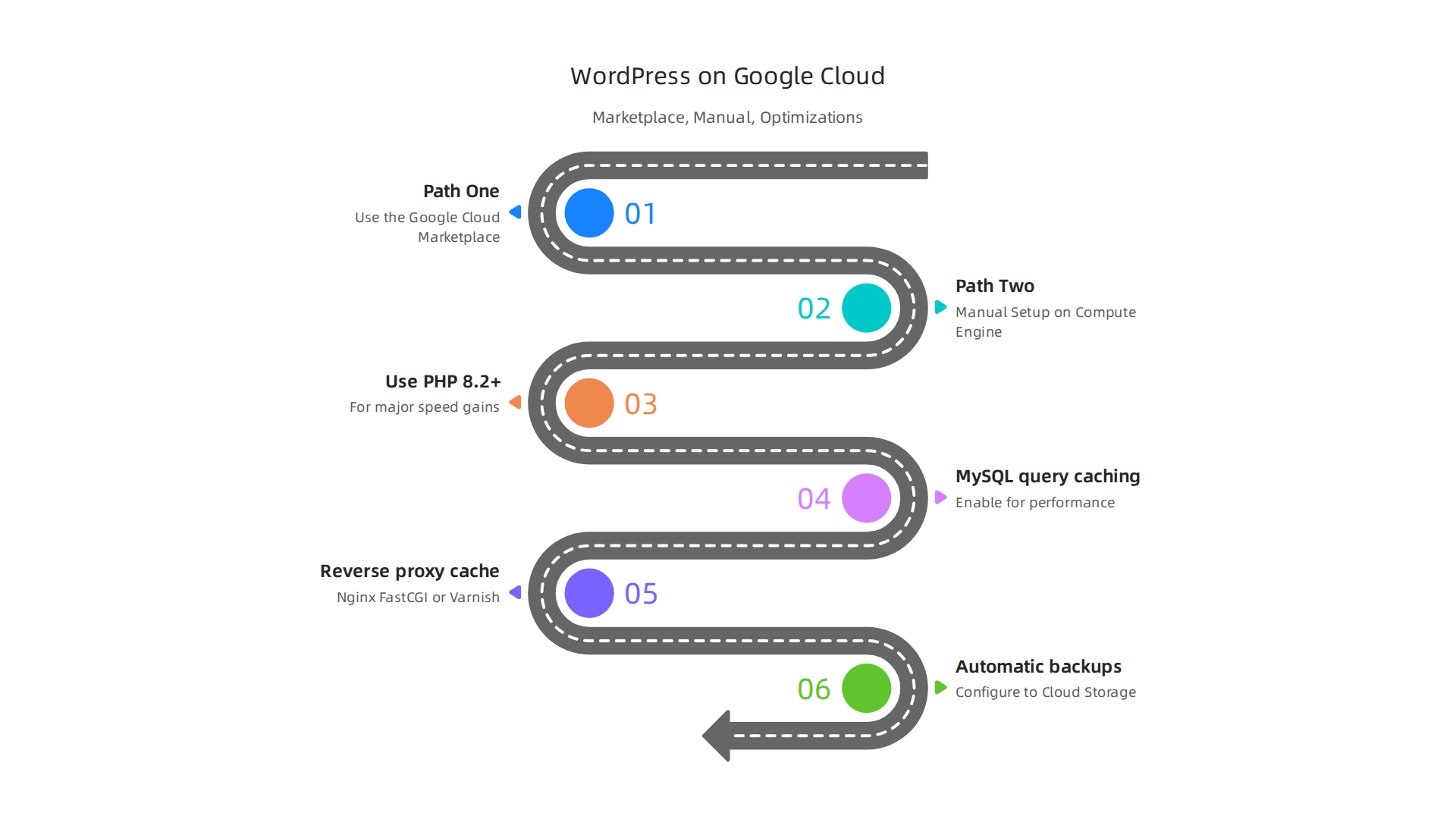
So you have decided to use Google Cloud for your site. Now what? Getting set up might sound scary at first. But you really have two main paths forward.
Both work well for small businesses.
Path One: Use the Google Cloud Marketplace
This is the easiest way. Google Cloud Marketplace has a pre-built WordPress image. You click a few buttons and your site is ready in minutes. The image comes with the latest WordPress version, PHP, MySQL, and caching already configured. You do not need to mess with servers or command line tools.
Here is the catch. The default settings are good but not great. You still want to tweak a few things after the install. Update your PHP version to 8.2 or higher for better speed. Enable opcache to store compiled PHP in memory. And set up a caching plugin like LiteSpeed Cache or WP Rocket. These small changes make a big difference. A complete WordPress performance optimization guide can walk you through each step.
Path Two: Manual Setup on Compute Engine
This path gives you more control. You spin up a new Compute Engine VM. Install a LAMP or LEMP stack manually. Then upload WordPress yourself.
Do this only if you have some technical comfort. You will manage your own server updates, firewall rules, and backup schedules. That is a lot of work. But you get full control over every detail.
Essential Server Optimizations
No matter which path you choose, these optimizations matter:
- Use PHP 8.2 or newer for major speed gains
- Enable MySQL query caching
- Add a reverse proxy cache like Nginx FastCGI Cache or Varnish
- Set up a CDN through Cloud CDN or a third-party service
- Configure automatic backups to Cloud Storage
Check out the best web hosting for WordPress UK providers to see how managed hosts handle these optimizations for you. Many include LiteSpeed servers and NVMe storage that skip the manual work entirely.
Common Pitfalls to Avoid
Here is what trips most business owners up. First, they skip the caching layer. A WordPress site without full-page caching on Google Cloud will have slow Time to First Byte (TTFB). The 2026 benchmarks show that the gap between the fastest and slowest hosts can reach nearly 300ms just from hosting alone.
Second, they forget to secure their admin panel. Set up a firewall rule that only allows your IP address to access /wp-admin/. Use strong passwords and two-factor authentication.
Third, they ignore monthly backups. A point-in-time backup saved one of our clients after a plugin update broke their entire site. Do not learn this lesson the hard way.
Getting google wordpress hosting running smoothly does not have to be painful. The marketplace path gets you started fast. Just remember to lock down your security and optimize your caching from day one.
Cost Analysis: Google Cloud vs. Managed WordPress Hosting — What SMBs Actually Pay
Here is where the real picture comes into focus. Google Cloud pricing sounds simple on paper. You pay for what you use. But the monthly bill can surprise you if you are not careful.
Breaking Down the Google Cloud Bill
A typical small business site on Google Cloud has three main cost areas. First is compute. A basic VM with 2 vCPUs and 4GB of RAM runs roughly $25 to $35 per month. Second is storage. A 50GB persistent disk costs around $5 per month. Third is network egress. Every time a visitor loads your site, data leaves Google’s network. Egress starts at $0.12 per GB and adds up fast.
Then come the hidden costs. A managed database like Cloud SQL adds $15 to $30 per month. Load balancing adds another $18. And if you want automated backups to Cloud Storage, budget another few dollars. The full Google Cloud pricing breakdown for 2026 shows how these pieces stack together for a real small business site.
Real Numbers for 10,000 Visitors Per Month
Let me give you a real comparison. A typical SMB site with 10,000 monthly visitors needs about 50GB of monthly bandwidth. Here is what you actually pay:
Google Cloud DIY setup:
- Compute Engine VM: $28/month
- Persistent disk (50GB): $5/month
- Cloud SQL database: $20/month
- Network egress (~50GB): $6/month
- Load balancer: $18/month
- Total: approximately $77/month
Managed WordPress host like Prism Webhost:
- Shared hosting with LiteSpeed, NVMe storage, free SSL: $10 to $25/month
- No egress fees, no separate database costs
- Includes automatic backups and DDoS protection
- Total: approximately $10 to $25/month
The managed host costs less in monthly fees. But more importantly, it saves you hours of time. You do not configure servers, apply security patches, or monitor bills.
When Each Option Wins
Choose Google Cloud when you have technical staff and need full control. Maybe you are running a high-traffic ecommerce store that needs auto-scaling. Or you want to build a custom multi-site setup.
Choose a managed host when your time is valuable. Most small businesses fall here. You want fast load times, strong security, and zero server maintenance. The best wordpress hosting providers handle all the backend work. That includes caching, updates, and 24/7 support.
If you want predictable costs and zero surprises, a managed WordPress host gives you better total value. Check out the stop overpaying for slow hosting guide to see how managed hosts compare on real pricing.
For most SMBs, the real cost of Google Cloud is not the $77 monthly bill. It is the hours you spend managing servers instead of growing your business. A quality managed WordPress hosting plan from a trusted provider removes that hidden cost entirely. And that savings is worth more than any pay-as-you-go discount.
Summary
This guide explains how Google Cloud powers WordPress hosting in 2026 and helps small business owners decide between self‑managed cloud servers and managed WordPress partners. It describes the two main approaches — spinning up Compute Engine instances yourself or using managed providers that run on Google Cloud — and compares them on cost, performance, ease of use, security, and scalability. You will see real cost examples (a typical DIY Google Cloud stack versus managed plans), benchmarked speed differences tied to TTFB and Core Web Vitals, and the practical optimizations that deliver fast, reliable sites. The article walks through simple setup options (Marketplace vs manual install), common pitfalls to avoid, and the security and scaling tools you get with Google’s infrastructure. By the end, you’ll know which path suits your budget and technical comfort, how to keep costs predictable, and what steps to take to get a fast, secure WordPress site without losing sleep over servers.
