




How to Choose the Best Domain Registrar: Avoid Hidden Fees & Secure Your Site
Article
Picking the right place to get your website name, also known as your domain name, is a really big deal for any small business or person starting their own online brand.

Think of your domain name as your online address. It’s how people find you on the internet. The company you buy this address from is called a domain registrar. Choosing the best domain registrar is like picking the right landlord for your online home. It affects how safe your website is, how easy it is to manage, and how much you pay over time.
Many business owners run into problems because they don’t pick wisely at first. Some domain companies might seem cheap at the start, but then they hit you with big fees when it’s time to renew. For example, some registrars often charge much less for the first year of a .com domain than they do for renewals, with 76% of verified prices showing a first-year discount compared to renewal costs in 2026, according to one report Press & Citations: Domain Pricing Findings. You might register a domain for a low price, but then the renewal cost can jump quite a bit. For instance, a .com domain that costs $9.99 for the first year might renew for $21.99, which is a big increase Domain Registrar Pricing 2026: Namecheap vs GoDaddy vs …. Hidden costs and tricky pricing for things like privacy protection or important security features can be a real headache. This is why knowing your domain name renewal price comparison is crucial.
Beyond money, there’s also the challenge of technical stuff. Some top domain registrars have easy-to-use tools, while others can be very confusing. You might worry about your website’s security or getting help when you need it. What if your website goes down, and you can’t reach support? These are real concerns for small businesses and entrepreneurs who just want their websites to work well.
Companies like google domains or squarespace domain registration offer different experiences, and it’s important to understand what each one brings to the table. In this article, we’ll give you a clear, step-by-step guide to help you look at different registrars. We will show you how to avoid common pitfalls like hidden fees and poor support. By the end, you’ll know exactly how to pick the best domain registrar that fits your business needs, keeps your site safe, and makes managing your online presence easy.
After learning about the common problems with picking a domain registrar, the next step is to know how to find the right one. It’s like having a map to help you choose the best domain registrar for your online home. You need a way to look at different companies and see which one fits your needs best. This means checking a few important things carefully.
Here’s a simple checklist to help you compare domain companies and make a smart choice.
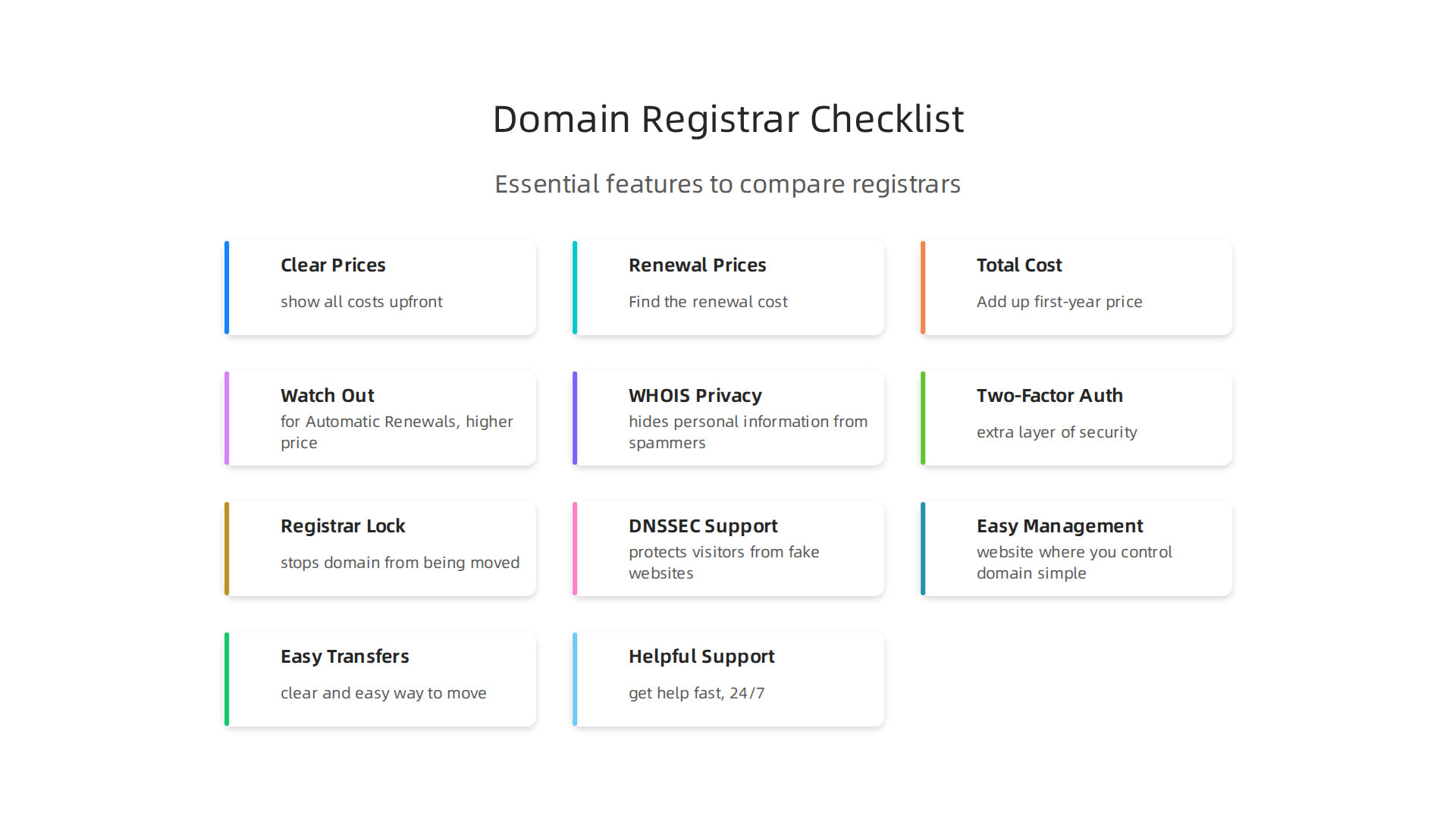
What to Look For in a Domain Registrar
Picking the right domain registrar depends on what you need for your website. A single-site entrepreneur might need something different from a growing online store.
Must-Haves (The Very Important Things)
- Clear Prices: Make sure they show all costs upfront. This includes the price for the first year and how much it will cost to renew each year after that. You don’t want any hidden fees. To truly understand what you’ll pay, learn how to master your domain name cost.
- Easy Management: The website where you control your domain should be simple to use. You should be able to change settings like DNS (which helps connect your domain to your website) without trouble. Some top domain registrars offer very strong DNS tools, which are great for keeping your site running smoothly and safely Best Domain Registrar for DNS Management (2026).
- Good Security: Look for features like domain privacy, which keeps your personal information hidden. Also, look for DNSSEC, which helps protect your website from bad guys.
- Easy Transfers: What if you want to move your domain to another company later? Make sure they have a clear and easy way to do this.
- Helpful Support: If you have a problem, you need to know you can get help fast. Look for registrars that offer help all day, every day (24/7), through chat, phone, or email.
Nice-to-Haves (Good Bonuses)
- Extra Features: Some registrars offer useful extras like email hosting, website builders, or developer tools. If you’re a developer or a business with special needs, you might want a registrar that offers an API (Application Programming Interface) for easier management. Companies like Cloudflare are known for their great tools for developers Best Domain Registrars for Developers in 2026: Porkbun, Cloudflare ….
- Bulk Management: If you plan to have many domain names, a registrar that lets you manage them all at once can save you a lot of time.
- Integration with Other Services: For example, if you already use certain web hosting services, it might be easier if your domain registrar works well with them.
Red Flags (Things to Avoid)
- Big Price Jumps: Watch out for very low first-year prices that jump way up when it’s time to renew.
- Bad Reviews: If many people complain about slow support or difficult tools, it’s a sign to look elsewhere.
- Hidden Fees: Always read the fine print to make sure there are no surprise charges for basic services like privacy protection.
By using this checklist, you can compare different domain companies, including popular ones like those formerly offered by google domains or squarespace domain registration, and choose the best fit for your business. Finding a reliable provider is key to a smooth online journey. For a hosting partner that prioritizes clear pricing, strong security, and helpful support, consider exploring options that provide enterprise-grade features for businesses of all sizes. Learn more about reliable web hosting and domain services.
Prism Web Host: Domain Registration & Hosting
Understanding the costs tied to your domain name is super important.

It’s not just about the first price you see. There are different fees and changes in price that can catch you by surprise if you’re not careful. This is especially true for those looking for the best domain registrar.
Pricing, Renewals, and Hidden Fees: What to Watch For
When you first register a domain name, you often see a low price. This is the initial registration cost, and it usually covers the first year. But many domain companies, including those that used to offer services like google domains or squarespace domain registration, have other fees you need to know about.
Here are the main costs you should understand:
- Initial Registration: This is the price to get your domain name for the first year. It’s often shown as a special deal or a very low price to get you to sign up.
- Renewal Rates: This is where many people get surprised. After the first year, the price to keep your domain name usually goes up. Sometimes it goes up a lot. For example, some common .com domains might cost around $10 to $15 for the first year, but then jump to $15 to $22 per year for renewal at bigger registrars. Some reports show that 76% of domain prices are lower in the first year than when you renew them later on. For instance, a .com domain that costs $9.99 for the first year at GoDaddy might renew at $21.99, which is a 120% increase Domain Registrar Pricing 2026: Namecheap vs GoDaddy vs ….
- ICANN Fees: ICANN is the group that manages domain names around the world. They add a small fee to most domain registrations. This fee is usually less than a dollar, but it’s part of the total cost. You can learn more about this in resources about Domain Renewal Cost & Price by TLD (2026).
- Premium Domains: Some domain names are considered "premium" because they are short, memorable, or use common keywords. These cost much more than regular domain names, both to buy and to renew.
- Transfer Costs: If you decide to move your domain name from one registrar to another, there might be a transfer fee. While moving a domain is often free or included with the first year at the new registrar, some companies may charge their own fees for you to move your domain away Registrar Pricing Due Diligence Renewal Transfer and Hidden Fees.
How Promotions Hide Long-Term Costs
Many top domain registrars use tempting first-year discounts. These promotions make their prices look very attractive at first glance. However, the catch is in the renewal price. You might pay $6.99 for your domain in the first year, but then it jumps to $18.99 or more in the second year. This makes it seem like you found a great deal, but it could cost you more in the long run. These "fake bargains" are a common tactic Domain Transfer Guide 2026: Steps, Duration, Auth · KEYDAL.
How to Figure Out Your True Multi-Year Costs
To avoid these surprises, here are some smart steps:
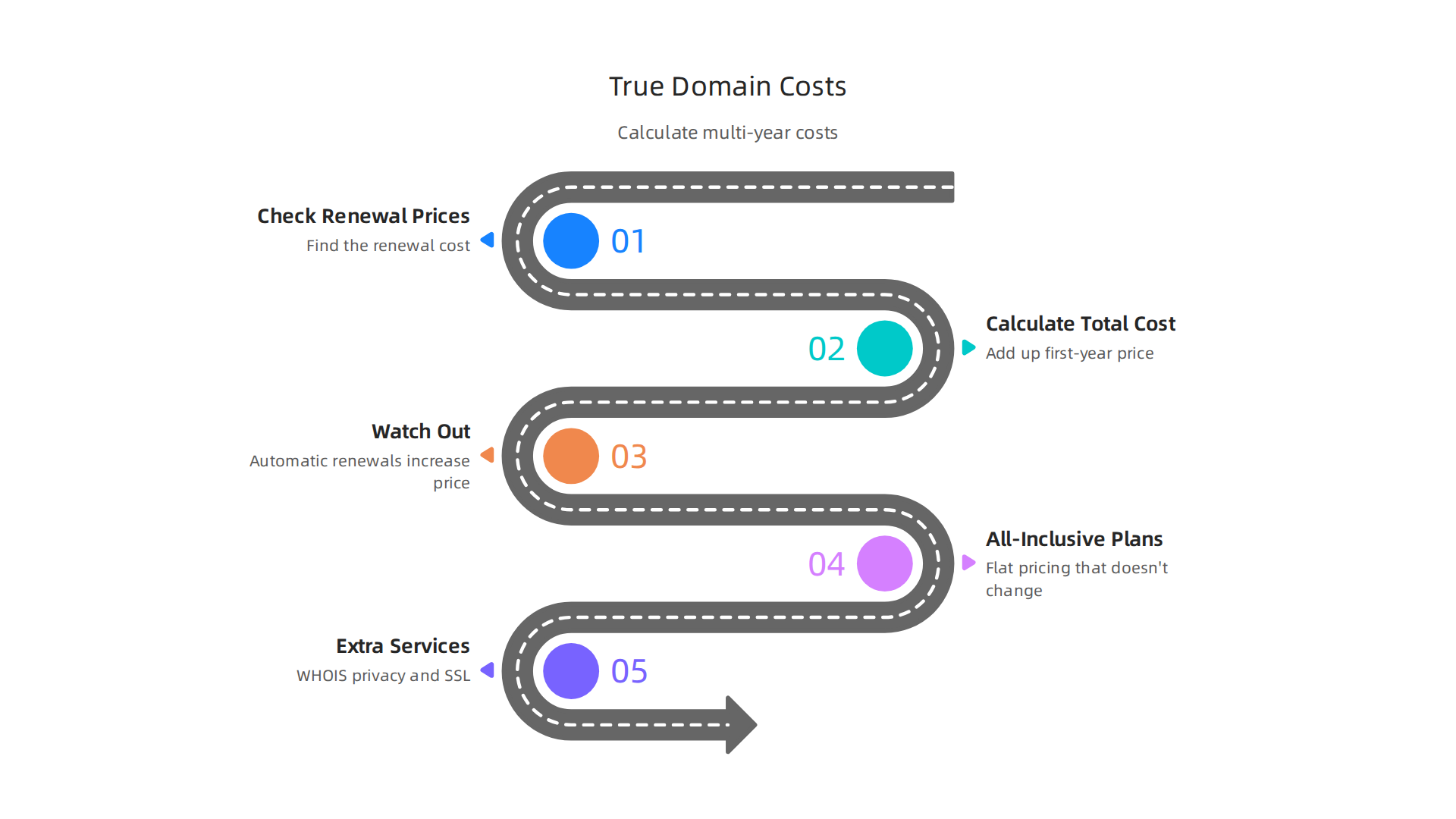
- Always Check Renewal Prices: Don’t just look at the first-year price. Find the renewal cost for each domain name you’re considering. This is the most important price to know for the long term. You can compare renewal prices easily with tools that track Average TLD Renewal Prices (2026).
- Calculate Total Cost for Several Years: Add up the first-year price and then the renewal price for the next two or three years. This gives you a better idea of the total cost over time. For example, if a domain is $10 for year one and $20 for renewal, a three-year cost is $10 + $20 + $20 = $50.
- Watch Out for Automatic Renewals: Many domain companies set your domain to renew automatically. This is helpful so you don’t accidentally lose your domain, but it means you’ll be charged the higher renewal price without a reminder. Make sure you know how to turn this off or change it if needed.
- Look for All-Inclusive Pricing: Some registrars, like Porkbun, offer clearer, flatter pricing that doesn’t change much from year to year. Others, like Cloudflare, offer domains at cost, meaning they charge you what they pay, which often means lower, stable prices Best Domain Registrars Compared: Spaceship vs Cloudflare vs ….
- Understand Extra Services: Things like WHOIS privacy (which hides your personal details online) or SSL certificates (for website security) might be free for the first year but cost money later. Always check if these are truly free forever or if they turn into paid services. For more details on avoiding unexpected costs, explore understanding your Wix domain cost or even your GoDaddy domain renewal price.
By being smart about pricing, you can choose the best domain registrar for your business and avoid nasty surprises down the road. It helps you save money and keep your online presence steady. You can also explore a broader domain name renewal price comparison to truly stop overpaying.
You just learned how to avoid surprise costs with your domain name. But making sure your domain is safe is just as important as saving money.

Think of your domain name as the front door to your online business. You wouldn’t leave your physical store unlocked, right? The same goes for your website. Choosing a good domain company means they offer strong security tools to protect your website from bad guys.
Security Features: WHOIS Privacy, Two-Factor, DNSSEC and Registrar Lock
When picking the best domain registrar, look closely at the security tools they offer. These features help keep your domain name safe from being stolen or misused. This is super important for all online brands, whether you’re a small business or a big online store.
Here are the key security features you should look for:
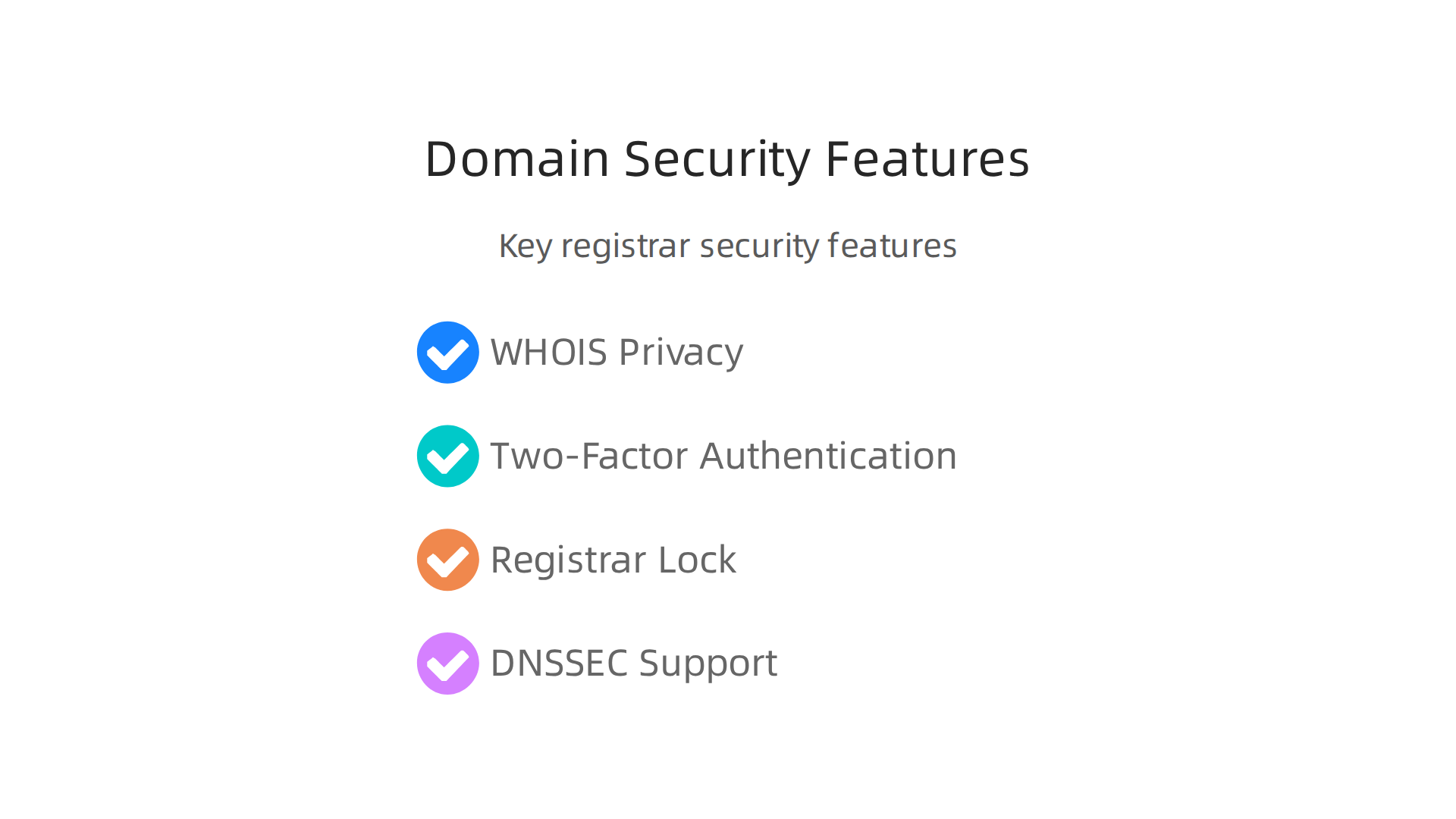
- WHOIS Privacy: When you register a domain, your personal information (like your name, address, and email) can become public. This is because of something called WHOIS. WHOIS privacy hides this information from spammers and hackers. Many top domain registrars offer this service, sometimes for free, sometimes for a small fee. It’s a simple way to protect your personal details online.
- Two-Factor Authentication (2FA): This adds an extra layer of security to your account. Instead of just a password, you need a second thing to log in, like a code sent to your phone. This makes it much harder for someone to get into your domain account, even if they guess your password. It’s like having a second lock on your door.
- Registrar Lock: This is a very important safety feature. It stops your domain name from being moved or changed without your permission. It’s often called "Client Transfer Prohibited" status. If your domain is locked, nobody can transfer it to another domain company without you first turning off this lock in your account. The main group that manages domain names, ICANN, also has rules about locks. For example, in 2026, newly registered domains might have a 30-day lock before they can be transferred, a change from the older 60-day rule Domain expiration: lifecycle, protection, best practices. This kind of lock helps keep your domain safe from unauthorized moves, as explained by About Locked Domain.
- DNSSEC Support: DNSSEC stands for Domain Name System Security Extensions. This feature helps protect your website visitors from being sent to fake websites. It works by making sure that your website’s address (its DNS information) hasn’t been tampered with. It’s like having a seal of authenticity on your website’s address, ensuring people land on your real site, not a tricky fake one Domain Name System Security for Domain Owners.
How Your Registrar Helps When Things Go Wrong
Choosing the best domain registrar also means picking a company that can help you if something bad happens, like your domain being hijacked. Good domain companies have clear steps for what to do in such cases, helping you get your domain back quickly. This quick help is crucial for your business because a hijacked domain can cause a lot of damage and lost sales. A trustworthy registrar should have strong policies for handling these situations and protecting your digital identity.
Checklist for a Secure Registrar
To make sure you pick a secure registrar, ask yourself these questions:
- Does the registrar offer free WHOIS privacy, or is it an affordable extra?
- Do they support two-factor authentication for logging into your account?
- Can you easily turn on and off the registrar lock from your dashboard?
- Does the registrar support DNSSEC to protect your website visitors?
- Do they have a clear plan for helping customers recover a domain if it’s stolen or compromised?
By checking these things, you can find a reputable domain registrar that protects your business and helps you keep your online presence safe and sound. It’s an important step for any business that relies on its website to connect with customers. Learning about these features is part of understanding your domain name meaning the business guide to web identity seo and security.
Beyond keeping your domain safe, how you manage it day-to-day is also super important. Think of it like taking care of your car after you buy it. You need the right tools and a good plan to keep it running smoothly. The best domain registrar gives you easy ways to control your domain, link it with other services, and grow your business without headaches.

Domain Management, DNS Controls and Developer Workflows
A good domain company offers more than just registration and security. It provides strong tools for managing your domain’s settings, especially its DNS (Domain Name System). DNS is like the internet’s phone book, matching your website name to its actual online address. Getting this right means your visitors can find your site every time.
What good DNS management looks like:
- API Access: For businesses that want to do things faster, an API (Application Programming Interface) is key. This lets computer programs talk to your registrar’s system directly. You can register, renew, and manage your domain and DNS records without manually clicking through menus. Many top domain registrars, like Cloudflare Registrar and Porkbun, offer full API access, which is great for developers and teams looking to automate tasks in 2026, as noted in expert reviews Best Domain Registrars for Developers in 2026: Porkbun, Cloudflare …. This kind of tool helps you manage many domains easily.
- TTL Control: TTL stands for "Time To Live." It tells other computers how long to remember your domain’s settings. With good TTL control, you can make changes to your DNS faster. If you need to switch your website to a new server, a low TTL means the change happens quicker, reducing the time your site might be down.
- Versioning and Zone Templates: For bigger businesses or those managing many domains, versioning means you can see past changes and even go back to an older setup if needed. Zone templates let you quickly apply the same DNS settings to multiple new domains, saving a lot of time and preventing errors. Cloudflare is often praised for its strong DNS tools, including a full records API and one-click DNSSEC, making it a top pick when DNS quality is important Best Domain Registrar for DNS Management (2026). For teams that need lots of control over DNS, tools that offer full DNS hosting APIs are very helpful in 2026 Best DNS and Domain APIs for Developers in 2026 – APIScout.
How Registrar Integration with Other Services Saves Time
The best domain registrar doesn’t just manage your domain in a bubble. It should work well with other important parts of your online business, like web hosting, Content Delivery Networks (CDNs), and SSL certificates.
When your domain company integrates well:
- Faster Setup: You can often set up your website hosting, point your domain, and get an SSL certificate all from one place or with fewer steps. This saves time and means less chance of making a mistake.
- Fewer Errors: If your domain registrar, hosting, and SSL provider all work together smoothly, there are fewer chances for things to go wrong. Imagine linking your web hosting meaning explained for business owners directly from your domain dashboard.
- Easier Management: Instead of logging into many different accounts, you might manage your domain and other key services from a single dashboard. This is very helpful for busy business owners. Even if you chose a platform like Squarespace for your website, looking into smooth Squarespace domain registration and integration can make your life much easier. Some domain companies also offer specific developer tools, like Google Cloud DNS, which helps integrate your domain with other Google services.
Evaluating Registrar User Interfaces and Automation for Scaling Teams
How easy it is to use your registrar’s website or tools makes a big difference, especially as your business grows. The user interface (UI) should be clear and simple, even if it offers many advanced features. For teams, automation features become critical.
Look for a registrar that offers:
- Intuitive Dashboards: A clean, easy-to-understand control panel where you can find all your domain settings without trouble.
- Automation for Growth: As your business scales and you add more domains, you’ll want tools that can automate tasks like renewals, DNS updates, and setting up new domains. This is where API access really shines, allowing teams to build custom workflows. Some of the best domain registrar options for developers, like Cloudflare Registrar, offer advanced developer tooling with full domain and DNS APIs and strong security for these automated tasks Best Domain Registrar for Domain APIs (2026). For managing many domains, especially for larger operations, finding the Best Enterprise Domain Registrars 2026 | SSO, API, Bulk Management can make a huge difference.
Choosing the right partner for your domain and hosting is a big step for your online presence. For reliable, secure, and high-performance website hosting infrastructure, consider Prism Web Host. We focus on making it easy for you to launch and keep your website running smoothly.
For more information on reliable hosting and domain solutions, you can always visit Prism Web Host: Domain Registration & Hosting.
After looking at how easy it is to manage your domain every day, let’s talk about the extra services that make a big difference. Many top domain registrars offer more than just a name for your website. They often bundle helpful features like email, security for your site, and ways to keep your personal information private. But it’s also smart to know which extras are truly useful and which are just unnecessary add-ons.
Value-added services: email, SSL, privacy and support
When choosing the best domain registrar, it’s not just about the price of the domain itself. It’s also about what else you get. Some services are really important for your online business, while others might just be trying to get more money from you.
Helpful Bundled Services
Let’s look at some important services that a good domain company might include:
- Email Forwarding: This lets you create a professional email address using your domain name (like
info@yourbusiness.com) and have all messages sent to your regular personal email. Many registrars offer a few email forwarding addresses for free, which is super handy for a small business. You often don’t need to pay for a full email hosting service right away if forwarding is enough. - Basic SSL Certificates: SSL makes your website secure. You know your site is secure when you see "https://" in the web address and a padlock symbol. This keeps information safe when people visit your site. A basic SSL certificate, like those from Let’s Encrypt, is often free and should be included by your registrar or hosting company. Many top domain registrars bundle free SSL certificates, or your web host might provide one 8 best domain registrars: price and renewal comparison 2026. If a registrar tries to sell you an expensive basic SSL certificate, it’s often an unnecessary upsell.
- WHOIS Privacy: When you register a domain, your personal contact information (like your name, address, and phone number) can be made public in a database called WHOIS. WHOIS privacy keeps this information hidden from spammers and marketers. The best domain registrar will often provide this service for free. For example, many domain companies like Namecheap, Porkbun, and Cloudflare include free WHOIS privacy with their domain registrations Porkbun Vs. Namecheap 2026: One Is Ripping You Off on …. It’s a critical privacy feature that shouldn’t cost you extra.
Spotting Unnecessary Upsells
While some extras are great, be careful of those that add unnecessary costs. Many registrars, like some commonly known ones, might offer a low first-year price but then charge much more for renewal or for services that should be free Domain Registrar Pricing 2026: Namecheap vs GoDaddy vs …. Always check the renewal price and what services are truly free for the long term. This helps you avoid hidden fees and truly understand your domain name renewal price comparison.
The Importance of Good Support
Imagine your website goes down, or you can’t figure out a setting. This is when good customer support becomes priceless. For businesses, timely and knowledgeable support means less downtime and fewer headaches.
When looking at a domain registrar, ask yourself:
- How easy is it to get help? Do they offer 24/7 support through live chat, phone, or email?
- Are the support staff knowledgeable? Can they actually solve your problem, or do they just read from a script?
- Are there clear paths for bigger problems? For businesses, knowing how to escalate a complex issue to a senior technician is important.
The top domain registrars will have clear support options listed. Some registrars even bundle enterprise-grade DNS, DDoS protection, and free SSL for better security and support options Best Domain Registrars 2026: Expert Comparison – names.center.
Evaluating Support Quality and Service Guarantees
Before you commit, it’s a good idea to check reviews about a registrar’s support. You can also test their pre-sales support by asking a few questions before you buy. Look for companies that offer Service Level Agreements (SLAs), which are promises about how quickly they’ll respond or how much uptime your domain services will have. This is a sign of a reliable partner. Choosing a reputable provider that protects your business is key to your online success. If you’re looking for more tips, explore how to find reputable domain name registrars that protect your business.
Transferring your domain name from one company to another can seem tricky, but it’s a common task for many businesses. Whether you’re unhappy with your current provider or found a better deal with another best domain registrar, knowing the right steps can make sure your website stays online without any hiccups.
Your Step-by-Step Domain Transfer Checklist
To move your domain smoothly, follow these important steps:
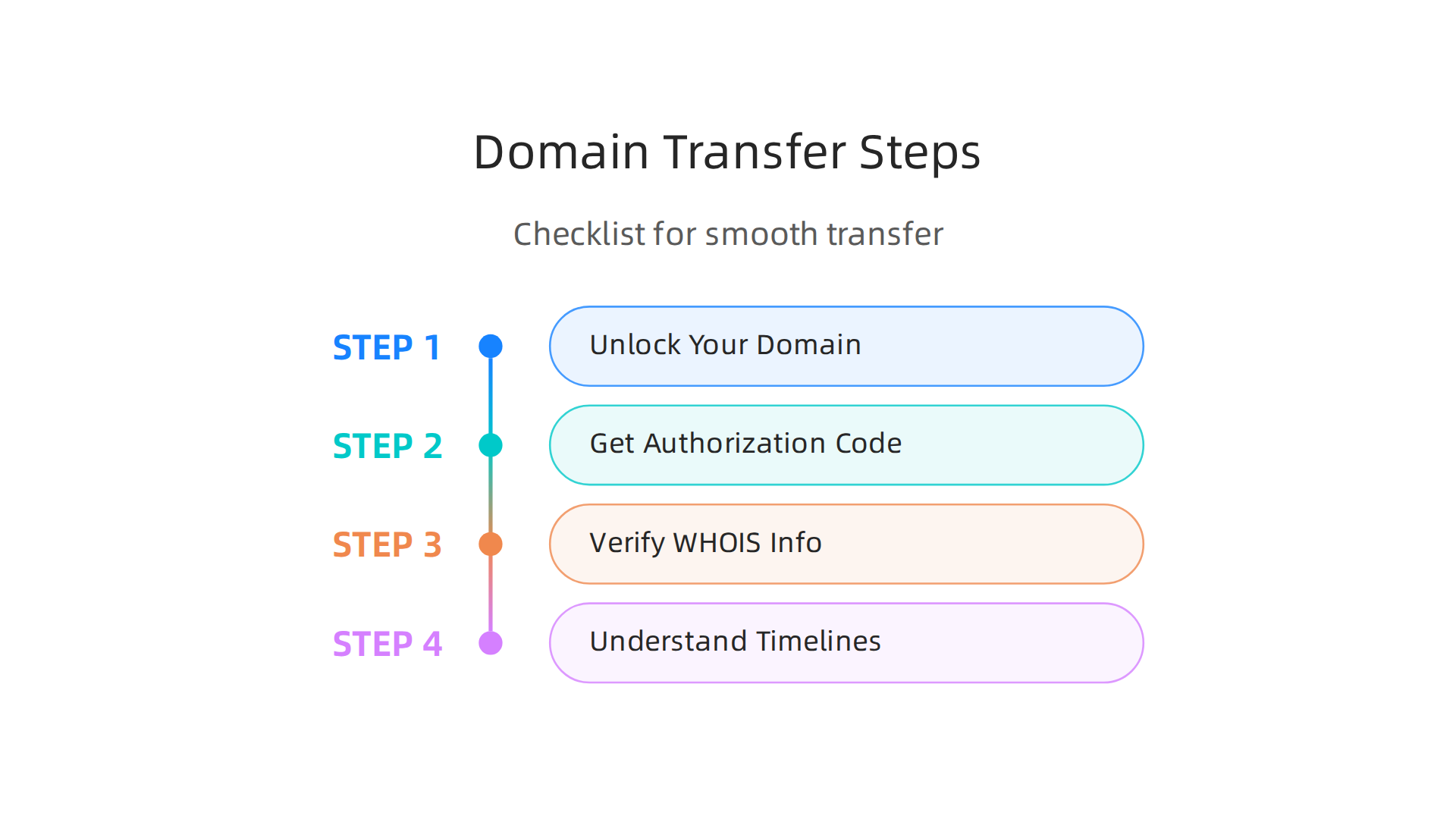
- Unlock Your Domain: First, you need to "unlock" your domain at your current registrar. This is a security feature to stop anyone from moving your domain without your permission. You usually do this from your account dashboard. This lock might be called "Registrar Lock" or "Client Transfer Prohibited" and must be turned off for the transfer to happen successfully, as explained by About Locked Domain.
- Get Your Authorization Code: Also known as an EPP code or transfer key, this is a secret password that proves you own the domain. Your current registrar will give you this code. You will need it to give to your new domain company. Make sure to copy this code carefully, as incorrect codes are a main reason transfers fail, according to the Domain Transfer Guide 2026: Steps, Duration, Auth · KEYDAL.
- Verify WHOIS Contact Info: Before you start the transfer, check that your contact information in the WHOIS database is correct and up-to-date. This helps ensure you receive important emails about the transfer.
- Understand Transfer Timelines: There are rules about when you can transfer a domain. For instance, you generally cannot transfer a domain within 60 days of first registering it or within 60 days of a previous transfer. However, in 2026, new rules mean that new registrations and post-transfer locks are often reduced to 30 days. It’s good to know that these policy-based locks cannot be lifted early, as noted in Why Can’t I Transfer My Domain? The 60-Day Lock – Maxinames.
How to Avoid Transfer Problems and Downtime
Transferring a domain has some common traps. Knowing about them helps you avoid losing access to your website.
- Watch Out for Locks: Besides the registrar lock you can turn off, ICANN (the group that oversees domain names) has locks too. These stop transfers for 30 or 60 days after certain events like a new registration or a change in who owns the domain. These locks are for security and can’t be rushed.
- Correct Authorization Codes: As mentioned, a wrong EPP code is a common problem. Double-check that you enter it exactly as given by your old registrar. Transfer failures are often caused by expired or incorrect codes, warns Domain Transfer Failed: Common Reasons and Solutions (2025).
- Hidden Fees: Some domain companies might try to charge extra "transfer-out" fees or make the process difficult. The How Registrar Pricing Impacts Long Term Domain ROI article points out that these hidden charges can affect your long-term costs. Always check what fees apply when moving your domain away.
- Plan for No Downtime: To keep your website running, do not cancel your old hosting or domain service until the transfer is fully done and your site is working with the new provider. It’s often smart to prepare your new hosting environment before starting the domain transfer. This is especially true if you need to migrate WordPress site to new domain safely in 2026 to protect your SEO and ensure zero downtime.
Moving Many Domains and Checking Everything Afterward
If you have many domains, moving them can be a bigger job. It requires careful planning to make sure all domains transfer correctly. Some providers like Google Domains used to offer domain registration, and many users might be looking to transfer their existing domains from them to another service. When choosing your new provider, look for top domain registrars that make multi-domain transfers easier.
After the transfer is complete, always do a final check.
- Make sure your website loads correctly with the new domain company.
- Test your email addresses to ensure they are working.
- Check your domain’s WHOIS information again to confirm the new registrar is listed as the provider. This helps make sure everything is set up right for your business.
Summary
This article explains how to choose the best domain registrar for your business by walking through pricing, security, management, and transfer considerations. It shows why the registrar you pick affects cost, uptime, and the safety of your online brand, and it exposes common traps like low first‑year offers that spike at renewal. You’ll learn which features are must-haves (clear pricing, WHOIS privacy, 2FA, registrar lock, DNSSEC) and which extras are useful versus upsells. The guide gives a simple checklist to compare registrars, step-by-step transfer instructions to avoid downtime, and practical tips for calculating true multi‑year costs. After reading, you’ll be able to shortlist registrars that fit your budget and security needs, avoid surprise fees, and manage domains with less risk.
