




Webflow Hosting For Business Websites Performance Security Scalability
Article
Running a business in 2026 means having a great website. But picking the right home for your website can feel like a big puzzle.

This home is called "web hosting," and it’s super important for how well your site works. Many business owners and new companies get stuck trying to figure out the best way to keep their website fast, safe, and always online.
This guide is here to make things easy for you. We will focus on Webflow hosting. Webflow is a tool that helps you build great websites without needing to know a lot of code. It also offers its own special web application hosting. This means your website lives right where you built it.
You’ll learn all about how Webflow hosting works and how it can help businesses like yours. We’ll talk about the things that worry most people:
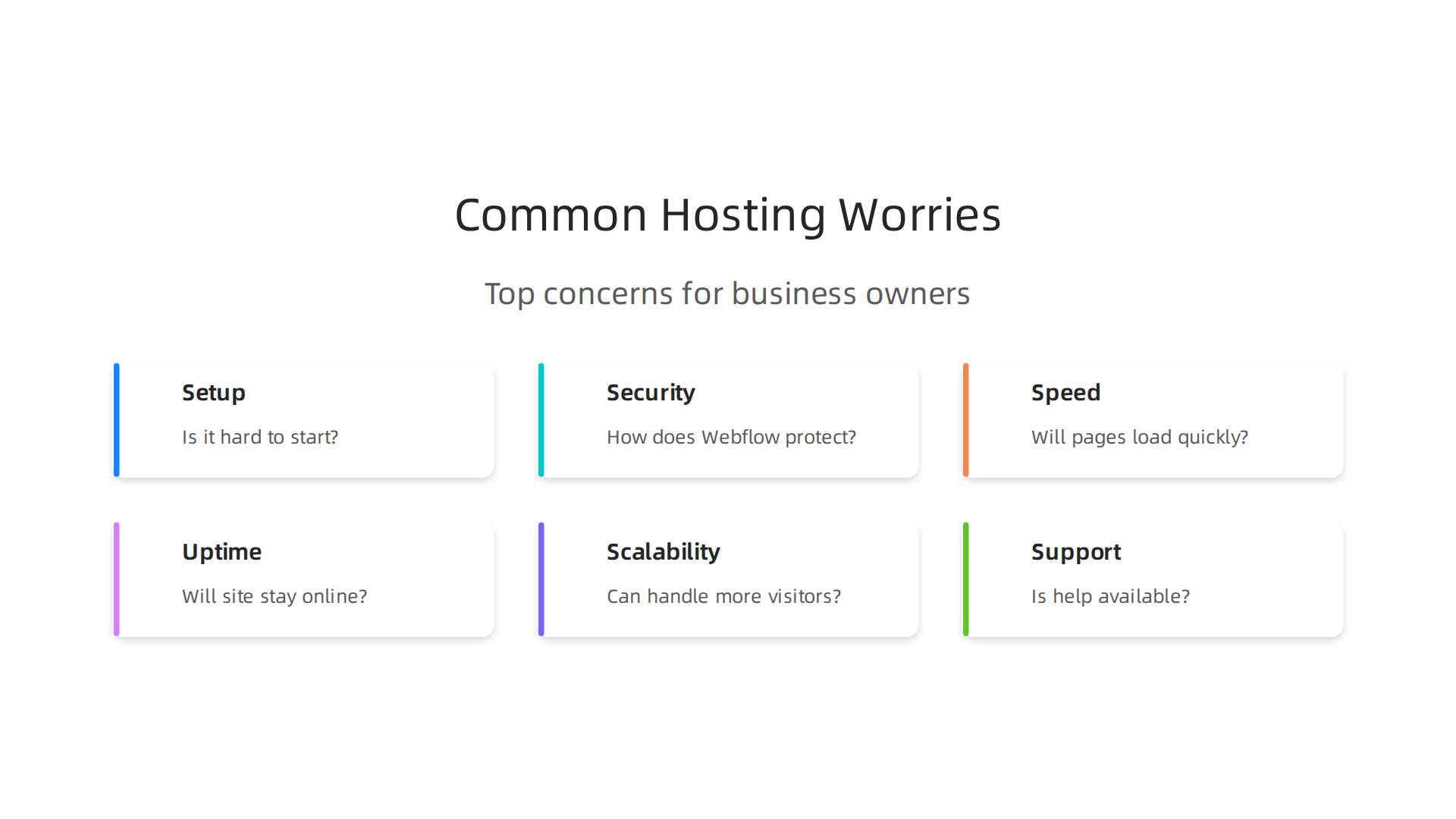
- Setting up your site: Is it hard to get started?
- Keeping it safe: How does Webflow protect your website from bad guys and cyber threats?
- Website speed: Will your pages load super fast for your visitors? Slow websites can make people leave!
- Always online: Will your website be up and running all the time, or will it have annoying downtimes?
- Growing with you: Can your website handle more visitors as your business gets bigger? Webflow hosting plans have limits on things like bandwidth, which is how much data your site can send out. Going over these can mean extra costs or slow speeds Webflow Limitations: What It Can’t Do (2026).
- Getting help: What if you have a question or a problem? Is there good support?
By the end of this guide, you will know exactly what to look for when it comes to webflow hosting. We will help you make smart choices for your business website. Understanding what web hosting services are is the first step to online success what is web hosting services a clear definition for business owners.
Many different types of web application hosting exist, from simple options like the Hostinger Website Builder to more general services like the GoDaddy Website Builder. Webflow offers a unique all-in-one approach. If you’re looking for strong, safe web hosting for your business, check out Prism Web Host – Web Hosting Services for options. We want to help you pick the best home for your website so you can focus on growing your business without any tech headaches.
Webflow hosting is special because it’s built right into the Webflow design tool. Think of it like a house where the walls, roof, and foundation are all made by the same company. This means everything works together very smoothly. It’s a type of web application hosting that takes care of all the tricky tech parts for you.
When you use Webflow for your website, you’re getting what’s called a managed hosting service. This means Webflow handles the servers, security, and updates. You don’t have to worry about finding a separate hosting company or learning complex server settings. This makes it much easier for small business owners and new companies to focus on their actual business.

How Webflow Hosting Works Its Magic
Webflow uses a smart system to make your website fast and reliable for everyone, no matter where they are in the world.
- Global Edge Network (CDN): Your website files are not stored in just one place. Instead, they are copied and saved on many servers around the world. These servers are called a Content Delivery Network, or CDN. When someone visits your site, the files come from the server closest to them. This makes your website load much faster. In fact, using a CDN can make your website’s "Time to First Byte" (how quickly the server responds) much faster, sometimes by 60-80% for people all over the world Site Speed SEO 2026: PageSpeed Impact on Rankings. This speed is super important because people don’t like waiting for slow websites.
- Automatic Scaling: As your business grows and more people visit your site, Webflow’s web app hosting can handle the extra traffic without slowing down. It’s like having a road that automatically gets more lanes when there are more cars.
Key Features for Your Business
Webflow hosting comes with important features that help your small to medium-sized business (SMB) succeed online:
- SSL Certificates and Automatic HTTPS: These are like security badges for your website. An SSL certificate makes sure that any information sent between your visitors and your site is private and safe. Webflow automatically gives you an SSL certificate and makes sure your site always uses "HTTPS" in its address, which shows visitors your site is secure. This is a big deal for trust and for how search engines like Google see your site.
- CMS Integration: If your website has a blog, news section, or products to sell, Webflow’s Content Management System (CMS) makes it easy to add and change things without touching any code. This is very helpful for keeping your site fresh and up-to-date. You can even export your CMS content as a CSV file if you need to Export CMS content as a CSV.
- Automatic Backups: Webflow regularly makes copies of your website. If anything goes wrong, you can easily go back to an earlier version. This is like having a save button for your entire website, protecting your hard work.
- Custom Domains: You can use your very own website address (like
yourbusiness.com) with Webflow hosting. This makes your business look professional and trustworthy. - No Server Maintenance: With Webflow’s managed hosting model, you don’t need to worry about server updates, security patches, or other technical chores. Webflow takes care of all that in the background, letting you focus on your business.
Understanding these features can help you pick the best home for your website. For more details on choosing a hosting company that values speed and security, you can learn how to make smart decisions for your business in 2026. Remember, choosing the right web hosting solution is vital for your online success.
Choosing the right web hosting solution is indeed vital for your online success. A big part of that success comes from how fast your website loads. Think about it: when you visit a website, you don’t like to wait, right?
Performance and speed: CDN, TTFB, and real-world loading times
Website speed is super important for two main reasons. First, fast websites make visitors happy. If your site is slow, people might leave before they even see your content or products. This means lost customers and sales. Second, search engines like Google look at how fast your website loads. Faster sites often rank higher in search results, helping more people find your business.

This is why things like a Content Delivery Network (CDN) and good caching are so important for getting people to visit your site and stay on it.
A Content Delivery Network (CDN), which Webflow hosting uses, helps a lot with speed. It stores copies of your website in many places around the world. So, when someone visits your site, the content comes from the server closest to them, making it load much faster. This also helps with caching, where your computer saves parts of a website so it loads even quicker next time.
One key measurement of speed is called "Time to First Byte" or TTFB. This measures how long it takes for your browser to get the very first bit of information from the server after you click on a link. A low TTFB means your server is quick to respond. Google aims for TTFB to be under 800 milliseconds for good performance, and faster speeds under 200ms are even better Site Speed SEO 2026: PageSpeed Impact on Rankings. Webflow’s web app hosting is built to keep this time low, which makes your site feel snappy from the start.
To help people know if a website offers a good experience, Google uses something called Core Web Vitals.
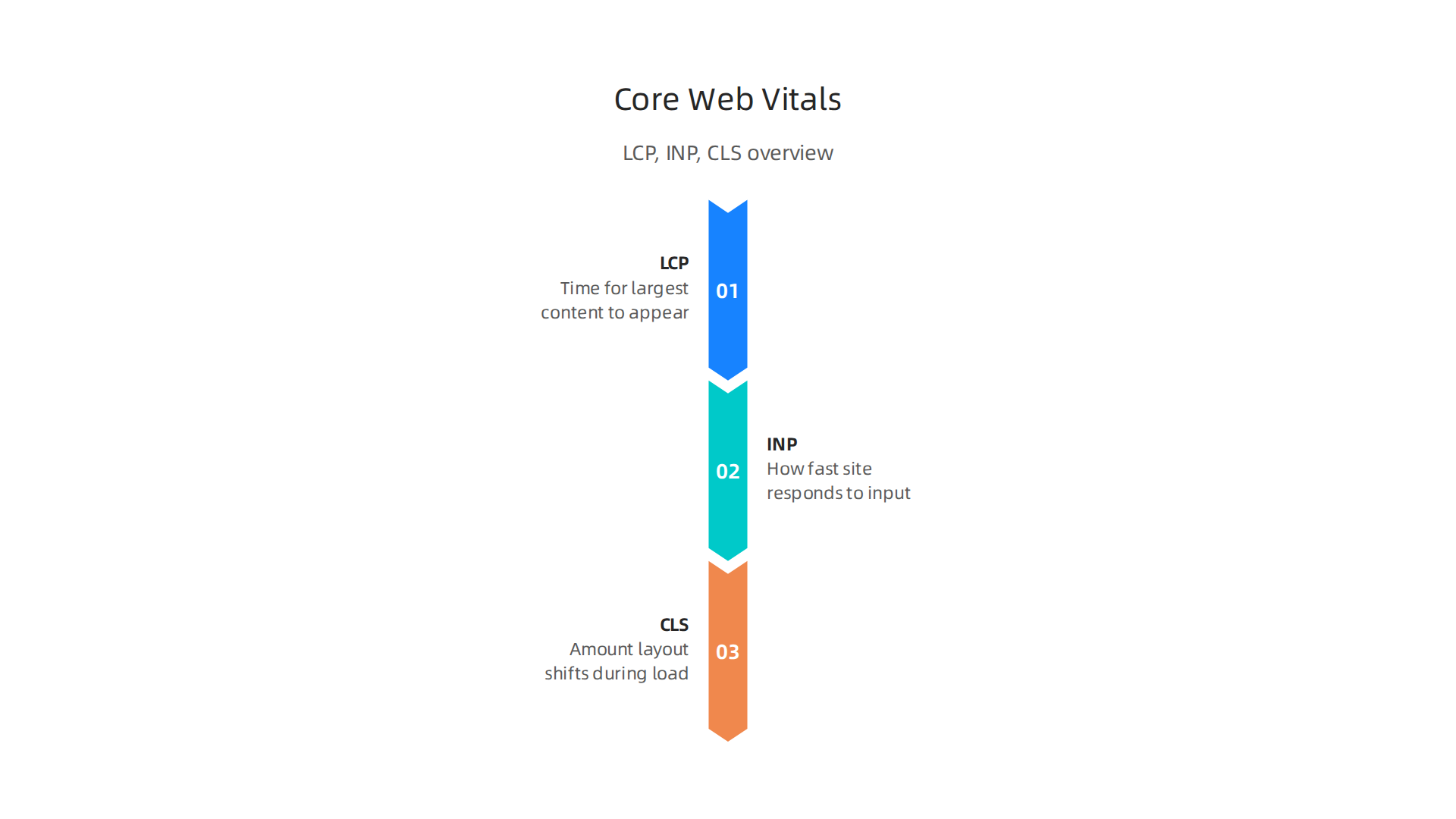
These are three simple measures that look at how fast a site loads, how quickly it reacts when you click on things, and if the page moves around a lot while loading.
- Largest Contentful Paint (LCP): This measures how long it takes for the biggest piece of content on your page to show up. It’s about how quickly your site feels useful to a visitor. A good LCP is under 2.5 seconds Core Web Vitals 2026: The Complete Guide to LCP, CLS & INP.
- Interaction to Next Paint (INP): This checks how fast your website responds when you click a button or tap on something. It’s about how smooth and interactive your site feels. A good INP is under 200 milliseconds Core Web Vitals 2026: INP, LCP & CLS Optimization.
- Cumulative Layout Shift (CLS): This measures how much your page layout jumps around while it’s loading. Nobody likes it when a button moves just as they’re about to click it. A good CLS is under 0.1 What Are the Core Web Vitals? LCP, INP & CLS Explained ….
You can check your website’s performance using tools like Google’s PageSpeed Insights or Lighthouse, which is built into web browsers. These tools will give you scores and suggestions for how to make your site faster.
Many website builders, even popular ones like Hostinger AI Website Builder Launch Small Business Sites Fast 2026 or GoDaddy Website Builder 2026 Create Fast Secure Websites, can sometimes have speed problems. Common issues include images that are too large, too many fancy effects, or servers that are just too slow. In fact, in 2026, many websites struggle with LCP, mostly due to images not being optimized and slow server responses Website Speed & Performance Statistics 2026 | 50+ Data Points.
With Webflow’s dedicated web application hosting, these bottlenecks are often taken care of automatically. This allows you to build a beautiful site without sacrificing the speed that keeps your visitors happy and your search engine rankings high. When looking for a hosting provider, it’s wise to consider providers known for excellent service, which you can learn more about by reading web hosting services reviews 2026 data backed guide to choosing a reliable host.
For a powerful, secure, and fast home for your website, explore the reliable infrastructure provided by Prism Web Host – Web Hosting Services.
After making sure your website is fast, the next big thing is to keep it safe and always running. Think of your website like a store. Speed gets people in the door, but security and reliability keep them coming back and protect your business. This is where strong webflow hosting or any good web application hosting really shines.
Security for Your Website
The internet can be a risky place. Bad actors, often called hackers, try to cause problems. They might try to steal information, break your website, or make it unavailable. Good hosting helps protect you from many of these threats.
- DDoS Protection: One common attack is a Distributed Denial of Service (DDoS) attack. This is when many computers try to visit your website all at once, overwhelming it so real visitors can’t get in. A strong hosting provider offers DDoS protection, which is like a bouncer at your store’s door. It stops the fake crowd so your real customers can enter. Top hosts use special firewalls to stop these attacks before they even reach your website’s main resources 5 Website Security Checklists and Best Practices for 2026.
- SSL Certificates (HTTPS): You might have seen website addresses start with "HTTPS" instead of "HTTP." The "S" means "secure." This is thanks to an SSL/TLS certificate. It scrambles the information sent between your website and your visitors, like their login details or payment info. This keeps their data private and safe from prying eyes. Most good hosting providers, like
Hostinger website builderorGodaddy website builderoptions, offer free SSL certificates that you should always activate Web Hosting Security: The Complete Checklist (2026). - Web Application Firewall (WAF): A WAF is like a guard for your website’s software. It checks all the traffic coming to your site and blocks anything that looks suspicious or harmful. This protects your site from many common web attacks Top 15 Web Application Security Best Practices in 2026. Quality
web app hostingoften includes these features automatically.
To keep your website safe, it’s wise to choose a provider with strong security measures. For a deeper dive into making smart hosting choices, consider reading our guide on choosing a web hosting company.
Backups and Reliability
Even with the best security, things can sometimes go wrong. Maybe you accidentally delete something important, or a software update causes a problem. That’s where backups come in.
- Automated Backups: Good hosting plans include regular, automatic backups of your entire website. This means copies of your site are saved often, so if something happens, you can easily go back to an earlier, working version. Experts recommend following the "3-2-1 backup rule": keep 3 copies of your data, on 2 different types of storage, with 1 copy kept off-site Cybersecurity Best Practices For 2026. This makes sure you can always restore your site.
- Easy Restore Process: Your hosting provider should make it simple to bring your site back from a backup. This can be a huge time-saver and stress-reducer if an issue ever comes up.
Always Online: Service Level Agreements (SLAs)
Reliability is about your website staying online and working properly all the time. Hosting providers often give you a Service Level Agreement (SLA). This is a formal promise about the service you’ll get.
- Uptime Guarantees: A key part of an SLA is the uptime guarantee. This is a promise that your website will be online a certain percentage of the time. For example, a "99.9% uptime" guarantee means your website should be up almost all the time, allowing only about 43 minutes of downtime in a month What Our 99.9% Uptime SLA Actually Covers. Many of the best web hosting services in 2026 aim for this or even higher.
- Support Response Times: SLAs also often include how quickly the hosting company will respond if you have a problem. Fast support is vital when your website is down or facing a security threat. Knowing your
webflow hostingor other provider has these protections in place offers peace of mind.
Choosing a hosting solution that offers robust security, reliable backups, and clear uptime guarantees is just as important as speed. It creates a stable and safe home for your online business to grow. For more tips on choosing a reliable web host, check out our guide on select the best web hosting for small business in 2026.
Even with great security and backups, what happens when many, many people visit your website all at once? Or when your business grows bigger and bigger? This is where your hosting needs to be able to grow with you. It’s all about handling those busy times and making sure your site is always ready for more visitors.

Websites That Grow With You
Imagine your website is a popular shop. When a lot of customers rush in, your shop needs to handle them all without anyone waiting outside. Your web host does this by using smart ways to scale up and down as needed.
- Edge Scaling and CDNs: Think of edge scaling as having mini-shops all over the world. When someone visits your website, they get the information from the mini-shop closest to them, not the main, faraway shop. This is done through something called a Content Delivery Network (CDN). A CDN helps your website load faster for everyone, no matter where they are, by storing parts of your site closer to your users. It also helps handle big rushes of visitors because the work is spread out How to Improve CDN Performance in 2026: Metrics …. Companies like Cloudflare are well-known CDNs that speed up content delivery. For example, using a CDN can make your website’s "Time to First Byte" (TTFB) much faster, which is how quickly your browser gets the first piece of information from the server Site Speed SEO 2026: PageSpeed Impact on Rankings. Many modern hosts, including options like
Hostinger website builderandGodaddy website builder, use or work well with CDNs. - Server Autoscaling: This is like your main shop having a magic back room that adds more cashiers and shelves automatically when more customers come in. When your website suddenly gets a lot of traffic, like from a big sale or a viral social media post, autoscaling means your
web application hostingautomatically adds more power to keep everything running smoothly. When traffic goes back down, it shrinks again. This way, you only pay for what you use, and your site stays fast. This is a key feature of advancedweb app hostingsolutions.
If you are looking into advanced hosting features that support this kind of growth, our guide on boost business with render web hosting performance security and scalability in 2026 can offer more insights.
What Uptime Guarantees Really Mean
We talked about uptime guarantees before, like 99.9% uptime. But what does that mean for important parts of your website? If your checkout page goes down during a big sale, that’s much worse than your "About Us" page being unavailable for a few minutes.
- Understanding Downtime: Even a 99.9% uptime means your site could be down for a short time each month. For critical pages like checkout or login, any downtime can mean lost money and upset customers. Good
webflow hostingor other high-quality hosting providers will have plans to get these vital pages back online super fast. - Incident Response: When something goes wrong, how quickly does your host react? A strong hosting company will have a team ready to jump in and fix problems right away. They’ll also have ways to lower the impact of issues, so even if there’s a problem, only a small part of your site is affected or it gets fixed very quickly. This is crucial for maintaining trust and ensuring your business keeps running without major hiccups. For businesses using services like Cloudflare, understanding their hosting pricing helps ensure you’re covered for high traffic and security needs Cloudflare Hosting Pricing What Businesses Must Know.
Planning for the Unexpected
Even the best systems can have a bad day. That’s why hosts have mitigation plans. These are like emergency drills for your website. They help the host act quickly to fix problems and stop them from spreading. For example, Hostinger prides itself on its strong security features, which includes advanced DDoS protection and automated backups, helping to keep sites safe and online Hostinger Trust Center.
Understanding these plans helps you feel confident that your website can handle whatever comes its way. It means your host has thought about what could go wrong and has a plan to deal with it, protecting your business from sudden slowdowns or crashes. To learn from real-world examples of website failures and how to avoid them, read our analysis of the Wordle unlimited website crash reveals 3 hosting mistakes small businesses must avoid.
Once you know your website is ready for anything, it’s time to think about the money part. How do you pick a hosting plan that fits your wallet but still gives you everything you need? This is where understanding prices and comparing plans becomes super important.
Pricing and plan comparison: choosing the right tier for your site
Picking the right hosting plan for your website is a lot like choosing a phone plan. You need to look at what’s included and what you actually use. Different hosting providers have different ways of charging, and knowing these can save you money in the long run.
Here are some common things that make hosting prices go up or down:
- Bandwidth: This is like the data limit on your phone plan. It’s how much information can travel to and from your website. If many people visit your site or you have lots of big pictures and videos, you’ll need more bandwidth. More bandwidth usually means a higher cost.
- CMS Items: For websites built with tools like Webflow, "CMS items" are like the pieces of content you can add, such as blog posts, products in a store, or team member profiles. If your website needs to hold lots of these items, a plan with more CMS item capacity will be needed, often found in higher tiers of
webflow hosting. - Form Submissions: If your website has contact forms, sign-up forms, or survey forms, this refers to how many times people can fill them out each month. Some plans limit this, so if you expect a lot of customer interaction, check this detail.
- Team Seats: This is how many different people can log in and work on your website’s backend or
web application hostingdashboard. Larger teams will need more "seats," which typically means a more expensive plan. - Enterprise Add-ons: These are special features for bigger businesses, like advanced security or super-fast support. They can add a lot to the cost, but they might be worth it if your business truly needs them.
Web hosting plans can vary quite a bit in price. Basic shared hosting might start as low as $2 to $12 per month, while website builders like Hostinger website builder or Godaddy website builder often cost between $10 and $40 per month. More advanced options like managed WordPress hosting can range from $15 to $60 a month, or even higher for very powerful web app hosting solutions How Much Does Web Hosting Cost in 2026? A Complete Pricing Breakdown. You can compare many different web hosts in tables that show both intro and renewal prices Best Web Hosting Comparison Table August 2026.
To really understand how much you’ll spend, it’s good to look at the Total Cost of Ownership (TCO). This isn’t just the monthly fee, but all the costs added together over time. TCO helps you see the bigger picture beyond just the monthly payment Total Cost of Ownership – MU Extension – Mizzou.
When comparing the full cost, think about these things:
- Platform Fees: These are the regular payments for the hosting itself. Remember that introductory prices often jump up when you renew, so always check the renewal price, not just the starting offer. For example,
Hostingeroften has very low starting prices that increase upon renewal Web Hosting Comparison: Our 2026 Table. - Development Time: How much time or money will you spend building or updating your website? If a platform is hard to use, you might spend more on a web developer, which adds to your total cost.
- Migration Costs: If you’re moving an existing website to a new host, there might be fees or time spent on transferring everything. This is a one-time cost, but it’s important to plan for it.
- Managed Support: Some plans include extra help from experts to keep your site running smoothly. This "managed support" can save you a lot of headache and time if you’re not a tech expert yourself.
Understanding these costs will help you choose a plan that not only fits your budget today but also makes sense as your business grows. Make sure you compare all the options to calculate your true web hosting cost and avoid hidden fees. When considering your hosting needs, exploring reliable services is key to success for your business. For comprehensive web hosting services designed for entrepreneurs and businesses, learn more about our options.
What happens if you need to move your website or you hit a snag and need help? This is where understanding website migration and reliable support becomes super important.
Migration, support, and troubleshooting: moving your site or staying put
Sometimes, you might need to move your website from one hosting company to another. This can happen if your old host is too slow, too expensive, or doesn’t offer the features you need as your business grows. Moving a website, called migration, needs careful steps to make sure everything works right and you don’t lose any information.
Here’s a simple checklist to help you move your website:
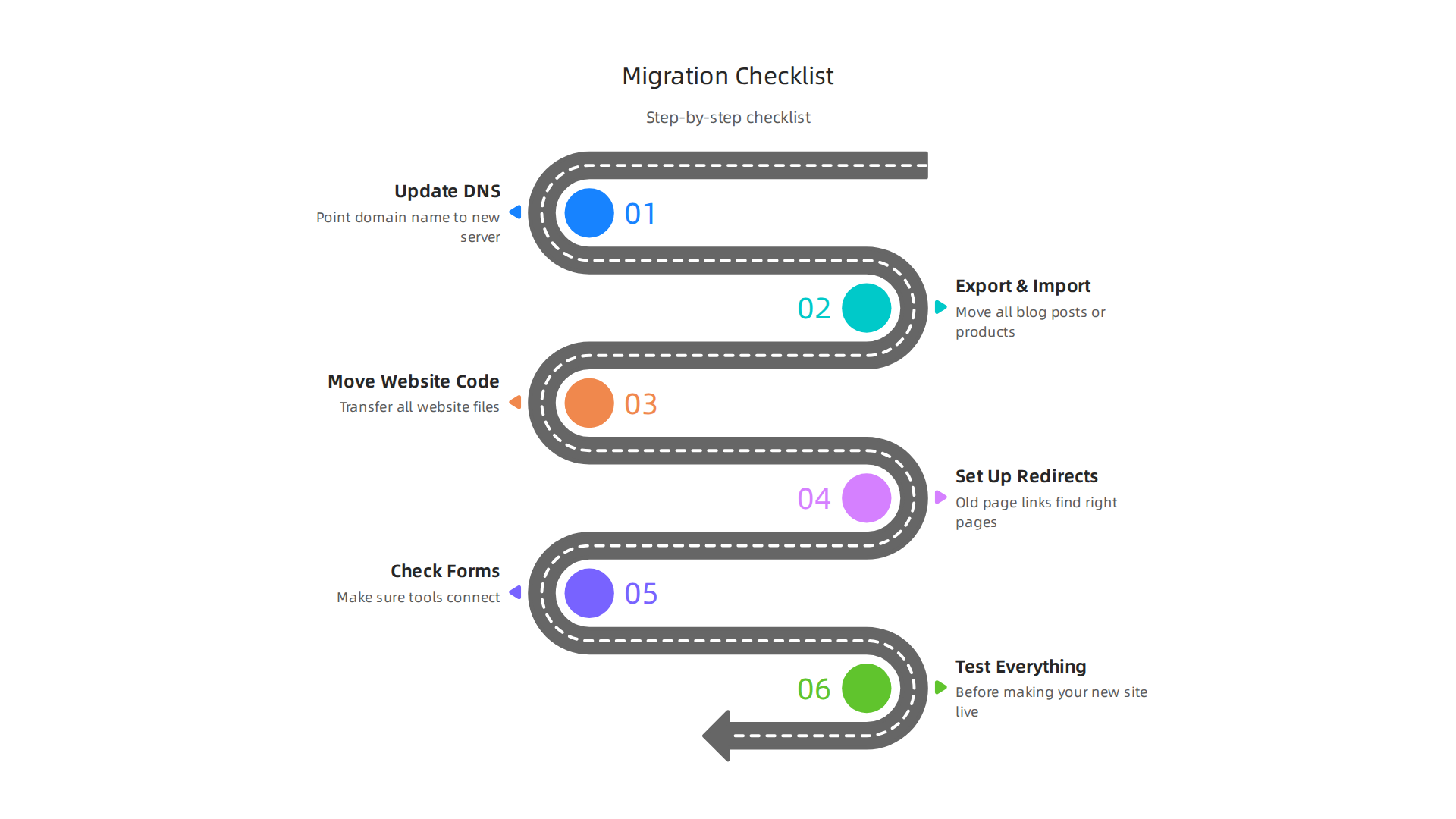
- Update DNS: This is like changing your website’s address. You’ll need to point your domain name to the new hosting server.
- Export and Import Content: If your site has lots of blog posts or products, you’ll need to move all that content. For platforms like
webflow hosting, you can often export CMS content as a CSV file. Other website builders, such as aHostinger website builderorGodaddy website builder, might have their own tools for this. - Move Website Code: You’ll also need to transfer all the files that make up your website. For example, if you want to export the code from Webflow, you usually need a paid Workspace plan to do it directly.
- Set Up Redirects: If any of your old page links have changed, you need to set up special rules (called redirects) so visitors still find the right pages on your new site.
- Check Forms and Integrations: Make sure any contact forms, sign-up forms, or tools that connect to other services (like email marketing) are working correctly on the new host.
- Test Everything: Before making your new site live, test every part of it. Click all the links, fill out forms, and check that pictures and videos load fast.
If you’re moving a WordPress site, there are specific steps to take to make sure it moves safely. You can learn more about how to migrate a WordPress site to a new domain safely in 2026.
Getting Help: Support Options
Even with the best planning, sometimes things go wrong. This is when good customer support from your web hosting provider makes a huge difference.
- Community Support: Many hosts have online forums or guides where you can find answers or ask other users for help. This is often free and can be very useful for common problems.
- Vendor Support Tiers: Most hosting companies offer different levels of support. Basic plans might include email support, while higher-priced plans for
web application hostingorweb app hostingoften come with faster help via chat or phone, sometimes 24/7. - Managed Services: For businesses that want less hassle, some hosts offer "managed" services. This means they handle many technical tasks for you, like updates and security. This can be great if you don’t have a lot of technical know-how or time.
- Service Level Agreements (SLAs): A good hosting company will have an SLA. This is like a promise document that tells you exactly what kind of service you can expect. It will usually state how much uptime your site will have (meaning how much time it will be online) and how fast they will respond to your problems Hosting SLAs and guarantees: An agency guide. For example, a 99.9% uptime means your site should almost always be working.
- When to Hire Help: If a migration feels too big, or if you run into problems you can’t solve, it’s smart to hire a professional. A web developer or a specialist migration service can ensure your site moves smoothly without costly mistakes.
Choosing a hosting company that offers great support is just as important as choosing one with the right features. Good support helps you avoid long downtimes and lets you focus on running your business. It’s a key factor when choosing a web hosting company a business guide to speed and security.
For reliable web hosting services that include strong support and help you keep your website running smoothly, consider looking into options like Prism Web Host – Web Hosting Services.
Summary
This guide explains Webflow hosting and why it matters for small and growing businesses. It shows how Webflow’s managed hosting combines the design tool and infrastructure so you don’t manage servers, with features like a global CDN, automatic scaling, SSL, backups and a CMS. You’ll learn how those features improve site speed (TTFB and Core Web Vitals), security (WAF, DDoS protection) and reliability (uptime guarantees and restore options). The article also walks through costs and plan considerations—bandwidth, CMS limits, form submissions and total cost of ownership—so you can pick the right tier. It covers practical migration steps, support options and when to hire help. After reading, you’ll know what to check in a host, how Webflow compares as an all-in-one option, and how to plan for performance, security and growth.
