




Hostinger Website Builder Review 2026 What SMBs Need To Know
Article
Why this Hostinger Website Builder review matters for SMBs and entrepreneurs
In 2026, many small business owners and people starting their own online ventures feel a bit lost when it comes to making a website.

You know you need one, but choosing the right tools can be tricky. You might wonder if you need to hire a pro, or if you can do it yourself easily. This is where a good website builder comes in handy.
This review is especially for you if you’re an entrepreneur, run a small to medium-sized business (SMB), or are building an online brand. It’s for anyone who needs to make smart choices about web hosting and the tools to build their site. We know you want a website that looks good, works fast, and doesn’t cost too much. You also want it to be safe from online threats.
We’re going to take a close look at the Hostinger Website Builder. This tool is known for letting you create a website very quickly, often in just minutes, and it even offers AI tools to help you out, like an AI website creation feature. It comes with many pre-made designs, over 170 different templates to be exact, which can help you make a professional-looking site without needing special skills
Hostinger Website Builder review 2026. Some people also compare it to other options like the GoDaddy website builder or even more advanced platforms like a Showit website.
Our goal is to give you a clear, honest review. We will check how easy it is to use, how well it performs, how safe your website will be, what kind of help you can get, and of course, how much it costs. For example, all Hostinger Website Builder sites now use Hostinger’s own fast content delivery network (CDN) by default, which helps them load quicker and be more secure
What’s new at Hostinger: 2026 product updates. We’ll help you see if this website builder is the right fit for your business needs in 2026. If you’re looking for general web hosting options, our own products at Prism Web Host offer reliable and secure solutions built for businesses like yours.
Overview: What is Hostinger Website Builder and who is it for?
The Hostinger Website Builder is a special tool that helps you create a website easily and quickly. Think of it as a kit that has everything you need to build your online home without needing to know a lot about computers or coding. It brings together web hosting, which is like renting space on the internet for your site, and an easy editor where you can drag and drop things to design your pages.
This builder is a big part of what Hostinger offers. It’s known for its helpful AI website builder features. This means it can use smart computer programs to help you get started. For example, it can suggest designs, write text for your pages, and even create images. People really like these tools because they make website building much faster and simpler in 2026, saving a lot of time and effort for busy owners I Tested Hostinger’s Website Builder: What To Know For 2026.
So, who is the Hostinger Website Builder made for? It’s perfect for:
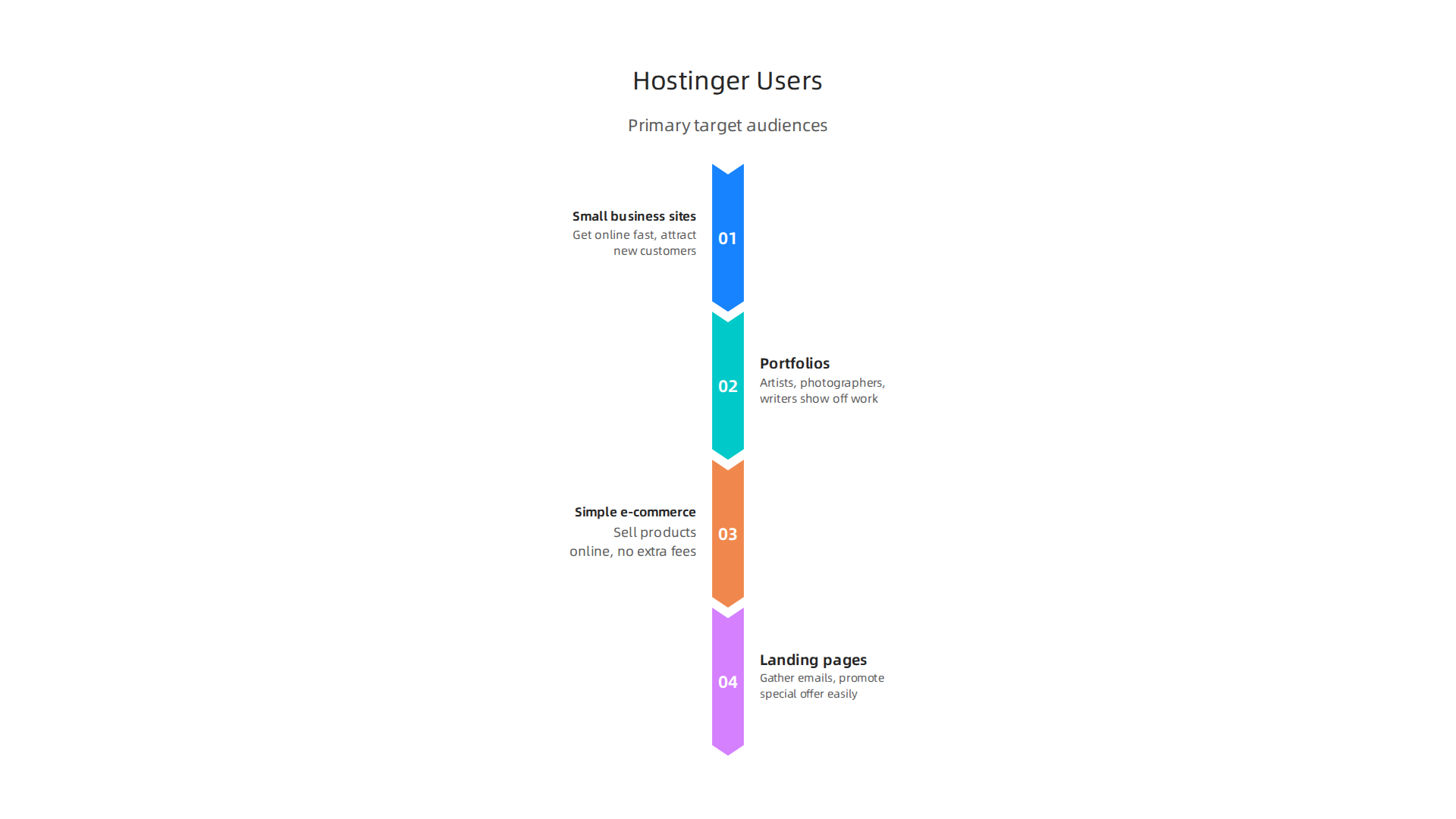
- Small business sites: If you run a small shop, a local service, or a growing business, this builder helps you get online fast. You can show what you do, list your services, and attract new customers.
- Portfolios: Artists, photographers, writers, or anyone who wants to show off their work can make a nice online gallery.
- Simple e-commerce: If you want to sell a few products online, the builder lets you set up a simple store. You can even sell up to 1,000 products with some plans, and they don’t charge extra fees on your sales Hostinger Website Builder Review 2026: Cheap, But Any Good?.
- Landing pages: These are single web pages made to gather emails or promote a special offer. The Hostinger Website Builder makes creating these focused pages easy.
Essentially, it’s for anyone who wants a professional-looking website without a lot of fuss or high costs. If you need a reliable and easy way to create your online presence, especially if you are looking for Hostinger cheap web hosting, this tool is a strong contender. It offers a beginner-friendly way to get your business or personal brand shining online. You can learn more about finding the best web hosting for small business 2026 to see where tools like this fit in.
After you know the Hostinger Website Builder is right for you, the next step is making your website look great. This is where templates and design tools come in handy. Hostinger offers many ready-made designs, called templates, to help you start easily.
Many Templates for Every Idea
The Hostinger Website Builder gives you lots of templates to pick from. These are like starter kits for your website, each with a different look and feel. You can find templates for almost any kind of business or personal project. For example, there are designs for shops, blogs, portfolios, and even restaurants. Many of these templates are made to fit certain jobs, so you might find one that looks just right for what you do. This means less work for you, as the main layout is already set up. You can see many of the options available to help you build your website quickly Website Builder | Create Your Website in Minutes with Ease.
A really cool thing about these templates is that they are built to work well on all devices. This is called mobile responsiveness. Whether someone views your website on a big computer screen, a tablet, or a small phone, it will always look good and be easy to use. This is very important today because so many people use their phones to look at websites.
Make It Your Own: Easy Customization
The best part about the Hostinger Website Builder is how easy it is to change things. You don’t need to know any special computer code. It uses a drag-and-drop system. This means you can click on parts of your website, like pictures or text boxes, and move them around with your mouse. You can also change colors, fonts, and add new sections easily. This freedom lets you make the template truly yours, matching your brand perfectly.

While it’s very easy to customize without code, for those who want even more control, Hostinger usually lets you add custom CSS if you know how, but most people won’t need it.
Compared to other options, the Hostinger Website Builder makes it simple to get a nice site. Other tools like the GoDaddy Website Builder create fast, secure websites, but Hostinger focuses on being super easy, especially with its Hostinger AI website builder features that help you pick and change designs even faster. If you’re looking for different styles, you might compare it to a Showit website builder review to see what other options offer.
Getting your website online means more than just a good design. You also need strong web hosting. At Prism Web Host, we make sure your website stays safe and fast, so your great design gets seen by everyone. If you’re ready to explore hosting options, check out our selection of Web Hosting Products & Services designed to keep your site running smoothly. This way, you get the best of both worlds: an easy builder and reliable hosting.
Now that you know how easy it is to pick a great template with the Hostinger Website Builder, let’s talk about the next step: actually building and managing your website pages. This is where the editor comes in. It’s the main tool you use to make your website exactly how you want it, all without needing to know special computer code.
Editor and Workflow: Building and Managing Pages
The Hostinger Website Builder uses a visual drag-and-drop editor. This means you can see your website as you build it. You simply click on blocks of content, like text, pictures, or buttons, and drag them to where you want them on your page. It’s like building with LEGOs, but for your website! This block-based system makes it super easy to add new parts or change existing ones. Because it’s so direct, many people find the learning curve to be short, which is great for anyone who isn’t a tech expert but wants a professional website in 2026 Hostinger Website Builder Review 2026 [Tried & Tested].
For people who don’t know much about website building, this simple setup is a big help. You don’t need to worry about complex settings or coding. The editor is designed to be beginner-friendly, allowing you to focus on your content and design ideas. Reviewers also confirm that the Hostinger Website Builder is beginner-friendly and combines hosting with its easy drag-and-drop editor Honest Hostinger Website Builder Review 2025: Pros, Cons, Results.
One of the coolest things is how the Hostinger AI website builder helps you. It can create text for your pages, suggest images, and even give you ideas for how to lay out your site. This is a huge time-saver and makes building even faster. For example, the AI tools can write content for your website and generate images, making the design process smoother Hostinger website builder review 2026 – I tested it and this was the result.
When it comes to managing your website, the Hostinger Website Builder has useful tools. It often has features like autosave, so your work is safe even if you forget to click "save." You can also manage many pages easily, adding new ones whenever you need more space for your ideas. Once your pages are ready, publishing them online is a straightforward step. Many users find the process clear and simple to follow Hostinger Website Builder Tutorial 2026 (Step-by-Step). This complete approach, from building with the drag-and-drop editor to publishing your site, makes the whole process smooth. If you’re looking into all the costs involved with getting your site online, including the builder and hosting, it’s good to understand the full picture, which you can read more about in our guide to the Hostinger cost.
After you finish building and publishing your website pages, you want them to work well for everyone who visits. This means your site needs to be fast and always available. How fast a website loads and how often it stays online is super important. It affects how people feel about your site, if they stay to look around, and even how easy it is for new people to find your site through search engines like Google.
Performance: Speed, hosting stack, and caching features
A slow website can make people leave before they even see your content. That’s why the speed of your site matters a lot for your customers and for your business. The Hostinger website builder does not just help you build pages easily, it also makes sure they run fast. This is thanks to the powerful hosting setup behind it.
Hostinger’s hosting uses special technologies to make your website quick. For example, they use LiteSpeed servers, which are known for being very fast, much quicker than older server types. They also use NVMe SSD storage, which is like a super-fast hard drive for websites, helping them load almost instantly. Many tests in 2026 show that Hostinger delivers speedy load times, often under 500 milliseconds for websites Hostinger Review 2026: Real Speed Tests, Uptime Data, and….
Another key part of Hostinger’s setup is its global network. They have servers in many different places around the world. This means when someone visits your site, the information comes from a server close to them, making it load much faster. They also use something called a Content Delivery Network, or CDN. Think of a CDN as many copies of your website stored in different places. When someone visits, they get the closest copy, speeding things up even more. Because of smart caching and global CDN, websites on Hostinger often load in less than a second Hostinger Web Hosting 2026: 0.8s Loads & 99.96% Uptime. If you’re curious about what all these hosting terms mean, you can learn more about what is web hosting services.
All these technical features work together to give you a website that performs well. High speed means your visitors have a better experience, which makes them happier and more likely to stay on your site.

Fast websites also rank better in search engines, helping more people find you. Plus, Hostinger usually guarantees very high uptime, often around 99.9% or more. This means your website is almost always online and ready for visitors.
Having a dependable website is crucial for any business or personal project in 2026. The Hostinger website builder helps you achieve this by providing great performance right out of the box. For businesses, this means more potential customers, better search engine rankings, and a smooth experience for everyone who clicks on your site. If you’re looking for hosting that performs, it’s always good to look at web hosting services reviews 2026.
While Hostinger’s powerful setup does a lot to make your site fast, how your actual website pages are put together also plays a big role. We’re talking about how quickly visitors see the first important parts of your page. This is often called "First Contentful Paint" (FCP). It’s a key measure because it shows how soon someone can start reading or seeing content, even before the whole page is fully loaded.
Many tests in 2026 show that Hostinger’s performance is strong. For example, TechRadar’s review noted that Hostinger delivered a speedy FCP of just 0.607 seconds, which is very fast Hostinger review 2026: Pros, cons and features tested. Other reports found Hostinger’s load times to be under 400ms on many plans Hostinger Review 2026: Tested for 560 Days. This means visitors see your content almost instantly.
Page load speed: Benchmarks and typical bottlenecks
Even with great hosting, some things on your website itself can slow it down. It’s like having a fast car but filling it with heavy stuff. Here’s what often affects how quickly your page first shows up:
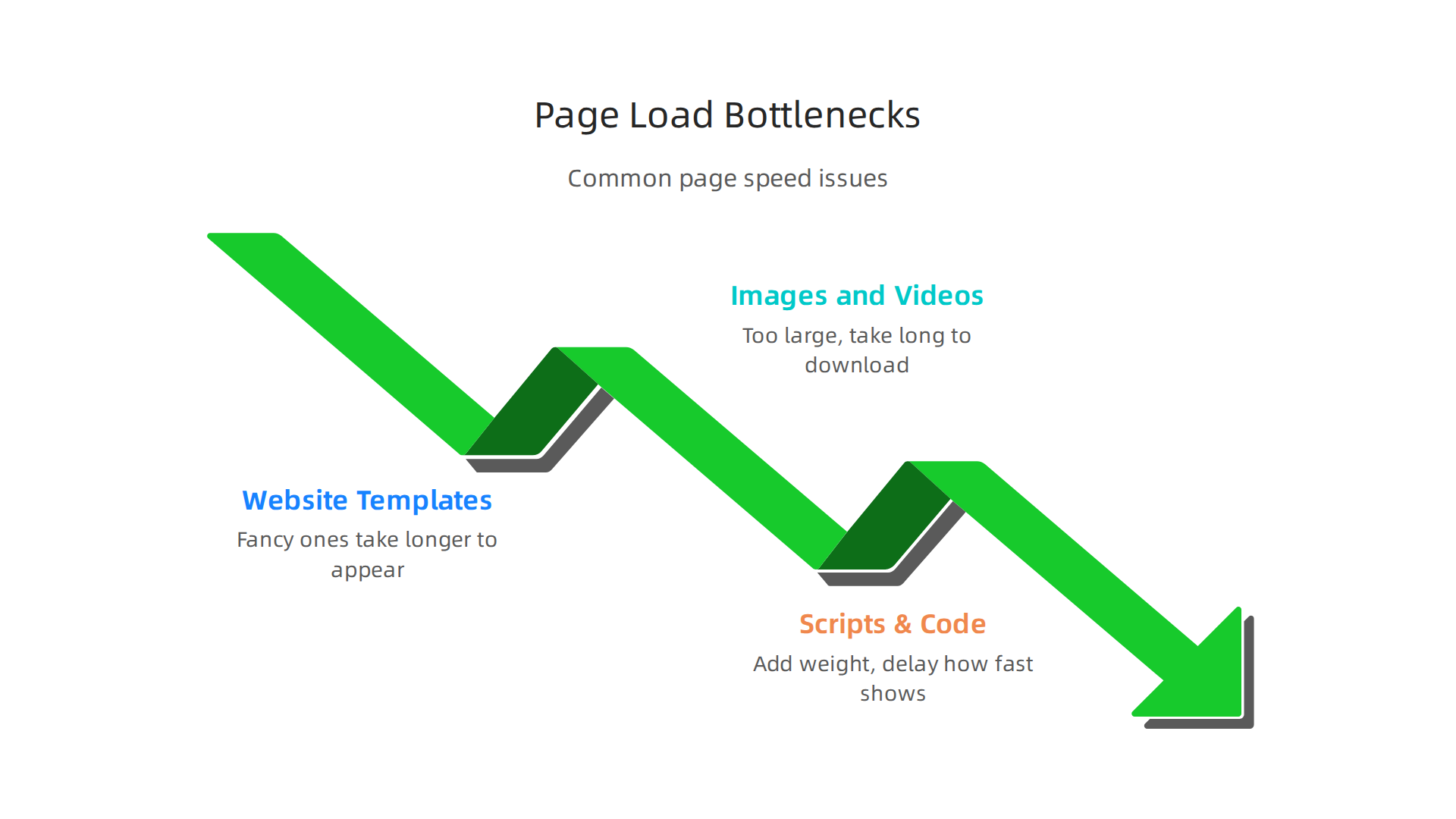
- Website Templates: The design template you pick for your site can have many different parts. Some templates are simpler and load fast, while very fancy ones might have lots of features or code that can take longer to appear.
- Images and Videos: Big pictures or videos that are not properly set up are one of the biggest reasons websites load slowly. If your image files are too large, they take a long time to download, making your visitors wait.
- Scripts and Extra Code: Many websites use small bits of code, called scripts, for things like tracking visitors, showing animations, or linking to social media. Too many of these can add weight to your page and delay how fast it shows up.
The good news is that the Hostinger website builder helps you manage these common issues. It offers tools to make sure your site stays quick. For example, it often has features for image optimization. This means your pictures are automatically made smaller without losing their good looks, so they load faster. The builder also supports lazy loading, which is a clever trick where images and other heavy content only load as someone scrolls down the page. This makes the top part of your website appear much quicker, improving the FCP score and overall experience.
Builders like the GoDaddy website builder and others also offer features to help with speed. But the ease of use and effectiveness of these tools can vary. With the Hostinger website builder, you get a balance of powerful hosting and helpful tools right in the builder itself, allowing you to create a fast site. For those considering a Showit website or another platform, checking their speed optimization features is always a smart move.
While a fast website is great, it’s just as important that your site is always online. This is what we call "uptime." Imagine having a super-fast shop, but it’s closed half the time. That wouldn’t be good for business! Website hosting companies like Hostinger offer what’s called a Service Level Agreement (SLA), which is a promise about how much of the time your website will be available.
Hostinger is known for its strong uptime numbers. Many tests in 2026 show that Hostinger delivers on its promises, often going above the standard 99.9% uptime guarantee. For instance, reports show Hostinger’s uptime at around 99.98% to 99.99% for its premium and business plans Hostinger Review 2026: Premium vs Business Tested 243 …. Other in-depth reviews found uptime as high as 100% on some monitored servers I’ve Tested Hostinger: My Full Review for August 2025. This means your website is almost always reachable by your visitors.
What makes a host reliable? It’s not just luck. Good hosts use several tricks to keep your site online:
- Redundant Systems: This means having backup systems ready to go. If one server goes down, another one steps in immediately, so you don’t notice any interruption.
- Regular Backups: Your website’s information is copied often. If something goes wrong, your host can bring back an earlier version of your site, saving your content.
- Data Center Distribution: Having data centers in different places around the world helps. If there’s an issue in one area, traffic can be sent to a data center that is still working fine. Hostinger uses a global network of data centers to ensure reliability and speed, no matter where your visitors are.
When you use the Hostinger website builder, you’re not just getting tools to create your site; you’re also getting the strong, reliable hosting that keeps it running smoothly behind the scenes. This stability is key for any business, whether you’re using a simple website template or a more complex setup. Comparing different hosts? Always look at their uptime records and read Web Hosting Services Reviews 2026 to help you choose a reliable host.
Keeping your website safe from bad guys is just as important as keeping it online. Good hosting comes with many built-in security features to protect your site.
When you choose the Hostinger website builder, you get strong security from the start. This includes protection from common threats like DDoS attacks, which try to flood your website with too much traffic to make it crash. Hostinger uses special tools like advanced hardware firewalls and traffic filtering to stop these attacks. For example, Hostinger has solutions for dealing with DDoS attacks that block bad traffic before it reaches your site How Hostinger Deals With DDoS Attacks. Some plans even let you turn on an "Under Attack Mode" for extra safety.
Another key security feature is an SSL certificate. This is like a digital lock for your website that keeps information private between your site and your visitors. Hostinger gives you a free SSL certificate with all its plans. This is important for keeping customer details, like when they fill out a form or buy something, safe. Many reviews confirm that Hostinger offers free SSL, along with other protections like firewalls and backups Hostinger Web Builder Review 2026.
Speaking of backups, while we talked about them for reliability, they are also a huge part of security. Imagine if your site got hacked or something went wrong. With regular backups, Hostinger can help you restore an earlier, safe version of your website. Hostinger also uses other important security measures like website firewalls and software to scan for malware, which are bad programs that can harm your site What Security Measures Does Hostinger Use?. This means your website is watched 24/7 for any signs of trouble.
For small businesses, handling customer data or payments means you need to follow certain rules. This is called compliance. Hostinger’s strong security helps you meet these rules by making sure your website is protected. This lets you focus on running your business, knowing that your website’s security is handled. Choosing a host with these features is key for any business that wants to protect its data and build trust with its customers. To learn more about meeting security standards, explore resources on FTC Event Web in 2026 How to Stay Compliant with Secure Web Hosting.
When you choose the Hostinger website builder, many key security features work behind the scenes to keep your site safe.

Hostinger takes care of a lot of the complex security stuff automatically, so you don’t have to worry. This is a big plus for anyone building an online presence, from a small blog to a growing business.
One important feature is the free SSL certificate that comes with all Hostinger plans. An SSL certificate makes sure that all information sent between your website and its visitors is private and secure. This is like putting a lock on your website’s data, which is very important for building trust with your customers, especially if they are making purchases or giving you their details Hostinger Website Builder review 2026. Many reports confirm that the Hostinger website builder provides this essential security feature at no extra cost Hostinger Website Builder Review.
Backups are another critical part of security, even though we talked about them for keeping your site running smoothly. Hostinger helps protect your site from bigger problems by doing automatic backups. This means if something bad happens, like a hacker attack or a mistake, you can bring your website back to an earlier, safe version. Some plans offer weekly or daily backups to make sure your important information is saved often I Tested Hostinger’s Website Builder: What To Know For 2026. Hostinger also uses firewalls, which are like guards for your website, and malware scanners that look for bad software trying to harm your site. All of these features are usually included for free for all customers Here’s How We Keep Your Websites Safe at Hostinger.
Most of these protections are set up automatically for you. For example, Hostinger’s basic DDoS protection and hardware firewalls are built into their web and cloud hosting plans Is DDoS Protection Included at Hostinger?. However, some advanced options, like an "Under Attack Mode," can be turned on by you if your site faces a strong attack. This gives you extra control when you need it most.
For managing your website, Hostinger provides tools like access logs within its dashboard. These logs help you watch for unusual activity, which can be an early sign of trouble How To Prevent DDoS Attacks in Hostinger. While the hostinger ai website builder handles much of the technical security, having these insights helps you keep a watchful eye on your site’s health. For more details on the true value you get with different plans, consider learning about the various features and what they mean for your overall spending by checking out how to understand Hostinger Cheap Web Hosting The Honest Cost And Value In 2026.
Even with all those safety measures, sometimes you just need a helping hand. That’s where good customer support comes in handy. The Hostinger website builder makes sure you have ways to get help when you need it.
Hostinger offers different ways to reach out, mainly through live chat and email. Their main support channel is a 24/7 live chat, which means you can get help any time of day or night. When you’re logged into your Hostinger account, you can find the "Ask" button in your hPanel dashboard. If you’re using the Hostinger AI website builder, this might be labeled "Ask Kodee," their AI assistant, who can give quick answers How to contact Hostinger support. If Kodee can’t help, you can usually connect with a human agent through the same chat I Tested Hostinger’s Website Builder: What To Know For 2026.
For less urgent questions or more detailed issues, you can send an email. Hostinger’s customer service policy aims to reply to emails within one business day Customer service policy. While live chat is best for quick fixes, email allows you to explain complex problems with more detail, which can be useful for business users. It’s important to know that Hostinger does not offer phone support, so chat and email are your main ways to talk to a person How to Contact Hostinger Customer Service.
Beyond talking to someone, Hostinger also has a great set of self-help tools. They have a large knowledge base filled with articles, guides, and tutorials that cover everything from setting up your site to fixing common problems. This is like having a huge online instruction book always available. These resources can often help you solve issues on your own, letting you learn more about your hostinger website builder and similar tools, whether you’re using it or looking at other options like a showit website or even webflow hosting.
Choosing a website builder like Hostinger means you get both easy-to-use tools and a strong support system. This setup helps you focus on making your website great, rather than worrying about technical problems alone. If you’re comparing different options, understanding the support available for platforms like the godaddy website builder or Hostinger is a smart move.
Thinking about building your online presence?
Prism Web Host — Web Hosting Products & Services
Pricing, Plans, and the Value Proposition for Growing Sites
After looking at how easy it is to use the Hostinger website builder and the good support it offers, let’s talk about how much it costs. Understanding the price helps you see the true value, especially when you compare it to other tools out there. Hostinger makes it simple with a few main plans, and each one helps different kinds of websites grow.
Most people start with the Premium Website Builder plan. For new users, it can be as low as $2.99 per month if you sign up for a longer term, like 48 months Hostinger Website Builder Review 2026: Cheap, But Any Good?. This plan is great for beginners or those building a simple personal website or portfolio. It usually includes the drag-and-drop builder, the hostinger ai website builder tools, and things like a free domain name for the first year. It’s an all-in-one package that covers hosting, the builder, and a domain Hostinger Website Builder Review 2026: Pros & Cons ($7280 In Bonuses + Discounts).
If your website needs more power, especially for selling things online, you might look at the Business Website Builder plan. This plan costs a bit more, sometimes around $3.99 per month for a long-term signup Hostinger Pricing 2026 | Shared, Cloud, VPS & More Costs. The big difference here is that it adds e-commerce features, allowing you to sell products online, and often includes more advanced AI tools like an image generator or content writer Hostinger Website Builder Review 2026: Cheap, But Any Good?. It’s perfect for small businesses that want to build an online store.
When you think about the cost, it’s important to compare what you get with other options. Hostinger’s plans often include hosting, a CDN (which makes your site faster), backups, and security features like SSL certificates. This means you’re not paying for these things separately, which can add up with other providers. For instance, comparing the total hostinger website builder cost to a godaddy website builder or even managing webflow hosting yourself can show big savings over time, especially since Hostinger often offers very low starting prices that renew at a higher rate later Hostinger Cost What You Actually Pay After The Promo Period Ends.
For example, a basic plan from Hostinger can be around $2.99/month, which includes web hosting. Other services, like a showit website builder, might have different pricing structures where hosting or advanced features are extra. Looking at the full picture of what’s included helps you understand the true web hosting cost in 2026. This makes the Hostinger website builder a very good choice for anyone wanting a complete package without many extra fees to worry about.
Summary
This review examines Hostinger Website Builder for entrepreneurs and small-to-medium businesses who need a fast, low-cost way to get online. It covers what the builder is, who it’s suited for, and the practical features you’ll use daily — including 170+ responsive templates, an easy drag-and-drop editor, and AI tools that generate copy and images. The article also looks under the hood at Hostinger’s hosting stack (LiteSpeed, NVMe, global CDN), real-world speed and uptime numbers, and common page bottlenecks like large images or extra scripts. Security features such as free SSL, backups, firewalls and DDoS protection are explained, along with support channels (24/7 chat and an AI assistant). Finally, the review breaks down pricing and value between Premium and Business plans so you can judge costs versus needs and decide whether Hostinger is the right fit for your site in 2026.
