




DreamHost Pricing Avoid Hidden Web Hosting Costs and Renewal Jumps
Article
Choosing the right home for your website is a big deal, especially for small businesses and online brands. You want your website to be fast, safe, and always online. But how do you pick a web host without getting confused by all the tech talk and different prices? Many business owners feel stuck when trying to figure out the best hosting for their needs.

One common worry is the web hosting cost. It’s easy to sign up for a cheap plan, only to find out the price jumps sky-high after the first year. This can mess up your budget. Also, understanding what each plan offers can be tricky. Do you really need all those fancy features, or will a simpler plan do the trick? What about security, like protecting your site from online attacks? And will your website load quickly, which is super important for keeping customers happy and helping you show up in search results?
These are all fair questions that many businesses face. For example, when looking at DreamHost, a popular web host, knowing the real DreamHost pricing is key. Their plans might start at one price, but the renewal costs can be quite different DreamHost Pricing 2026: Real Plans & Renewal Costs.
It’s not just about the first bill, it’s about what you’ll pay over time. This includes looking at other options like Hostinger pricing, HostGator pricing, or Bluehost pricing to make sure you get the best deal for your business.
This article is here to help clear things up. We’ll give you a simple breakdown of DreamHost pricing, explain what’s included in each plan, and highlight any important details you need to know. We’ll also help you compare DreamHost with other popular providers so you can make a smart choice for your website without any surprises. Knowing how to calculate your true web hosting cost and avoid hidden fees is a valuable skill for any business owner calculate your true web hosting cost and avoid hidden fees in 2026.
Picking the right home for your website means looking at all the options. DreamHost has different types of plans, each made for various needs.
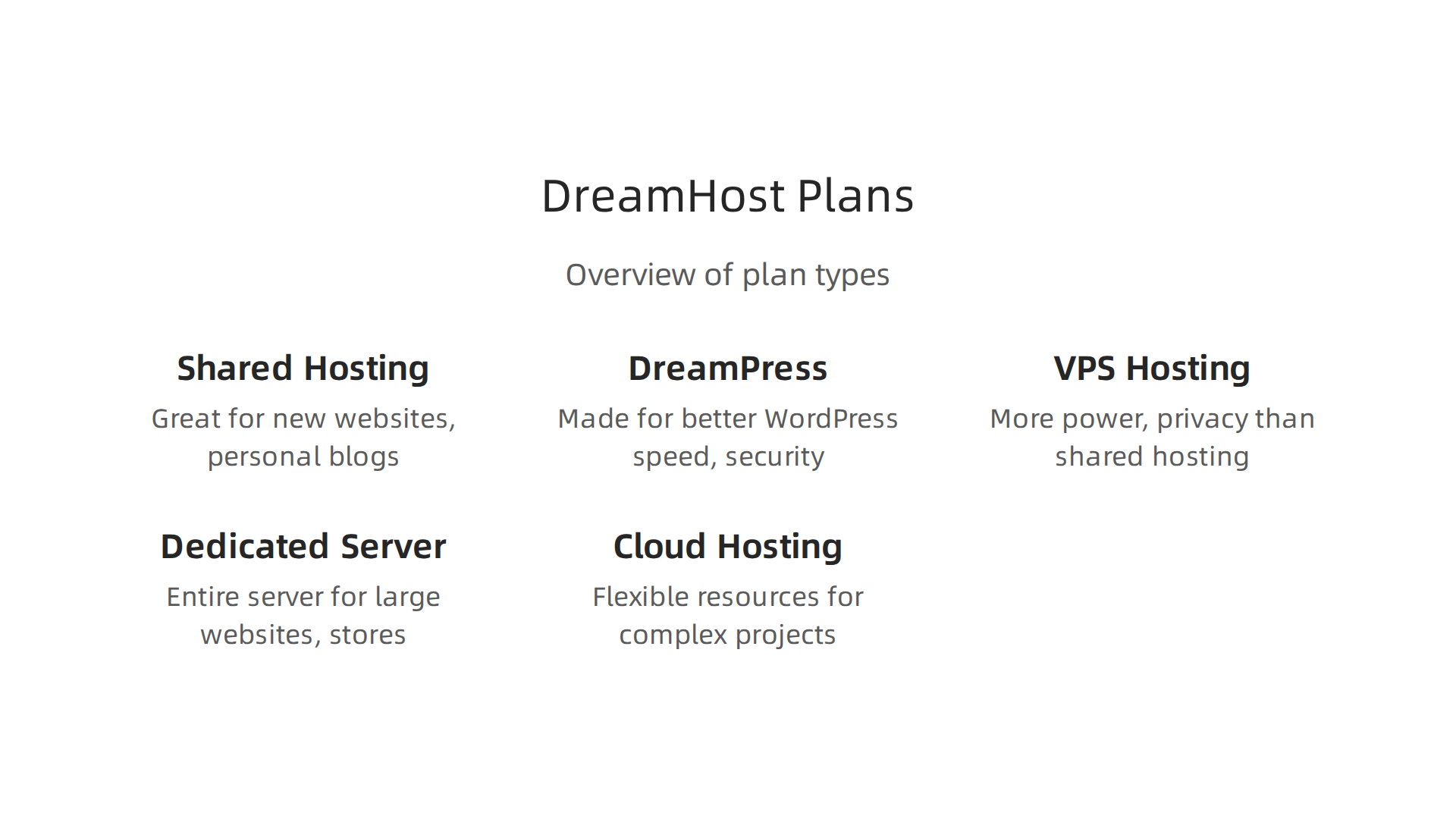
Knowing about these plans and their real DreamHost pricing helps you choose what’s best for your business. Let’s break down the main types of hosting DreamHost offers.
Shared Hosting
Shared hosting is like living in an apartment building. Many websites share space on one big server. This makes it a great choice for new websites, personal blogs, or small businesses just starting. It’s usually the cheapest option.
DreamHost’s shared hosting plans typically start at a low price, like around $2.95 per month for the first term if you pick a longer billing cycle, such as three years. But watch out for the renewal costs, which can be much higher. For example, a plan starting around $2.95 might renew at $10.99 per month or more DreamHost Pricing Breakdown: Plans, Discounts, and Renewal Costs. This is a common thing to see with many hosting providers, including sometimes with Hostinger pricing or HostGator pricing, where the initial deal is very attractive. DreamHost offers two main shared plans:
- Shared Starter: Good for one website, blogs, or simple online portfolios.
- Shared Unlimited: Best for people who want to host many websites, like different small projects or multiple blogs.
These plans are easy to use and come with a free SSL certificate to keep your site secure.
DreamPress (Managed WordPress Hosting)
If your website runs on WordPress, DreamPress is made just for you. It’s like having a special, super-fast apartment in the building, just for WordPress sites. DreamPress plans are built for better speed and security, which is very important for blogs and online stores that use WordPress.
DreamPress usually starts around $16.95 per month for the first signup period. The renewal price can go up to about $19.99 per month for the basic plan DreamHost’s own hosting plans.

This type of hosting is great for growing blogs, small e-commerce sites, or any WordPress site that needs faster loading times and more support than basic shared hosting. For other WordPress hosting choices, you might want to look into the best web hosting for WordPress options in 2026.
VPS Hosting (Virtual Private Server)
VPS hosting gives you more power and privacy than shared hosting. Think of it as having your own small house. You still share a server with others, but your part is separate and works like its own mini-server. This means more control, better performance, and more resources for your website.
VPS plans from DreamHost are good for businesses that are growing, have more website traffic, or need to run special applications. Starting prices are often around $15 per month, but can go up to $120 per month depending on how much power you need What types of hosting plans are available?. Renewal rates for VPS hosting are generally more stable compared to shared hosting. If you’re looking for other cost-effective server options, you might explore cheap VPS hosting that still offers good performance.
Dedicated Server Hosting
Dedicated hosting is like owning your very own private island. You get an entire physical server all to yourself. This offers the most power, security, and control. It’s for very large websites, big online stores, or companies with lots of traffic and very specific needs.
Because you’re getting a whole server, the web hosting cost is much higher. Dedicated server plans with DreamHost can start around $169 per month and go up to $399 per month. These plans are best for enterprise-level websites or businesses that need top-notch performance and cannot share server resources with anyone else.
Cloud Hosting
DreamHost also provides Cloud Hosting, which is different from traditional hosting. It’s like having flexible resources you can turn up or down as needed. You only pay for what you use, and it’s great for developers, complex projects, or websites that have traffic spikes. It offers a lot of flexibility and scalability.
When comparing DreamHost pricing with other options, always look beyond the first year. Many providers, including Bluehost pricing, often show very low starting rates that jump significantly upon renewal. Understanding these long-term costs is crucial to find the best value for your business. It’s important to compare pricing models and avoid hidden fees when making your final decision.
When you’re trying to pick the best home for your website, especially if it uses WordPress, you often find yourself looking at shared hosting and managed WordPress hosting like DreamPress. Both have their good points, but they serve different needs, and their DreamHost pricing shows that. Let’s look at how they stack up in terms of cost, how well they perform, and what you get for your money.
Shared Hosting vs DreamPress (managed WordPress): cost, performance, and trade-offs
Shared hosting is usually the cheapest way to get your website online. It’s like sharing an apartment with many others. Your website shares server space and resources with many other sites. DreamHost’s shared plans can start very low, around $2.89 per month for the first signup period. However, remember that the renewal prices often jump higher, sometimes to $10.99 per month or more, as noted in a 2026 DreamHost pricing guide DreamHost Pricing 2026: Real Plans & Renewal Costs. This is a good choice for brand-new websites, personal blogs, or small businesses with little traffic. The main trade-off here is performance. If one website on the shared server gets really busy, it can slow down all the other sites, including yours.
Now, let’s talk about DreamPress. This is DreamHost’s special hosting made just for WordPress websites. Think of it as having a private, high-speed apartment just for your WordPress site. The DreamHost pricing for DreamPress is higher, starting around $14.99 per month. It also has renewal costs that can reach about $20-$25 per month for the basic plan DreamHost Review 2026: Ultimate Guide + 10 Pros & Cons. But with this higher cost comes much better performance. DreamPress servers are set up to make WordPress run super fast. This means your website loads quicker, which is great for your visitors and helps with search engine rankings. If you want to know more about how different hosts compare, you can also look into a Siteground Hosting Review 2026.
Here’s why the higher DreamPress cost is often worth it for growing businesses:
- Better Performance: Websites on DreamPress load much faster than those on shared hosting. This is crucial for online stores and professional blogs that need to keep visitors happy. DreamHost states their WordPress hosting is built for speed and security WordPress Hosting – Fast & Secure – DreamHost.
- Enhanced Security: DreamPress includes extra security features designed to protect WordPress sites from common online threats. This gives you more peace of mind, knowing your site is safer. For more robust security and performance features, consider exploring services like Prism Web Host – Web Hosting & Services, which offers enterprise-grade security and isolated hosting.
- Managed Updates: With DreamPress, DreamHost takes care of WordPress updates and other technical tasks for you. This means you don’t have to worry about updating your WordPress software, themes, or plugins yourself. This saves time and prevents common issues that can happen with manual updates.
- Scalability: If your website suddenly gets a lot more visitors, DreamPress can handle it better. It’s built to give your site the resources it needs to stay fast and online during busy times.
In short, if you have a simple personal blog or a brand-new website and want to save money, shared hosting is a good start. But if your WordPress site is growing, gets a lot of traffic, or is important for your business, the extra DreamHost pricing for DreamPress is a smart investment. It offers the speed, security, and hands-off management that busy websites need to succeed in 2026.
Beyond shared and managed WordPress hosting, your website might eventually need more power and control. This is where Virtual Private Server (VPS), Cloud, and Dedicated hosting come in. These options offer better performance and reliability, but their DreamHost pricing, and the pricing from other providers like Hostinger pricing, HostGator pricing, or Bluehost pricing, will reflect their advanced features.
VPS, Cloud, and Dedicated: pricing for scalability and predictable performance
When your website grows past what shared hosting or even managed WordPress hosting can comfortably handle, VPS hosting is often the next step. Think of a VPS as having your own private apartment within a larger building. You still share the physical server with others, but you get your own dedicated part of the server’s resources. This means your website’s performance won’t be affected by other sites on the same server.
For DreamHost, VPS hosting plans start around $10 per month for basic resources like 30GB of SSD storage and 1GB of RAM, according to a 2026 DreamHost review [DreamHost Review (2026): Test, Benchmarks – Prehost]. Renewal prices for VPS plans at DreamHost can start at $15.99 a month and go up to $114 a month, depending on how many resources you need [DreamHost Review (2026)Can You Trust Their Shared Hosting?]. This web hosting cost gives you more control and faster speeds than shared hosting, making it ideal for growing businesses or websites with moderate traffic. If you’re looking into these kinds of upgrades, it’s wise to learn how to calculate your true web hosting cost and avoid hidden fees in 2026.
Next up is cloud hosting, which is known for being super flexible. Instead of one physical server, your website uses a network of virtual servers. This is like having your website spread across many computers, so if one goes down, others pick up the slack. Cloud hosting is great because you can easily scale your resources up or down as needed, often paying only for what you use. This makes it very adaptable for websites with traffic that changes a lot. The pricing for cloud hosting can vary greatly, depending on the computing power, storage, and bandwidth you use.
Finally, dedicated server hosting gives you an entire physical server all to yourself. This is the ultimate in power, privacy, and control, like owning the whole apartment building. You don’t share any resources with anyone else, which means top-notch performance and security. Dedicated servers are usually the most expensive option, often costing hundreds of dollars per month, and are best suited for very large websites, high-traffic online stores, or businesses with strict security and performance requirements.
The main things that drive the web hosting cost for VPS, Cloud, and Dedicated plans are:
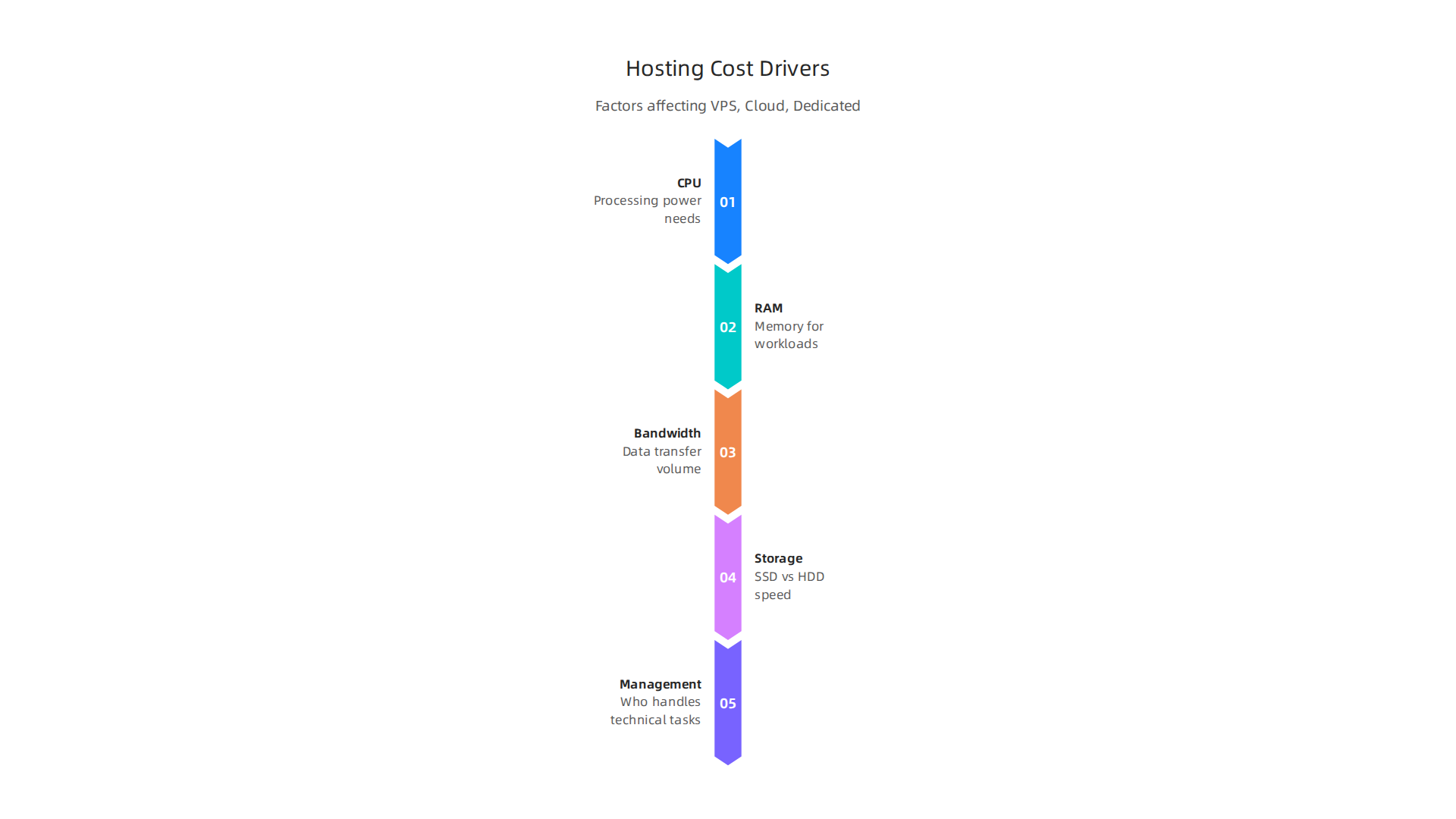
- CPU (Central Processing Unit): How much processing power your website needs. More complex sites need more CPU.
- RAM (Random Access Memory): How much memory your server has to run programs and handle data quickly.
- Bandwidth: How much data can be transferred to and from your website. High traffic means you’ll need more.
- Storage Type: SSD (Solid State Drives) are faster than older HDD (Hard Disk Drives), so they usually cost more.
- Management Level: You can choose between "unmanaged" (you do all the technical work) or "managed" (the hosting provider handles server maintenance, updates, and security). Managed options cost more but save you time and headaches.
Businesses should think about upgrading from shared or managed hosting to VPS or cloud hosting when they see their website traffic growing, when they need more reliable performance, or when they need better security against threats like DDoS attacks. For example, DDoS attacks continue to be a significant threat in 2026, with businesses constantly needing stronger protection [DDoS Attack Statistics 2026: 41 Key Facts and Trends – SentinelOne]. If your website is crucial for your business and downtime means losing money, the higher DreamHost pricing or the increased web hosting cost for a VPS or cloud plan is a wise investment to ensure predictable performance and better protection. You might even want to look into cheap VPS hosting in 2026 that doesn’t sacrifice performance or security as a stepping stone.
When looking at your web hosting cost, it’s not just about the monthly price tag. Many important features often come bundled or can be added on. These features greatly change the full cost and how safe and fast your website will be. Let’s talk about some key features like security and performance.
Security Features
Website security is a big deal in 2026. Here are some common security features that affect your total web hosting cost:
- SSL Certificates: An SSL (Secure Sockets Layer) certificate encrypts the information sent between your website and its visitors. This means things like login details or credit card numbers are kept private. Most good hosting providers, like DreamHost, Hostinger, HostGator, or Bluehost, offer a free basic SSL certificate with their plans. But for more advanced needs, you might pay extra. Without SSL, your site might show up as "not secure" in browsers, which can scare away visitors.
- Backups: Imagine losing all your website’s information in a flash! Regular backups save you from this worry. Many hosts include daily or weekly automatic backups. Others might charge extra for this important service or for keeping backups for a longer time. Always check if backups are included in your DreamHost pricing or other hosting plans.
- DDoS Protection: A Distributed Denial of Service (DDoS) attack tries to shut down your website by flooding it with too much fake traffic. Good hosting providers include protection against these attacks. For example, some cloud hosting providers offer strong defenses, often using a Content Delivery Network (CDN) to help spread out traffic and stop attacks before they reach your server. These protections are vital for keeping your website online and running smoothly, and they can impact the overall web hosting cost DDoS Protection Costs with CDNs. Many web hosting providers also have their own solutions for cloud security and DDoS protection, such as those discussed in a 2026 guide to Cloud infrastructure security.
Performance Features
Speed and reliability are also super important for your website. Here’s what to look for:
- Content Delivery Network (CDN): A CDN helps your website load faster for people all over the world. It does this by storing copies of your website’s content on servers closer to your visitors. So, if someone in Europe visits your website hosted in the US, the CDN will deliver the content from a European server, making it much quicker. Some hosting plans include a basic CDN, while others offer it as an add-on.
- Managed Updates and Support: If you choose "managed" hosting, the provider handles things like server updates, security patches, and fixing technical issues. This saves you a lot of time and effort, especially if you’re not a tech expert. This level of service usually adds to the web hosting cost, but it can be worth it for the peace of mind. DreamHost pricing for managed WordPress or VPS plans will reflect these extra services.
How These Features Change Your Real Costs
When comparing DreamHost pricing, Hostinger pricing, HostGator pricing, or Bluehost pricing, always look beyond the cheapest monthly number. A very low initial web hosting cost might not include essential security or performance features. Adding them later can make your bill much higher than expected. Think of it as buying a car: the base model is cheap, but adding air conditioning, safety features, and a good sound system makes the total price go up.
For small to medium-sized businesses, having these features included from the start means fewer surprises and better protection. It helps protect your website from attacks and ensures your customers have a fast, safe experience. A reliable host will offer many of these features as standard. You can learn more about finding the best deals and understanding hidden fees in a detailed guide to web hosting cost in 2026.
For businesses prioritizing security, speed, and ease of use, considering a provider like Prism Web Host can offer a more complete picture of what’s included in your web hosting package.
Now, let’s look closer at how specific popular hosts stack up against each other. When you’re choosing a web host, comparing DreamHost pricing to other big names like Hostinger, HostGator, and Bluehost is key.

It’s not just about the first price you see; it’s about the full value, what you pay later, and how much help you get.
Head-to-head: DreamHost pricing vs popular competitors (value, renewal shocks, and support)
Many web hosting companies grab your attention with very low introductory prices. But the real cost often shows up when it’s time to renew your plan. This is where you might find big differences between providers.
Understanding Intro vs. Renewal Pricing
When comparing DreamHost pricing, Hostinger pricing, HostGator pricing, and Bluehost pricing, pay close attention to the renewal rates. For example, a common complaint about DreamHost is its renewal pricing. Reviews in 2026 show that DreamHost’s renewal costs can jump significantly, sometimes by as much as 171% compared to the first price you paid DreamHost Review 2026: Honest Look at Performance, Pricing, and …. This means a cheap initial web hosting cost can become quite expensive over time. It’s wise to always check both the starting price and the renewal price for any plan you consider, as detailed in guides like DreamHost Pricing 2026: Real Plans & Renewal Costs.
Other providers also use this model. Hostinger often has very attractive first-year prices, but their renewals can also be higher. Bluehost and HostGator follow similar patterns. The trick is to read the fine print and understand your long-term web hosting cost. For a deeper dive into how these costs can surprise you, it’s helpful to look at a Bluehost vs DreamHost 2026: Honest Side-by-Side Hosting C… comparison.
Value and Features Comparison
Beyond just price, what do you get for your money?
- DreamHost: They are well-known for offering good storage and unlimited bandwidth on many plans. They often include a free domain name and privacy for that domain, which can save you money. DreamHost also has a strong focus on open-source projects like WordPress, making it a favorite for many WordPress users. However, some find their custom control panel a bit harder to learn if you’re used to cPanel DreamHost’s weakness lies in its uncompetitive pricing. You can explore the different kinds of plans they offer by checking What types of hosting plans are available?.
- Hostinger: Known for being very budget-friendly, especially for beginners. They offer good speed and a user-friendly control panel. Hostinger includes free SSL certificates and backups, which are important for security.
- HostGator: Offers a variety of hosting types, from shared to dedicated servers. They are generally seen as reliable, but sometimes their shared hosting can feel slower if your site gets a lot of visitors. They also include free SSL and often provide a website builder.
- Bluehost: This host is a top choice for WordPress, even recommended by WordPress itself. Bluehost plans often include a free domain, SSL, and easy WordPress installation. Their plans can be a bit pricier than Hostinger’s for basic shared hosting, but they offer strong WordPress-specific features.
Support Availability
Good customer support is priceless when something goes wrong with your website.
- DreamHost: They offer 24/7 technical support, but it’s mainly through live chat and email. Phone support is not always available, which can be a downside for some users who prefer to talk to someone directly.
- Hostinger: Provides 24/7 live chat support, which is often fast and helpful. They also have a large knowledge base for self-help.
- HostGator: Offers 24/7 phone, live chat, and email support. Many users find their support team quick to respond and knowledgeable.
- Bluehost: Also provides 24/7 phone and live chat support, making it easy to get help whenever you need it. Their support is generally well-regarded, especially for WordPress-related issues.
In summary, if you’re looking for strong WordPress integration and generous resources, DreamHost pricing can be appealing, but be prepared for higher renewal costs. For the absolute lowest entry web hosting cost, Hostinger pricing might win, though renewal jumps are also a factor. HostGator pricing and Bluehost pricing offer solid, reliable choices, particularly for those wanting strong support and a traditional cPanel experience. Ultimately, choosing the right host means looking at the total package: initial price, renewal price, included features, and the kind of support you’ll get over the long haul. To avoid future surprises with your web hosting cost, understanding how providers handle their domain name renewals is a smart move. Check out our guide on Domain Name Renewal Price Comparison to learn more.
Now that we’ve looked at how DreamHost compares to others, let’s focus on choosing the best DreamHost plan for your small or medium-sized business (SMB). Picking the right plan means looking closely at your needs so you get good value without any surprises in your web hosting cost.
Here is a simple checklist to help you choose:
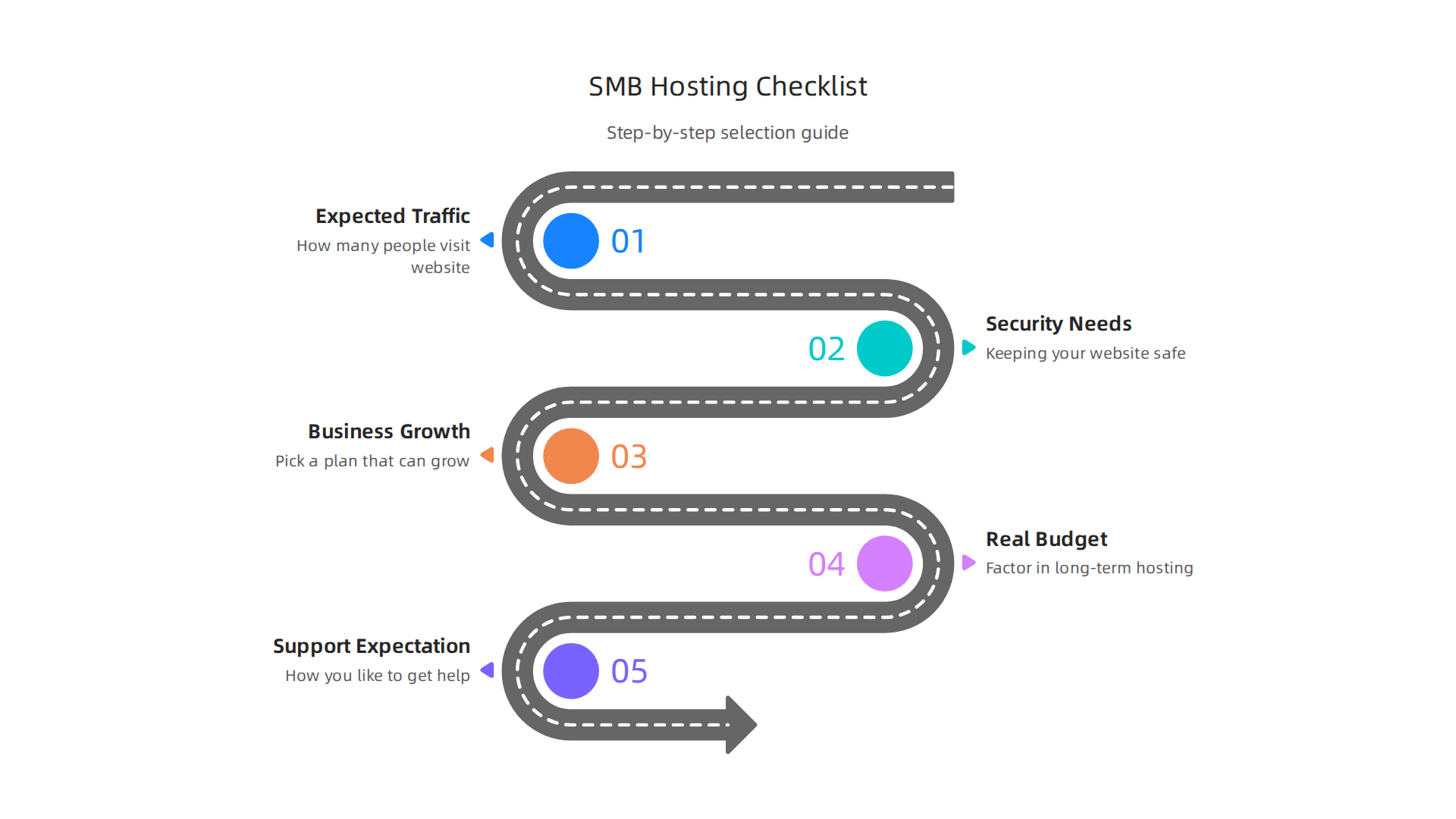
A Step-by-Step Checklist for SMBs
-
1. How much traffic do you expect?
Your website’s needs change based on how many people visit it. A brand new blog won’t need as much power as a busy online store. DreamHost offers different kinds of plans, like Shared Starter for simple sites and DreamPress for fast WordPress sites. You can see their main options on the DreamHost hosting plans page. Make sure the plan you pick can handle your visitors now and in the future. You can also watch a helpful video overview to understand the DreamHost Hosting Plans Explained. -
2. What are your security needs?
Keeping your website safe is super important. Think about things like free SSL certificates, which keep your site secure for visitors, and protection from bad attacks. DreamHost often includes many basic security features to help keep your site safe. -
3. How much will your business grow?
It’s smart to pick a plan that can grow with your business. If you think your website will get bigger over time, choose a hosting plan that lets you easily upgrade. This means you won’t have to switch hosts later on, which can be a hassle. -
4. What’s your real budget for
web hosting cost?
Your budget is about more than just the first monthly payment. Remember those renewal prices? Your initialdreamhost pricingmight look low, but the renewal can be higher. Always factor in the long-termweb hosting costto avoid surprises. You should also think about extra costs for add-ons, backups, and moving your site. To truly understand what you’ll pay, learn how to calculate your true web hosting cost. -
5. What kind of support do you expect?
When something goes wrong, you need help. DreamHost offers support mainly through chat and email, available 24/7. If you really prefer talking to someone on the phone, know that it’s not always an option. Think about how you like to get help and if their support style fits you.
Beyond the Monthly Fee: Hidden Web Hosting Cost
When you look at dreamhost pricing, make sure to check for these extra costs:
- Add-ons: Does your plan include a free domain name forever, or just for the first year? Do you get enough email accounts, or will you need to pay extra?
- Backups: Daily backups are super important for your website’s safety. Does your chosen plan include them for free, or is it an extra charge?
- Migration Costs: If you’re moving your website from another host, check for migration fees. DreamHost offers free WordPress migrations, which can save you a lot of money if you use WordPress.
- Refunds: It’s also good to know about any money-back guarantees. DreamHost offers a 30-day money-back guarantee on many hosting plans, letting you try them out risk-free. This is noted in many reviews, including this DreamHost Review: Is This Budget Host Worth It? [2026].
By using this checklist, you can make a smart choice for your business and avoid unexpected web hosting cost surprises.

If you want to explore reliable, secure, and high-performance hosting options tailored for businesses, learn more about our services at Prism Web Host.
Summary
This article breaks down DreamHost pricing and what each plan really includes so small businesses and site owners can pick the right hosting without surprises. It explains the main plan types—shared, DreamPress (managed WordPress), VPS, cloud, and dedicated—gives typical starting prices and renewal realities, and highlights the security and performance features that drive total cost. You’ll learn how promotional entry rates can mask higher renewal fees, which add-ons commonly raise your bill (backups, advanced SSL, migrations), and when a site should move from shared hosting to VPS or dedicated servers. The guide also compares DreamHost with other popular hosts on value, support, and renewals, and offers a simple SMB checklist to match your traffic, growth expectations, and budget to the right plan. Read this and you’ll be able to calculate the long‑term hosting cost, avoid common billing traps, and choose a plan that balances price with speed and security.
