




Cloudflare Pages Pricing Unveiled Real Costs No Hidden Fees
Article
Choosing the right home for your website can feel like a big puzzle. For many small businesses and online brands, figuring out hosting costs is a top worry.

No one likes surprise bills or hidden fees, especially when your business counts on its online presence to grow. Imagine launching a new product, getting lots of visitors, and then finding out you owe a lot more money than you planned because of "overage fees." It can be a real headache!
Many worry about how much it will truly cost to keep their website running fast and safe, especially as their business grows. They might look at options like Cloudflare Pages, Vercel hosting, or even AWS hosting, and wonder which one offers the best deal without hidden catches. Understanding the real cloudflare pages pricing is super important to avoid these problems.
In this guide, we’ll help you make smart choices. You’ll get a clear look at how Cloudflare Pages charges for its services. We will break down its pricing plans, show you how to guess your own costs, and even compare it to other choices like Vercel or AWS. We’ll look at the good parts and the parts that might cost you more than you think. This way, entrepreneurs, marketing managers, and IT managers can pick a hosting solution that fits their budget and needs for 2026 and beyond. This is key to mastering your overall web hosting cost in 2026 and avoiding hidden fees.
You see, Cloudflare Pages offers a free plan that can be quite useful for many. This free plan often includes things like unlimited bandwidth and up to 500 builds each month. However, it’s good to know the exact limits to avoid surprises later on, as some sources mention build limits and daily request limits even on the free plan Cloudflare Pages Free Tier Limits & Pricing 2026. As your website gets more popular, knowing these details will help you move to a paid plan without fear of unexpected charges. For instance, the Pro plan for Cloudflare Pages typically costs around $20 to $25 per month, offering more builds and features Cloudflare Pages Pricing 2026: Plans, Hidden Costs & Cheaper.
Overview: How Cloudflare Pages pricing is structured
Understanding the Cloudflare Pages pricing starts with knowing its different plans and how each feature is charged. Cloudflare Pages offers a clear setup with a free tier and paid options that grow with your needs. This helps businesses, from small online shops to larger brands, pick the right level of service without unexpected bills.
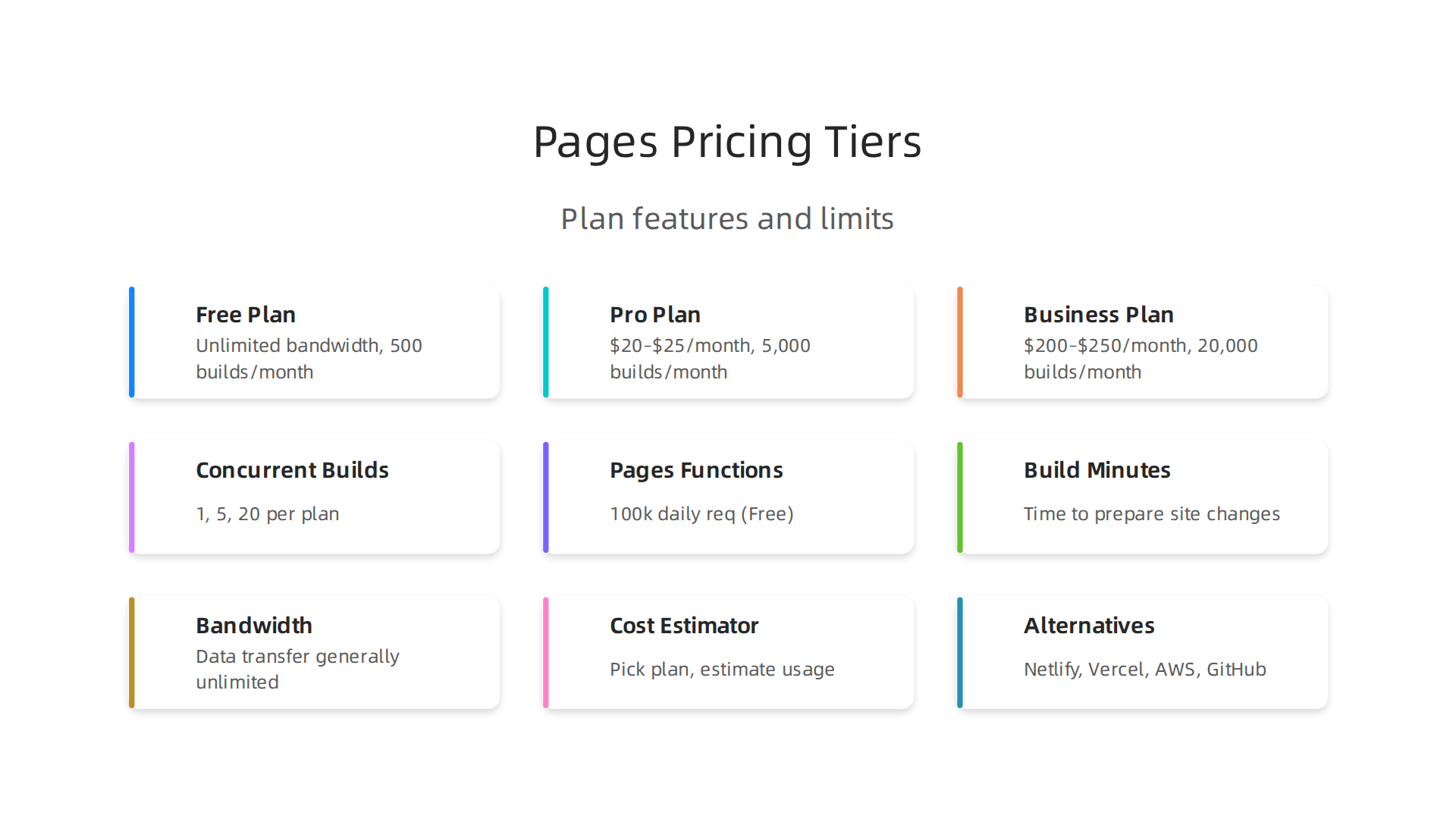
Cloudflare Pages generally uses a tiered system, meaning you choose a plan that includes certain features and limits. As of 2026, the main plans are Free, Pro, and Business.
The Free Plan: A Great Starting Point
The Free plan is very generous and a popular choice for many. It often includes unlimited bandwidth, which means lots of people can visit your site without extra charges for data transfer. You also get to host unlimited static sites and handle unlimited static requests. For businesses just starting, this is a huge plus because it keeps your initial cloudflare hosting pricing at zero.
However, there are some important limits on the free plan, mainly around how often you can build your website code and deploy it. The Free plan typically allows up to 500 builds per month and only one build at a time Cloudflare Pages Free Tier Limits & Pricing 2026. This plan also includes a certain number of requests for Pages Functions (serverless code), usually 100,000 requests per day, which count towards the overall Cloudflare Workers Free plan quota Pricing · Cloudflare Pages docs. These limits are generous for personal projects or small sites, but growing businesses might hit them quickly.
Paid Plans: Pro and Business
When your website needs more power, speed, or features, you can upgrade to a paid plan. The Pro plan is a common step up for many businesses. It usually costs around $20 to $25 per month, depending on if you pay yearly or monthly Cloudflare Pages Pricing (2026): Plans & Price History. With the Pro plan, you get more builds, typically up to 5,000 per month, and can run five builds at the same time Cloudflare Pages Free Tier Limits & Pricing 2026. This plan is designed for growing teams and projects that require more frequent updates and faster deployment.
For even larger organizations and more complex needs, there is the Business plan. This plan typically costs around $200 to $250 per month. It greatly increases your build allowance to about 20,000 builds per month and allows up to 20 concurrent builds Cloudflare for Developers 2026: Real Costs, Limits & Alternatives. Business plans often come with other advanced features and support.
Metered Add-Ons and Team Limits
While bandwidth and static requests are generally unlimited across all plans, some features might be "metered." This means you pay for what you use beyond a certain amount included in your plan. The main metered feature for Cloudflare Pages involves Pages Functions, which use Cloudflare Workers. Beyond the free daily limits, you pay for additional requests and CPU time used by these serverless functions Pricing · Cloudflare Workers docs. This is similar to how other cloud services like Vercel hosting pricing or AWS hosting cost might charge for specific compute resources.
Other factors influencing your overall Cloudflare Pages pricing include team size and project limits. For instance, even the Free plan supports unlimited collaborators, but paid plans may offer higher limits for total projects and custom domains per project Cloudflare Pages Pricing & Bandwidth Limits 2026: Free vs Pro …. Knowing these details is key to accurately calculate your true web hosting cost and avoid hidden fees that can surprise you.
To dive deeper into what businesses should know about Cloudflare’s hosting options, you can read our guide on Cloudflare hosting pricing what businesses must know. This knowledge is essential for IT managers and entrepreneurs who want to select the best web hosting for small business or enterprise-level operations in 2026, ensuring their online presence is both powerful and budget-friendly.
Cloudflare Pages offers a clear way to understand costs, but some charges are based on how much you use things.
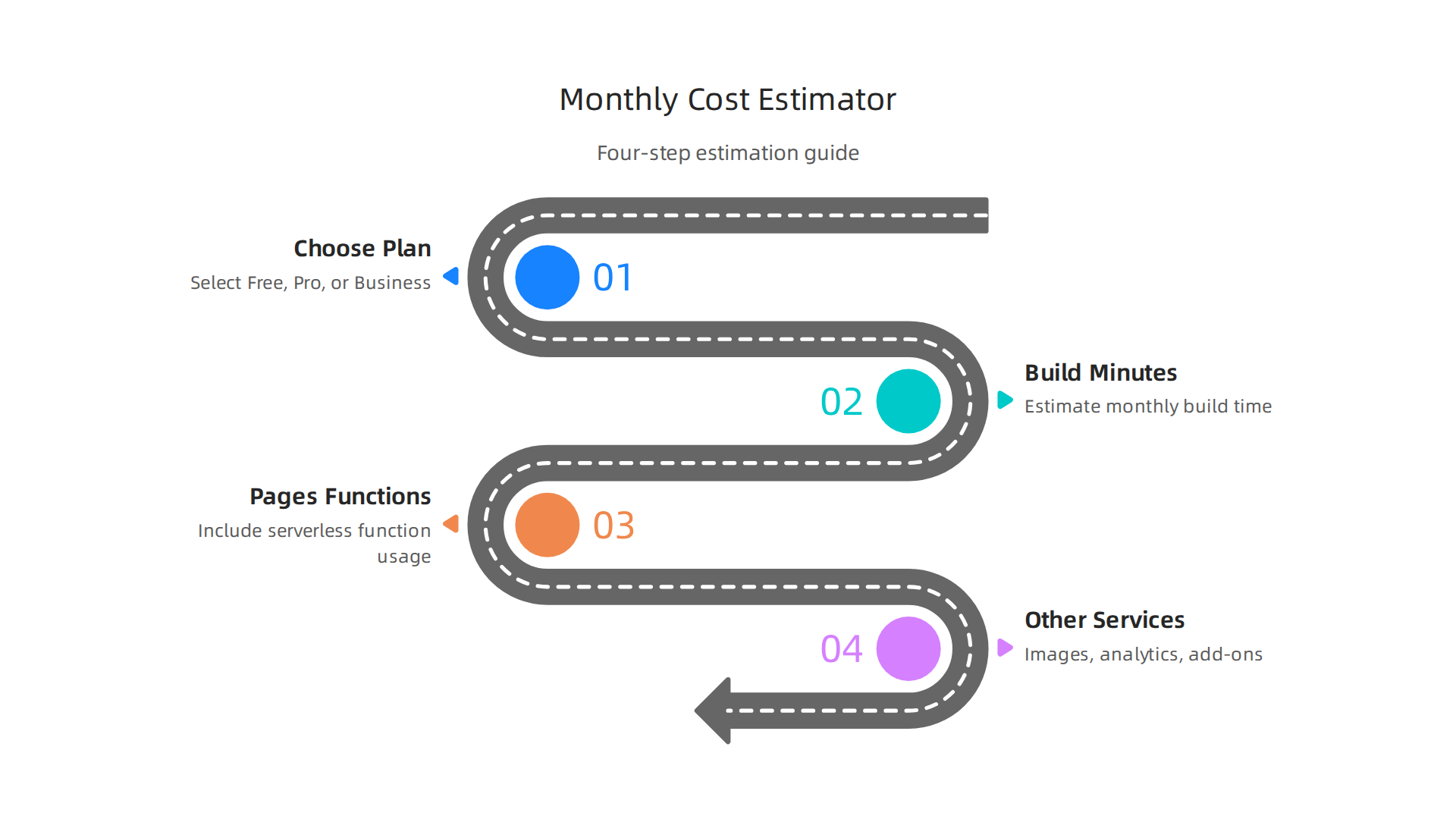
These "usage-based" charges are important to know, especially as your website grows. They can affect your overall Cloudflare Pages pricing.
What Are Build Minutes?
Think of "build minutes" as the time it takes for Cloudflare to get your website ready each time you make a change and publish it. When you update your website, Cloudflare Pages takes your code and "builds" it into a live site. This process takes time, measured in minutes.
Each Cloudflare Pages plan comes with a set number of build minutes per month:
- Free Plan: Gives you 500 build minutes each month. You can also only do one build at a time Cloudflare Pages Free Tier Limits & Pricing 2026. This is great for small personal sites or projects that don’t change often.
- Pro Plan: Jumps to 5,000 build minutes per month and allows five builds at once. This plan starts around $20 to $25 per month Cloudflare Pages Pricing (2026): Plans & Price History.
- Business Plan: Offers a large 20,000 build minutes each month, with up to 20 builds running at the same time. This is for bigger teams and costs about $200 to $250 per month Cloudflare for Developers 2026: Real Costs, Limits & Alternatives.
If you go over your build minutes limit on a paid plan, Cloudflare might charge extra for each additional minute. So, if you’re updating your site very often, or if your website takes a long time to build, these minutes can add to your cloudflare hosting pricing.
Bandwidth and Data Charges
One of the best parts about Cloudflare Pages is its approach to bandwidth. Bandwidth refers to the amount of data visitors download from your website. For static sites hosted on Cloudflare Pages, bandwidth is generally unlimited across all plans, including the Free plan. This means you don’t pay extra fees for data transfer, no matter how many people visit your site or how large your files are Cloudflare Pages Pricing 2026: Plans, Hidden Costs & Cheaper …. This is a big difference from some other cloud providers where you might face "egress fees" or charges for data leaving their network, similar to how some might calculate aws hosting cost or vercel hosting cost. Cloudflare even lets you store and get objects with no egress fees when using their R2 storage, which works well with Pages Workers & Pages Pricing.
Other Metered Items
While static sites on Cloudflare Pages enjoy unlimited bandwidth, other features might have separate costs. The main one is Pages Functions, which are like small pieces of code that run when someone does something on your website. These functions use Cloudflare Workers behind the scenes.
- Pages Functions (Cloudflare Workers): Even on the Free plan, you get 100,000 requests per day for Pages Functions, along with 10 milliseconds of CPU time per request Cloudflare Pages Free Tier Limits & Pricing 2026. If your website uses many serverless functions or they need more processing power, you might pay extra. For example, the paid Workers plan includes 10 million requests per month and additional charges for more. This is another area where your Cloudflare Pages pricing can go up if your usage is high, much like how vercel hosting pricing can increase with serverless function usage.
Other Cloudflare services that could add to your overall web hosting cost, if you choose to use them with Pages, might include things like advanced image resizing or specific analytics features beyond what’s included. Always check the details for each service you add to your Cloudflare setup.
Understanding these detailed cost drivers helps you choose the right plan and avoid surprises. To get a better handle on your potential spending, you can use a tool to calculate your true web hosting cost. This way, you can ensure your online presence is both powerful and budget-friendly.
To really nail down your potential Cloudflare Pages pricing, it helps to have a simple way to estimate costs.

Since Cloudflare Pages can grow with your needs, understanding how to forecast your spending is super important. You want to avoid surprises, right?
Here is a step-by-step approach to help you figure out your monthly Cloudflare Pages bill:
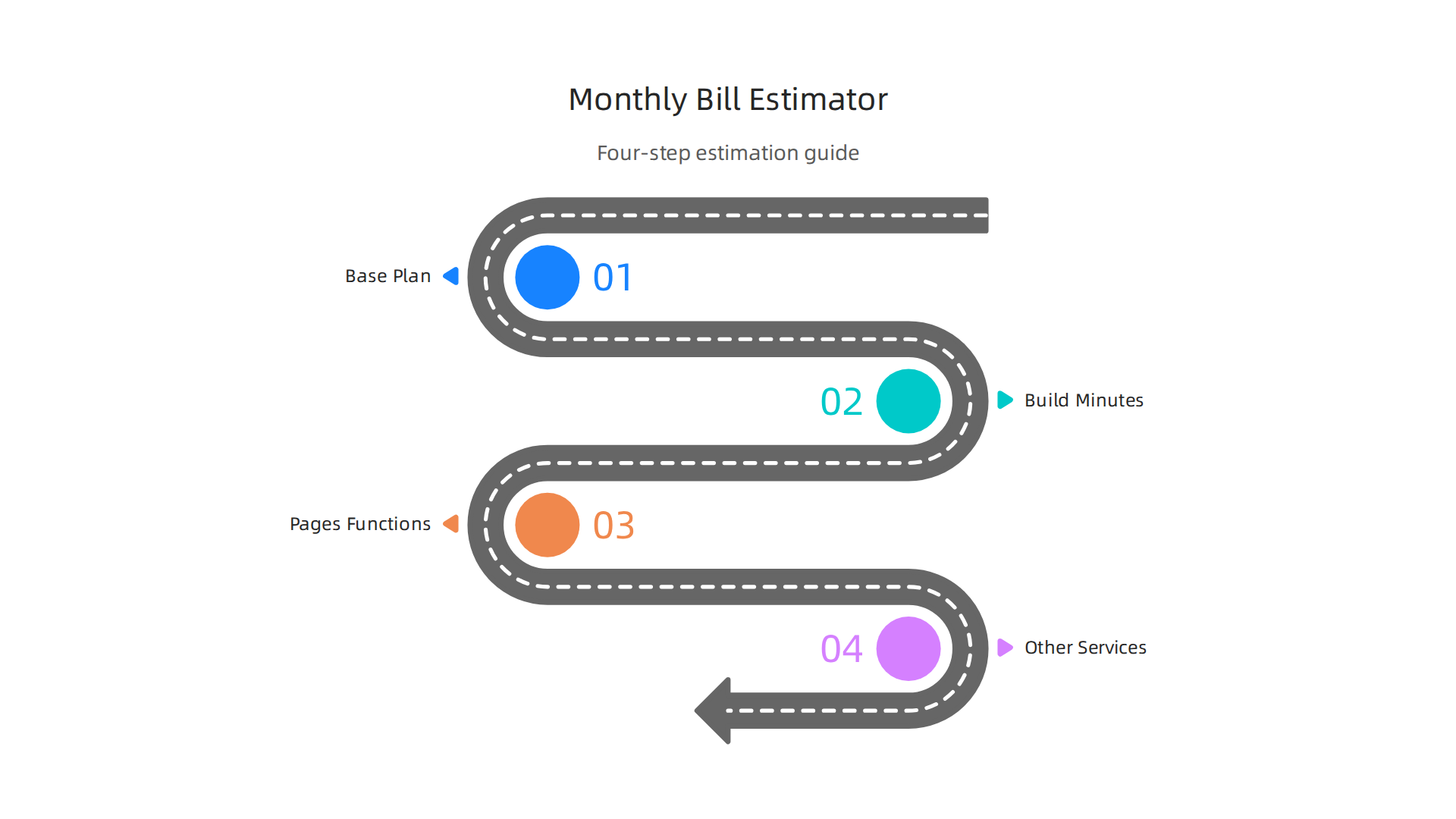
Step 1: Pick Your Base Plan
First, decide which Cloudflare Pages plan fits your basic needs.
- Free Plan: Great for small, simple sites. You get 500 build minutes and 100,000 daily requests for Pages Functions for free Cloudflare Pages Pricing & Bandwidth Limits 2026: Free vs Pro ….
- Pro Plan: If your site gets more updates or uses Pages Functions often, this plan is a good step up. It typically starts around $20 to $25 per month and includes 5,000 build minutes Cloudflare Pages vs Temps 2026: Free Tier & Pricing.
- Business Plan: For very busy sites or larger teams, this plan costs around $200 to $250 per month and includes 20,000 build minutes.
Your chosen plan will be the starting point for your monthly bill.
Step 2: Estimate Your Build Minutes
Think about how often you plan to make changes to your website. Each time you push an update, Cloudflare builds your site.
- Conservative Use: If you update your personal blog once a week, and each build takes a minute or two, you’ll easily stay within the Free plan’s 500 minutes per month. Many sites will find their Cloudflare Pages pricing remains at zero for this aspect.
- Aggressive Use: If you have a team making daily updates to a big website that takes 10 minutes to build each time, you’ll quickly use up minutes. For example, 30 updates a month * 10 minutes each = 300 build minutes. If you have many more updates, or if your build times are longer, you might need a Pro or Business plan to cover those extra minutes. Some online tools, like the Cloudflare Workers Pricing Calculator (2026), can help you estimate this.
Step 3: Account for Pages Functions (Cloudflare Workers)
If your website uses dynamic features, like a contact form that sends emails or pulls data from another service, you’re likely using Pages Functions, which run on Cloudflare Workers.
- Free Usage: The Free plan gives you 100,000 requests per day for Pages Functions, along with 10 milliseconds of CPU time per request Cloudflare Pages vs Temps 2026: Free Tier & Pricing.
- Paid Usage: If your functions get millions of requests or need more processing power, you’ll start paying extra. For instance, the paid Workers plan includes 10 million requests per month, and after that, charges are around $0.30 for every million additional requests Pricing · Cloudflare Workers docs. Keep an eye on this if your website becomes very interactive, as it can increase your Cloudflare hosting pricing, similar to how higher usage impacts vercel hosting cost or aws hosting cost.
Step 4: Consider Other Cloudflare Services
Are you using other Cloudflare features beyond just hosting your static site? Things like advanced image optimization, special security rules, or specific analytics tools can add to your bill. Always check the pricing for any extra services you turn on.
To prepare for your estimate, gather these inputs:
- Your chosen Cloudflare Pages plan (Free, Pro, Business).
- Your estimated number of website updates (pushes/builds) per month.
- The average time each build takes.
- Your estimated number of Pages Functions requests per month (if you use them).
- Any other Cloudflare services you plan to use.
By looking at these numbers, you can get a good idea of your cloudflare pages pricing. If you’re looking for more ways to understand and manage your website expenses, learning to master your web hosting cost in 2026 can be a huge help. Many online calculators, like the Cloudflare Pages + Workers Cost Calculator 2026, can also assist you in forecasting your costs accurately. If you need reliable, secure, and high-performance hosting solutions that make managing these details easier, consider checking out Prism Web Host.
Calculating the direct monthly cost for Cloudflare Pages is a great start. But savvy business owners know that the price tag isn’t the whole story. What you get for that price, like built-in security, speed, and helpful support, can offer huge hidden value.

These things often save you money and headaches in the long run.
Built-In Security Saves You Money
One big plus with Cloudflare Pages is the security that comes with it. You might not see these features listed on your monthly bill, but they protect your website from many online dangers. For example, Cloudflare offers strong protection against DDoS attacks. These are like huge waves of bad internet traffic trying to crash your site. Having this kind of protection built-in means you don’t have to pay extra for another service.
Cloudflare also includes free secure connections (called SSL or TLS) for your website. This makes sure all information sent between your site and visitors is private and safe. Without this, browsers would warn people your site isn’t secure, which can scare away customers. Many other hosting services charge extra for this important security feature. You also get a Web Application Firewall (WAF) on higher plans, which acts like a guard for your website, stopping common attacks. This overall level of security helps keep your cloudflare pages pricing much more valuable than it looks at first glance.
Performance That Boosts Your Business
Speed matters a lot online. People get annoyed by slow websites and might leave. Cloudflare Pages helps your site load super fast because it uses a global network of servers, called a CDN. This means your website content is stored closer to your visitors, no matter where they are in the world. When someone visits your site, the content comes from the nearest server, making it much quicker.
This speed isn’t just nice for your visitors. It also helps your website show up higher in search results, which can bring in more customers. Fast loading times can improve how many people buy things or sign up for your services. So, even if you see a similar direct vercel hosting cost or aws hosting cost, the built-in performance of Cloudflare Pages can lead to better business results without extra charges for speed-boosting tools. The platform fully supports modern features like HTTP/3, QUIC, and image compression to ensure your site is always fast and modern, according to the official Cloudflare Pages information.
Support When You Need It
When things go wrong, good support is priceless. Cloudflare offers different levels of customer support, depending on your plan. For small businesses, knowing you can get help quickly can make a big difference. If your website goes down, or you have a problem, fast support means less time lost and less money missed.
While the free plan has community support, paid plans offer quicker, more direct help. This kind of support means less stress and more time for you to focus on your business, rather than fixing website problems. When you think about the full value of cloudflare hosting pricing, the peace of mind that comes with reliable support is a huge, often unseen, benefit. To understand all the features and what comes with each plan, you might want to look at the Cloudflare Pricing 2026: Plans, Costs & Real ROI which breaks down the value beyond just the numbers.
Considering all these hidden benefits changes how you think about cloudflare pages pricing. It’s not just about the monthly fee. It’s about the security, speed, and support that come with it, all working together to give you a strong online presence. For more details on what you get with Cloudflare Pages, check out our guide on Cloudflare hosting pricing for businesses.
Now that we’ve seen the great value inside Cloudflare Pages, it’s smart to look at other options too. Knowing what else is out there helps you make the best choice for your website. When you compare cloudflare pages pricing with other services, you should think about more than just the monthly bill. You also need to look at what features you get and how easy they are to use.
Other Choices and Their Differences
Many different services can host your website. Here are some popular ones and how they stack up against Cloudflare Pages:
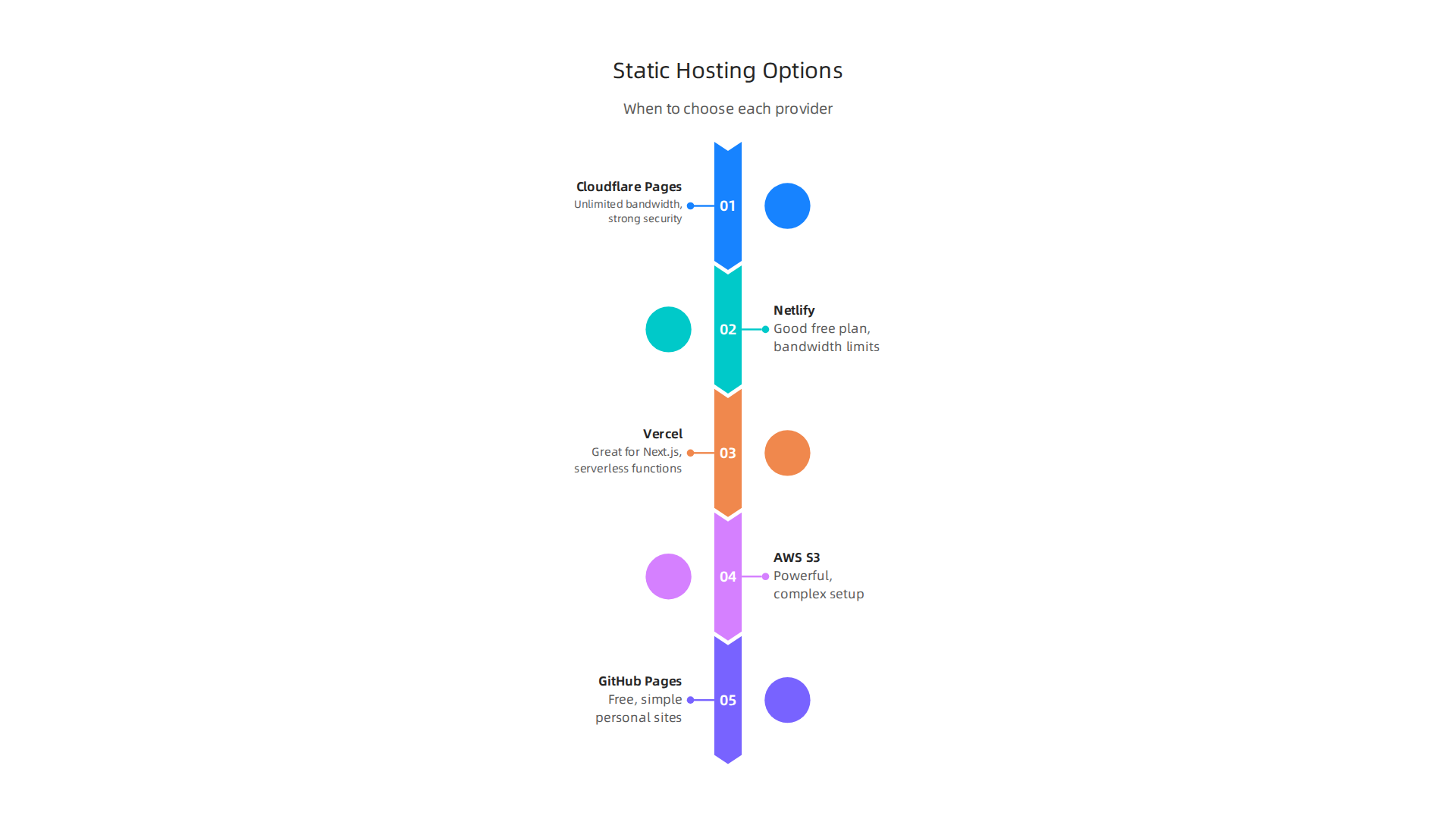
- Netlify: This is a very common choice for static websites, much like Cloudflare Pages. It has a good free plan, but its paid plans often use a credit system. Netlify can charge a lot if your website uses too much bandwidth (the data sent to visitors). For example, Netlify’s free tier usually caps bandwidth at 100 GB per month, with extra costs for going over this limit, unlike Cloudflare Pages which offers unlimited bandwidth across all plans. You can find more details in comparisons of Cloudflare Pages alternatives.
- Vercel: Vercel is another top option, especially if you’re building websites with Next.js, a popular tool for web developers. It’s known for being fast and easy to use with certain kinds of projects. Vercel also offers "Serverless Functions," which let your website do more complex tasks without needing a full server. However, your vercel hosting pricing can grow if you use many of these functions or go over certain limits.
- AWS (Amazon Web Services): AWS offers many powerful tools, like S3 for storing files and CloudFront for speedy delivery. These can be used to host static websites. The aws hosting cost can be very low for small sites, but it gets more complex to set up and manage. It’s often best for bigger businesses with a team of tech experts.
- GitHub Pages: This is a free option, great for personal projects or simple sites. It links directly to your code on GitHub, making it easy to publish. But it has fewer features and less support than paid services.
You can see a deeper comparison of various static hosting providers, including their starting prices and what they’re best for, in guides like Static Website Hosting: Providers Compared (2026).
How to Pick the Best Option for You
To choose the right service, think about these things:
- How many visitors do you expect? If you think your website will get a lot of traffic, Cloudflare Pages is a strong choice because it offers unlimited bandwidth on all plans, even the free one. Other services like Netlify might charge a lot more if your site becomes very popular, as their free tiers often have limits on bandwidth, according to the Best Cloudflare Pages Alternatives in 2026 (8 Compared).
- How often do you change your website? If you update your site often, you’ll need more "builds" (the process of turning your code into a live website). Cloudflare Pages gives you 500 builds per month for free, which is quite generous for many small businesses.
- Do you need special server code? If your website needs to do more than just show static pages, like handling forms or logging in users, you might need "serverless functions." Cloudflare Pages offers these through Cloudflare Workers. Vercel and Netlify also have similar features.
- What kind of help do you want? Cloudflare offers different levels of customer support. If you’re new to hosting, knowing you can get quick help is important.
When to Choose Cloudflare Pages
Cloudflare Pages is often a great fit if:
- You want fast website loading times and strong security without paying extra for them.
- You expect a lot of visitors and don’t want to worry about surprise bandwidth bills.
- You are already using other Cloudflare services, as they work well together.
- You want a good free plan with many features for testing or small projects.
When thinking about your total costs, remember to look at the big picture over a year or more. Don’t just compare the monthly cloudflare pages pricing directly to vercel hosting cost or aws hosting cost. Think about the "Total Cost of Ownership" (TCO), which includes all the hidden benefits and potential savings we talked about earlier. This means thinking about how much time you save not having to worry about security, performance, or costly overage fees. For a complete understanding of all your hosting expenses, it’s wise to calculate your true web hosting cost and avoid hidden fees in 2026. This holistic view helps you find a hosting solution that truly supports your business goals.
When thinking about your total costs, remember to look at the big picture over a year or more. Don’t just compare the monthly cloudflare pages pricing directly to vercel hosting cost or aws hosting cost. Think about the "Total Cost of Ownership" (TCO), which includes all the hidden benefits and potential savings we talked about earlier. This means thinking about how much time you save not having to worry about security, performance, or costly overage fees. For a complete understanding of all your hosting expenses, it’s wise to calculate your true web hosting cost and avoid hidden fees in 2026. This holistic view helps you find a hosting solution that truly supports your business goals.
Saving money: Optimization tips and monitoring to avoid surprises
Even with a great service like Cloudflare Pages, it’s smart to have ways to keep your spending in check. While Cloudflare Pages is known for its generous free tier and clear pricing, especially with unlimited bandwidth, other services might have unexpected charges. Knowing how to save money and watch your usage can help you avoid surprise bills and keep your cloudflare pages pricing low.
Smart Ways to Lower Your Costs
Here are some simple steps to make sure you’re not spending more than you need to:
- Be smart about "builds": A "build" is when your website code gets turned into the live site visitors see. Cloudflare Pages gives you 500 free builds each month. To save money, try to:
- Only build when needed: Do not set up your site to build automatically for every tiny change. Group your changes and build them all at once.
- Keep your website lean: A smaller website takes less time to build. This helps you stay within your build limits.
- Optimize your content: Even though Cloudflare Pages offers unlimited bandwidth, making your website files smaller helps it load faster for your users. This is also super important if you’re ever using a service where
vercel hosting pricingoraws hosting costcan go up with more data.- Compress images: Make sure all your pictures are as small as possible without losing quality. Tools can do this for you.
- Clean up your code: Get rid of any extra, unused code.
- Use caching wisely: Caching saves copies of your website content closer to your visitors. This means your website loads much faster, and it uses less power from the main servers. Cloudflare is excellent at caching, which is a big part of why its services, including cloudflare hosting pricing, are so efficient.
- Set up rules for changes: If many people work on your website, make sure there are clear rules about who can make updates. This prevents many small, unnecessary builds that can add up on other platforms.
Keep an Eye on Your Spending
Monitoring your website’s usage is like watching your bank account. You want to know what’s happening so you don’t get surprised.

- Check your dashboard often: Cloudflare Pages, like most hosting services, has a dashboard where you can see your usage, such as how many builds you’ve used. Make a habit of checking it regularly.
- Set up alerts: If possible, set up alerts that tell you when you’re getting close to a limit on builds or other resources that might affect your vercel hosting pricing or other hosting costs. This way, you get a heads-up before any extra charges happen.
Teamwork and Budgeting
Having a clear plan for your team and your money is key to managing your website costs.
- Assign roles: Know who is in charge of updating the website and who monitors the costs. This prevents mix-ups.
- Plan your budget: Even if you’re mostly on a free plan, have a clear idea of what you’re willing to pay if your site grows. Cloudflare Pages offers very clear steps up from its free plan, so you can plan for future cloudflare pages pricing changes easily. For example, the free tier offers 500 builds per month, while the Pro plan offers 5,000 builds for $20 a month, which is quite affordable for the extra capacity Static site hosting compared in 2026.
- Review regularly: Once a month, look over your hosting bill and usage. This helps you catch any unexpected changes or areas where you could save more. Learning to master your web hosting cost in 2026 can really make a difference.
By following these tips, you can make sure your website hosting stays affordable and predictable, no matter which service you choose. Knowing how to handle your usage means you get the most value for your money.
Summary
This article explains Cloudflare Pages pricing in practical terms so small businesses, marketing managers, and IT leaders can pick a hosting plan without nasty surprises. It covers the core plans—Free, Pro ($20–$25/month) and Business ($200–$250/month)—and explains how build minutes, Pages Functions (Cloudflare Workers), and other metered features drive additional costs. You’ll learn that bandwidth for static sites is generally unlimited, while build minutes (500 free, 5,000 Pro, 20,000 Business) and serverless function usage can add charges if you exceed limits. The guide shows a simple, four-step method to estimate monthly bills, highlights built-in benefits like DDoS protection, CDN speed, and SSL that increase real value, and compares Pages with alternatives such as Vercel and AWS. Finally, it offers optimization and monitoring tips to avoid overages and plan a predictable hosting budget for 2026 and beyond.
