




Hostinger Domain Registration Cost Understanding Pricing Renewal and What You Need to Budget
Article
Introduction: Simplifying Your Online Presence with Hostinger Domains
Starting an online presence for your business can feel like a lot. Terms like domain registration and web hosting get thrown around, and it is easy to get confused. But here is the thing: the very first step is actually the simplest one. You need to secure a domain name. That is your address on the web, the place where customers will find you.
The problem is there are many registrars out there. Each one offers different prices, features, and renewal rates. Without clear guidance, you might end up paying way more than you expected or missing important security features. According to a 2026 guide on the best domain services for small businesses, you should always compare renewal fees and check what is included, like privacy protection and SSL certificates. That advice alone can save you from common pricing traps.
Hostinger is one provider that makes this process easier. They offer a hostinger web domain service paired with affordable hosting plans.
But even with a good provider, you still need to understand hostinger pricing and what you actually get for your money. Many businesses jump at a low first year price only to find the renewal cost much higher. Knowing the real cost to buy a domain name and the ongoing domain name registration cost helps you plan your budget.
This guide gives you a complete walkthrough of Hostinger’s domain and hosting services. We will cover how to pick the right domain, what to watch for with renewal rates, and how to avoid surprises. We will also look at real user experiences to help you decide if Hostinger cheap web hosting is right for your business. By the end, you will have the confidence to set up your online home without the headache.

And once you have your domain, you will need reliable hosting to make your site fast and secure. For a high performance option, check out the hosting plans from Prism Webhost.
They offer strong security and uptime to keep your business online. To learn more about what affects your yearly costs, read our guide on domain cost per year.
1. Understanding Hostinger’s Domain Registration Services
Let’s start with the first thing you need: your domain name. This is your address on the internet, and getting it right matters. Hostinger makes this part easy by offering a huge selection of domain extensions.
You are not limited to just .com here. Hostinger gives you access to over 400 different TLDs, or top-level domains. That includes the usual options like .com, .net, and .org. But you also get newer ones like .store, .tech, and .online. And if you need a country-specific address, you can pick something like .co.uk or .de. According to the detailed 2026 review of Hostinger’s domain offerings, you can even find specialty TLDs that match your brand perfectly.
The Free Domain Bonus
Here is one of the best parts of using Hostinger. When you buy one of their annual web hosting plans, you get a free domain for the very first year. This can save you a good chunk of money right at the start. Instead of paying a separate domain name registration cost, it is included in your hosting package. That makes the cost to buy a domain name for year one basically zero.
This is a smart move if you are just starting your business website. You can test everything out and see if the hostinger cheap web hosting setup works for you without worrying about an extra bill for the domain.
What About the Real Domain Name Registration Cost?
Now let’s talk honestly about hostinger pricing. The first year is a bargain. A .com domain can be as low as $2.99 for the first year. But you need to know what happens after that. The renewal price is where most people get surprised.
According to the 2026 pricing breakdown from CheckThat, a .com domain renews at about $19.99 per year after the first year. That is a jump of over 500 percent. Other TLDs can be even bigger shocks. A .shop domain might cost just $0.99 the first year but then renew at $34.99. That is a 3,430 percent increase.
So here is the honest advice. Stick with .com or .net if you want predictable renewal costs. .net has one of the smallest increases, going from about $11.99 to $15.69. Avoid specialty TLDs like .shop or .tech unless you truly need them and are ready for the high renewal.
Simple Management Built In
Hostinger also makes managing your domain easy. Their control panel, called hPanel, lets you handle everything in one place.
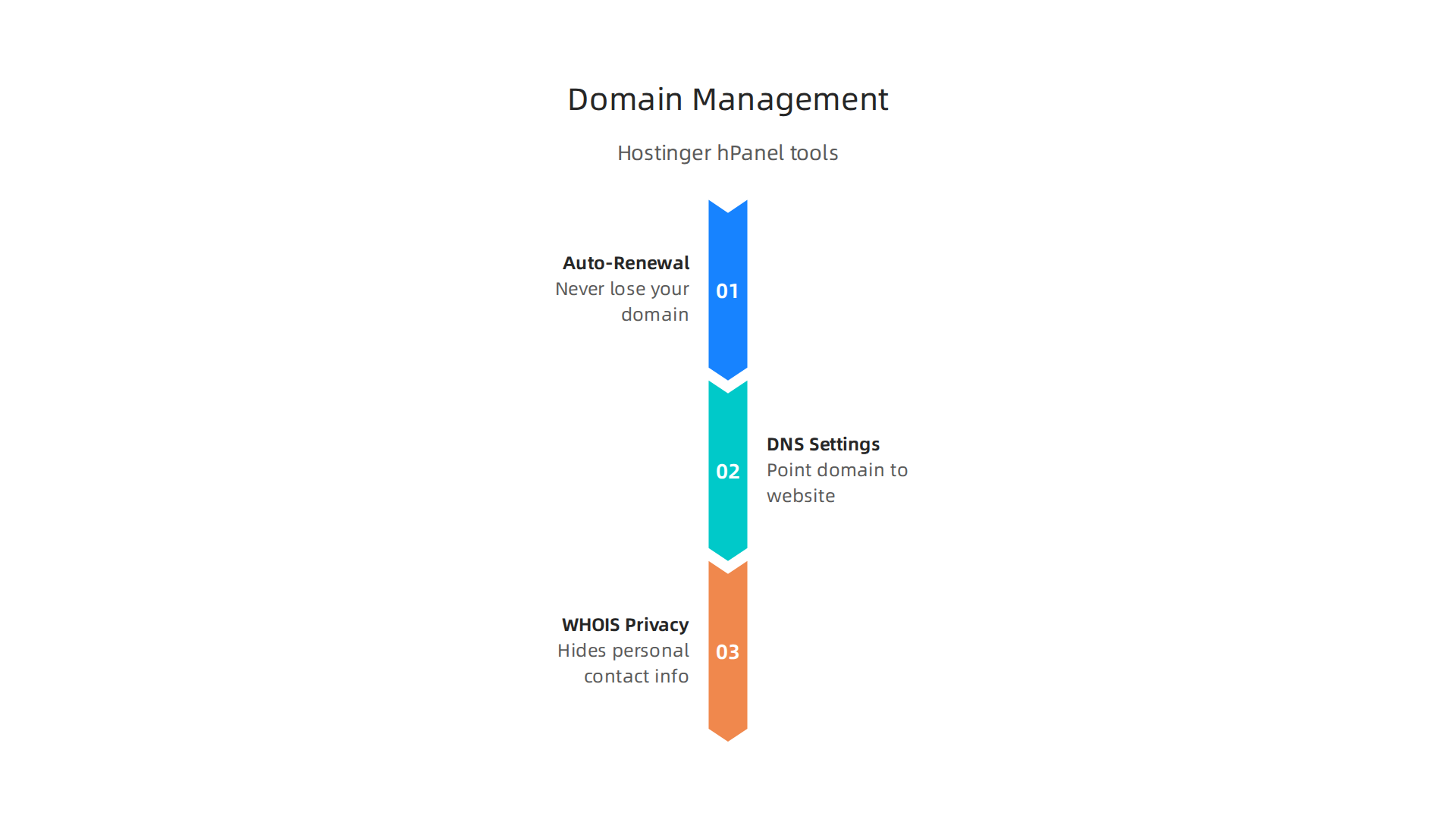
You can turn on auto-renewal so you never lose your domain. You can manage your DNS settings to point your domain to your website. And WHOIS privacy is included for free, which keeps your personal contact information hidden from the public.
Other registrars often charge extra for that privacy protection. Hostinger includes it automatically. That is a nice bonus.
A Quick Look at Popular TLD Pricing
Here is a simple table to show you what to expect for the most common options:
| TLD | First Year Price | Renewal Price | Price Jump |
|---|---|---|---|
| .com | $2.99 | $19.99 | +567% |
| .net | $11.99 | $15.69 | +31% |
| .org | Varies | Around $15-20 | Moderate |
| .shop | $0.99 | $34.99 | +3,430% |
| .tech | $5.99 | $59.99 | +900% |
As you can see, the domain name registration cost looks amazing in year one but can bite you later. Plan for the renewal, not just the promo price.
If you want to compare how Hostinger stacks up against other providers for avoiding price traps, check out our guide on cheapest domain hosting in 2026.
Making Your Choice
So is Hostinger a good place to get your hostinger web domain? Yes, especially if you are bundling it with a hosting plan. The free first year is a real deal. Just remember to budget for the renewal. Pick a .com or .net if you want stable long-term costs. And use the simple management tools to keep everything running smoothly.
Once you have your domain locked in, you will need hosting that can keep your site fast and secure. For a reliable option, take a look at the hosting services from Prism Web Host. They offer strong performance and security to match your new online address.
2. Hostinger Web Hosting Plans: An Overview for SMBs
Now that you understand how Hostinger handles domains, let’s talk about the actual hosting. A domain is just an address. The hosting is what makes your website actually work.
Hostinger offers several types of hosting plans. Each one is built for a different stage of business growth. Let me walk you through them so you can pick the right one for your needs.
Shared Hosting: The Starting Point
Shared hosting is where most small businesses begin. Your website shares server space with other sites. This keeps the cost low. Hostinger calls their shared plans Premium, Business, and Cloud Startup.
The Premium plan starts at around $1.99 per month if you lock in a longer term. It is built for a single website and personal projects. You get free SSL, weekly backups, and the hPanel control panel. This is the real hostinger cheap web hosting option.
The Business plan bumps up to about $2.99 per month on promotion. It supports up to 100 websites. That makes it better if you run multiple sites for your business or side projects.
The Cloud Startup plan lands around $6.99 per month promo pricing. It uses cloud resources instead of a single server. That gives you better performance for growing sites with over 100 daily visitors.
VPS Hosting: More Power and Control
If your business outgrows shared hosting, VPS is the next step. Virtual private server hosting gives you dedicated resources inside a shared environment. Your site will not be slowed down by noisy neighbors.
Hostinger’s VPS KVM 1 plan starts at $4.99 per month on promotion. It gives you full server control. This is great for developers or businesses running custom applications.
What You Get With Every Plan
Every Hostinger hosting plan includes a few key features. You get a free SSL certificate to keep customer data safe. Weekly backups protect you from accidental data loss. And the hPanel control panel makes managing everything simple. These features are usually add-ons with other hosts. Hostinger includes them in the base price.
Side-by-Side Plan Comparison
Here is a simple table to help you compare the most popular options for small businesses:
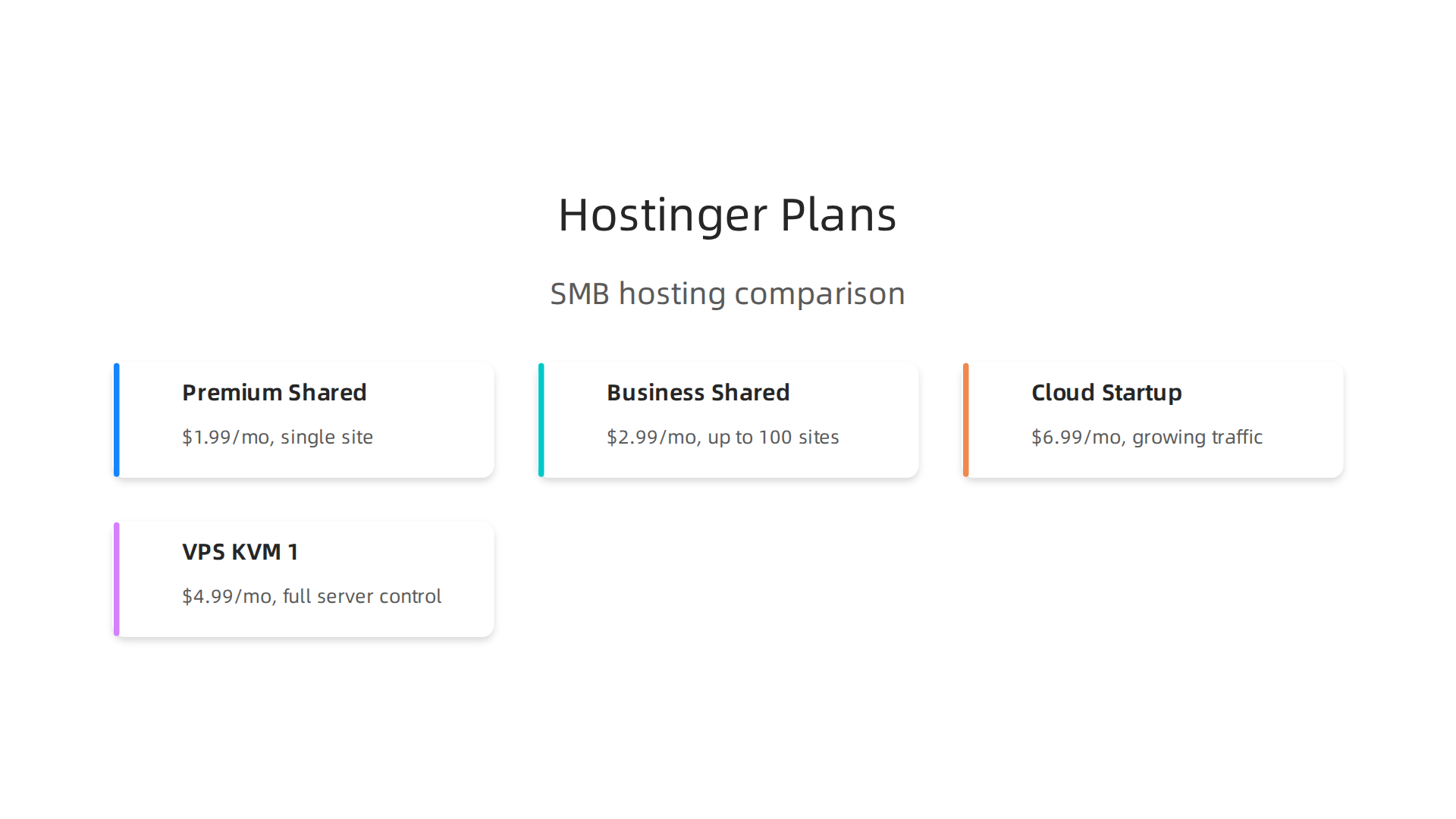
| Plan | Promo Price | Standard Price | Best For |
|---|---|---|---|
| Premium Shared | $1.99/month | $10.99/month | Single site, personal projects |
| Business Shared | $2.99/month | $16.99/month | Small business, up to 100 sites |
| Cloud Startup | $6.99/month | $25.99/month | Growing sites, 100+ visitors/day |
| VPS KVM 1 | $4.99/month | $9.99/month | Full server control, developers |
These promotional prices usually require a longer commitment, often 48 months. The renewal prices are what you will actually pay after year one. According to a Hostinger review and benchmarks from 2026 on Reddit, the jump from promo to standard pricing is significant for most plans.
Which Plan Should You Pick?
If you are just starting out, the Premium shared plan is enough. You get one website, free SSL, and decent performance for a low entry price.
If you run a small business with multiple sites or an online store, go with the Business plan. The extra site allowance and improved resources make it worth the small price difference.
If your site is already growing and getting steady traffic, the Cloud Startup plan gives you better speed and reliability. The jump from $6.99 to $25.99 at renewal is still manageable for most growing businesses.
And if you need full control and plan to run custom software, go straight to VPS.
Understanding these pricing tiers is important. Many business owners only look at the promo price and get surprised at renewal. To avoid that shock, compare real costs across providers. Our guide on comparing web hosting pricing models in 2026 can help you spot the true cost before you commit.
The right plan depends on where your business is today and where it is going in the next year or two. Pick based on your needs now, but keep an eye on that renewal price so you are never caught off guard.
3. Performance and Uptime: What to Expect from Hostinger
So you picked a plan and you understand the real renewal cost. But a cheap plan that goes down all the time is no bargain at all. How does Hostinger actually hold up when real people visit your website?
The short answer is that Hostinger performs better than most low cost hosts. They build their entire stack on LiteSpeed servers. This is important because LiteSpeed is much faster than the old Apache servers many budget hosts still use. LiteSpeed handles more visitors at once and serves pages quicker.
Hostinger also stores all your site data on NVMe SSD drives. This is currently the fastest type of storage you can get. It means your database queries, images, and files all load much faster than they would on traditional hard drives.
What do real world tests show? A 2026 Hostinger benchmark test by Gizmodo measured a Time to First Byte of 291 milliseconds and a First Contentful Paint of 435 milliseconds. Those are strong numbers for shared hosting. An even more impressive result came from a 2026 01net performance test. They recorded 100% uptime over a two month window and an average server response time of just 47 milliseconds. That is excellent.
Other independent benchmarks back this up. A 2026 analysis on Fueler speed benchmarks under 400ms confirmed that Hostinger keeps average load times under 400 milliseconds for most standard sites. You can also check the Pingdom monitoring data for Hostinger yourself to see day by day availability and response times from servers around the world.
Not every review is perfect though. One 2026 critical Hostinger vs Bluehost analysis recommends that serious growing websites look elsewhere. The reviewer found better support and faster speeds on services like Cloudways or NameHero for similar pricing. This is worth keeping in mind if you expect heavy traffic growth.
A big piece of the performance puzzle is location. Hostinger lets you choose from data centers in the USA, UK, Netherlands, Lithuania, Singapore, India, and Brazil. Pick the one closest to your audience and your site will load noticeably faster for them. Your hostinger web domain is the front door, but the data center location is what makes the door open quickly for each visitor.
Here is what you need to remember. For a small business starting out, Hostinger delivers reliable speed and uptime that beats most budget competitors. The LiteSpeed technology and SSD storage give it a real advantage. If you want a broader view of who delivers the best real world results, check out our web hosting services reviews for 2026.
And if you want to skip the budget compromises entirely and start with isolated hosting environments and guaranteed performance, explore our premium web hosting products and services built on the same NVMe and LiteSpeed infrastructure that makes modern websites fly.
4. Security Features: Protecting Your Domain and Website
Speed matters a lot. But none of it matters if your site gets hacked or your personal information ends up in the wrong hands.

Security is where many budget hosts cut corners. How does your hostinger web domain actually hold up when it comes to safety?
The good news is that Hostinger includes serious security features on every plan, not just the expensive ones.
Free SSL certificates on every plan
SSL encrypts data between your visitors and your site. Google also uses SSL as a ranking signal. Hostinger gives you unlimited free SSL certificates with every plan, automatically applied when you sign up. A detailed look at Hostinger security features overview confirms this is standard, not an upsell. Many competitors like GoDaddy only offer free SSL on more expensive tiers.
DDoS protection and server-level defenses
DDoS attacks flood your site with fake traffic to crash it. Hostinger includes DDoS protection on all plans using Cloudflare integration and their own traffic analysis tools.
They also use a Web Application Firewall (WAF), mod_security, and PHP hardening to block threats like SQL injection and cross-site scripting. According to their Hostinger Trust Center documentation, they are also ISO/IEC 27001:2022 certified. That is a big deal. It means an outside auditor verified their security practices meet international standards.
Automated backups so you can sleep at night
If something goes wrong, backups are your lifeline. Most Hostinger plans include weekly automated backups. The Business plan and above include daily backups. You can also trigger manual on-demand backups anytime from the control panel. A 2026 TechRadar security review highlights that this backup system is more generous than many hosts offer at the same price point.
Domain privacy protection
When you register a domain, your name, address, phone number, and email end up in a public database called WHOIS. Spammers and identity thieves scrape this data constantly. Hostinger includes free domain privacy protection with every domain registration. This hides your personal contact details from the public database. It is the same protection that some registrars charge $10 to $15 per year for.
The bottom line on security
Hostinger covers the essentials well. Free SSL, DDoS protection, automated backups, and domain privacy are all included at no extra cost. If you want a deeper comparison of how different hosts handle security certificates and costs, check out our guide on GoDaddy SSL certificate cost 2026 to see how pricing varies.
And if your business handles sensitive customer data and you need hosting with enterprise-grade isolation and dedicated security monitoring, our premium web hosting products and services include 17Tbps+ DDoS protection, DNSSEC, and point-in-time backups built right in.
5. Customer Support and User Experience
You are up late working on your site and something breaks. Maybe a page stops loading, or you cannot log into the control panel. This is when customer support matters most.

So how does your hostinger web domain experience hold up when you actually need help?
Hostinger offers 24/7 live chat support. That means any time of day or night, you can open a chat window and talk to a real person. According to a Hostinger 2026 review on Windows Forum, the support reputation is generally strong, especially around live chat. Most users find the team responsive and helpful. The company also maintains a large knowledge base with hundreds of tutorials for self-service.
But not every experience is perfect. Some users note that the depth of technical knowledge varies depending on who answers. For basic questions like setting up email or pointing a domain, chat works great. For complex server issues, you may get transferred or wait a bit longer for a specialist.
The control panel that makes everything easier
The real star of the user experience is hPanel. Hostinger built their own control panel instead of using the traditional cPanel. For beginners, this is excellent news. hPanel is cleaner and simpler. You do not have to hunt through confusing menus to find basic settings like file management, email accounts, or database tools.
At this price point, the hostinger cheap web hosting package includes an interface that feels modern and responsive. Users often praise hPanel for being easier to navigate than the cluttered dashboards of competitors. A honest Hostinger review on YouTube notes that while support response times can lag during busy periods, the overall ease of use and dependable performance make it a solid choice for everyday websites.
When you need more hands-on support
For most small projects, Hostinger’s combination of live chat and hPanel is more than enough. But if you prefer a more traditional setup with cPanel and dedicated support teams that go deeper on technical issues, consider alternatives. To see how different hosts compare on pricing and support quality, check out our guide on cheapest domain hosting in 2026. It helps you weigh the trade-offs between low cost and hands-on help.
6. Scaling Your Business with Hostinger’s Advanced Options
Starting with a single shared hosting plan works well when your traffic is low. But what happens when your site starts getting real visitors? Maybe hundreds or even thousands per day.

Shared hosting has limits. The good news is that Hostinger makes it easy to move up when your site outgrows its first home.
Moving from shared to VPS or cloud hosting
Hostinger offers shared plans for beginners, but they also have VPS (Virtual Private Server) and cloud hosting options for when your site needs more power. A VPS gives you dedicated resources. Your site does not have to compete with neighbors for CPU and RAM. Cloud hosting spreads your site across multiple servers, which improves reliability even further.
The upgrade process is straightforward. You do not have to migrate your site manually or rebuild anything from scratch. Hostinger handles most of the transition for you. This means less downtime and less stress. According to a Hostinger review covering VPS and cloud hosting features, VPS plans include full root access. That gives developers complete control over the server environment.
Tools that help you grow
Advanced plans come with features that make scaling smoother. You get dedicated IP addresses, which can improve email deliverability. You also get staging environments. A staging environment is a test copy of your site where you can try out changes before making them live. This is huge for businesses that update their sites often and cannot afford mistakes.
Another big advantage is the ability to manage multiple domains and websites from one account. Instead of logging into separate dashboards for each site, you control everything from a single hPanel account. This saves time and reduces confusion. If you are running several online projects, having everything in one place is a game changer. It means you can add new sites in minutes without extra setup work.
When you are ready to scale
Scaling with a hostinger web domain setup does not require a technical degree. Their support team helps you pick the right plan based on your current traffic and goals. And because your control panel stays the same whether you are on shared or VPS hosting, there is no learning curve when you upgrade. For businesses that need even more power beyond VPS, Hostinger also offers cloud plans that auto-scale with your traffic. If you get a sudden spike from a viral post or a sale event, your site stays online and fast.
If you are thinking about how to grow your online presence without switching hosts, you might want to explore cheap VPS hosting options that give you more control and resources without a huge price jump.
How Prism Webhost compares for growing businesses
While Hostinger handles scaling well within its own ecosystem, some businesses prefer a provider that offers even more hands-on support and enterprise-grade infrastructure from day one. Prism Webhost hosting and domain services give you NVMe SSD storage, LiteSpeed servers, and a 99.99% uptime SLA right from the start. If you value ultra-fast speeds and robust security as you add more domains and traffic, it is worth comparing options to see what fits your long-term plan.
Summary
This guide walks small businesses through picking and managing a Hostinger web domain and the matching hosting plan, explaining the real costs, performance, security, and upgrade paths you need to know. It describes Hostinger’s free first-year domain with annual hosting, the major jump from promo to renewal prices for common TLDs, and which extensions tend to be most predictable long term. You’ll learn the differences between shared, cloud, and VPS plans, what features come included (free SSL, WHOIS privacy, backups), and how LiteSpeed/NVMe infrastructure affects speed and uptime. The article also covers control panel usability, 24/7 live chat support, and best practices for choosing data centers and staging environments. By the end you’ll be able to pick the right TLD and hosting tier, budget for renewals, enable key security settings, and plan a smooth upgrade path as your site grows.
