




Site123 Pricing in 2026 The Real Cost After Hidden Fees
Article
Building a website in 2026 is easier than ever with platforms like Site123.
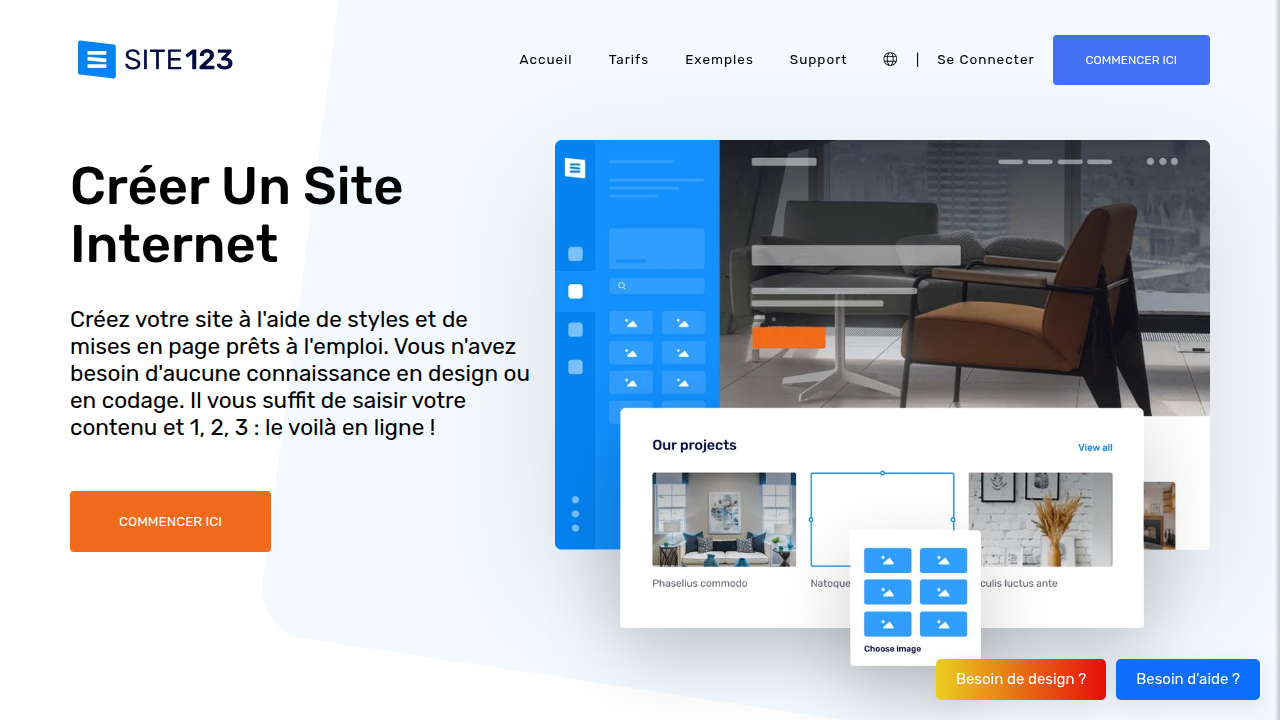
You can have a site live in minutes without writing code. But here is the catch: Site123 pricing is not as straightforward as it seems.

The monthly rate you see is just the beginning. Add-ons, premium templates, and ecommerce features can push the real cost much higher.
Many users run into hidden charges. A 2026 guide on website cost breakdowns notes that most builders hide extras like domain privacy, SSL upgrades, and transaction fees behind their basic tiers. Site123 works the same way.
This guide clears up the confusion. We break down every Site123 plan, expose the hidden costs, and compare it to popular alternatives like the GoDaddy Website Builder (see our breakdown of GoDaddy hosting prices 2026 for a full picture), Hostinger Website Builder, and Showit. By the end, you will know exactly which option fits your budget.
And if you decide to go with a platform that needs separate hosting, look for a host that delivers speed and security without surprise fees. Prism Web Host offers reliable hosting with transparent pricing and enterprise-grade protection.
Site123 Pricing Plans: An Overview
Before you pick a plan, you need to see the full picture. Site123 pricing breaks into six tiers: Free, Basic, Advanced, Professional, Gold, and Platinum.
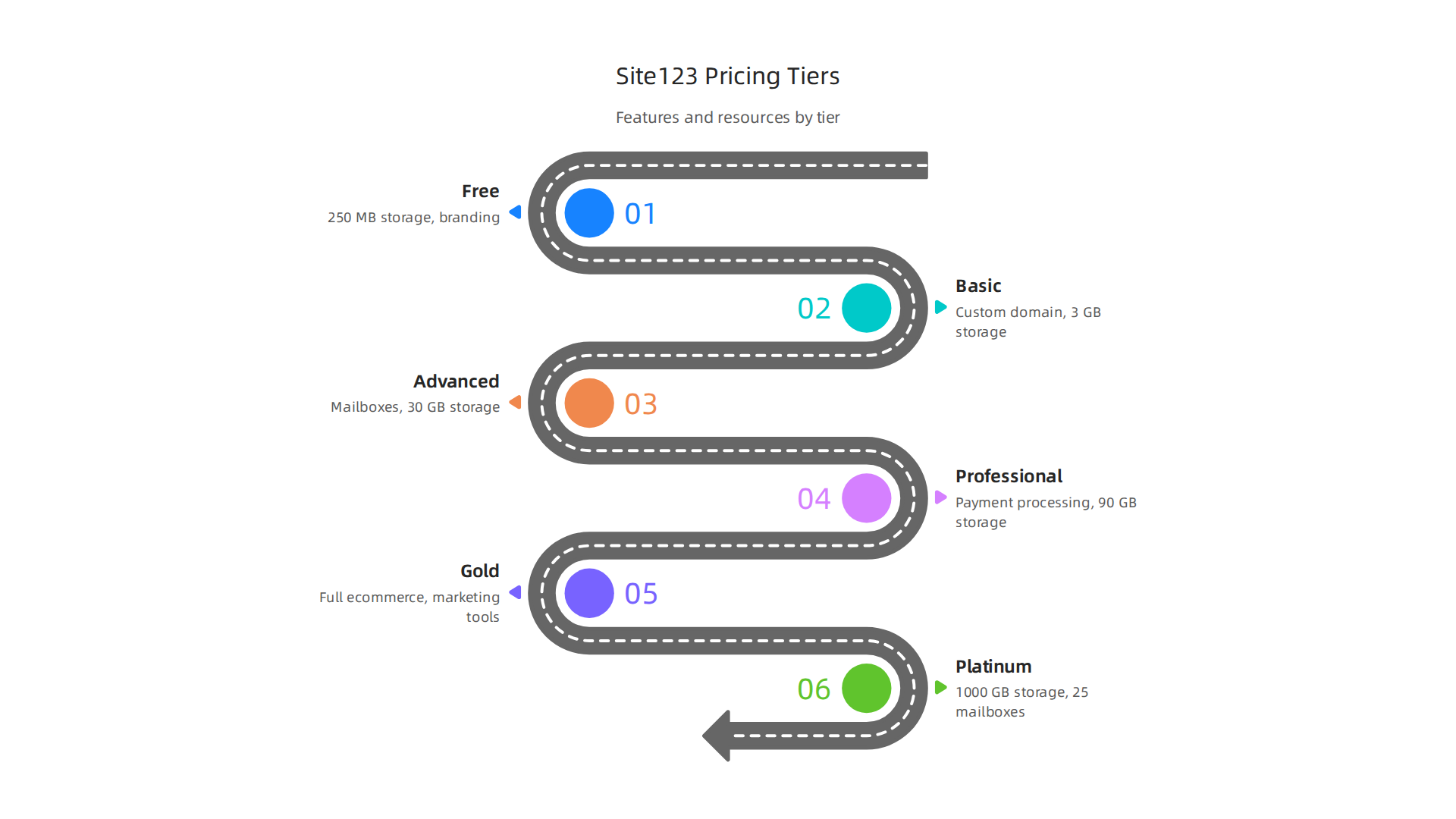
Each step up adds storage, bandwidth, and features that matter for a real website.
The Free Plan: A Test Drive
The Free plan costs exactly $0.00 per month. You get 250 MB of storage and 250 MB of bandwidth. That is enough to play around and see if you like the builder. But you are stuck with a subdomain like yourname.site123.me, and Site123 places its branding on your pages. No custom domain. No ecommerce. No professional credibility.
Think of the Free plan as a demo. You cannot run a real business on it.
The Paid Plans: What You Actually Get
Once you upgrade, the real choices begin. An overview of SITE123 pricing in 2026 shows how each plan unlocks more room to grow.
Basic starts around $10.80 to $12.80 per month with annual billing. This plan lets you connect a custom domain, removes Site123 branding, and gives you around 3 GB of storage and 3 GB of bandwidth. It works for a simple portfolio or a one-page business site.
Advanced jumps to roughly $12.80 to $17.50 per month on annual plans. Storage increases to about 30 GB, bandwidth to 15 GB. You also get mailboxes so you can send and receive emails from your domain. This plan suits a growing small business.
Professional runs about $24.00 to $24.60 per month annually. Storage hits 90 GB, bandwidth 45 GB. You unlock credit card processing and more email options. Good for a busy store or content site.
Gold costs around $33.00 per month on a yearly plan. You get 270 GB of storage and full ecommerce tools plus marketing integrations.
Platinum is the top tier at about $48.00 per month annually. Storage jumps to 1000 GB. You get 25 mailboxes, unlimited languages, and every feature Site123 offers.
Annual Billing Saves You Money
Here is a key detail. Site123 pricing drops significantly when you pay yearly instead of monthly. The same Advanced plan that costs $19.00 per month on a 3-month contract drops to $12.80 per month on a 12-month contract. Go for 2 years and it falls further to around $7.47 per month.
You pay the full term upfront. But the savings are real.
If you decide Site123 is not the right fit and want more control over your hosting, check out this Showit website builder review for another option that puts flexibility first.
No matter which path you choose, knowing the real costs upfront saves you from surprises later. The next section walks through exactly where those hidden charges hide so you can budget with confidence.
Free vs Paid: What You Get with Each Site123 Tier
The Free plan sounds tempting. Who doesn’t like free? But the gap between free and paid is huge. Let me break down exactly what changes when you pay.
The Free Plan: More Limits Than You Think
The Free plan from Site123 gives you a working website. But it comes with real costs you cannot see on the price tag.
Here is what you actually deal with:
- A subdomain address. Your site lives at yourname.site123.me. That looks unprofessional to visitors.
- Site123 branding. Ads and a floating tag appear on your pages. You cannot remove them.
- Tiny storage and bandwidth. Only 250 MB each. That is barely enough for a handful of images.
- No ecommerce. You cannot sell anything.
- Limited templates. You miss the full template library.
As one detailed breakdown of SITE123 pricing plans and renewal costs points out, the free tier works for testing only. You really cannot run a real business on it.
What Changes When You Go Paid
The moment you pick any paid plan, three big things happen.
First, the ads disappear. That Site123 floating tag is gone. Your site looks clean and yours.
Second, you get a custom domain. Instead of a subdomain, you use your own web address. That builds trust with visitors. The official SITE123 pricing page confirms that every annual paid plan includes a free domain for the first year.
Third, storage and bandwidth jump way up. Even the Basic plan gives you 3 GB of each. That is 12 times what the Free plan offers.
Which Plan Unlocks Which Feature
Not every feature comes with every plan. Here is how the tiers stack up:
| Feature | Free | Basic | Advanced | Professional | Gold | Platinum |
|---|---|---|---|---|---|---|
| Custom domain | No | Yes | Yes | Yes | Yes | Yes |
| Remove Site123 branding | No | Yes | Yes | Yes | Yes | Yes |
| Mailboxes | No | No | Yes | Yes | Yes | Yes (25) |
| Credit card processing | No | No | No | Yes | Yes | Yes |
| Multilanguage support | No | No | Yes | Yes | Yes | Unlimited |
| Ecommerce tools | No | Limited | Limited | Yes | Full | Full |
| Storage | 250 MB | 3 GB | 30 GB | 90 GB | 270 GB | 1000 GB |
| Bandwidth | 250 MB | 3 GB | 15 GB | 45 GB | 90 GB | 1000 GB |
A review from Cybernews covering SITE123 pricing and features for 2026 notes that the Advanced plan is where most small businesses find real value. That is the first tier that includes mailboxes, which lets you send and receive email from your domain.
The Real Question: Free or Paid?
The Free plan helps you test the builder. That is all. The moment you want a professional website that builds credibility, you need a paid plan.
If you outgrow what Site123 offers and want more control over your hosting environment, consider options that give you complete flexibility. A platform like Prism Web Host provides reliable, high-performance hosting with enterprise-grade security, automatic scaling, and real support for growing businesses.
No matter which path you choose, match your plan to your actual needs. Do not overpay for Platinum features if you just need a simple business site. And do not stay on Free if you want people to take you seriously.
Hidden Costs and Add-Ons in Site123 Pricing
The price you see on the plan page is not the final number. Like most website builders, Site123 has extra costs that can surprise you after you sign up.
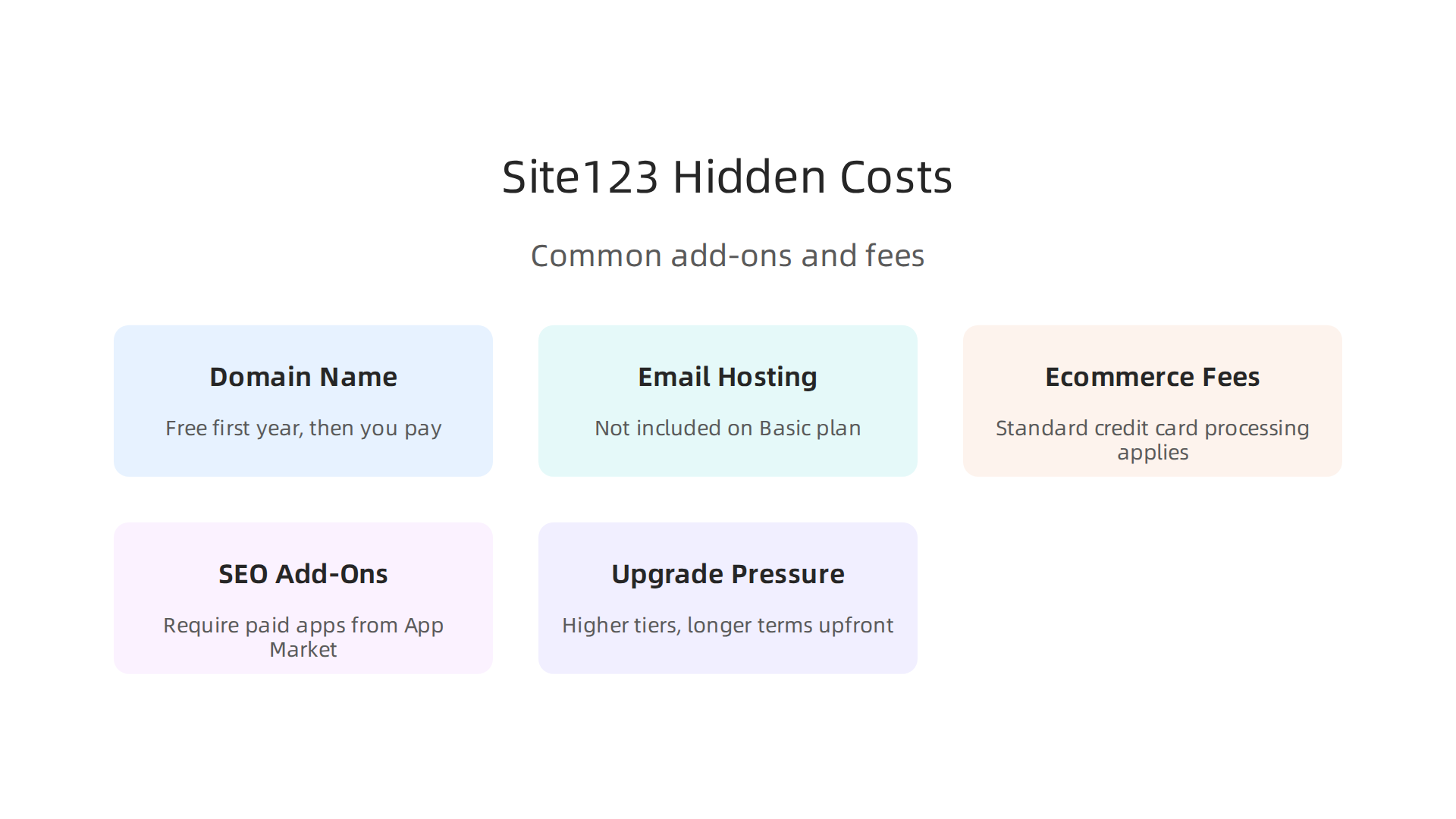
Let me walk through the biggest ones so you can budget properly.
Domain Name: Free First Year, Then You Pay
Every paid Site123 plan includes a free domain for the first year. That sounds great. But after 12 months, the renewal cost kicks in. You have to pay to keep your web address.
How much? It depends on the domain extension (.com, .net, etc.). Typically, domain renewal through Site123 costs more than buying the same domain from a separate registrar. For comparison, a standard .com domain renewal from a dedicated domain provider often runs around $10 to $15 per year. Site123 may charge closer to $20 or more.
If you want to avoid this markup, you can register your domain elsewhere and point it to your Site123 site. But that takes a little extra setup. Learn more about domain renewal pricing explained if you want to keep your renewal costs low.
Email Hosting: Not Included on the Basic Plan
Professional email addresses (like info@yourdomain.com) matter for credibility. But you do not get them with the Basic plan. Mailboxes start only at the Advanced plan, and even then you only get two.
If your business needs multiple email accounts from day one, you will need to either upgrade to a higher plan or pay for a third-party email service. That is an extra cost many people miss when comparing site123 pricing.
Ecommerce Transaction Fees
When you sell products, payment processors charge fees. Site123 does not add its own markup on top, but standard credit card fees of about 3% apply. Those fees are consistent across most builders and payment gateways, as noted in a detailed review of SITE123 pricing plans and hidden costs. Still, it is a cost you should factor in if you plan to run an online store.
SEO and Marketing Add-Ons
Site123 includes basic SEO tools in its paid plans. But advanced features often require paid apps from the App Market. For example, if you want deeper analytics, email marketing automation beyond the included limits, or custom integrations, you will pay extra per month. These add-ons can push your monthly bill higher than the base plan price suggests.
Upgrade Pressure During Checkout
Here is a tricky thing about Signing up. When you choose a paid plan, Site123 does not charge you right away. Instead, it creates a free account first. Then you have to click "Upgrade" to see the full plan options. During that upgrade flow, you may be tempted to pick a higher tier or a longer contract term to get a lower monthly rate.
But be careful. Longer terms mean you pay the whole amount upfront. Even a three-year plan requires a single large payment. If you change your mind after the 14-day refund window, you are locked in.
How to Stay Ahead of Surprise Costs
Before you pick a plan, map out all the features your site needs for at least the next two years. Do you need email? Ecommerce? Multiple languages? Then check which tier includes those features without extra purchases. Do not assume everything is included in the base price.
If you outgrow Site123 and want a hosting setup where the pricing is transparent from the start, look at providers that bundle domain, email, and security without upselling. A platform like Prism Web Host gives you clear upfront pricing with no hidden renewal spikes.
Site123 vs Competitors: Pricing Comparison
So how does site123 pricing stack up against the big names? You need to look past the monthly sticker price and compare what you actually get at each tier.

Let me walk through the main competitors so you can see where Site123 wins and where it falls short.
Site123 vs Wix
Wix is probably the most well-known website builder out there.
In 2026, Wix pricing starts at $17 per month for the Light plan and goes all the way up to $159 per month for Business Elite, all billed annually. That puts Wix at a higher entry point than Site123, which starts around $12.80 per month for the Basic plan.
But here is the thing. Wix gives you a lot more for that money. Even the $17 Light plan includes 2GB of storage, a free domain for the first year, and removal of Wix ads. For $29 per month on the Core plan, you get full ecommerce capabilities with unlimited products, booking tools, and analytics. That is a much richer feature set than what Site123 offers at a similar price point.
Wix also has a free plan you can use forever, which Site123 does not offer for business use. And Wix’s template library is huge, with over 800 designs. Site123 gives you fewer options.
If you want to see the full breakdown of what each Wix plan includes, check out the detailed Wix pricing plans for 2026 from Website Builder Expert, which compares all four tiers side by side.
Site123 vs Squarespace
Squarespace is known for beautiful design templates.
Its pricing starts at $16 per month for the Personal plan when billed yearly. That is slightly more than Site123’s cheapest paid plan. But Squarespace’s Personal plan includes a free custom domain, unlimited bandwidth, and free SSL.
For ecommerce, Squarespace’s Commerce Basic plan costs $28 per month. This gives you a full online store with no transaction fees, unlimited products, and inventory management. Site123’s ecommerce features start at the Advanced plan, which is around $18.60 per month but with fewer built-in tools.
Squarespace also excels in design quality. Every template looks professional out of the box. Site123’s templates work fine, but they do not have the same polish. For creative professionals or brands where appearance matters, Squarespace is worth the extra cost.
Site123 vs Weebly
Weebly, now owned by Square, focuses heavily on small business ecommerce. Its pricing starts at about $10 per month for the Starter plan, which is actually cheaper than Site123’s Basic plan. The Professional plan at $12 per month includes a free domain and removes Square ads.
Weebly’s big advantage is its ecommerce features. Because Square runs the platform, you get built-in payment processing, inventory tools, and shipping discounts. Site123’s ecommerce feels more basic by comparison. You can sell products, but you do not get the same depth of features.
The trade-off is that Weebly’s templates and design flexibility are more limited. You cannot customize layouts as freely as you can on Site123. So if design control matters more to you than advanced selling features, Site123 may still be the better pick.
The Value Verdict for Small Businesses
Here is my honest take. Site123 pricing wins on simplicity and speed. You can launch a basic site faster on Site123 than on any of these competitors. The drag-and-drop interface is genuinely easy to use.
But if you need ecommerce, advanced design control, or room to grow, you will probably outgrow Site123. Wix and Squarespace give you more features at each price level. Weebly beats Site123 on ecommerce value.
For a personal blog, small portfolio, or simple informational site, Site123 is fine. For an online store or a business that plans to scale, look at the alternatives first. And if you ever want to move away from website builders entirely, a transparent hosting provider can give you more control over your site’s performance and costs from the start.
The key is knowing what your site actually needs before you commit. Take stock of your must-have features, then compare site123 pricing against the competition with those needs in mind. That is the only way to know if you are getting real value or just a low entry price.
Is Site123 Worth the Cost? Value Analysis for SMBs
By now you have seen how site123 pricing compares to Wix, Squarespace, and Weebly. But the real question for any small business owner is simple: is it worth your money?
The answer depends on what you need at each tier.

At the lowest paid plan, Site123 costs about $12.80 per month. That gets you a basic site with no ads, a free domain, and decent performance. For a simple portfolio or a one-page business site, that is real value. You get a site up fast without learning anything technical.
But as you move up the pricing ladder, the value gets trickier. The Advanced plan adds ecommerce features, but they are more limited than what you get from competitors at similar prices. The Gold and Platinum plans unlock more products and marketing tools, yet the design flexibility stays basic. You cannot deeply customize templates or add complex functionality.
So what do actual users say? Overall, customers give Site123 strong marks for ease of use and customer support. According to a detailed set of user reviews on GetApp, the platform earns 4.4 out of 5 stars overall, with value for money scoring 4.3. People love how fast they can launch a site. But some note that features they want later require upgrades that cost more.
Churn rates are harder to pin down publicly, but common user complaints point to a pattern. Many users start on Site123 and then outgrow it. They want more design freedom, better ecommerce tools, or room to scale traffic. That is when they move to other platforms. For a business that sees real growth, Site123 may not be a long-term home.
And that brings us to scalability. If you plan to grow your site over years, adding pages, products, and visitors, Site123’s simplicity becomes a ceiling. You cannot access the code, install custom apps, or move your site easily. For SMBs that want to build a serious online presence, a more flexible hosting setup often makes more sense.
Before you commit, think about your next two years. If your site will stay small, site123 pricing is fair. If you expect to grow, compare your long-term needs against a transparent web hosting cost breakdown that lets you control your own performance and costs.
Sometimes the simplest tool is the right one. But for a business that plans to scale, the simplest tool can also be the one you outgrow first.
Tips to Save Money on Site123 Pricing
You looked at the plans and your wallet feels the pinch. The good news is you do not have to pay full price for site123 pricing. A few smart choices can cut your costs by a meaningful amount every year.
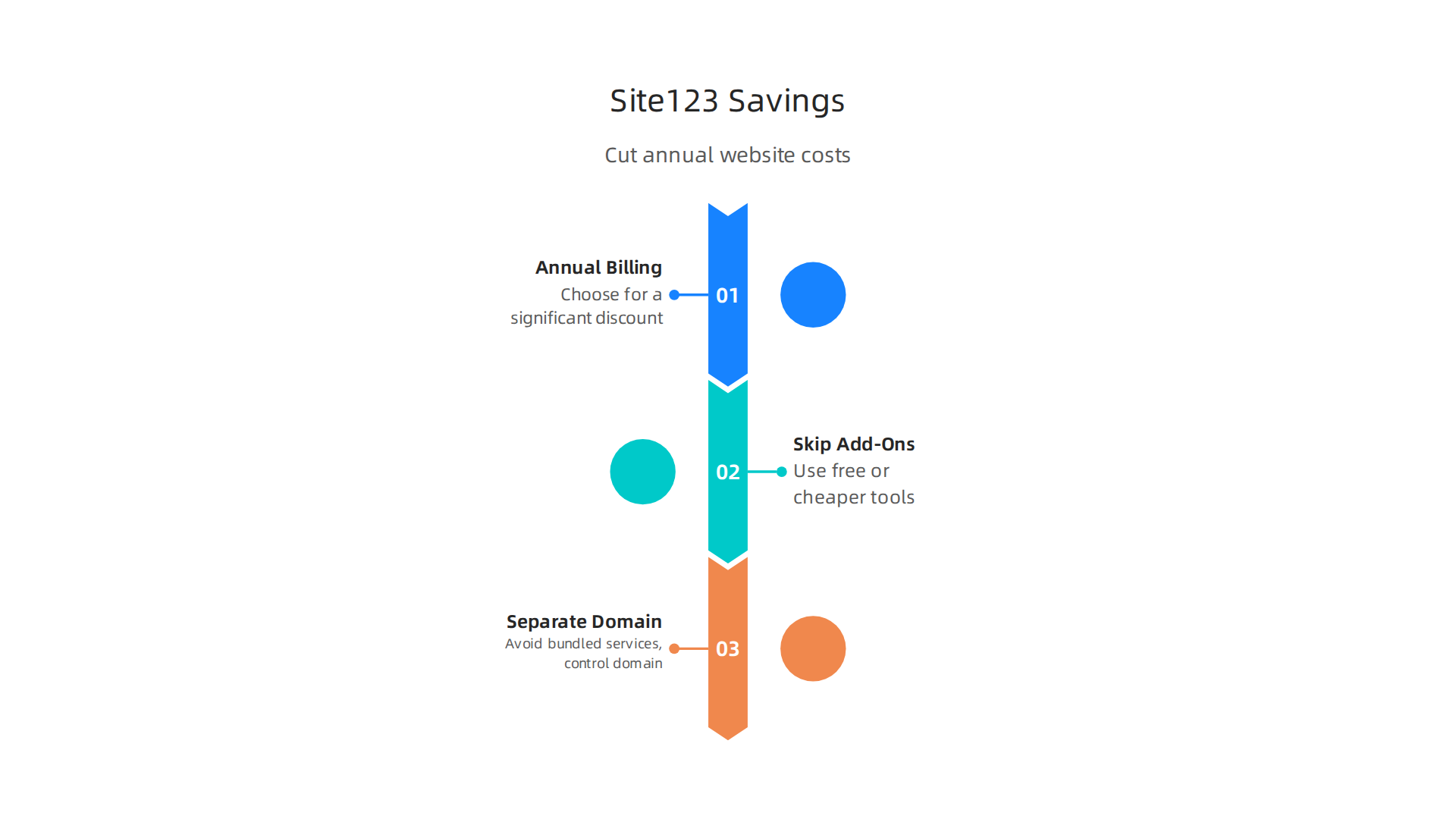

Tip 1: Choose Annual Billing for a Big Discount
Here is the quickest way to save. Site123 offers a lower monthly rate when you pay for a full year upfront. That discount usually lands around 20 percent. According to the detailed SITE123 pricing breakdown, users who choose annual billing consistently get better value. Instead of paying month to month, commit to 12 months and keep that extra cash in your pocket.
Just remember one thing. When you sign up for annual billing, you pay the full amount at once. Make sure you are happy with the platform within the 14-day refund window. After that, the money is locked in.
Tip 2: Skip Site123 Add-Ons and Use Free or Cheaper Third-Party Tools
Site123 has an app market with plugins and extras. Some of those cost extra every month. Before you buy, ask yourself if you can get the same feature for free elsewhere.
Need email marketing? Services like Mailchimp or Brevo offer free tiers for small lists. Need backup copies of your site? Use a free tool like UpdraftPlus or even manual downloads. Need a contact form? Google Forms is completely free. Avoid the paid add-ons inside Site123 unless you truly cannot find a substitute.
This is especially true for features like custom code or analytics. You can add Google Analytics for free. You do not need a paid Site123 plan to track visitors.
Tip 3: Separate Your Domain and Email from Site123
Every paid Site123 plan includes a free domain for the first year. That sounds great. But renewal prices after year one can be higher than what you would pay at a dedicated domain registrar. After the first year, move your domain to a registrar like Porkbun or Namecheap that offers transparent renewal rates.
The same logic applies to email. Site123 gives you mailboxes with paid plans. But professional email services like Google Workspace or Microsoft 365 give you better features and reliability for a similar price. If you already use one of those for your business, just point your domain to it. Skip the Site123 mailboxes entirely.
By handling domain and email separately, you avoid paying for bundled services you might not need. Plus you keep control of your domain if you ever decide to leave Site123.
Keep these tips in mind as you set up your site. A little planning now can save you real money over the next two years. And if you eventually find that site123 pricing limits your growth, consider a more flexible hosting setup like the one offered by Prism Web Host, where you get full control, better performance, and transparent pricing.
Summary
This article explains Site123 pricing in plain terms, showing that the headline monthly rate is often just the starting point. It walks through each plan—from the Free tier to Platinum—detailing storage, bandwidth, email, ecommerce capability, and which features unlock at each level. The guide flags the most common hidden costs, including domain renewal markups, email hosting gaps, paid app add-ons, and checkout upsells, and it shows how annual billing and third‑party services can cut costs. You’ll also get a practical comparison to Wix, Squarespace, and Weebly so you can judge value versus features, plus a short verdict for small businesses and clear tips to avoid surprises. By the end, readers will know which Site123 plan fits their needs, what extra fees to budget for, and when to consider moving to a more transparent hosting setup.
